FAQ: I Can’t see any Esphome devices to include or exclude.
If you can’t see any ESPHome devices to include or exclude, you will need to make sure the ESPHome integration is installed and your devices are enabled.
Go to Settings → Devices & services and, under the Integrations tab, you should see the ESPHome integration displaying the number of devices you have.
If you don’t see the ESPHome integration, Home Assistant may have discovered an ESPHome device automatically. If you add a discovered device, the ESPHome integration will be installed automatically.
If your device hasn’t been discovered, you can add it manually using its IP address or hostname.
- Go to Settings → Devices & services → Add Integration → ESPHome.
- Add your device manually using its IP address or hostname.
- Once your devices have been added, you should be able to select them.
If you already see the ESPHome integration with your devices, make sure you haven’t disabled them.
Below is an example of an ESPHome device that has been disabled. When a device is disabled, you will see an Enable button.
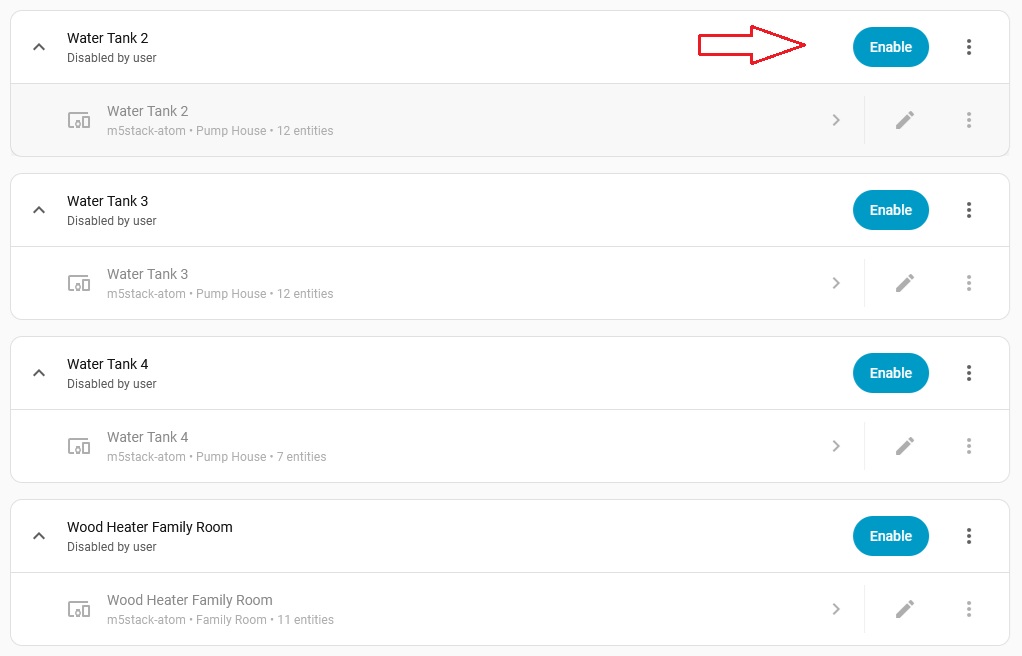
If the device is enabled, you will not see an Enable button, as shown below.

If your devices are disabled, you will need to enable them before they can be selected in the Included ESPHome Devices or Excluded ESPHome Devices inputs.
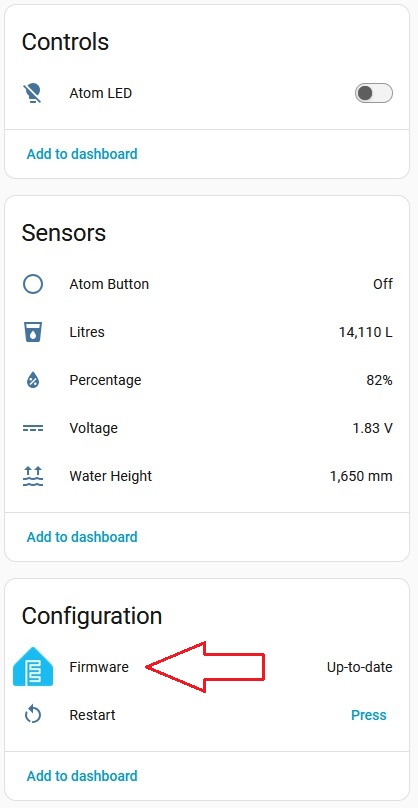
Finally the last step to check. In the ESPHome integration, open one of your devices and, under Configuration, check if you have Firmware listed, as shown in my screenshot below. This entity must also be enabled.
For more information, see the official Home Assistant ESPHome documentation: Home Assistant ESPHome integration Click Here
Enjoy
Blacky 
Back to FAQ: Click Here