đź”” ESPHome Full-Duplex Audio Intercom - Because I Was Bored on Vacation

:bellhop_bell: ESPHome Full-Duplex Audio Intercom - PBX-lite, Voice Assistant, TCP/UDP, and too much audio debugging

Hey everyone! :wave:

Big update for the project.

The repository is here:

:point_right: GitHub - n-IA-hane/esphome-intercom: ESPHome Intercom API - Full-duplex bidirectional audio streaming for ESP32 with Home Assistant integration · GitHub

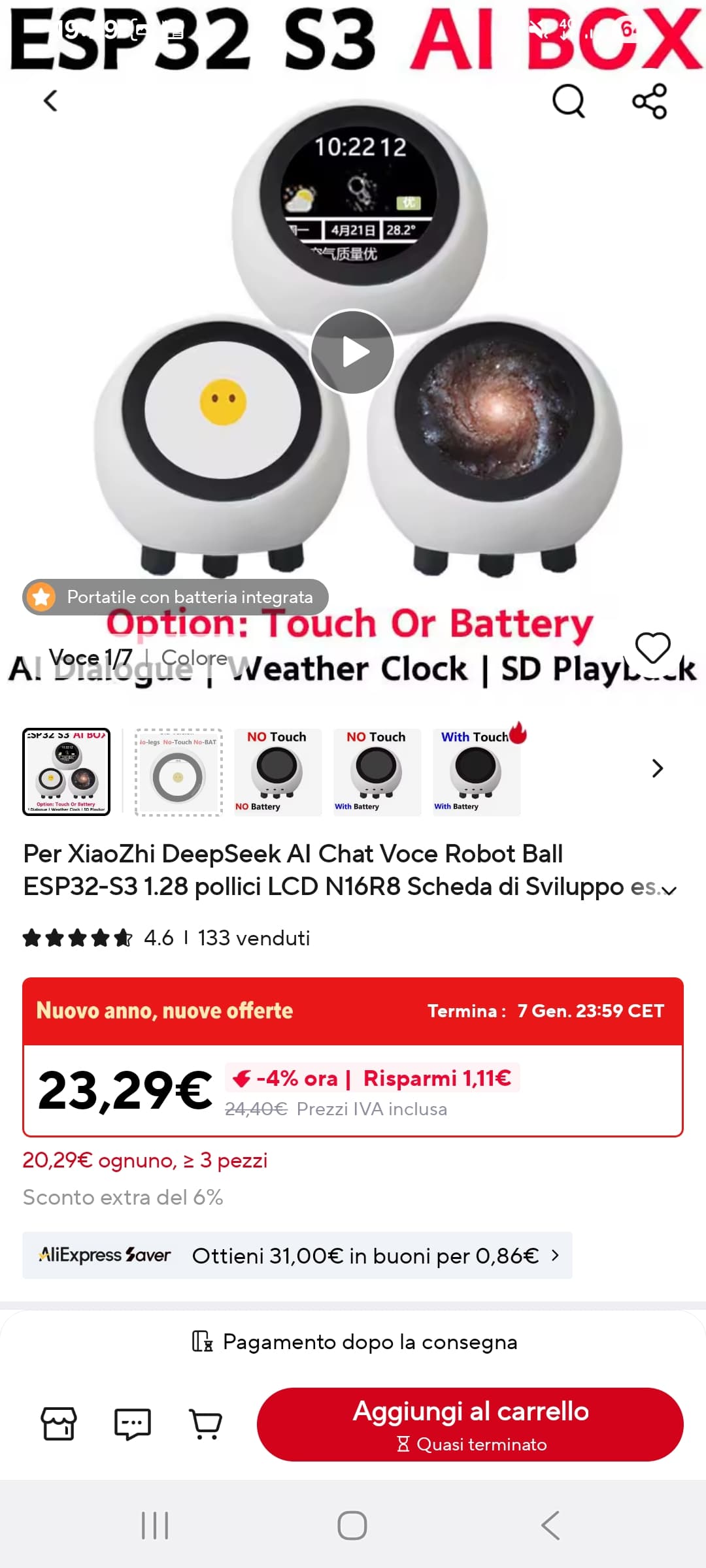
The project started as a very small idea: I bought one of those cheap round Chinese ESP32-S3 “smart balls” from AliExpress, originally just because I wanted a simple
full-duplex doorbell / intercom.

Then scope creep did what scope creep does.

It grew from “press a button and talk to Home Assistant” into a full ESPHome audio stack with:

  • full-duplex audio
  • acoustic echo cancellation
  • Voice Assistant and Micro Wake Word running on the same device
  • TCP and UDP intercom transports
  • a Home Assistant integration
  • a Lovelace softphone card
  • LVGL touchscreen UIs
  • codec-aware volume handling
  • and now a real PBX-lite call model

So the project is still for the simple use case, but the internal model is now much cleaner and more powerful.

The important warning first

:warning: The next release, 2026.5.0, will break old YAMLs.

This is intentional.

The project had grown too much around old compatibility layers, old filenames, old protocol assumptions, and a few “it works, but it is not really clean” routing
tricks. The current dev branch is moving to a clearer model and cleaner YAML structure.

If you are already using the old versions, do not blindly flash the next release over your current setup. Read the README on the dev branch first and expect to
adapt your YAMLs.

The break is annoying, but it is worth it: the result is much easier to reason about, easier to extend, and much closer to what I wanted the project to become.

The new mental model: every ESP is an extension

The old project behaved a bit like a PBX, but internally it was still using several shortcuts.

For example, Home Assistant could notice that an ESP went into an outgoing state, inspect the selected destination, and then connect it to another peer. It worked,
but the model was backwards: HA was doing too much interpretation.

The new model is simpler:

Every ESP is treated as an independent phone extension.

Each ESP can:

  • originate a call
  • receive a call
  • answer
  • decline
  • hang up
  • expose its current state
  • expose its selected destination
  • expose the last terminal reason
  • be mirrored by the Home Assistant card

Home Assistant is also treated as a peer in the same system. It can originate and receive calls too, just like a softphone.

So this is no longer “PBX-like”.

It is a small PBX-lite system.

You can still use it as a normal doorbell

Do not be scared by the PBX terminology.

If all you want is:

  • one ESP at the door
  • a Home Assistant dashboard card
  • call / answer / hangup
  • auto-answer if wanted
  • full-duplex audio

that still works.

In that case the ESP has a very small phonebook, usually just the Home Assistant peer, and the card behaves like the softphone on the other side.

The bigger model is there so that the simple model is not a special hack anymore.

How the card behaves now

The Lovelace card has two different behaviours depending on the selected destination.

1. ESP selected destination is another ESP

In this case the card mirrors the ESP.

If you press Call on the card, it presses the ESP's real call action. The ESP originates the call. The card just reflects what the ESP is doing:

  • Idle
  • Outgoing
  • Ringing
  • Streaming
  • Busy
  • Declined
  • Remote hangup
  • Remote device lost
  • DND
  • Timeout
  • protocol / bridge errors

This matters because ESP-to-ESP calls may not pass through Home Assistant at all.

The card should not pretend to be the caller when the ESP is the caller. It should mirror the device.

2. ESP selected destination is Home Assistant

If the selected contact matches the Home Assistant instance name, for example Home or Office, then the card behaves like a softphone.

In that case Home Assistant originates the call toward the ESP, and the ESP sees an incoming call from the HA peer.

So:

  • selected destination = another ESP -> card mirrors the ESP
  • selected destination = HA -> card is the HA softphone

That distinction made the whole system much cleaner.

TCP and UDP are both first-class transports

The project now has two real intercom transports:

  • TCP for framed signaling + audio over one reliable connection
  • UDP with raw PCM audio and a separate framed control port

Default ports:

  • TCP signaling/audio: 6054
  • UDP audio: 6054
  • UDP control: 6055

TCP and UDP firmware can coexist on the same network.

If both peers use the same transport, they can communicate directly when the phonebook entry points to the peer.

If the protocols differ, Home Assistant can bridge them.

Example:

  • TCP ESP -> TCP ESP: direct possible
  • UDP ESP -> UDP ESP: direct possible
  • TCP ESP -> UDP ESP: through HA bridge
  • UDP ESP -> TCP ESP: through HA bridge

Unified phonebook

The phonebook is now protocol-aware.

Home Assistant publishes one logical roster through:

sensor.intercom_phonebook

Rows look like this:

Name|tcp|ip|tcp_port
Name|udp|ip|udp_audio_port|udp_control_port
Name|ha|ip|tcp_port|udp_audio_port|udp_control_port

The ESP firmware subscribes to that single phonebook and normalizes the entries locally for its own transport.

This replaces the older split TCP/UDP phonebook approach.

It also makes cross-protocol routing understandable: if a contact cannot be reached directly by the current firmware transport, the entry can point to Home Assistant
and preserve the real destination name in the signaling payload.

## HA-IS-PBX mode

There is also an optional HA-IS-PBX routing mode.

Normally, if two ESPs can call each other directly, they do.

But sometimes you want every call to pass through Home Assistant:

- to keep call history visible in HA
- to bridge transports
- to forward calls
- to centralize routing rules
- to build automations around calls

With HA-IS-PBX enabled, the ESP delegates routing to Home Assistant even when it knows about the destination.

This is optional.

Direct ESP-to-ESP is still a core goal of the project.

## ESP-side auto-discovery

A proper ESP-side discovery system is still planned.

The project already has the PBX-lite model needed for it, and the goal is that compatible ESPs on the same LAN can discover each other and become callable without HA
being required as the phonebook authority.

However, I am being careful here.

The previous mDNS browser implementation exposed timing/stability problems on real devices, especially around reconnection and Home Assistant restarts. So ESP-side
discovery is being redesigned and soak-tested before it becomes part of the standard YAMLs again.

For now, the stable dev baseline is:

- HA publishes the protocol-aware phonebook
- ESPs subscribe to it
- direct calls still work when the phonebook entry points directly to the peer
- ESP-side mDNS discovery will come back only when it is solid

## Call reasons now propagate

Terminal reasons are now part of the model.

If a remote ESP declines because Do Not Disturb is enabled, the caller should receive that reason and display it.

Examples:

- Local hangup
- Remote hangup
- Busy
- DND
- Timeout
- Remote device lost
- Unreachable
- Protocol error
- Bridge error

Internally these remain machine-readable, but the ESP and card expose user-facing reason text.

This is important because the system should behave like phones do: if the remote side is busy or in DND, the caller should know why the call ended.

## Do Not Disturb

DND is now a native intercom control.

When enabled, an incoming call is declined with reason DND.

That reason travels back to the caller instead of being swallowed by Home Assistant.

Home Assistant should forward signaling, not consume it and invent a different story.

## Audio stack

The audio side also changed a lot.

The project contains several ESPHome external components:

### intercom_api

The main intercom component:

- call state machine
- TCP/UDP signaling
- phonebook
- routing mode
- auto-answer
- DND
- call / answer / decline / hangup actions
- terminal reason reporting

### i2s_audio_duplex

A full-duplex I2S component for single-bus audio.

Standard ESPHome i2s_audio is great, but it does not cover the simultaneous mic + speaker single-bus cases this project needs.

This component is used for:

- codec boards such as ES8311 / ES7210 + ES8311
- MEMS mic + I2S amplifier boards
- full-duplex intercom
- Voice Assistant
- Micro Wake Word
- media playback
- echo reference generation

### esp_aec

A lighter ESP-SR acoustic echo cancellation wrapper.

This is the standard choice for:

- intercom-only builds
- generic full-experience builds
- single-mic boards where the full AFE pipeline is not needed

### esp_afe

A full Espressif AFE pipeline wrapper.

Used where the extra frontend stages are worth the RAM/CPU cost:

- Echo Cancellation
- Noise Suppression
- Auto Gain Control
- Voice Activity Detector
- Speech Enhancement on dual-mic boards

The exposed controls are now named with full user-facing names instead of short internal labels.

Single-mic boards expose:

- Echo Cancellation
- Noise Suppression
- Auto Gain Control
- Voice Activity Detector

Dual-mic boards expose:

- Echo Cancellation
- Speech Enhancement
- Voice Activity Detector

### Codec-aware volume

Boards with an ES8311 codec use hardware DAC volume as the real master volume.

Generic boards without a codec use software speaker volume.

This avoids mixing up “media player volume”, “software speaker gain”, and “hardware DAC volume”, which are not the same thing.

## Voice Assistant and Micro Wake Word

Full-experience YAMLs combine:

- intercom
- Voice Assistant
- Micro Wake Word
- AEC or AFE processing
- media player
- LVGL UI where the hardware has a display

The goal is still to make an ESPHome device that can act like a serious local voice/intercom endpoint, not just a toy demo.

There are different AEC modes depending on board class and available resources.

As a rule of thumb:

- intercom-only builds use the lighter VoIP-style AEC profile
- full-experience single-mic builds use SR AEC
- dual-mic full AFE boards use the AFE pipeline
- generic full-experience boards use esp_aec, not full esp_afe, to stay within realistic memory/flash limits

## Ready-to-use YAMLs

Current dev YAMLs are organized by use case and transport.

### Intercom only

yamls/intercom-only/single-bus/spotpear-ball-v2-intercom-tcp.yaml
yamls/intercom-only/single-bus/spotpear-ball-v2-intercom-udp.yaml
yamls/intercom-only/single-bus/generic-s3-intercom-tcp.yaml
yamls/intercom-only/single-bus/generic-s3-intercom-udp.yaml

### Full experience, AEC

yamls/full-experience/single-bus/aec/spotpear-ball-v2-full-aec-tcp.yaml
yamls/full-experience/single-bus/aec/generic-s3-full-aec-tcp.yaml
yamls/full-experience/single-bus/aec/generic-s3-full-aec-udp.yaml
yamls/full-experience/single-bus/aec/waveshare-p4-touch-full-aec-tcp.yaml

### Full experience, AFE

yamls/full-experience/single-bus/afe/spotpear-ball-v2-full-afe-tcp.yaml
yamls/full-experience/single-bus/afe/spotpear-ball-v2-full-afe-udp.yaml
yamls/full-experience/single-bus/afe/waveshare-s3-full-afe-tcp.yaml
yamls/full-experience/single-bus/afe/waveshare-s3-full-afe-udp.yaml
yamls/full-experience/single-bus/afe/waveshare-p4-touch-full-afe-tcp.yaml
yamls/full-experience/single-bus/afe/waveshare-p4-touch-full-afe-udp.yaml

### Experimental dual-bus

yamls/experimental/dual-bus/intercom-only/esp32-s3-mini-intercom.yaml
yamls/experimental/dual-bus/intercom-only/generic-s3-dual-intercom.yaml
yamls/experimental/dual-bus/full-experience/esp32-s3-mini-full.yaml

The tested focus right now is ESP32-S3 / ESP32-P4 with PSRAM and ESP-IDF.

## Tested hardware focus

The project currently focuses on:

- Spotpear Ball v2
- Waveshare ESP32-S3 Audio
- Waveshare ESP32-P4 Touch
- generic ESP32-S3 single-bus MEMS mic + I2S amplifier setups
- experimental dual-bus S3 setups

Hardware requirements depend on the YAML, but in general:

- ESP32-S3 or ESP32-P4
- PSRAM strongly recommended / required for full builds
- ESP-IDF framework
- I2S mic and speaker path
- correct codec / pin configuration for your board

Generic YAMLs are examples, not magic. You still need to adapt pins and hardware details to your board.

## Home Assistant integration

The intercom_native custom integration provides:

- TCP listener
- UDP socket manager
- browser WebSocket audio for the Lovelace card
- protocol-aware phonebook sensor
- call / answer / decline / hangup / forward services
- transport-aware routing
- bridge logic for TCP <-> UDP
- call state and reason propagation

The Lovelace card acts either as:

- a mirror of the ESP, when the ESP is calling another ESP
- a softphone, when the ESP selected destination is Home Assistant

This distinction is one of the biggest usability improvements in the new model.

## Breaking changes recap

The next release moves to version:

2026.5.0

The project is adopting a Home Assistant-style calendar versioning scheme.

Breaking changes include:

- old YAML names replaced by TCP/UDP-specific filenames
- old Simple / Full mode removed
- PBX-lite is now the implicit product model
- mode: is optional and only used for raw UDP audio mode
- old split phonebook sensors replaced by one protocol-aware phonebook
- legacy ESPHome service wrappers for contact mutation removed
- old UDP helper component removed
- protocol framing changed
- MSG_STOP renamed to MSG_HANGUP
- MSG_DECLINE added
- HA and ESP firmware must be updated together
- old Xiaozhi naming replaced by Spotpear Ball v2 naming
- automations using old entity IDs may need updates
- Home Assistant integration now depends on zeroconf
- old YAMLs will need manual adaptation

Again: this is not a tiny patch release. It is a model cleanup.

## Why this was worth doing

The old project worked, but too many behaviours were emerging from side effects.

The new model gives the project a real structure:

- ESPs are extensions
- HA is an extension and optional PBX
- calls have source, destination, state and reason
- TCP and UDP are transports, not different products
- phonebook rows are protocol-aware
- card behaviour follows the selected destination
- DND, busy and hangup reasons propagate
- direct calls and HA-bridged calls can coexist

Once that model is in place, the project becomes easier to extend.

The next big piece is bringing ESP-side discovery back in a clean and stable way, so devices can discover peers directly without Home Assistant being the only
phonebook source.

## Useful docs

Before upgrading, read the dev branch documentation:

- README: https://github.com/n-IA-hane/esphome-intercom
- Architecture notes: docs/ARCHITECTURE.md
- Reference: docs/reference.md
- Deployment guide: docs/DEPLOYMENT_GUIDE.md
- Protocol docs: docs/INTERCOM_PROTOCOL.md
- Phonebook docs: docs/PHONEBOOK_PROTOCOL.md

## Small disclaimer

This project is still very much a real-world debugging battlefield.

Full-duplex I2S, ESP-SR, AEC reference paths, wake word timing, LVGL, Wi-Fi behaviour, PSRAM placement, codec registers, UDP/TCP signaling, and Home Assistant state
reflection all interact in fun and occasionally cursed ways.

I used a lot of help from advanced reasoning agents while developing and auditing the code, but every change still needs real hardware testing. If you try the dev
branch, expect movement, expect breaking changes, and please report what hardware you tested.

:point_right: GitHub: https://github.com/n-IA-hane/esphome-intercom

Questions, testing reports, hardware donations, bug reports, and “why did you do this to yourself?” comments are welcome.
14 Likes

I lazily watched the friends neighbours kids set up a similar thing yesterday, between their cubby houses adjacent to the fence, high up in the old gum trees. Australia in the summer - I love to visit my mate near the beach, kookaburras and magpies singing, BBQ sizzling, doing the occasional Aussie salute, the beach flies being less friendly than the ones out bush in the paddocks in the channel country up north.

Two tin cans and a piece of string.

Right next to their refrigerated Eskies hanging on the end of a few joined power extension cables snaking out of the open kitchen window, covered with flyscreen and a broken gum branch to swat the flies off their lemonade and jelly. They still have their flashing LED lights going, entwined around the huge trunk and branches, a leftover from Christmas day, and probably going to be left on till they go back to school in a month’s time. In their cozzies, squirting each other with heavy duty water cannons over the fence, as the garden hose was banned, no waterproofing on the extension cable joints and nobody wanting to do first aid without a AED machine close by. They take helf-n-safty real seriously too mate!

Two way communication. Simultaneous if needed. Visual too. Extremely low power. Adjustable volume. Natural intelligence - took all of two seconds to ask their dad for his used beer cans (they didn’t need to ask him to scoff the second - he had already downed a few) and a piece of fishing line they had to untangle. No echo. Full duplex. Standby backup - their cell phones and Instagram. Auto hangup too - just put it down. Absolutely no Chinese components. Multiprotocol support - supports Pig Latin and sign language too. Privacy too - they whisper.

It got an update overnight, their mum (note the Aussie spelling) suggesting they use string instead of fishing line, the audio characteristics being superior.

Downtime to upgrade was was about five minutes, as they had to find scissors to cut the fishing line knot to remove it before installing the string and tying two knots.

With the social media ban downunder, children are forced to actually TALK to each other. Face-to-face. Shock, horror! A novelty.

An emerging trend? Cutting edge? No changes to the Matter standard required. My neighbours’ grandma swears they used the very same technology when the cubby house was HERS half a century ago!

Thinking aloud whether should add an extension to make it three way for the cubby house on the other side. Do we do point to point, duplicating the setup to the other tree? Three lots of string and six cans? Do we join it in the middle for a party line and only three cans? My mate offers to drink the extra beers. Where to tie the knot for optimum audio response, string tightness, etc? My mate is giggling, a little pickled, suggesting we ask AI. With earnest seriousness only a few beers can bring on.

Should we, or just experiment?

We’re not posting on on GitHub. The kids in the yard on the other side have hanged their elbows over the fence, bored, also curious. Can they do the same thing? Can they climb the fence and check it out themselves? Their dad offers to drink a beer, for scientific research purposes of course, so they can have another node. My mate obliges, carrfully tossing it overhand over the fence with accuracy only an experienced beach and backyard cricketer can master.

I’m asking grandma if she has any old windup telephones in the old shed, and if my mate has a spare 48v power supply and a lot of two core wire. We might be onto something here…

I know, it’s the hot sun and pineapple juice talking… The kids are laughing, conjuring up some scheme, asking if we can go to the movies tomorrow after the sun on the beach gets too hot, already bored.

Life is good!

3 Likes

@meconiotech this is absolutely awesome. I think, there are multiple people waiting for this for implementing an in-house communication system, a doorbell or a baby phone.

Can you please create a Pull Request for esphome to upstream your intercom component?

2 Likes

Good morning. This is a really great project. Could you please tell me how the connection will work if there are multiple users? For example, someone stands at the door and calls Mayach v3, and there are two or three users in HomeAssistant, and they all receive a call notification at the same time. Will they all be able to hear the person who just arrived, and will they all be able to talk to the person who just arrived? Thank you.

Link? It doesn’t show on a search.

Hi, there are still a lot of things that need to be tested. I’m testing from a PC and Android app, and everyone who connects seems to be able to talk to the other person. The component itself creates a driver for using the microphone and speaker together. You can then manage the call logic yourself via the esphome yaml or through home assistant automations. I’ll be doing some testing soon to see if I can implement something for multicast. Take a look at my git. I’ve also published two example yamls that I use daily. You can use them as a starting point for your own tests. And please, if you find anything that doesn’t work or that you’d like to see improved, please let me know.

1 Like

Hi you can find it on AliExpress

Just the link, please. “This image could not be loaded”.

https://a.aliexpress.com/_ExTLgrm

1 Like

Could you please tell me? Is it possible to use both HomeAssistant and P2P simultaneously? So that if the HA server is down for some reason, I can still receive a call?

Hi! Yes, it’s absolutely possible.
The component itself is just a bidirectional audio bridge - it opens a stream to whatever destination you configure. The actual behavior and logic are entirely up to you through automations.
By default, you set a static IP/port, but since remote_ip and remote_port accept templates, you can dynamically switch between HA and P2P targets based on any condition you want.
For example, you could create an automation that:
Tries to reach HA first
If HA is unavailable (timeout or no response), switches remote_ip to another ESP device
Starts the stream
The component doesn’t care where the audio goes - it just streams to whatever IP:port you tell it to. So yes, you can build a fallback system where P2P kicks in when HA is down.

1 Like

@meconiotech It feels a bit like your great feature in the GitHub discussion does not get the appropriate attention from the Esphome maintainers. Would be great to get their feedback to understand the best way to integrate full-duplex audio in Esphome.
Maybe it gets more attention if you create an additional Pull Request?

1 Like

Quick update:
In the last days I’ve been doing a full refactor of the component.
It has now evolved into a pseudo phone-like system, with:

  • Static contacts
  • Dynamically auto-discovered contacts via mDNS
  • The ability to scroll through contacts and call a selected peer

At the moment I’m finishing testing and cleaning things up.
Stay tuned, because soon I’ll publish a proper release with all the involved components and documentation.

The refactor also focuses on maximizing reuse of existing ESPHome components, keeping the system modular and maintainable.
Depending on the hardware, the audio path automatically adapts to dual-bus or single-bus I2S setups, transparently enabling full-duplex operation without requiring additional user configuration.

From a functional point of view, the system now supports two distinct call flows:

  • Calling Home Assistant
    When an ESP calls Home Assistant, it behaves like a classic intercom:
    • An event is generated in Home Assistant
    • HA can handle user notifications
    • The user can answer the call and establish two-way audio with the device
    • HA can also arbitrarily open audio streams toward devices (useful for remote two-way communication with a room, ambient audio monitoring, or announcements)
  • ESP ↔ ESP calls
    Calls between ESP devices behave like internal calls in a phone system:
    • The caller initiates a call to the selected peer
    • If the receiver does not have auto-answer enabled, it enters a ringing state and can be answered manually
    • If the receiver is in auto-answer mode, the full-duplex communication is established automatically

Home Assistant is entirely optional and not part of the core architecture:
discovery, signaling, and audio streaming all work ESP-to-ESP without HA in the loop.

TODO / future exploration:

  • Experiment with multicast audio
  • One-to-many calls (e.g. announcements to multiple ESPs at once), similar to store or public-address systems
3 Likes

Good afternoon. I don’t understand why my post was banned.

I dont know, it wasn’t me :person_shrugging:

Please add information about which pins it connects to. GPIO was previously missing, but now it’s gone. Thank you.

You used to have a great description. It was clear where everything was connected. Please bring it back. And as far as I understand, you redesigned everything for a different microphone. Can I use the old one you had, or should I order a new one? Thank you.

Yes, the documentation is currently outdated due to a major refactor.

The pinout and hardware section will be restored to avoid further confusion.

Regarding the microphone: the INMP441 is still supported.
In general, any standard I2S microphone should work, as the audio path is generic and not bound to a specific microphone model.

1 Like

Can you please tell me if I can run the EPROM device on an esp32-s3 (wroom-1) with any GPIO? Thank you.

@meconiotech Hi. I’m playing a bit with your components, great work with that. I have one question, i’m using ring buffer speaker reference and i have good echo cancelation results when aec filter lenght is 8, this adds to much load in my project. If i understand correctly there is a need to buffer speaker samples to be aligned with mic data, but it looks like there is some kind requirement for filter length to. This is not correct in my opinion.
Br
Jakub