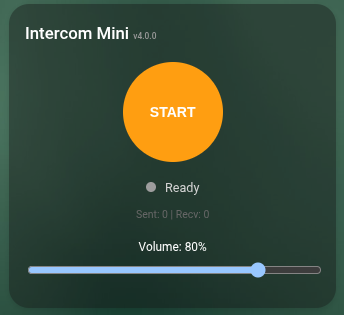
đź”” ESPHome Full-Duplex Audio Intercom

:bellhop_bell: ESPHome Full-Duplex Audio Intercom - Because I Was Bored on Vacation

Hey everyone! :wave:

Big update! The project has been renamed and moved:

:point_right: GitHub - n-IA-hane/esphome-intercom: ESPHome Intercom API - Full-duplex bidirectional audio streaming for ESP32 with Home Assistant integration · GitHub

The old intercom-api URL redirects automatically, so existing configs keep working.


The Origin Story :8ball:

I grabbed one of those cheap Chinese “smart balls” from AliExpress (the Xiaozhi Ball V3, ~$15), originally just wanting a simple doorbell intercom. Then scope creep
happened.


What It Does Now :telephone_receiver:

  • Full-duplex audio - talk AND listen at the same time
  • Two modes: Simple (Browser ↔ HA ↔ ESP) and Full (ESP ↔ HA ↔ ESP, intercom between rooms)
  • PBX-like routing - HA acts as central hub, relays calls between any combination of ESPs and browsers
  • Echo Cancellation (AEC) - using Espressif ESP-SR, three reference modes:
    • ES8311 stereo digital feedback (sample-accurate, best quality)
    • ES7210 TDM hardware reference (multi-mic boards)
    • Direct TX reference (for single-bus setups without codec, zero ring buffer)
  • Voice Assistant + Micro Wake Word - runs alongside the intercom on the same device
  • 48kHz I2S bus with FIR decimation - native codec quality for media, 16kHz for AEC/VA/intercom
  • Lovelace card - custom card with call/answer/hangup, contact selector, volume controls
  • Media Player - play music, TTS, notifications through the same speaker (mixer with ducking)
  • Auto-answer, persistent settings, status LED, contact management

Bundled Components :package:

  • intercom_api - TCP full-duplex audio streaming (port 6054), call state machine, PBX routing
  • i2s_audio_duplex - Full-duplex I2S for single-bus setups. Works with codecs (ES8311, ES8388, WM8960) and discrete I2S MEMS mic + amp (no codec). Standard ESPHome
    i2s_audio can’t do simultaneous mic+speaker on one bus.
  • esp_aec - Acoustic Echo Cancellation wrapper for ESP-SR (sr_low_cost recommended for VA+MWW compatibility)
  • intercom_audio - UDP-based intercom (ESP-to-ESP direct, no HA relay needed)
  • mdns_discovery - mDNS service discovery for finding intercom devices on the network

Ready-to-Use Configs :page_facing_up:

  • xiaozhi-ball-v3-va-intercom.yaml - Xiaozhi Ball V3 (ES8311, round display) - Intercom + VA + MWW + LVGL UI
  • xiaozhi-ball-v3-intercom.yaml - Xiaozhi Ball V3 - Intercom only
  • waveshare-s3-audio-va-intercom.yaml - Waveshare ESP32-S3-Audio (ES7210+ES8311 TDM) - Intercom + VA + MWW
  • waveshare-p4-touch-lcd-va-intercom.yaml - Waveshare ESP32-P4 Touch (7" LCD) - Intercom + VA + MWW + LVGL UI
  • esp32-s3-mini-va-intercom.yaml - ESP32-S3 Mini (SPH0645 + MAX98357A) - Intercom + VA + MWW
  • esp32-s3-mini-intercom.yaml - ESP32-S3 Mini - Intercom only
  • generic-esp32-s3-intercom.yaml - Any ESP32-S3 (dual I2S bus) - Intercom + AEC
  • generic-esp32-s3-duplex-intercom.yaml - Any ESP32-S3 (single I2S bus, no codec) - Intercom + AEC + Media Player

Hardware Support :gear:

  • Xiaozhi Ball V3 - ES8311 codec, single bus duplex, stereo digital feedback AEC, VA/MWW
  • Waveshare S3-Audio - ES7210+ES8311, single bus TDM, hardware slot AEC reference, VA/MWW
  • Waveshare P4 Touch - ES7210+ES8311, single bus TDM, hardware slot AEC reference, VA/MWW
  • ESP32-S3 Mini - SPH0645 + MAX98357A, dual bus, ring buffer AEC, VA/MWW
  • Generic S3 (dual bus) - Any I2S mic + any I2S amp on separate buses, ring buffer AEC
  • Generic S3 (single bus) - Any I2S MEMS mic + any I2S amp on same bus (no codec needed), direct TX reference AEC

Requirements: ESP32-S3 or ESP32-P4 with PSRAM, ESP-IDF framework. slot_bit_width: 32 required for MEMS mics without codec.


What Changed from v1 :recycle:

  • UDP → TCP (port 6054) - reliable delivery, no packet loss
  • go2rtc/ffmpeg → native HA integration - no add-ons needed
  • One-way → PBX-like routing through HA bridge
  • No AEC → three AEC reference modes (stereo, TDM, direct TX)
  • No VA → full VA + MWW coexistence
  • Ring buffer AEC → direct TX reference for single-bus (no delay tuning needed)
  • 16kHz only → 48kHz bus with FIR decimation (better audio quality)
  • Repo renamed from intercom-api to esphome-intercom (old URLs redirect)

The Obligatory Disclaimer :sweat_smile:

I (n-IA-hane) am still incredibly lazy. Claude Code wrote the original post, and Claude Code is updating it now. After months of debugging I2S full-duplex, AEC
filter convergence, reference buffer alignment, wake word false positives during TTS, slot_bit_width mysteries with MEMS mics, and my endless “Porco D*O! it still
doesn’t work” messages… the AI is still here. Somehow.

Claude would like everyone to know it has developed a deep familiarity with heap_caps_calloc, ESP32 watchdog timers, and the MSM261S4030H0R datasheet that it never
asked for.


:point_right: Repo: GitHub - n-IA-hane/esphome-intercom: ESPHome Intercom API - Full-duplex bidirectional audio streaming for ESP32 with Home Assistant integration · GitHub

Hope this is useful to someone! Questions welcome.

16 Likes

Very interesting project :slight_smile:
You already completly integrated the ball into a doorbell panel?

Hi.
No, I use that ball as a two-way audio device to talk with the inside of the house and for experimentation. In theory, to make it work, any ESP32 could be enough, but it needs to be an S3 because the component performs fairly heavy operations in terms of resources. You also need at least a microphone or an I2S amplifier/speaker, so in that sense you can choose the form factor and enclosure yourself.

I jumped into this experiment and I’m putting a lot of things on the table. I’m working on interoperability, trying to leverage ESPHome upstream native components as much as possible. As suggested—and I agree—it would be really nice to be able to talk to your voice assistant and say “Call X” and start a call flow.

I’m trying to build a kind of complete framework. At its core, the component accepts a destination IP and port, and even with just that, if you configure two ESPs with their respective IPs, you can put them in direct communication. Alternatively, if you select Home Assistant’s IP and port using go2rtc and WebRTC, or an external go2rtc server, and start the service (for example via a switch exposed from the ESP to Home Assistant), you can stream bidirectional audio to Home Assistant. With WebRTC, this allows full two-way communication, which already covers several use cases that users can adapt to their needs.

On top of this simple component, I’m building a full emulation of a phone system. I’m trying to do everything in YAML and lambdas, because I believe it’s mainly a matter of implementing the right logic. It’s almost all ready—I originally designed it this way—but I’m open to suggestions and ideas.

You can have multiple ESPs configured for bidirectional audio along with Home Assistant. In each device’s YAML, you can declare a list of static IPs in an array: the first entry is Home Assistant, if present; otherwise, you can add other destination names and IPs. If multiple ESPs are present, they discover each other via mDNS service announcements (a native ESPHome component). Using mDNS discovery (for which I had to create a custom component), devices exchange their respective IPs and ports and automatically populate another array. These arrays are merged and effectively become a phonebook that you can scroll through using logic I implemented (I created a “Next” button to cycle through contacts and text sensors that indicate which contact is currently selected).

You press a GPIO button—or trigger it via YAML logic—and you place a call to the selected destination. The receiver supports two modes: auto-answer, where communication starts automatically, or manual answer. In the latter case, using the UDP component (already present in ESPHome), devices exchange signaling data such as caller name, callee name, IPs, and ports. The receiver enters a “ringing in” state, and you can answer via a GPIO, a YAML logic block, or by pressing a button exposed to Home Assistant.
It’s an ESP↔ESP / ESP↔Home Assistant intercom that can scale up to behave like a PBX.

If Home Assistant is selected as the destination and you place a call, a notification is sent to the Home Assistant app, linking to an intercom dashboard where you can answer. I’m currently encountering some UDP signaling issues after a full streaming session: for some reason, there appears to be a kind of cooldown of around ten seconds before new calls can be received, along with some other issues.

Everything is modular and optional. If you only need a simple door intercom, you can just configure Home Assistant’s IP and port, expose a GPIO to Home Assistant as a binary sensor, and create a switch that triggers the component’s start and stop actions. On the Home Assistant side, you can build whatever automation you prefer for answering calls, using the exposed GPIO as the trigger. If you want to answer, you simply press the switch that starts the service.

Once these parts are completed, I plan to release another version that will be a full refactoring. I want to experiment with multicast to allow grouping multiple ESPs as simultaneous receivers, enabling one-to-many audio scenarios where a single speaker is played back on multiple devices at the same time, as well as true multi-party conversations. Additionally, I want to explore whether it’s feasible to build a device that supports both bidirectional audio and video.

1 Like

Sounds very interesting :slight_smile:
Most interessting usecase for me is the doorbell functionality.
Ripping a Xiaozhi off an put it into a 3D printed doorbell pannel would be one option.
Build individual with an ESP32-S3 the other.
Why is auto disconnect only working with the Xiaozhi?

Hi. I have updated the entire project in git you can find two yaml files for 2 different platform. Intercom is the working yaml for XiaoZhi Ball (single i2s bus and audio codec) intercom mini is the working yaml for esp mini that i have soldered manually (it has two i2s bus one for mic one for speaker) now auto hangup is better managed for both devices.

I took my voice assistant client ESP32-S3 N16R8 changed the Pins and Hardware settings, flashed esphome.
Installed go2rtc. webrtc was already installed.
All options are there after i connected the esphome device.
The demo dashbord is also functional.
But for some reason I dont get a connection to that steam.
Not even with vlc :frowning:

Can i see your configuration? Yaml, go2rtc etc?

Sure.
[Edit] One mistake I did was using the go2rtc addon. Didnt realised its included in Home Assistant now.
But now I have at least one way working mic.
I can hear the mic of the esp on phone or pc but not the phone or pc mic on the esp device.

Esphome Config intercom-mini.yaml:

# ==============================================================================
# ESP32-S3 INTERCOM MINI - Dual I2S Bus (SPH0645 + MAX98357A)
# ==============================================================================
#
# Compact headless intercom device using separate I2S buses for microphone
# and speaker. Controlled entirely via Home Assistant - no display or buttons.
#
# This example shows how to use intercom_audio with STANDARD ESPHome
# microphone and speaker components (separate I2S buses).
#
# HARDWARE:
#   - Board: ESP32-S3 Mini (4MB Flash, Quad PSRAM)
#   - Microphone: SPH0645 I2S MEMS (I2S_NUM_0) - has DC offset, needs dc_offset_removal
#   - Speaker: MAX98357A I2S amplifier (I2S_NUM_1)
#   - LED: WS2812 RGB (GPIO21)
#
# KEY DIFFERENCES FROM intercom.yaml:
#   - Uses standard ESPHome microphone/speaker components (not i2s_audio_duplex)
#   - Two separate I2S buses (one for mic, one for speaker)
#   - No display - all control via Home Assistant
#   - dc_offset_removal: true - required for SPH0645 microphone
#
# ==============================================================================

substitutions:
  name: intercom-mini
  friendly_name: Intercom Mini
  p2p_port: "12346"
  signaling_port: "12350"
  signaling_broadcast: "192.168.1.255"  # Subnet broadcast (more reliable than 255.255.255.255)

# Include shared configuration
packages:
  base: !include packages/intercom_base.yaml

# ==============================================================================
# CONTACTS - Configure your contacts here
# Format: "Name|IP" - First entry should be HomeAssistant
# ==============================================================================
globals:
  - id: static_contacts
    type: std::array<const char*, 8>
    restore_value: no
    initial_value: '{
      "HomeAssistant|192.168.30.21",
      "",
      "",
      "",
      "",
      "",
      "",
      ""
    }'

esphome:
  name: ${name}
  friendly_name: ${friendly_name}
  min_version: 2025.5.0
  platformio_options:
    board_build.flash_mode: dio
  on_boot:
    priority: 600
    then:
      - lambda: |-
          // Extract HA IP from static_contacts[0] (format: "Name|IP")
          if (id(static_contacts)[0] && id(static_contacts)[0][0]) {
            std::string entry = id(static_contacts)[0];
            size_t sep = entry.find('|');
            if (sep != std::string::npos) {
              id(ha_ip) = entry.substr(sep + 1);
            }
          }
          // Restore speaker volume from saved state
          float vol = id(speaker_volume).state / 100.0f;
          id(intercom).set_volume(vol);
          // Restore mic gain from saved state
          id(intercom).set_mic_gain((int)id(mic_gain).state);
      # Resolve first contact at boot
      - script.execute: resolve_selected_contact

esp32:
  board: esp32-s3-devkitc-1
  flash_size: 16MB
  framework:
    type: esp-idf
    sdkconfig_options:
      CONFIG_ESP32S3_DEFAULT_CPU_FREQ_240: "y"
      CONFIG_ESP32S3_DATA_CACHE_64KB: "y"
      CONFIG_ESP32S3_DATA_CACHE_LINE_64B: "y"
      CONFIG_LWIP_MAX_SOCKETS: "16"
    components:
      - espressif/esp-sr^2.3.0

psram:
  mode: octal
  speed: 80MHz

# ==============================================================================
# CONNECTIVITY
# ==============================================================================
api:
  encryption:
    key: "my_enc_key"

ota:
  - platform: esphome
    password: "my_ota_key"

web_server:
  port: 80

logger:
  hardware_uart: UART0
  level: INFO

wifi:
  ssid: !secret wifi_ssid
  password: !secret wifi_password
  ap:
    ssid: "${name} Fallback"

mdns:
  services:
    - service: "_intercom"
      protocol: "_udp"
      port: ${p2p_port}
      txt:
        device: ${name}

# ==============================================================================
# EXTERNAL COMPONENTS
# ==============================================================================
external_components:
  - source:
      type: git
      url: https://github.com/n-IA-hane/esphome-intercom
      ref: main
      path: components
    components: [intercom_audio, esp_aec, mdns_discovery]

# ==============================================================================
# I2S AUDIO BUSES
# ==============================================================================
i2s_audio:
  # I2S Bus 0: INMP441 Microphone
  - id: i2s_mic_bus
    i2s_lrclk_pin: GPIO6
    i2s_bclk_pin: GPIO7

  # I2S Bus 1: MAX98357A Speaker
  - id: i2s_spk_bus
    i2s_lrclk_pin: GPIO12
    i2s_bclk_pin: GPIO9

# ==============================================================================
# MICROPHONE (INMP441)
# ==============================================================================
microphone:
  - platform: i2s_audio
    id: mic_component
    i2s_audio_id: i2s_mic_bus
    i2s_din_pin: GPIO4
    adc_type: external
    pdm: false
    bits_per_sample: 32bit
    sample_rate: 16000
    channel: left

# ==============================================================================
# SPEAKER (MAX98357A)
# ==============================================================================
speaker:
  - platform: i2s_audio
    id: spk_component
    i2s_audio_id: i2s_spk_bus
    i2s_dout_pin: GPIO8
    dac_type: external
    i2s_mode: primary
    timeout: never  # Prevent speaker from stopping due to data timeout

# ==============================================================================
# ECHO CANCELLATION
# ==============================================================================
esp_aec:
  id: aec_component
  sample_rate: 16000
  filter_length: 4

# ==============================================================================
# INTERCOM AUDIO (separate mic/speaker mode)
# ==============================================================================
intercom_audio:
  id: intercom
  microphone_id: mic_component
  speaker_id: spk_component
  aec_id: aec_component
  listen_port: ${p2p_port}
  remote_ip: !lambda 'return id(selected_ip).state;'
  remote_port: !lambda 'return (uint16_t)id(selected_port).state;'
  buffer_size: 8192
  prebuffer_size: 2048
  dc_offset_removal: true  # Required for SPH0645 mic to allow mic_gain > 1
  on_start:
    - lambda: 'id(call_state) = 3;'
    - component.update: call_state_text
  on_stop:
    - lambda: |-
        if (id(call_state) == 3) {
          std::string peer_ip = id(selected_ip).state;
          if (!peer_ip.empty() && peer_ip != id(ha_ip)) {
            auto ips = wifi::global_wifi_component->get_ip_addresses();
            std::string our_ip = ips.empty() ? "" : ips[0].str();
            id(signaling_msg) = "HANGUP:${name}:" + our_ip;
          }
        }
        id(call_state) = 0;
        id(caller_name) = "";
        id(caller_ip) = "";
    - script.execute: flush_signaling
    - script.execute: resolve_selected_contact
    - component.update: call_state_text

# ==============================================================================
# mDNS DISCOVERY
# ==============================================================================
mdns_discovery:
  id: discovery
  service_type: "_intercom._udp"
  scan_interval: 30s
  on_peer_found:
    - logger.log:
        format: "Peer found: %s (%s)"
        args: ["name.c_str()", "ip.c_str()"]
  on_peer_lost:
    - logger.log:
        format: "Peer lost: %s"
        args: ["name.c_str()"]

# ==============================================================================
# DEVICE-SPECIFIC CONTROLS
# ==============================================================================
number:
  # Speaker volume (software volume via intercom_audio component)
  - platform: template
    id: speaker_volume
    name: "Speaker Volume"
    icon: "mdi:volume-high"
    min_value: 0
    max_value: 100
    step: 5
    initial_value: 50
    optimistic: true
    restore_value: true
    unit_of_measurement: "%"
    set_action:
      - lambda: |-
          // Software volume: 0-100% maps to 0.0-1.0
          float vol = x / 100.0f;
          id(intercom).set_volume(vol);

  # Microphone gain (amplification during 32→16 bit conversion)
  - platform: template
    id: mic_gain
    name: "Microphone Gain"
    icon: "mdi:microphone"
    min_value: 1
    max_value: 16
    step: 1
    initial_value: 2
    optimistic: true
    restore_value: true
    set_action:
      - lambda: 'id(intercom).set_mic_gain((int)x);'

# ==============================================================================
# ECHO CANCELLATION SWITCH
# ==============================================================================
switch:
  - platform: intercom_audio
    intercom_audio_id: intercom
    aec:
      name: "Echo Cancellation"
      icon: "mdi:ear-hearing"

# ==============================================================================
# STATUS LED (WS2812 RGB on GPIO21)
# ==============================================================================
light:
  - platform: esp32_rmt_led_strip
    id: status_led
    name: "Status LED"
    icon: "mdi:led-on"
    pin: GPIO16
    chipset: WS2812
    num_leds: 1
    rgb_order: RGB
    effects:
      - strobe:
          name: "Ringing"
          colors:
            - state: true
              brightness: 100%
              red: 100%
              green: 0%
              blue: 0%
              duration: 300ms
            - state: false
              duration: 300ms
      - strobe:
          name: "Calling"
          colors:
            - state: true
              brightness: 100%
              red: 100%
              green: 50%
              blue: 0%
              duration: 500ms
            - state: false
              duration: 500ms

/config/go2rtc.yaml

streams:
  intercom_mini:
    - "exec:ffmpeg -f s16le -ar 16000 -ac 1 -i udp://0.0.0.0:12346?timeout=5000000 -c:a libopus -b:a 48k -application voip -f mpegts -"
    - "exec:ffmpeg -re -f alaw -ar 8000 -ac 1 -i pipe: -f s16le -ar 16000 -ac 1 udp://1192.168.40.7:12346?pkt_size=512#backchannel=1"

webrtc:
  candidates:
    - 192.168.30.21:8555  # go2rtc server IP
    - stun:8555
  ice_servers:
    - urls: [stun:stun.l.google.com:19302]

api:
  listen: ":1984"

rtsp:
  listen: ":8554"

Dashboard:

title: Intercom
views:
  - title: Intercom
    icon: mdi:phone-voip
    cards: []
    type: sections
    max_columns: 2
    sections:
      - type: grid
        cards:
          - type: vertical-stack
            title: Intercom Mini
            cards:
              - type: horizontal-stack
                cards:
                  - show_name: true
                    show_icon: true
                    type: button
                    entity: switch.intercom_mini_streaming
                    name: Streaming
                    icon: ''
                    show_state: true
                    tap_action:
                      action: toggle
                  - show_name: true
                    show_icon: true
                    type: button
                    entity: button.intercom_mini_call_answer_hangup
                    name:
                      type: entity
                    icon: ''
                    tap_action:
                      action: call-service
                      service: button.press
                      target:
                        entity_id: button.intercom_mini_call_answer_hangup
              - type: conditional
                conditions:
                  - condition: state
                    entity: switch.intercom_mini_streaming
                    state: 'on'
                  - condition: state
                    entity: sensor.intercom_mini_selected_contact
                    state: HomeAssistant
                card:
                  type: custom:webrtc-camera
                  url: intercom_mini
                  mode: webrtc
                  media: audio+microphone
                  muted: false
                  style: >-
                    width: 100%; aspect-ratio: 1/1; background: #1a1a1a;
                    border-radius: 12px;
              - type: entities
                title: Call Status
                entities:
                  - entity: sensor.intercom_mini_call_state
                    name: State
              - type: conditional
                conditions:
                  - condition: state
                    entity: sensor.intercom_mini_call_state
                    state: RINGING_IN
                card:
                  type: entities
                  entities:
                    - entity: sensor.intercom_mini_call_from
                      name: Caller
                      icon: mdi:phone-incoming
              - type: entities
                entities:
                  - entity: sensor.intercom_mini_selected_contact
                    name: Contact
                  - entity: button.intercom_mini_next_contact
                  - entity: text.intercom_mini_destination_ip
                  - entity: number.intercom_mini_destination_port
                  - entity: number.intercom_mini_speaker_volume
                    name: Speaker Volume
                  - entity: number.intercom_mini_microphone_gain
                    name: Microphone Gain
                  - entity: number.intercom_mini_ring_timeout
                    name: Ring Timeout
                  - entity: number.intercom_mini_auto_hangup_timeout
                  - entity: switch.intercom_mini_auto_answer
                    name: Auto Answer
                  - entity: switch.intercom_mini_auto_hangup
                    name: Auto Hangup
                  - entity: switch.intercom_mini_echo_cancellation
              - type: entities
                title: Diagnostics
                entities:
                  - entity: sensor.intercom_mini_wifi_signal
                    name: WiFi
                  - entity: sensor.intercom_mini_peer_count
                    name: Peers
                  - entity: sensor.intercom_mini_tx_packets
                    name: TX
                  - entity: sensor.intercom_mini_rx_packets
                    name: RX
                  - entity: button.intercom_mini_reset_stats
                    name: Reset Stats
                  - entity: button.intercom_mini_refresh_peers
      - type: grid
        cards:
          - type: vertical-stack
            title: Intercom
            cards:
              - type: horizontal-stack
                cards:
                  - show_name: true
                    show_icon: true
                    type: button
                    entity: switch.intercom_streaming
                    icon: ''
                    show_state: true
                    tap_action:
                      action: toggle
                    name: Streaming
                  - show_name: true
                    show_icon: true
                    type: button
                    entity: button.intercom_call_answer_hangup
                    icon: ''
                    tap_action:
                      action: call-service
                      service: button.press
                      target:
                        entity_id: button.intercom_call_answer_hangup
                    name: Call/Answer/Hangup
              - type: conditional
                conditions:
                  - condition: state
                    entity: switch.intercom_streaming
                    state: 'on'
                  - condition: state
                    entity: sensor.intercom_selected_contact
                    state: HomeAssistant
                card:
                  type: custom:webrtc-camera
                  url: intercom
                  mode: webrtc
                  media: audio+microphone
                  muted: false
                  style: >-
                    width: 100%; aspect-ratio: 1/1; background: #1a1a1a;
                    border-radius: 50%;
              - type: entities
                title: Call Status
                entities:
                  - entity: sensor.intercom_call_state
                    name: State
              - type: conditional
                conditions:
                  - condition: state
                    entity: sensor.intercom_call_state
                    state: RINGING_IN
                card:
                  type: entities
                  entities:
                    - entity: sensor.intercom_call_from
                      name: Caller
                      icon: mdi:phone-incoming
              - type: entities
                entities:
                  - entity: sensor.intercom_selected_contact
                    name: Contact
                  - entity: button.intercom_next_contact
                  - entity: text.intercom_destination_ip
                  - entity: number.intercom_destination_port
                  - entity: number.intercom_speaker_volume
                    name: Speaker Volume
                  - entity: number.intercom_microphone_gain
                    name: Microphone Gain
                  - entity: number.intercom_ring_timeout
                    name: Ring Timeout
                  - entity: number.intercom_auto_hangup_timeout
                  - entity: switch.intercom_auto_answer
                    name: Auto Answer
                  - entity: switch.intercom_auto_hangup
                  - entity: switch.intercom_echo_cancellation
                    name: Echo Cancellation
              - type: entities
                title: Diagnostics
                entities:
                  - entity: sensor.intercom_wifi_signal
                    name: WiFi
                  - entity: sensor.intercom_peer_count
                    name: Peers
                  - entity: sensor.intercom_tx_packets
                    name: TX
                  - entity: sensor.intercom_rx_packets
                    name: RX
                  - entity: button.intercom_reset_stats
                    name: Reset Stats
                  - entity: button.intercom_refresh_peers
      - type: grid
        cards:
          - type: logbook
            title: Call History
            hours_to_show: 24
            entities:
              - switch.intercom_streaming
              - switch.intercom_mini_streaming
              - text_sensor.intercom_call_state
              - text_sensor.intercom_mini_call_state
            grid_options:
              columns: 24
              rows: 6
        column_span: 2
  - type: sections
    max_columns: 4
    title: test
    path: test
    sections:
      - type: grid
        cards:
          - type: heading
            heading: New section
          - type: custom:webrtc-camera
            url: udp://192.168.100.71:12346?pkt_size=512#backchannel=1
            mode: webrtc
            media: audio+microphone
            muted: false
            style: >-
              width: 100%; aspect-ratio: 1/1; background: #1a1a1a;
              border-radius: 12px;

I copied as much as possible without changes for the beginning.

Hi Tom, looking at your configurations I see three different IP addresses across three different subnets:

Home Assistant is on 192.168.30.21, the go2rtc backchannel is pointing to 192.168.40.7, and the WebRTC card in your test section is pointing to 192.168.100.71.

This is likely the root of your problem. You need to figure out what the actual IP of your ESP32 is and make sure all configurations point to that same address.

A few more things to keep in mind:

This is not a standard stream you can debug with VLC like you would with ONVIF or RTSP. Those protocols use codecs, but running codecs on ESP is not really feasible, so the audio is transmitted as raw PCM. If you want to test with VLC you could try something like “vlc udp://@:12345 --demux=rawaud --rawaud-channels=1 --rawaud-samplerate=16000 --rawaud-fourcc=s16l” but there’s no guarantee it will work properly.

About the packet counters in Home Assistant: TX increments whenever the ESP sends data, even if nothing is actually receiving it on the other end. So TX counting up doesn’t mean the connection is working. RX on the other hand only increments when packets actually arrive at the ESP, so if RX stays at zero, the audio from go2rtc is not reaching your device.

I’ve tested this component on several ESP32-S3 platforms and recreated this setup without major issues. The system is admittedly complex with many pieces involved (ESP, go2rtc, ffmpeg, WebRTC) but at this point it’s fairly solid. That said, I’ve always tested bidirectional streams within the same subnet, never across different networks with NAT in between. If you have NAT or masquerade between these subnets, UDP traffic might not be flowing correctly in both directions, especially for the backchannel from go2rtc to the ESP.

So to summarize: first verify the actual IP of your ESP32, then update your go2rtc configuration and WebRTC card to use that correct IP, and ideally test everything on the same subnet to rule out NAT issues.

1 Like

Hi,
thank you for your explanation. 192.168.100.71 was just a test card i used at testing at very beginning.
192.168.30.21 is home assistant ip and 192.168.40.7 the esp where one way audio is working.
But wou might be right with the point about different subnets could be the reason for that problem.
But Im also using ith with a voice assistant client without any problems.
I also dont see anything blocked in the firewall playing arount the with the intercom.
Even nc from home assistant to the esp looks not suspicous:

nc -v -u -z 192.168.40.7 12346
192.168.40.7 (192.168.40.7:12346) open

nc -v -u -z 192.168.40.7 12350
192.168.40.7 (192.168.40.7:12350) open

I guess the problem is around go2rtc because RX is 0 all the time.

I think you’re right, the problem is likely in go2rtc.

Enable trace logging to see what’s happening:

log:
level: trace

When you open the stream and speak, look for lines about the backchannel ffmpeg. If you see “stop producer” for the backchannel, that’s the issue.

Also try separating the ports to make debugging easier. In go2rtc:

streams:
intercom_mini:
- “exec:ffmpeg -f s16le -ar 16000 -ac 1 -i udp://0.0.0.0:12346?timeout=5000000 -c:a libopus -b:a 48k -application voip -f mpegts -”
- “exec:ffmpeg -re -f alaw -ar 8000 -ac 1 -i pipe: -f s16le -ar 16000 -ac 1 udp://192.168.40.7:12347?pkt_size=512#backchannel=1”

And in ESP yaml set listen_port to 12347.

This way 12346 is mic to go2rtc, 12347 is go2rtc to speaker. Easier to see which direction fails.

I got it running now. At least inside the LAN. :slight_smile:
Have you managed to get it running over the internet ?
Using Home Asssistant Cloud, VPN or just open ports?
For my ip cams its not a problem they work (MSE) from outside LAN and RTC from iside.
But directly configurated as custom:webrtc-camera without any go2rtc config.
To the itercom I dont get any connection at the moment. Any Idea? :slight_smile:

Actually I use it often to talk to my home when I’m away. With the Home Assistant app and WebRTC it works the same for me whether I’m home or outside. But I haven’t tried streaming between two ESPs, for example two remote ESPs talking to each other.

For remote access I use Nginx Proxy Manager installed via apt directly on my Proxmox host. This way I can use Proxmox’s auto-renewed certificates to cover Home Assistant and other LXC containers with HTTPS. This allows me to access Home Assistant and other self-hosted services when I’m away from home. But I think any remote access method should work, whether it’s Home Assistant Cloud, DuckDNS addon, or similar solutions

By the way, what fixed the LAN issue in the end? Was it the separate ports or something else? Would be good to know for others who might have the same problem.

Hi Tom, I noticed that on the LTE network I have no problems, but when I connect to my office WiFi and try to open the stream, WebRTC doesn’t load. There’s definitely something to look into.
I’ve been reading up on the ESPHome APIs. Soon I want to try using the same system that the Voice Assistant stream uses—I’d like to leverage a similar API. It will probably require creating a custom integration on HA as well, and obviously programming some kind of back channel. Voice Assistant is half-duplex, but it could be a good starting point.
Maybe I’ll leave the intercom component as is for ESP-to-ESP communication, but create an additional component to import, something like “intercom-api.” I need to dig deeper into this. The Voice Assistant component uses an extremely clever and robust method for transmitting audio.
As soon as I have time in the next few days, I’ll give it a try and see where it leads. It could solve all the remote connectivity issues, but I can’t guarantee anything.
Sooner or later, I’ll also try adding video support.

Its not completly fixed as I noticed today.
The reason that I didnt realised its is working at least some times two way is that WebRTC often lost connection when I scrolled down and the window is outside the screen.
Because of this combination of sometime working and connection issues it took me some time until I realised that it works at least sometimes.

Propably still some networking issues.

I guess the reason for not working over LTE is that the STUN / go2rtc is not configured properbly in some way.
I need to dig deeper before I understand whats wrong here.

What I also noticed is that sometimes I have nearly no delay and clear sound, sometimes I have delay and clear sound and sometimes I have delay and cracking sound. Restart or reconnect fixed the cracking problem.
About the random delay I’m not sure.
Also echo is a very bad but that might have to do with mic and speakter beeing close together on the voice client.
Could imagine it would work better with the ball.

What I read about go2rtc was that some nerwork configurations are challenging.
I will dig deeper next days :slight_smile:
But your approach using the voice assistant stream sound promissing as well!
Having video too would be awesome.

It also took me a while to figure out that the WebRTC tab needs to be in the foreground, otherwise it loses the connection, and when it comes back most of the time I get one-way audio or it doesn’t restart at all. I also haven’t been able to understand what causes the variable delay issue. Sometimes I have instant calls with 50ms latency, other times I hear with 50ms but send audio with a 2-3 second delay—very unbalanced. I think it’s something related to go2rtc/WebRTC because ESP-to-ESP communication doesn’t have this problem.

Any way to integrate i2s_audio_duplex and the official voice_assistant components? That would be awesome!

Yes, it’s on the roadmap. I also think it would be really useful to be able to talk to the voice assistant by saying something like “Call X”. I’ll try to work on that in the next few days.

1 Like


Hi! W.I.P today i able to stream full duplex with the esp using esphome api! I need to solve some problems of glitch and latency but it seems very good. Is strange i have 8 seconds of latency same when you open a camera entity in home assistant i will debug this but i haven’t problem for remote access both LTE and my office now is working versus my home!