ESPHome IR Blaster (NAS-IR02W6-Pro V3) / Stbility Problems

I have had really good luck flashing ESPHome into Tuya Beken BK7231T IR Blasters. There were no Sub-G radios in these IR Blasters.
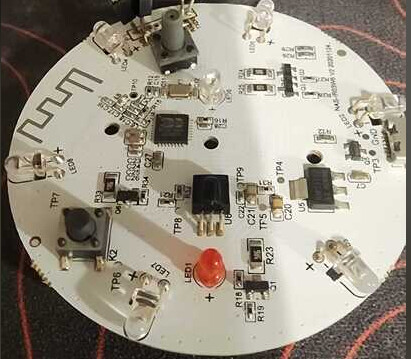
However, I have had nothing but stability problems with another set of Tuya Beken BK7231N IR Blasters which have built in Sub-G radios (Tuya SH4) connected to the BK7231N. The PCB of this IR Blaster has this written in its silkscreen: “NAS-IR02W6-Pro V3 2022.05.17”

I am using HAOS to monitor / maintain the IR Blasters. I wrote different YAML files for each kind of IR Blasters. I changed the processor type and some of the GPIO pin assignments.

I fear that since I am not including anything in my YAML files for the Sub-G radios, that random data from the radios are causing the IR Blaster to randomly disconnect and reconnect from/to the WIFI.

Has anyone gotten Tuya IR Blasters using Beken BK7231N processors connected to Sub-G (SH4) radio stably working with ESPHome?
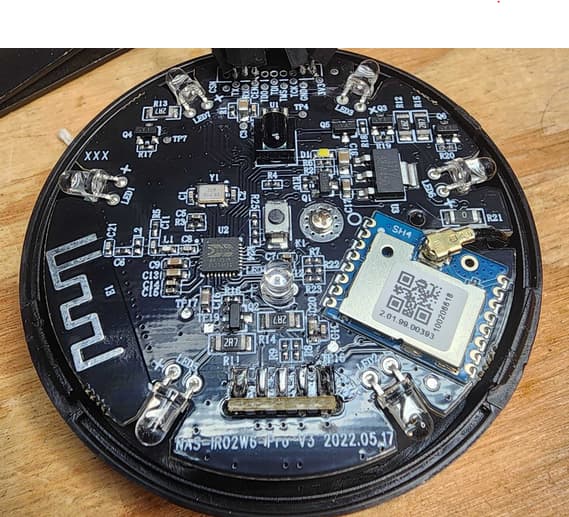
The specifications for the SH4 radio (the castellated daughter board above) can be found here.

Follow up…

I’ve gotten to a place where, after about 10 minutes, the BK7231N IR Blasters (black PCBs) will stabilize and work as expected with HAOS (HAOS will display the current state of the IR Blaster button & the indicator LED will light if a remote control button in HAOS is pressed).

Both BK7231N IR Blasters work the same. So I do not think this is a hardware issue. I have added YAML code to explicitly turn the 2 lines from the SH4 interrupts into BK7231N inputs. And to explicitly turn the SH4 SPI clock input into a BK7231N output that is always low.

I still do not know why the BK7231N IR Blasters do not work (appears to keep resetting or at least disconnecting from the WIFI) for minutes after a power cycle.

Follow up 2 …

Problem solved:

Started to notice during testing that an IR Blaster would occasionally reset during its own transmission. I commented out the IR Blaster’s Receive YAML code and that stabilized the IR Blaster.

Later, I found an effort to control the 433MHz SH4 radio and added the necessary code to HAOS to configure the radio. This is the solution I am running now and it appears to be stable.

Hello could you share the procedure/code to integrated it in home assistant? I have done the follow procedure UPDATED How To Guide - Tuya CloudCutter with ESPHome LibreTiny - No soldering and I integrted in HOme assistant, but I’m not seen in the esphome builder. So could you help me?

Thanks

I’ve tried everything under the sun to get my BK7231N/CB3S IR blaster to work/stabilize since Oct 2024 and have failed miserably. I’ve replaced it with a zigbee IR blaster.

@giangi007 , I had opened my IR blasters up and programmed them over the serial port. I do not recall having a problem when adding them to the ESPHome Builder. But that may have been because they were directly connected over the serial port. When adding a new ESPHome device I see where a Home Assistant → ESPHome Builder → NEW DEVICE popup states:

A device needs to be connected to a computer using a USB cable to be added to ESPHome. Once added, ESPHome will interact with the device wirelessly.

I am not familiar with Tuya-CloudCutter. I may have some Beken smart switches that I can not open (are sealed). I might try Tuya-CloudCutter and see how far I get.

@mmstano , is your Beken IR blaster only a WIFI & IR blaster? Or does it also include a SH4 (433MHz) radio? I was able to get expected operation out of 2 IR blasters which only had the Beken processor (only WIFI). But the next 2 IR blasters I bought also contained an SH4 433MHz radio. The unconfigured radio must have caused the Beken processor to reset. Not until I pulled in support for the SH4 and included it in the YAML file was I able to get expected operations out of the 2 new IR blasters.

Here are the important parts of my YAML. Notice all the places “tuya_rf” appear for support of the SH4 433MHz radio:

external_components:
 - source:
    type: local
    path: components
   components: [ tuya_rf ] 
esphome:
  name: "irblaster"
  friendly_name: ir_blaster
 
bk72xx:
  board: generic-bk7231n-qfn32-tuya

#rf transmitter and receiver
tuya_rf:
  id: rf
  receiver_disabled: true
  dump: raw

Mine is WiFi with only IR. No RF. It uses the BK7231N, more specifically, a CB3S chip.

… so it doesn’t look anything like the 2 different ones (pictured above) that I have?

Also, looking back on what I had finally settled upon, I see that I turned off the IR receiver in the YAML file. You might want to try that as well to see if your IR blaster will operate normally.

Yea, it’s not a circular board. It’s more of a square/rectangle shape. Black board. I’ve tried everything there is to try, including #'ing out the IR receiver. It’ll work, anywhere between 2 minutes to a couple hours, then disconnects from the API, then eventually disconnects from the WiFi. I’ve spent over a year messing with it, including tweaks to my WiFi network, tweaks to the YAML, to no avail. I’m thinking the chip on this board has failed or is failing. Or maybe, just maybe, with updates to the Libretiny WiFi, it just doesn’t like WiFi mesh networks, which is what I have.

I digress… but no worries. I’ve been slowly switching things over to zigbee and this made the cut last week. I’m curious to find out if I can use the same pronto codes for the devices I was using it with or if I’ll need to capture the codes from scratch.

… that sure does sound familiar (like the problems I experienced). Maybe, as a last resort, try encapsulating the IR receiver inside the IR blaster with black electrical tape or black heat shrink tubing.

1 Like

Thanks, I’ll give it a shot when I’m more motivated to try and revive it. It stinks to invest so much time for no conclusive results, lol. I just flashed via serial for another retry last week. Probably going to let it sit for a month. If I try too soon and it doesn’t work, I’m liable to take a hammer to it or throw it across the room at this point.

Could you share the complete yaml file?

+1 I have a NAS-IR02W6-Pro V3 aswell and am having a really hard time discovering the correct pinout for the IR/LED/Button. Could you share the complete YAML config or point to where it can be found?
Really appreciate your help.

… I’ll dig it out when next I get back to my computer. This might be more a procedure than only a YAML file solution … as I needed to add tuya_rf (see the: “components: [ tuya_rf ]” line in posted in the example code) to stabilize the IR Blaster’s performance.

Below are the first about 100 lines of my YAML file that I use for my NAS-IR02W6-Pro V3 IR Blaster. I cleaned it up a bit removing commented out code. And I cut off the last about 700 lines of IR codes which likely don’t match your equipment. (I did leave a couple LG TV examples codes).

You do have to get and install the tuya_rf ESPHome custom component. Looks like I put it here: /homeassistant/esphome/components/tuya_rf. It has been a few weeks, so I hope I am remembering this correctly.

If you don’t install tuya_rf, I don’t think the YAML install will work (the compiling will likely fail).

external_components:
 - source:
    type: local
    path: components
   components: [ tuya_rf ] 
esphome:
  name: "irblaster"
  friendly_name: ir_blaster
 
bk72xx:
  board: generic-bk7231n-qfn32-tuya
 
# Enable logging
logger:
# Enable Home Assistant API
api:
  encryption:
    key: !secret api_encryption_key
 
ota:
  - platform: esphome
    password: "REDACTED"
 
wifi:
  ssid: !secret wifi_ssid
  password: !secret wifi_password
 
  # Enable fallback hotspot (captive portal) in case wifi connection fails
  ap:
    ssid: "Wifi-Ir-Blaster Fallback Hotspot"
    password: "REDACTED"
 
## Webserver
web_server:
  port: 80
  version: 2
 
captive_portal:
    
# Remote Receiver 
remote_receiver:
  pin:
    number: 8
    inverted: True
    mode:
      input: True
      pullup: True
  dump: all
  tolerance: 25%

#rf transmitter and receiver
tuya_rf:
  id: rf
  receiver_disabled: true
  dump: raw

remote_transmitter:
  id: ir_transmitter
  pin: 7
  # Infrared remotes use a 50% carrier signal
  carrier_duty_percent: 50%
  on_transmit:
    - switch.turn_on: status_led
  on_complete:
    - switch.turn_off: status_led

switch:
  - platform: gpio
    pin:
      number: 9
      inverted: true
    id: status_led
    
binary_sensor:
  - platform: gpio
    pin:
      number: 23
      inverted: False
      mode:
        input: true
        pullup: false
        pulldown: true
    name: Reset/Input Button

button:
  #LGTV
  - platform: template
    name: LGTV Power Button
    id: lgtv_power
    on_press:
      - remote_transmitter.transmit_nec:
          transmitter_id: ir_transmitter
          address: 0xFB04
          command: 0xF708
  - platform: template
    name: LGTV Home Button
    id: lgtv_home
    on_press:
      - remote_transmitter.transmit_nec:
          transmitter_id: ir_transmitter
          address: 0xFB04
          command: 0x837C

# I assume you don't need all the IR codes. There are about 700 lines of this stuff.

Hello, can you share me the button code for RF transmitter? I have a compilation problem. Thanks

The RF transmitter code is from this github project:

I am only using the IR transmit and receive capabilities of my NAS-IR02W6-Pro V3 2022.05.17 at this time. So I don’t have any YAML code to send RF messages out of the NAS-IR02W6-Pro V3 2022.05.17.

In the tuya_rf github project page, there is a link:

… to an ESPHome page describing transmitting IR and RF signals. And inside that description (with examples) there is a link:

… to an ESPHome page specifically for setting up RF devices. With several examples. Like this one:

button:
  - platform: template
    name: RF Power Button
    optimistic: true
    on_press:
      - remote_transmitter.transmit_rc_switch_raw:
          code: '100010000000000010111110'
          protocol: 2
          repeat:
            times: 10
            wait_time: 0s

# Or for raw code
button:
  - platform: template
    name: Raw Code Power Button
    on_press:
      - remote_transmitter.transmit_raw:
          code: [4088, -1542, 1019, -510, 513, -1019, 510, -509, 511, -510, 1020,
                 -1020, 1022, -1019, 510, -509, 511, -510, 511, -509, 511, -510,
                 1020, -1019, 510, -511, 1020, -510, 512, -508, 510, -1020, 1022]