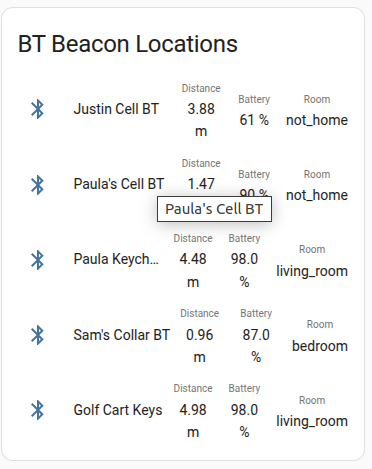
Just sharing this if anyone interested. The HA display/card is still a work in progress and needs cleaned up but, that isn’t really what’s important here. I’m just showing that you can use the BT beacons for room presence that shows you the Room, Distance, and Battery Level of the BT beacon whether it’s a phone, watch, or what many of mine are is BlueCharmBeacons. They work very well with HA and just in general. They are also a very good quality product IMO and i have no affiliation.
Here is how I get BT beacons battery level as a sensor with Esphome. If you already know the MAC address and it’s Service UUID where it transmits the battery level than this is all you need. The Service UUID of “2080” is for specifically the BlueCharmBeacons and may not work for other brands.
This is how you add multiple beacons you want to listen for.
esp32_ble_tracker:

  on_ble_service_data_advertise:
    - mac_address: DD:34:02:07:E3:B6
      service_uuid: '2080'
      then:
        - lambda: 'id(beacon_battery_paula).publish_state(x[0]);'

    - mac_address: DD:34:02:07:E2:40
      service_uuid: '2080'
      then:
        - lambda: 'id(beacon_battery_sam).publish_state(x[0]);'


    - mac_address: DD:34:02:07:E2:A7
      service_uuid: '2080'
      then:
        - lambda: 'id(beacon_battery_golf).publish_state(x[0]);'
If you dont know the Service UUID that contains the battery information or whatever information that your wanting to use. For example these BT Beacons can also act as motion sensors and will only transmit it’s UUID when the beacon is moved from being in a still position. Some also can detect temperature and will transmit that temp value in a Service UUID. If you need to find out your specific devices Service UUId’s and Hex value then you can find it using this in Esphome.
esp32_ble_tracker:
  on_ble_advertise:
    - mac_address:
        - DD:34:02:07:E3:B6
        - DD:34:02:07:E2:40
        - DD:34:02:07:E2:A7
      then:
        - lambda: |-
            ESP_LOGD("ble_adv", "New BLE device");
            ESP_LOGD("ble_adv", "  address: %s", x.address_str().c_str());
            ESP_LOGD("ble_adv", "  name: %s", x.get_name().c_str());
            ESP_LOGD("ble_adv", "  Advertised service UUIDs:");
            for (auto uuid : x.get_service_uuids()) {
                ESP_LOGD("ble_adv", "    - %s", uuid.to_string().c_str());
            }
            ESP_LOGD("ble_adv", "  Advertised service data:");
            for (auto data : x.get_service_datas()) {
                ESP_LOGD("ble_adv", "    - %s: (length %i)", data.uuid.to_string().c_str(), data.data.size());
            }
            ESP_LOGD("ble_adv", "  Advertised manufacturer data:");
            for (auto data : x.get_manufacturer_datas()) {
                ESP_LOGD("ble_adv", "    - %s: (length %i)", data.uuid.to_string().c_str(), data.data.size());
            }
The last thing you need is to define template sensors to display each individual beacon’s battery level.
sensor:

  - platform: template
    name: "Beacon Battery Paula Keys"
    id: beacon_battery_paula
    icon: 'mdi:battery'
    unit_of_measurement: '%'
    device_class: "Battery"

  - platform: template
    name: "Beacon Battery Golf Cart"
    id: beacon_battery_golf
    icon: 'mdi:battery'
    unit_of_measurement: '%'
    device_class: "Battery"

  - platform: template
    name: "Beacon Battery Sam"
    id: beacon_battery_sam
    icon: 'mdi:battery'
    unit_of_measurement: '%'
    device_class: "Battery"
If someone has any better suggestions for displaying this information in a HA card then don’t be shy!