Hi Peeps,
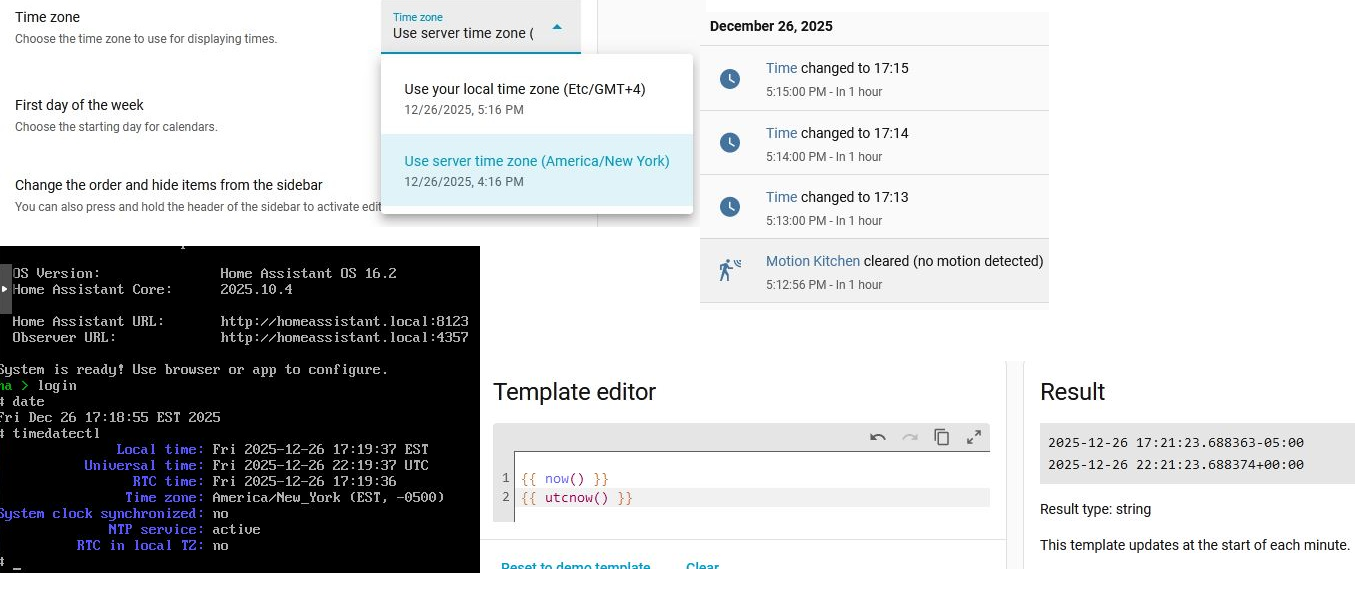
I rarely post here because I usually find my way through problems by searching, but this one I can’t figure out. My events are off by an hour - For example when something happens, it says “In 1 hour” as to when it happened - I’ve done a lot of searching and tried checking timedatectl, system time, time inside of HAOS, server time/local time setting within the HA user profile setting. Nothing seems to fix this. I’m not sure when it started happening. I’ve tried three different browsers, no difference. The client computer I am browsing with has it’s time same as the server time. Even the event log shows a time sensor I’ve created will say that the clock “changed to 5:13pm” at 5:13pm, but it says it will happen “in 1 hour” which should really say “Just now”
Maybe someone else will see something I’m missing? Does anyone have any idea what’s causing this?
I collected screenshots on some things with the userprofile set to “server time” and also “local time” I restarted HA completely between these two collections of data. See attached image.
Any help or ideas is appreciated. This one has me stumped.
R