Hi there when i try and add new matter devices to HA i get an error on the app, Failed to save thread network credential, ,error: Thread network credentials do not match with any of the active thread networks around, and the matter device fails to install/connect, I have only tried with Wifi devices so not sure if this is the issue or not. Any help would be appreciated.
It sounds as if you are saying that you are trying to add a Matter-over-WiFi device and are receiving a Thread error, which should never happen. Can you provide more details what you are doing and where it is failing? For example:
Is the device you are commissioning Matter-over-Thread or Matter-over-WiFi?
What make and model of Thread Border Router is installed on your network?
What Matter commissioning app are you using? HA companion for iOS, HA companion for Android, Apple Home, Google Home, Amazon/Alexa, or other?
Have you successfully deployed any Matter devices yet, and if so, what kind and what fabric (i.e. what app) controls them?
I am having the same issue and would really appreciate some advice on how to fix it. I am a complete nube so forgive dumb / basic questions
-
It is a Aqara Matter over Thread P2 motion sensor.
-
I am using the Smart home ZBT-1 as my Thread border router. (I also have a Home Pod mini, and an iPhone which understand can be Thread routers but I havent set them up to be a router)
-
Im not sure I understand the question about a Matter commissioning app. I am using the Matter integration in HA. I could use other Apple devices for the TBR, but havent configured them as such so far.
-
I have deployed 3 Linkind LED bulbs and they work great. in HA it looks like they are Matter over WIFI. (it says ‘wifi’ after Network Type in the device info)
Any recommendations or trouble shooting steps would be much appreciated!
This is referring to which app on your phone is used to deploy or setup (“commission”) new Matter devices. There are several options available, and they each configure the device to a different Matter fabric. The HA mobile companion app commissions new devices to the HA matter fabric (BETA add-on) but you could also use the Apple Home app which commissions new devices to your Apple matter fabric. Once a device is added to one fabric, it can be added to others, in a (typically straightforward) “sharing” procedure.
Thread, like WiFi, is just a network protocol that connects devices to each other, but cannot control them. A smart home protocol like Matter or HomeKit is used on top of Thread (or WiFi) for the control part. Thread, like WiFi, has credentials (“dataset”) for security but, unlike WiFi, doesn’t let you choose your own. Instead they are auto-generated and saved on your phone’s keychain and sadly, there are no apps to manage them if you have more than one.
Since you have both OTBR and HomePod Thread networks, you likely have both datasets stored in your keychain, and the Matter commissioning app is probably trying to use the wrong ones. It would be nice if the apps let you choose which dataset to use, but instead it just seems to pick one for you.
Because of this ridiculous software limitation, Thread works best if you have just one dataset right now. You might be able to reconfigure your OTBR to use the same credentials as the HomePod Thread, or vice versa, but you still have the issue of two datasets having already been stored in your keychain and no app to manage them. Some suggestions that seem to have worked for others:
- Try a completely different phone without any HomePod knowledge (like an old Fire tablet) and install the HA app for commissioning;
- If you have a Mac computer, you can use the Keychain Access app to delete thread credentials off your phone, but obviously deleting HomePod dataset will cripple its TBR functionality;
- Try removing all HomePods from your Apple Home which should clear their dataset from the keychain. Plus side, when you add them back, they might all grab the OTBR dataset still in the keychain;
- There is a back-channel method of commissioning Matter devices to HA without a phone, but it requires your server to have a dedicated Bluetooth radio for commissioning, and consequently must be in Bluetooth range of the device being commissioned, so it is kind of a pain in the neck but good to have in a pinch).
4 Likes
I was having exactly this same issue just now trying to add my Aqara Motion P2 as a Matter device to Home Assistant. I’m using the Connect ZBT-1 as the radio and the official Matter Server and OpenThread Border Router add-ons. I had not connected a Matter device before.
I found under Settings > Devices & Services > Thread, then clicking Configure for the Thread service gives options to select the preferred network. I had two networks listed, the one set up by Home Assistant and presumably the one set up by Apple Home. I removed the Apple Home network and set Home Assistant as the preferred network for credentials. Then I sent credentials from my iPhone to Home Assistant and also sent credentials from Home Assistant to iPhone.
After this, I was able to add my motion sensor as a Matter device in Home Assistant without issue!
1 Like
Personally I had enormous trouble with ZBT-1/Sky Connect. Initially I just used the apple and google hubs thread border routers I had which worked great once I got rind of the ZBT-1.
Later on I added the thread firmware to a Sonoff dongle I had as a spare for my Zigbee network.
Thread continued to work flawlessly. Just as a test I put the ZBT-1 back in after updating firmware and once again my thread network fell over multiple time a day.
Needless to say the ZBT-1 is in the bin
I’m getting the “failed to store thread credential in keychain thread network credentials do not match with any active thread networks around” error when trying to sync credentials on ios companion app > integrations > thread ‘send credentials to phone’.
I have an old macbook with the keychain app, however I don’t see any obvious entries for thread/hass/etc.
Anyone know the keychain entry/ies to remove or some way to identify them if they are unique?
Or any other way to resolve the above error trying to sync the credentials from thread to ios hass companion app (without removing homepods)?
I’m not having any specific issues (yet), not having any actual thread devices, just 4 thread boarder routers (haotb/nesthub/2xhomepodmini), but I want to be ready when I do get some thread devices.
1 Like
You didn’t mention, but can you expand on the following:
- does your HA Thread Integration have a “preferred network” entry with a “key in a phone” icon?
- If yes, then is the preferred network the one for HA’s OTBR w. ZBT-1/Skyconnect (Assuming you have OTBR/Skyconnect)?
- Do you plan to use the Homepods?
Regarding this particular error,
I’m kind of guessing here as to why this error, but iOS stores the Thread credentials against a particular Thread Border Router by its extended MAC address, so my guess is that when you try to store the Thread credentials, iOS starts looking for advertisements from that particular TBR and if it doesn’t see it then it throws this error. If your iOS device is on a WiFi network that is on the same LAN as your HA OTBR (and using IPv6), then it should see these advertisements … in which case my speculation is incorrect.
1/2: yes the ha thread integration has the preferred network as the ha obtr+skyconnect.
3: I assume you mean to connect thread devices to the homepod mini’s, I don’t have any currently, and while I assume I will want to use the HAOTBR to onboard any future thread devices, but that would not be set in stone. I don’t know what kind of performance/propagation to expect between the different thread routers.
Yes the iphone is on the same wifi network as the homepods and nest, the HAOS/otbr is on ethernet, and I can only assume that the ipv6 is working, but not sure how or if there is a good way to confirm it as far as thread is concerned.
I do remember getting these all set up and connected to HA was confusing and painful, and went through multiple adding/removing from each other, however long ago I did that.
OK… does this entry have a “key in a phone” icon?
This icon indicates to HA that this entry has the Thread credentials that will be transferred to the iOS device.
Check your HA UI->Settings->System->Network and see what IPv6 addresses you have.
You should have at least one starting with fe80, and another one starting with something like fdaf that is used by Thread. Make sure your iOS device also has an IPv6 address with the same fdaf like starting prefix.
In your iOS HA Companion App, go UI->Settings->Companion App->Debugging->Thread and see if you have any entries. If you do, then you should be able to delete each one by sliding slightly to the left until yo see the word “Delete”, then tap on Delete to remove it.
1 Like
Yes I have the key in a phone icon, I have fd7b prefix ipv6 in both HA and ios networks.
I do not see any ‘thread’ section in the companion app > debugging, only export logs/eventlog/location history + reset options.
That’s good 
Hmm… that I am not sure about. It may be that way because you don’t have credentials … or may be the iOS version your iOS device is running. What version are you running?
i’m still rocking an 8+ on 16.7.12, I’m partial to the thumbprint, and it still works so not upgrading until its dead.
I do have a slightly newer but not current ipad, I will check it later.
BTW I appreciate all the discussion, thank you!
Ok to follow up, the ipad @ 17.7.10 does have the debug thread menu, I tapped the ‘transfer to home assistant’ button on the 4 pan networks listed, get a success indication.
from the ipad, the thread integration can send/receive credentials successfully with no error
but…
from the iphone, I still receive the same error, so it appears some kind of limitation related to the older ios on the 8+.
so in my case, it seems this may not be not a problem with ha/thread/keys, but some issue with ios older than 17.
again, appreciate all the help, hopefully it can also help others in the future!
Yeah, I would try to keep up with the latest iOS version. The HA Companion App uses the underlying iOS’s Thread framework.
I have the same issue trying to save to iPhone. I can’t save them via my iPad either. This is what mine looks like. All my devices are on iOS26.2. I assume my ZBT-2 is the preferred network. Am I meant to Send credentials to Home Assistant first. I do have some devices on HomeKit network. Ideally I would move them over to Home assistant.
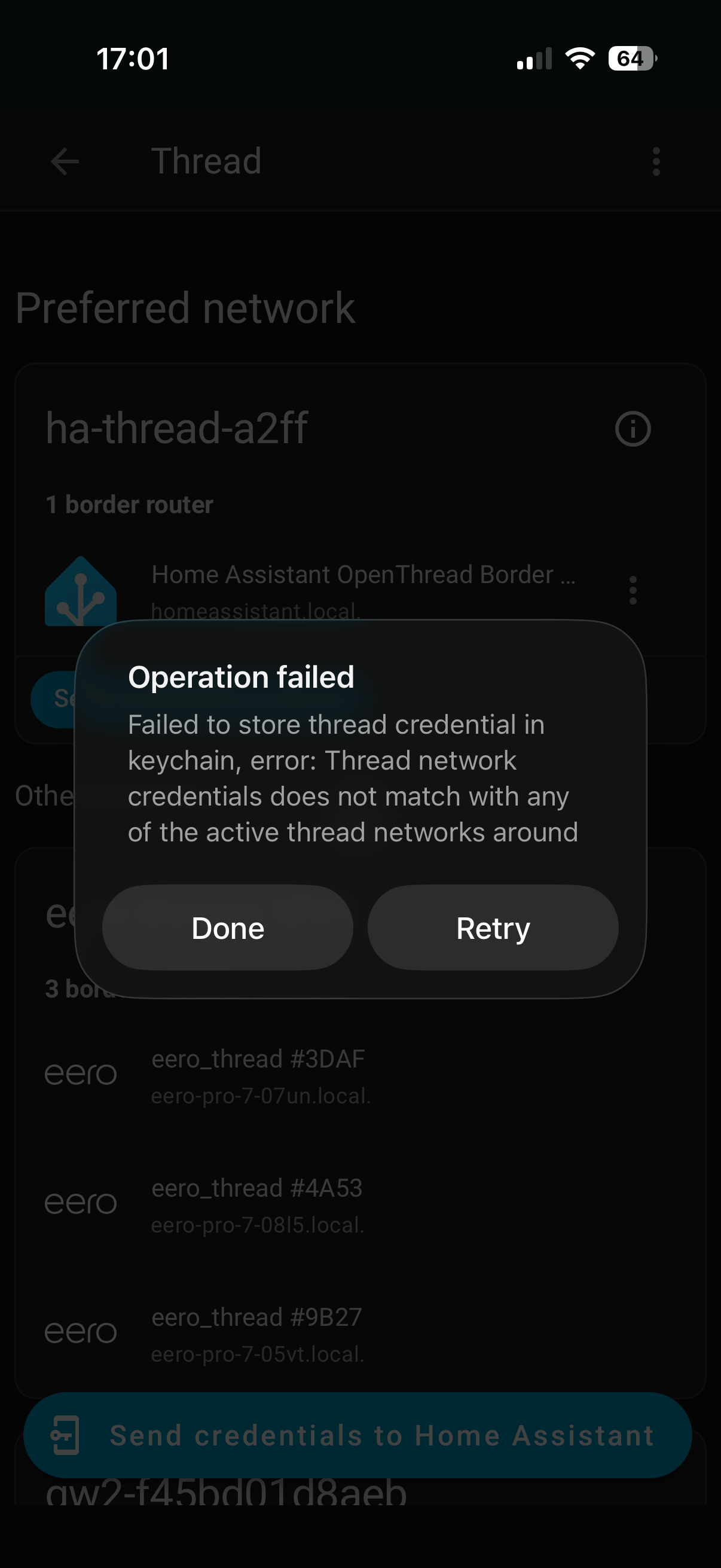
I think what the error means is that iOS (and Android as well) stores Thread credentials that are associated with a particular TBR, and the TBR sends out mDNS advertisements and the iOS device is expecting to see the advertisements from this particular TBR and doesn’t see them. This is a bit of a guess, however.
On the other hand, if you have a Homekit network already, chances are you already have Thread credentials stored on your iOS device. In your iOS HA Companion App, go to UI->Settings->Companion App->Debugging->Thread and see what Thread credentials are already there. You may want to instead send your credentials to HA and then go to the Thread Integration and see what networks show up with the (i) icon which means HA has Thread credentials from that Thread network. If one of those with the (i) is not the ha-thread-xxx then may want to make it preferred, and HA will in turn move the ha-thread-xxx to that network.
I had a look in the log as you suggested. It only had credentials for the HomeKit. I have transferred those credentials to the phone and now I can make HomeKit the preferred network. I don’t want to do this. I want the ZBT-2 to be the preferred network. The HomeKit and ha-thread network have (i), the Eero and IKEA do not. I still get the same error when I am trying to send credentials to the phone. Should this button disappear if the credentials are sent successfully, or is it always there?
Once you made the HomeKit the preferred network, then HA should have also made its own OTBR part of the preferred network. When this happens, it means that HA and Homekit are part of the same Thread network. The only difference would be that the Thread credentials stored on your iOS device are likely associated with the Apple device acting as the Homekit hub and not associated with the HA OTBR.
One thing to try is goto UI->Settings->Companion App->Debugging->Thread, click on the Thread credentials, and slide to the left and delete it.
In the Thread integration, go to the ha-thread-xxx entry and click on the 3-dots and set it to be used as the Thread credentials for iOS/Android, then try sending the credentials to your iOS device.
I think its always there.
3 Likes
I now have my IKEA outdoor motion sensors and door sensors. They were out of stock of temperature and humidity sensors. As I have a lot of Apple devices around the house, I think it will be better to make HomeKit my preferred network again and not use the ZBT-2 at the moment. I hope to get these devices setup over the Christmas break. Thanks for all the feedback.