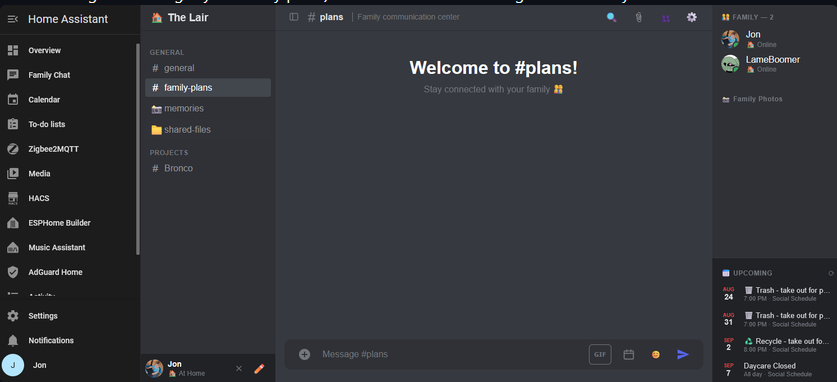
A private chat for your family that runs entirely inside Home Assistant. There’s no separate account to create — Family Chat signs everyone in automatically using whoever’s already logged into Home Assistant, so each person just shows up as themselves. There are no ads, the data is all hosted on your Home Assistant system (make sure you have room for all those gifs and images your family posts) and no monetization being forced down your throat.
First welcome to the Home Assistant Forum!
Thanks for contributing an App for the Community to use!
2 things.
You refer to add-ons a lot in the Git documentation. New Apps especially are being ask to use the term Apps at least in conjunction with add-on as the word Apps is used in all the official documentation and add-on is deprecated / removed. New users will not know what an add-on even is…
Second you are free to use the help of AI or other contributors all you want while coding. It is asked and will soon be required to attribute help from anyone or anything in your coding. So list the AI (or any other helper) as a contributor, and you are golden. No need to explain it.
I have updated the content on my github to reflect the changes you requested, I will note that the FAQ for this site currently includes 7 references to add-on. You might want to update that.
Short answer: not right now, and it’s not really a packaging thing I could just flip a switch on. It comes down to how the whole login system works under the hood.
Family Chat signs you in automatically using whoever’s already logged into Home Assistant, no separate account to create, no password to remember. That only works because Home Assistant’s own ingress system tells the app who you are, right after you’ve already logged into HA itself. A plain Docker container running completely outside of Home Assistant/Supervisor would never receive that information at all, so there’d be no way for the app to know who’s using it.
There’s a security side to this too, it’s not just a missing convenience. If I tried to work around it by having some other setup pass that identity along manually, that’d only be safe if access to the container was locked down really carefully, since anyone who could reach it directly could just claim to be any user. Supervisor’s ingress is trustworthy specifically because it’s a controlled system Home Assistant itself manages, not just a header being present.
So making this work outside the App ecosystem would really mean building a whole separate login system from scratch (real accounts, passwords, all of it), a legitimately big undertaking, not a quick tweak, and not something I have planned right now.
If that ever changes I’ll post about it here, but for now this needs Home Assistant with Supervisor specifically (OS or Supervised), plain Home Assistant Container installs won’t be able to run it.
Thank you for following up and getting it taken care of, it seemed like something that should be fixed since the rule about that was being enforced so… enthusiastically.
I hear you, but I’m trying to help the new Apps start out right anyway. The whole name change thing got me so upset, I am passing the emotion on to the new App owners where I can.
Thanks for having the install instructions correct, most are copying a template that still has add-on in it so newbees might not even be able to install their stuff..
Hey, I think I follow what you’re asking, let me know if I’ve got it wrong.
Sounds like you’re asking whether a non-admin Home Assistant user can get access to Family Chat at all, since the sidebar icon only shows up for admin accounts. That’s a real limitation, but it’s not something Family Chat itself controls, it’s how Home Assistant handles ingress-based apps in general right now. Every app that uses ingress (not just this one) is admin-only in the sidebar for the same reason.
It sounds like you tried working around that with a Webpage card, a regular dashboard (unlike the sidebar) can be shared with non-admin users, so the idea of dropping a Webpage card pointed at Family Chat’s URL onto a shared dashboard makes sense as a workaround to try.
The issue is that it doesn’t actually get around the underlying limitation, it just relocates where that admin-only URL is being loaded from. An ingress session is tied to the admin account that’s currently logged in, not something that can be embedded or handed off to someone else’s account. So if it “works,” it’s most likely still working because you’re logged in as the admin who set it up, not because the non-admin person can actually reach it.
When you say it only works locally, do you mean:
It works on your home network, but not when accessing Home Assistant remotely, or
It works for you, but the actual non-admin person you’re trying to share it with still can’t get in?
If it’s #2, that’d confirm what I described above. Either way, I don’t think there’s currently a way around this, it’d need Home Assistant itself to support non-admin access to ingress apps, which isn’t there yet. If that changes, I’ll be watching for it.
I’ve continued to work on Family Chat the last couple weeks, here’s what’s new since the last update post.
New features
Message editing. Fix a typo or reword something after sending: your own messages only, with a small “(edited)” label so it’s never hidden that something changed.
Backup & restore, from the admin panel. Download a single file with every message and every uploaded file, independent of Home Assistant’s own backup system, a safety net worth having before doing anything risky to the underlying instance.
Link previews. Paste a link and it unfurls into a real preview card, thumbnail and description for most sites, an embedded player for YouTube.
Message grouping and date dividers. Consecutive messages from the same person are now visually grouped instead of repeating the name every time, and a “Today” / “Yesterday” / full-date divider shows once per day instead of on every message.
Custom emoji shortcodes. Type :yourname: directly into a message, not just from the picker.
Notifications now open the app directly when tapped, instead of landing on the main Home Assistant dashboard, also tries to jump straight to the right channel, though whether that part survives Home Assistant’s own session redirect is genuinely hit or miss.
Storage moved to a more durable location (/config instead of /data), migrated automatically, so an uninstall/reinstall or repository hiccup is much less likely to take your data with it.
Fixes
A real saga this cycle: the app store had gotten “detached” and stuck refusing updates. Root cause ended up being two compounding issues: an empty repository.yaml file, and a version number that had briefly gone backwards during some manual troubleshooting. Both fixed; updates should behave normally now.
Several rounds of scroll-to-bottom bugs: opening a channel, switching channels quickly, and posting an image, GIF, emoji, or link preview could all independently leave the view stuck short of the actual latest message. All tracked down and fixed.
GIF search and trending were fully broken for a couple versions (a missing constant from an earlier edit) - fixed.
Link previews were silently failing on Amazon and similar sites due to bot detection; now uses a realistic browser identification, and any link that still fails to preview shows an honest “request timed out” card instead of nothing.
The GIF picker’s results were genuinely overlapping each other, not just tightly packed: fixed with better spacing.
On mobile, the reply/react/edit/delete buttons used to sit on top of every message at all times. Now hidden until you tap the message, like they should’ve been from the start.
A CodeQL-flagged XSS gap (not currently exploitable, but worth closing) in a template string.
Housekeeping
README rewritten with an actual screenshot and a properly up-to-date feature list.
“Add-on” references updated to “app” throughout, matching Home Assistant’s own current terminology.
As always, update from the App Store like normal, a couple of these (the storage migration, the AppArmor permission fix) need a full Rebuild rather than just a Restart to fully take effect.
For people running home assistant in docker, apps is difficult to setup. Things like this can also be created in Home assistant as a custom integration…
The short answer is that Family Chat is going to stay an app rather than move to a custom integration, at least for now. Here’s the thinking behind that.
A custom integration runs inside Home Assistant’s own Python process. Family Chat is a full web app with its own backend (Flask), its own WebSocket server, its own SQLite database, and its own frontend. Bringing all of that into HA’s process would mean sharing HA’s Python environment and dependency versions instead of shipping its own, and would put a chat server’s workload (message history, file uploads, image handling, GIF search, etc.) directly inside the same process that’s also running your automations and integrations. If something in Family Chat hangs or leaks memory, that becomes an HA core problem instead of a contained one. Running as its own app keeps that isolated, so a bug in the chat can’t take down your smart home.
There’s also the fact that a chat app just doesn’t map well onto HA’s entity and device model. Integrations are built around exposing entities, states, and services. Messages, channels, reactions, file attachments, and a real-time chat UI aren’t really “entities” in any useful sense, so a lot of what makes this a chat app would have to be bolted on sideways rather than fitting the model integrations are designed for.
None of that is a knock on the idea, and I do think you’re raising a real, legitimate downside: if you’re running Home Assistant in Docker without Supervisor, apps aren’t available to you at all, and that locks you out completely right now.
So for now, Family Chat is staying as an app. If Home Assistant’s app/add-on model changes in a way that closes this gap for Container installs, or if there’s a reasonable path to support both without fragmenting the codebase, I’ll revisit it. But that’s not something I see happening in the near term.
That said, it’s MIT licensed, so if a custom integration is something you or anyone else wants badly enough to build, you’re welcome to fork it and take a run at that yourself. I’d genuinely be interested to see how it turns out.
I just found this:
You might want to check it out. It looks like a slightly different variation on the chat in home assistant idea and is an integration.
Home Assistant automations can now post into any channel
Link previews fixed for pages without Open Graph tags, and for Facebook/Instagram
Link preview text/images no longer show raw HTML entities
Messages can be moved between channels
Admin Activity log added (tracks message deletions and moves)
Security review: fixed SSRF, stored XSS, unvalidated socket fields, and reaction spoofing
Admin panel now holds a fixed size across tabs
Emoji picker's Recent tab layout fixed
Phone numbers in messages are now tap-to-call links
Messages can be pinned per channel
Added a live "is typing…" indicator
Fixed file-caption dialog sizing on mobile
Fixed inconsistent message spacing (multiple follow-up rounds)
Fixed mobile tap targets not responding (iOS, then separately Android)
Admin Backup tab now shows estimated backup size and free disk space
Channels can be reordered via drag-and-drop in the admin panel
Security review: fixed DNS-rebinding SSRF bypass, backup decompression bomb, unvalidated channel on send_message, CSRF gap on backup export, added X-Content-Type-Options header
It’s been a busy stretch for Family Chat. Since October 7 there have been seven releases, from version 2.51.0 to 2.54.0. Here’s a rundown of what changed.
New features
Polls. Settle “pizza or tacos?” in seconds. Start a poll from the message bar with up to 10 options, and choose whether people can pick one answer or several. Votes update live for everyone, and you can see who voted for what. Tap your pick again to take your vote back.
Voice messages. Hold the microphone button to record, then let go to send. Slide your finger away before letting go if you change your mind. Voice messages play right in the chat. They need Home Assistant to be opened over HTTPS.
Message formatting. You can now use bold, italics, inline code, code blocks and bulleted or numbered lists. Previews of a message, such as reply quotes, notifications, the pinned list and the Activity log, show clean text without the formatting marks.
Drafts are saved per channel. Start typing in one channel, hop over to another, and your unfinished message is still waiting when you come back, even after a reload.
Drag and drop files. Drag a file from your computer onto the chat to share it in the channel you’re viewing. A box shows exactly which channel it’s going to.
Easier channel organizing. Admins and the server owner can rearrange channels by dragging them, both in the admin panel and in the chat’s own Settings. You can also drop a channel straight into a different category. It works with touch too.
Fixes and polish
Tapping a notification on your phone now opens the chat on the channel the message came from. Before, it showed an “Unable to connect” error, and iPhones ignored the tap entirely.
The “someone is typing” indicator no longer pushes the newest message out of view.
The light theme no longer shows names and headings as white text on a white background.
Error pages now report “not found” properly instead of looking like a server crash.
On a phone, the message bar now fits all of its buttons, even on small screens.
Restoring an older backup now works fully right away, without needing a restart.
Security
A security review turned up a handful of issues, and all of them are fixed:
Link previews can no longer be tricked into reaching your home network by a website that changes its address mid-request. (To be clear, no one ran into this.)
A specially crafted backup file can no longer fill up your disk during a restore.
The backup download now has to be started from the admin panel itself, not from a link on another site.
Messages can no longer be posted into channels that don’t exist.
Long, deliberately crafted messages can no longer slow down the server or everyone’s browser.
Every security issue fixed since the project began is now listed in SECURITY.md, along with how to report a new one.
Documentation
The README is fully up to date with all of the above, including who can do what, the security protections, and how to run the tests. The automated test suite has also grown from 39 to 67 tests.
As always, update the app from the Home Assistant app store to get everything. If something looks off, especially on your phone, let me know.