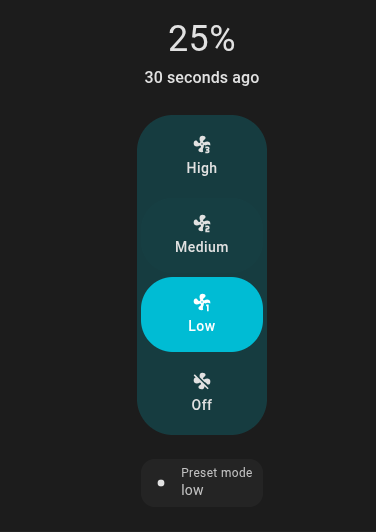
I managed to make a fan that is % only have 3 presets using a template fan. The presets react to my custom % but it only sets the values to 33, 66, 100, despite what I am trying
- fan:
      - name: "Preset Mode Fan Example"
        state: "{{ states('fan.master_fan_2') }}"
        turn_on:
          - action: fan.turn_on
            target:
              entity_id: fan.master_fan_2
        turn_off:
          - action: fan.turn_off
            target:
              entity_id: fan.master_fan_2
        percentage: >
          {{ state_attr('fan.master_fan_2', 'percentage') }}
        speed_count: 3
        set_percentage:
          - action: fan.set_percentage
            target:
              entity_id: fan.master_fan_2
            data:
              percentage: "{{ percentage }}"
        preset_modes:
          - "off"
          - "low"
          - "medium"
          - "high"
        preset_mode: >
          {% if is_state('fan.master_fan_2', 'on') %}
            {% if state_attr('fan.master_fan_2', 'percentage') == 100  %}
              high
            {% elif state_attr('fan.master_fan_2', 'percentage') == 60 %}
              medium
            {% else %}
              low
            {% endif %}
          {% else %}
            off
          {% endif %}
        set_preset_mode:
          - action: fan.set_percentage
            target:
              entity_id: fan.master_fan_2
            data:
              percentage: >-
                {% if preset_mode == 'high' %}
                  100
                {% elif preset_mode == 'medium' %}
                  60
                {% elif preset_mode == 'low' %}
                  20
                {% else %}
                  0
                {% endif %}
petro
July 9, 2025, 11:22am
3
This sets the percentage on the master fan.
This is what percentage is shown in the percent slider.
So you aren’t doing anything with custom percentages outside the preset_modes.
apsmith12
July 10, 2025, 12:09am
4
But is that not what this is doing, setting the % based on if I click low/med/high buttons?
set_preset_mode:
- action: fan.set_percentage
target:
entity_id: fan.master_fan_2
data:
percentage: >-
{% if preset_mode == 'high' %}
100
{% elif preset_mode == 'medium' %}
60
{% elif preset_mode == 'low' %}
20
{% else %}
0
{% endif %}
petro
July 10, 2025, 9:09am
5
That’s only setting the percentage of fan master 2. The percentage of the template fan is driven by what I listed above.
apsmith12
July 11, 2025, 2:12am
6
Well its not setting the percentage of either, and the preset and percentage apply both to the template. The part that you highlighted is also calling out fan_master_2, so I am confused how to have the template change presets.
I basically took this from here: Template - Home Assistant
apsmith12
July 11, 2025, 2:35am
7
So I realized that it sort of does work, the drop down menu part does exactly what I want, but the buttons do no:
petro
July 11, 2025, 9:03am
8
The dropdown is preset mode and the buttons are percentage.
apsmith12
July 12, 2025, 2:49am
9
So, if I put the same logic into the set_percentage, that didn’t seem to read the high, medium, low, so how do those button pushes get recognized? does the “low” button default to 33, and I need to check in the logic if its 33, then set it to 20 for example? I’ll try that
apsmith12
July 12, 2025, 3:04am
10
For some reason that clicked and this seems to work, you basically redirect the default 33/66/99 of the buttons to new values.
- fan:
- name: "Fan Master"
unique_id: 0c14dcef-7658-4db5-9e4f-9f4d9f298123
state: "{{ states('fan.master_fan_2') }}"
turn_on:
- action: fan.turn_on
target:
entity_id: fan.master_fan_2
turn_off:
- action: fan.turn_off
target:
entity_id: fan.master_fan_2
        percentage: >
          {{ state_attr('fan.master_fan_2', 'percentage') }}
speed_count: 3
set_percentage:
- action: fan.set_percentage
target:
entity_id: fan.master_fan_2
data:
percentage: >-
{% if percentage >= 70 %}
100
{% elif percentage >= 34 %}
60
{% elif percentage > 0 %}
20
{% else %}
0
{% endif %}
preset_modes:
- "off"
- "low"
- "medium"
- "high"
preset_mode: >
{% if is_state('fan.master_fan_2', 'on') %}
{% if state_attr('fan.master_fan_2', 'percentage') >= 70 %}
high
{% elif state_attr('fan.master_fan_2', 'percentage') >= 34 %}
medium
{% else %}
low
{% endif %}
{% else %}
off
{% endif %}
set_preset_mode:
          - action: fan.set_percentage
            target:
              entity_id: fan.master_fan_2
            data:
              percentage: >-
                {% if preset_mode == 'high' %}
                  100
                {% elif preset_mode == 'medium' %}
                  60
                {% elif preset_mode == 'low' %}
                  20
                {% else %}
                  0
                {% endif %}