girkers
August 10, 2021, 6:40am
1
I have this fan template:
  - platform: template
    fans:
      main_bedroom_fan:
        friendly_name: "Main Bedroom fan"
        value_template: "{{ states('input_boolean.state') }}"
        percentage_template: "{{ states('input_number.percentage') }}"
        preset_mode_template: "{{ states('input_select.preset_mode') }}"
        oscillating_template: "{{ states('input_select.osc') }}"
        direction_template: "{{ states('input_select.direction') }}"
        turn_on:
          service: script.fan_on
        turn_off:
          service: script.fan_off
        set_percentage:
          service: script.fan_set_speed
          data:
            percentage: "{{ percentage }}"
        set_preset_mode:
          service: script.fan_set_preset_mode
          data:
            preset_mode: "{{ preset_mode }}"
        set_oscillating:
          service: script.fan_oscillating
          data:
            oscillating: "{{ oscillating }}"
        set_direction:
          service: script.fan_direction
          data:
            direction: "{{ direction }}"
        speed_count: 3
        preset_modes:
          - 'low'
          - 'medium'
          - 'high'
And it looks fine, but whenever I try and use it to turn my fan on to a speed I get an error saying script:fan_set_speed can’t be found.
I get that I don’t have this script, I just don’t know what to write?
I only see helpers so how is it actually linked to a fan? And what should happen to turn on that real fan? Simply place that action into the correct script.
girkers
August 10, 2021, 9:43am
3
I read words, but have absolutely no idea what you are talking about?
Sorry
You use all kinds of input_select.x but those are all virtual. How is a actual fan involved in this all? How is it integrated into HA?
koying
August 10, 2021, 11:59am
5
In plain words: What is you actual fan, and how is it connected to Home Assistant
girkers
August 10, 2021, 9:44pm
6
@septillion and @koying thanks for the help.
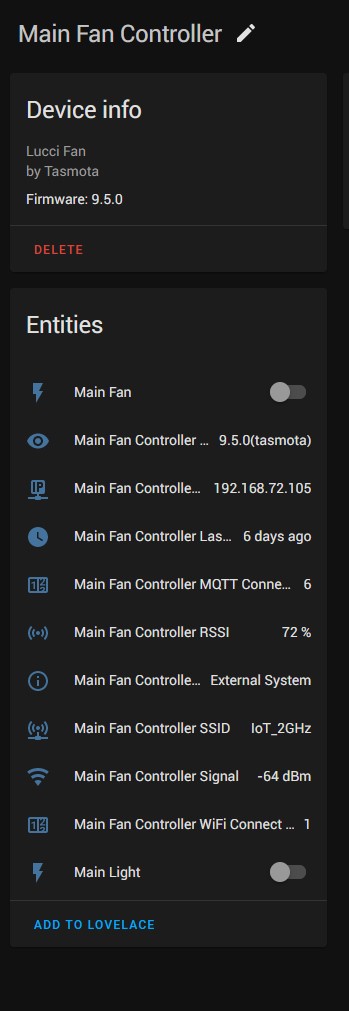
Okay so to clarify in my head mainly, the template I have is simply buttons and stuff, there is no actual “meat”. My fan is configured through the Tasmota integration, like this:
So how do I connect my fan to the template?
Thanks
koying
August 11, 2021, 6:39am
7
Basically, replace your empty scripts by service calls on your tasmota entities.
...
        turn_on:
          service: switch.turn_on
          target: switch.main_fan
        turn_off:
          service: switch.turn_off
          target: switch.main_fan
...
You’ll have to figure what service to call for each functionality.
So you’re only able to turn on and off the fan and light?
If so, what is the benefit of making a template fan?
girkers
August 11, 2021, 7:58am
9
As i need to adjust the speed of the fan instead of just being able to turn it off and on.
But can you control the speed with the “Main Fan Controller”-device you have in HA now? If not, making a template fan will not help.
girkers
August 11, 2021, 8:39am
11
But how? Yes I have switch to turn the fan on and off, but I want to be able to set the speed from the UI directly, not just turn it on or off.
koying
August 11, 2021, 8:48am
12
We cannot tell. Check the tasmota documentation related to your device, I guess
That will not magically happen if you make a template.
So how did you setup the fan in HA and Tasmota?