I use the integration SMA Solar - Home Assistant. It works great for reading out a lot of data from the inverter. However, I would like to be able to dynamically set the power limit of the inverter from Home Assistant and at the moment that does not seem to be possible.
The background for the request is that I live in Denmark where the power cost changes every hour according to the prices on Nordpool. In the summer time we routinely have hours where the production of renewable energy exceeds demand so that we have negative power price where we are charged money for supplying power to the grid. Some times you are even paid money to consume power
During these hours with negative power prices I would like to limit the production from my SMA-STP8.0-3AV-40 so that it exports little or no power to the grid and only produces what we need for our household. I got as far as calculating the setpoint for the power limit based on power prices and measured power consumption in my home before I realized that the stp…inverter_power_limit in the SMA integration is a sensor and not a number that can be set.
I’m also looking for a solution to this. The documentation from SMA shows that it is possible to set the power limit using modbus. I don’t think it is possible using webconnect.
I think this feature will be more requested as the prices of electricity becomes more volatile. As an example, the lowest price of electricity in my area was -31.6 EUR/MWh on 2024-04-13. In that case it would be nice to create an automation that adjusts the power limit so that no electricity is exported or imported.
The only solution I have found is logging on to the inverter directly and setting the power limit there. I have requested from SMA that they make this parameter more easily accessible, for instance in the SMA Energy app.
Which model do you have? I have the Sunny Tripower 8.0 (i.e. STP-8.0) and I cannot find any place to configure power limit in the web ui on the inverter.
A small update: I asked SMA support about how to set power limit on my inverter and they refered me to my installer. I asked my installer for help and they replied that they had now given me administrator rights. Now I can configure device parameters through the ennexOS sunnyportal and have successfully configured a power limit on my inverter. It seems like I can enable the modbus server through ennexos but have not tried it yet. It does not seem possible for me to set the power limit in the local web interface on the inverter, just through the cloud service. (But I suspect that I might be able to give more permissions to the “user” in the local interface through the cloud).
As a first step I would be happy to just set the power limit to a low value, like 500 W when an hour has a negative price. Unfortunately it is a lot of steps to change the value and I don’t understand if it would be possible to do it using e.g. cURL.
I can now set my Sunny Tripower 4.0 Inverter power via http calls. Technically, this means I can integrate this into HA. Next step is to figure out HA automation’s.
I don’t know (yet). My tripower inverter uses Webconnect Software version 1.5.0.R.
I do assume SMA uses the same web portal for all appliances. This is because the web portal seems generic and it costs less to maintain one web portal instead of one per type.
Great to see that you are making progress! As I understand it you are doing this on local web interface for your inverter. Do you login as “user” or “installer”? I only have the password for the “user” user and relevant settings like power limit are read only.
Elaborating on the work of @johanbos (thank you!), here is an example automation to set the power limit. I can confirm that the key for the inverter power limit is also valid for an SB3.0; so probably also for other (all?) models?
It is quick and dirty (practically no error catching, ip and password are hardcoded…), but it works in my setup. The key 0156-76BC0C32 is inverter-specific and will have to be changed for each installation.
Tried to implement the automation and shell_commands of @tomvanacker85 and experimented with the Postman version of @johanbos and found a solution to an issue with SSL on my setup; I needed to add “-k” to the curl command to ignore certificate issues:
For the automation to properly execute, make sure you define the correct helpers (variables) .
Furthermore, as I have a setup with a Sunny Home Manager 2.0 and a Sunny Triower 6.0, I did not change the Inverter “Active power limit” with the key “6802_00832B00”, but instead the “Set active power limit at grid connection point” with key “6800_0092D700”. Note to also set the following: “Operating mode of act. power limit. at grid connection pt” to “Fixed specification in Watt”, with the key “6800_0892D600”.
This will then nicely limit the grid return to be “0” while the inverter modulates to the consumed power, e.g. run at max while the car is charging with solar power and a negative electricity price .
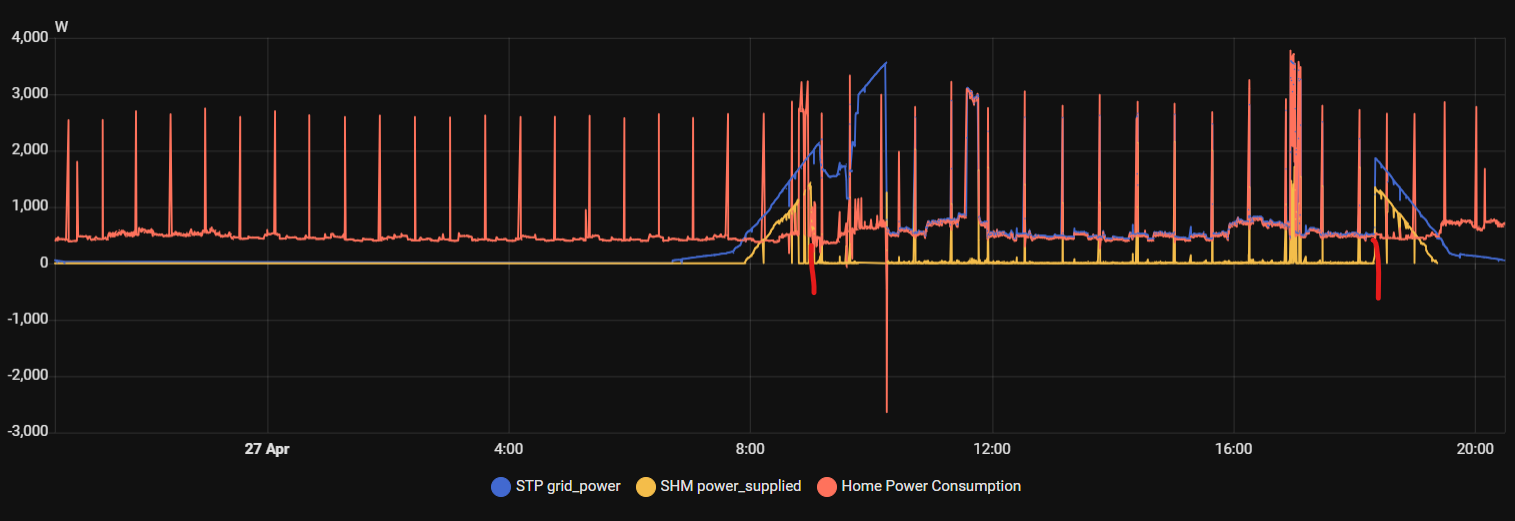
The graph below shows the effect of limiting the power at the grip point to “0” [W] (between the red times): the inverter modulates the power (blue line) to match the house consumption (red line). The power supplied to the grid (yellow line) stays at zero for most of the time, only some small transients due to the cooker boiler heater spikes. (Missmatch at the start is due the the heatpump consumption not shown…)
I’m monitoring the behavior of “Operating mode of act. power limit. at grid connection pt” as it did reset to “off” somehow (maybe due to the sunny home manager web-interface override?
Inspired by the posts here (thanks all!) I have created a similar setup by setting the “Active power limit”. I have noticed that after some time I see multiple “507 Active power limit AC frequency” warnings in the events list of the SMA webportal. Usually this ends up in the result that changing the active power limit doesn’t work anymore. With this I mean that the value is properly changed, but the generated power will not increase anymore (so a previous limit seems to remain active). I can only fix this by turning the inverter off and on. Do other people also experience this issue?
@rwaiboer Why are you using another key? I wonder if it would change things for me… And how do you change the “Operating mode of act. power limit. at grid connection pt”?
Can you please elaborate in detail how you configured your setup?
I’ve got the exact same setup (STP 8 instead of STP 6 though) and want to do the same as you have achieved (set GCP return value to 0 W and change the “operating mode of act power limit at gcp” to “fixed spec in W”)
I’ve got “installer” access to the SMA web UI and can manually change the settings in question.
I can also set the GCP wattage limit through the ha-pysmaplus plugin discovered entities through calling the respective action on the GCP parameter in HA development tools (and the change persists in the SMA UI). However the parameter for “operating mode of act power limit at gcp” is not available in this manner. So I’m unable to set it in HA or use it in HA automations. (the goal)
Furthermore, just as you, I also experience a reset of the “operating mode of act power limit at gcp” to “off”.
I thought it was related to an EMS device in my home managing the power distribution (flexio box: https://flexio.lifepowr.io/en), assuming you don’t have this hardware, I can rule it out as the source of the reset.
the reset can potentially be circumvented by creating an automation which checks the current price of supplying to the grid every hour, if it’s negative: set the GCP value and make it active



 .
. .
.