Hi all 
I've been building a personal-finance add-on and it's now at a stable beta I'd love feedback on. The whole point is to understand household spending without handing your bank data to a SaaS. It runs entirely on your own HA, local-first.
The problem it solves
Budgeting apps want a cloud account and your bank login. I wanted the opposite: drop in a CSV/PDF statement, get it categorised, see where the money goes, track budgets and receipts, and have none of it leave the house. Since it's an HA add-on, it also turns your finances into entities you can put on dashboards and automate against.
Local-first & private by design
-
No external calls by default. Strict-local mode is the default: zero outbound requests (no telemetry, no phone-home).
-
Data lives in the add-on's private
/datavolume (SQLite), included in your HA backups. -
AI is opt-in. If you want auto-categorisation help, you can point it at a local LLM (Ollama/LM Studio) so even that stays on your network, or a cloud model with redaction + per-request approval + a full audit log. Sensitive categories (salary, mortgage, medical…) are never sent.
-
It learns, so it gets quieter. Categorisation runs manual → learned rules → vendor defaults → keyword library → (only then) AI. Every correction you teach it (a "+ rule" or a vendor's default category) auto-applies to future imports, so over time there's less manual tidying and fewer AI calls, enabling AI isn't a forever cost.
-
Sign-in is your Home Assistant login via ingress, no separate account.
Key features
-
 Import bank statements: CSV (most reliable), PDF, or a photo/scan (OCR), with a review step.
 -
 Auto-categorise with rules + a vendor library; one-click
  AI suggest (category, country, and vendor) when you enable it.
 -
 Dashboard: Spending by category/vendor/member/project, a spend-by-location map, trends and budgets.
 -
 Budgets, subscriptions detection, savings/investments, car & home running costs.
 -
 Receipts: Upload/scan, auto-match to a transaction, or create a transaction straight from a receipt.
 -
 MQTT sensors: Spend/income/net/budget/review-queue as HA entities for dashboards & automations.
 -
 Energy-cost offset: net your solar/grid production against your energy spend, right inside HA.
 -
 Multi-user household with roles, plus a child/allowance view.
Install (one-click repository add)
- Settings → Add-ons → Add-on store → ⋮ → Repositories → paste the repo URL
(or use the "Add to my Home Assistant" badge in the README).
-
Install (a prebuilt multi-arch image is pulled: no on-device compiling).
-
Open the Web UI from the sidebar: you're signed in as the owner automatically.
Repo + full docs: https://github.com/SpiritSLO-UK/HomeAssistant-expenses-analytics
(see docs/ha-install.md for the step-by-step, and docs/privacy.md for the privacy model).
Status & feedback wanted
It's a beta, it works end-to-end, and I run it on my own HA on a Raspberry Pi 4. I'd really value feedback on:
-
Import parsers for your bank's statement format (share an anonymised sample and I'll add a parser).
-
The categorisation rules/vendor matching.
-
Anything confusing in the setup or the privacy posture.
-
Local LLM (Ollama / LM Studio / HA LLM). The
local_llmmode is built but I haven't been able to test it, I don't have a local model set up. It targets any OpenAI-compatible endpoint and should work; if you run one, I'd love to hear what works (models, endpoint quirks, requirements) so I can harden that path.
Happy to answer anything. Thanks for taking a look! 
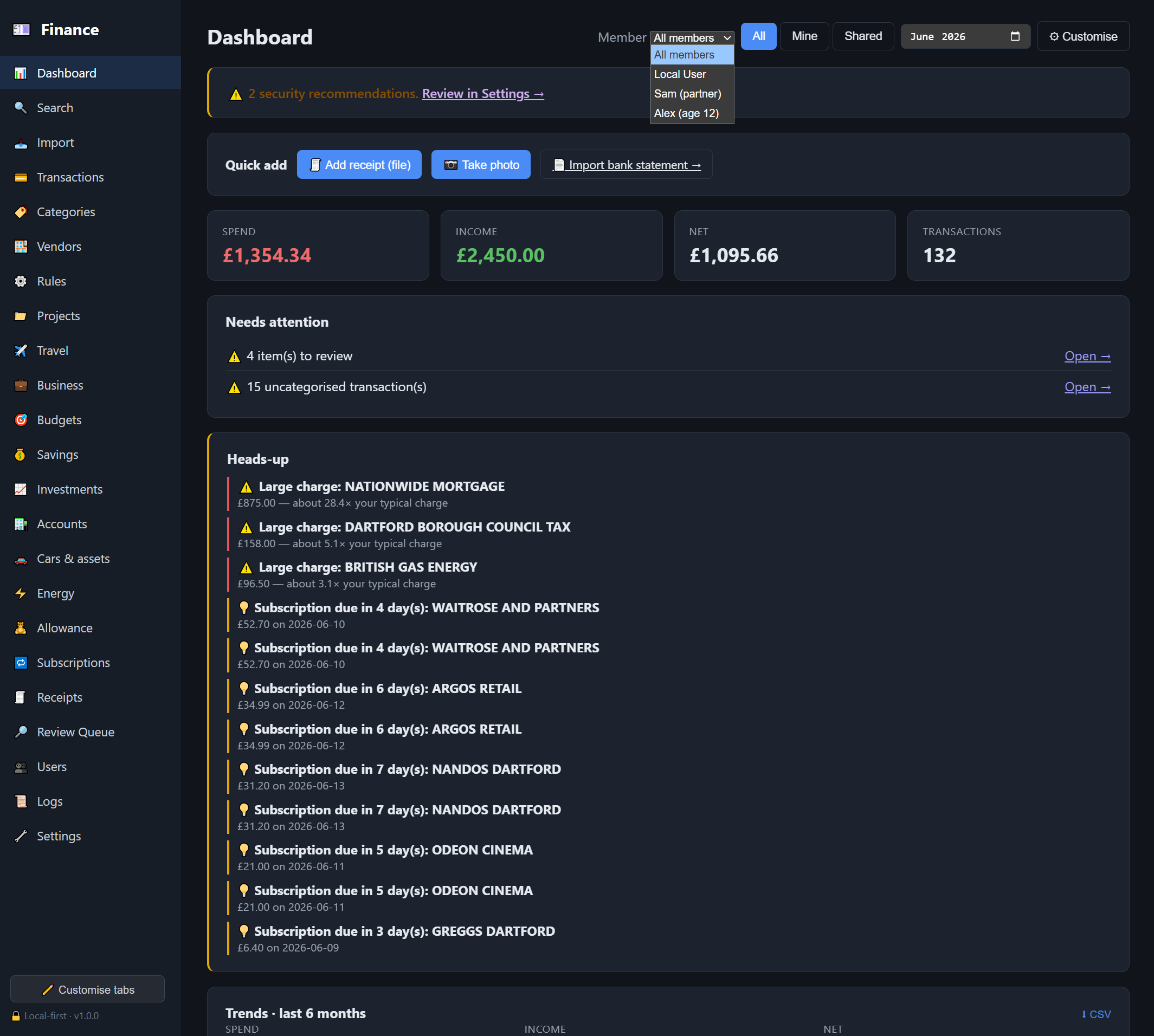
Dashboard: monthly totals, a heads-up feed, trends, spending by category and a spend-by-location map:
More images available at:
README: HomeAssistant-expenses-analytics/README.md at main · SpiritSLO-UK/HomeAssistant-expenses-analytics · GitHub
Thank you for everything.
SpiritSLO