If you have been pulling Fitbit data into Home Assistant through the web API, you probably saw it coming. Google turns the legacy Fitbit Web API down this month and the Google Fit APIs follow at the end of the year. Garmin users had their turn in March, when the login change broke the community Garmin Connect integration until a rewrite in April (it works again now). Most of the big health apps on Android write their data into Health Connect on the phone these days, and from there route A or C below gets it into HA without HA logging in to anyone’s cloud. The watch app keeps syncing through its own cloud like it always did (Gadgetbridge doesn’t even need a vendor account). HA just doesn’t log in there anymore.
Below are the three routes I know of, and they can run side by side. I should say up front that I built one of them (route C), so keep that in mind when you read it. I built it with a lot of help from Claude Code; I review and test every change myself on my own phone and HA, and the repo has an AI policy that explains how. I tried to be fair to the other two, and for a lot of people route A is already enough. Since this is a wiki, please fix it where I got something wrong.
Step 1: turn it on in your watch’s app
This is for route A and C, which read Health Connect. Route B reads Google’s or Garmin’s cloud instead, so if that is all you use you can skip this part.
| Brand | Where to turn it on | What stays behind |
|---|---|---|
| Fitbit (Google Health app, renamed from Fitbit on 19 May) | Top left, Connections > Partner apps > under Add connections, Sync your favorite health apps > Set up | SpO2, active calories |
| Garmin (Garmin Connect 5.14.1 or newer, Android 14 or later) | Under Connected Apps in Garmin Connect | Body Battery, stress, HRV status, training load, Pulse Ox, respiration, resting heart rate |
| Samsung Health | Settings > Health Connect, Get started, choose the data, Allow | Stress, ECG, Energy Score, HRV, skin temperature, respiratory rate, resting heart rate, cycle tracking |
| Gadgetbridge 0.89.0 or newer (Amazfit, Bangle.js, Pebble, Xiaomi and many more) | Settings > External Integrations > Health Connect, turn on Sync after device sync | Depends on the watch |
The last column is what that app doesn’t write to Health Connect, so no route that reads Health Connect can get it either. Garmin and Gadgetbridge only write, Samsung Health syncs both ways. For Garmin I only put Connected Apps because I couldn’t find the full menu path confirmed by Garmin anywhere, if you have it on your phone please add the exact taps. Oura, Withings, Polar, Whoop and Zepp also write to Health Connect, I just don’t have rows for them yet.
What each app does write
Google Health: steps, distance, total calories, exercise, sleep with stages, heart rate, resting heart rate, HRV, respiratory rate, body temperature, skin temperature, VO2 max, blood glucose, weight, body fat, hydration, nutrition.
Garmin Connect (since 5.14.1, July 2025): steps, distance, active and total calories, heart rate, sleep with stages, weight, body fat, activities.
Samsung Health: steps, exercise, heart rate, sleep with stages, blood pressure, blood glucose, oxygen saturation, weight, body fat, height, basal metabolic rate, nutrition.
Gadgetbridge: depends on what your watch measures.
When does the data show up
A lot of the ‘it doesn’t work’ moments are really timing. Google Health writes the nightly metrics after its morning sync, which is often an hour or more after you wake up, so don’t build an automation that expects last night’s HRV at 7:00. To check or force a sync, go to Connections > Partner apps > Manage Health Connect > Sync in the Google Health app. Garmin Connect writes after each successful watch sync. Samsung only gets the watch data on the phone when the watch reconnects or when you open the Samsung Health home screen, so if it looks stuck, open the app once. Gadgetbridge writes after a device sync, if you turned on Sync after device sync.
Step 2: from the phone into HA
I think most people end up with route A, plus B if they are on Garmin and want Body Battery or stress, or plus C if they want past days in long-term statistics.
Route A is the HA companion app, which you probably have already. It reads Health Connect, about 25 types, and keeps the latest value as a sensor. Its docs say ‘only the last 30 days of data is used’, and because it keeps the latest reading it can’t backfill past days. For today’s steps on a dashboard or ‘less than 5000 steps at 20:00, send a reminder’ that is enough though, and you don’t need anything else from this post.
Route B is the cloud integrations. Since 2026.8 HA core has a Google Health integration for Fitbit and Pixel Watch. It polls Google’s cloud every 15 minutes to an hour, needs your own Google Cloud project and OAuth client, and has no HRV or SpO2 sensor (for Fitbit, HRV does come through Health Connect, SpO2 through neither). For Garmin there is the community Garmin Connect integration in HACS, which logs in to Garmin’s cloud. These are the only way to some of the metrics in the last column of the table, like Body Battery, stress and training load for Garmin. Nothing stops you from using them just for those and Health Connect for the rest.
Route C is Life Dashboard Companion, the one I built. It’s an open source (MIT) Android app plus a HACS integration. It’s a separate app, the HA companion app stays as it is. The app reads 33 Health Connect types plus screen time per app, and the integration writes day totals and hourly ranges into long-term statistics on the dates they actually happened. A backfill of up to a year shows up as a year of steps and heart rate. Pairing is a QR code shown in the integration.
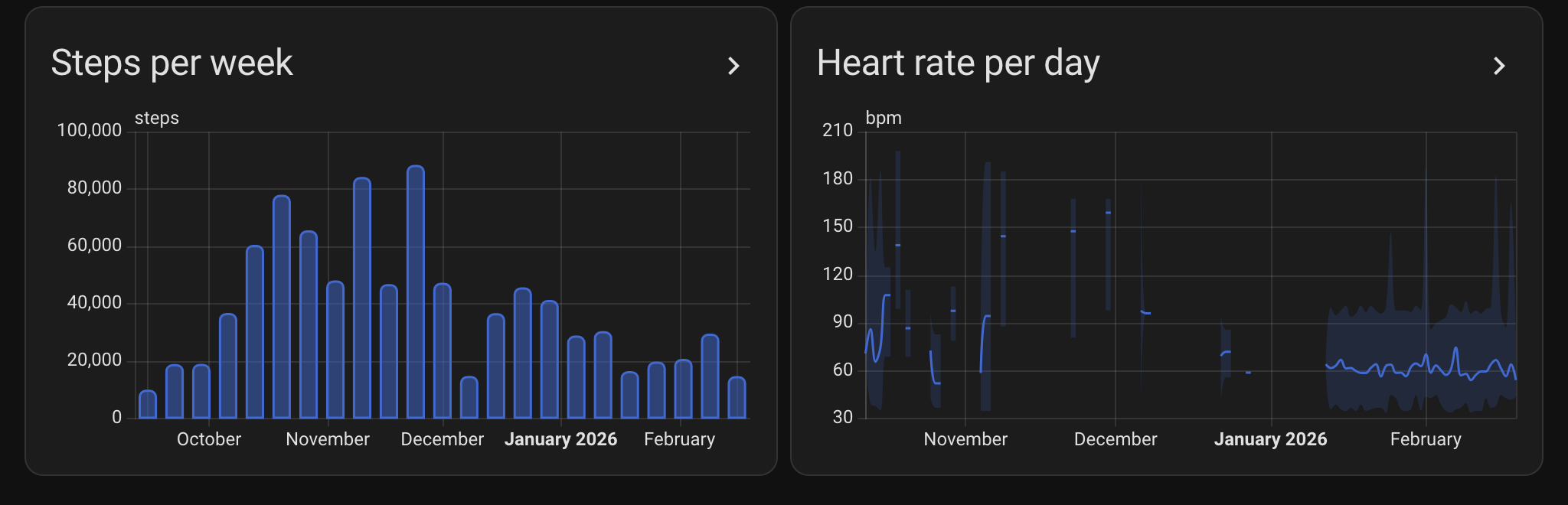
For now the app is an APK from GitHub Releases (F-Droid is in review, it’s not on Play yet) and the integration goes into HACS as a custom repository until the default listing is through. Count on 15 to 30 minutes the first time, the setup steps go through it. Workouts don’t turn into calendar events, so if you were after that it won’t help you. The data goes from the phone to your own HA, nothing goes to me and there is no analytics in it.
If you have a scale or blood pressure monitor in HA, the app can also write those readings back into Health Connect, each type with its own write permission. Google Health picks up weight and body fat from there, blood pressure it doesn’t. And you can skip the integration and send to MQTT with Discovery on the broker HA already uses, but then it’s latest values only, no long-term history.
Links
The per brand pages are in my repo and go a bit deeper than this post: Fitbit / Google Health, Garmin, Samsung, Gadgetbridge, or the overview. The route C code is in the Android app and integration repos. For iPhone there is a separate iOS app that sends Apple Health data with the same payload over a webhook or MQTT, it doesn’t pair with the integration yet and gets less attention than the Android app.
If you have a brand that isn’t in here, or something works differently on your phone, let me know and I’ll add it. Or just edit it in, that’s what the wiki is for.