I have created a Home Assistant App that makes the local aircraft data from a Flightradar24 (FR24) receiver available to Home Assistant and other applications that understand the dump1090/readsb JSON format. It optionally displays the data on a map as a tab using ingress.
FR24 dump1090 Bridge for Home Assistant

FR24 dump1090 Bridge functions as a lightweight, non-invasive local aircraft-data layer for Home Assistant:
 Live Visualization: Displays aircraft on an interactive, real-time map with live statistics and a radio coverage outline.
 Normalization: Accepts one explicitly selected source and publishes consistent dump1090/readsb-compatible aircraft.json endpoints.
 Zero Interference: It does not alter an FR24 receiver’s normal upstream feed, replace receiver hardware, or attempt to decode raw ADS-B RF signals. If you’re looking for a lightweight way to visualize and expose local aircraft data inside Home Assistant, check out the repository.
The recommended/default input is a receiver’s SBS/BaseStation TCP feed on port 30003. An authenticated FR24 /flights.js feed or an existing dump1090/readsb aircraft.json feed can be selected as mutually exclusive alternatives. An FR24 receiver is therefore not required when a compatible aircraft.json source is already available.
Includes a live Raw ADS-B Map available directly through the Home Assistant sidebar/Ingress interface. The map displays aircraft currently received by the local FR24 receiver, updates positions once per second, shows raw aircraft information, and includes live receiver and bridge statistics.
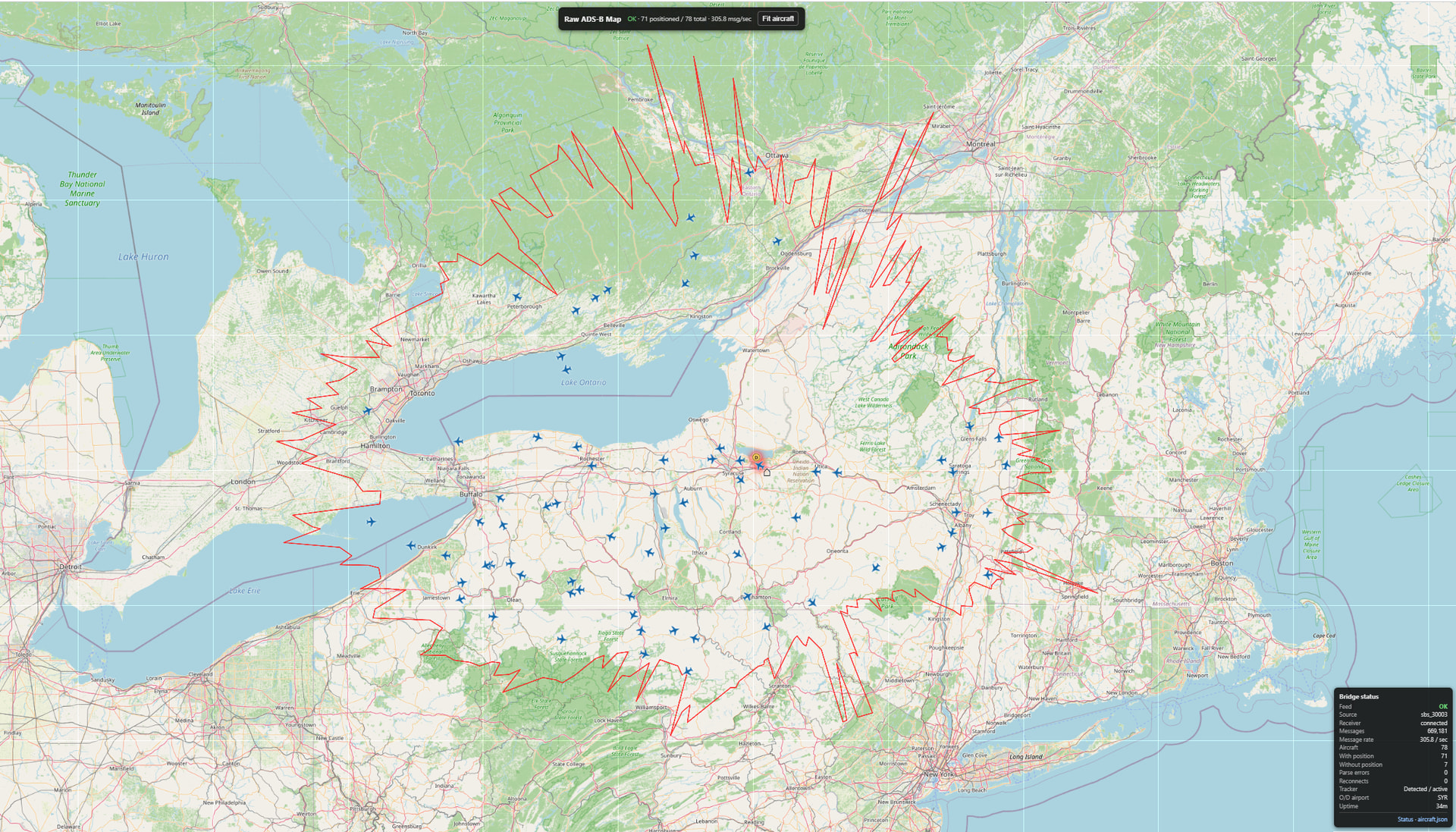
About range coverage: The coverage outline is learned from actual aircraft observations and improves over time. Each 1° bearing records the farthest aircraft observed in that direction. A new installation may therefore show a sparse or irregular outline at first. Allow the app to run for several hours—or longer in areas with limited traffic—for the coverage envelope to mature.
Aircraft data remains local: the bridge retrieves aircraft observations directly from the FR24 receiver over your local network and does not query Flightradar24’s Internet service for aircraft data. It is intended for people who already host an FR24 receiver and want to use their own received ADS-B/Mode-S observations locally.
This makes the receiver usable as a local aircraft-data source for applications such as ADSB Aircraft Tracker for Home Assistant and ADS-B SkyVista, as well as other software that can consume dump1090/readsb-compatible JSON.
How is this different from the Flightradar24 custom integration?
FR24 dump1090 Bridge is intended for users who operate a local Flightradar24 receiver. It consumes the receiver’s local SBS/BaseStation feed and republishes those locally received aircraft observations in dump1090/readsb-compatible JSON.
It does not replace the Flightradar24 custom integration, which provides enriched flight information, airport data, scheduled-flight tracking, events, and other features using Flightradar24’s online services. The two projects address different use cases and can coexist.

The following Home Assistant applications have been used with the bridge:
-
ADSB Aircraft Tracker for Home Assistant
A Home Assistant integration for monitoring aircraft from a dump1090/readsb-compatible data source. Its documentation includes configuration guidance specifically for FR24 dump1090 Bridge.
-
ADS-B SkyVista for Home Assistant— hasn’t been updated since Jan26 though
A Home Assistant aircraft visualization/integration that can consume dump1090-compatible aircraft data.