Man this plugin sucks, i had to change my current dashboard, build an extra dashboard for on the laptop to use during races, buy rgbw wled and get into how all that works 
Niklas, thanks for all the effort you put in to this.
Man this plugin sucks, i had to change my current dashboard, build an extra dashboard for on the laptop to use during races, buy rgbw wled and get into how all that works
Niklas, thanks for all the effort you put in to this.
Hello Niklas.
Here in the drawing you can see the ideas of my son. Our first idea was a complete card, valid for all sessions of racing weekend. Here it will be cool to get the opportunity to check or unceck the separate columns.
The second drawing is valid in a separat card for the Qualifing mode, without tire age.
The 3rd and 4th drawing is for Practice and Race mode.
We think, the most “easiest” way is to generate a card with all informations and show or don’t show the columns, copy the cards on the dashboard and control the visibility. So everyone has the opportunity to set different settings based on the status of the F1 sensor (practice, qualifying, or race). Hint from Constantin: The sector times are always for the current lap. The color are simular to F1 colors (purple, green and red).
I hope that image helps and is clear enough. Have a wonderful weekend and please stay healthy.
Constantin and Ronny
P.S. A donation is on its way. 
Yes, I know, it takes a lot of time and money… sorry, not sorry 
Thanks Ronny and Constantin, you have really thought this through and put together a solid proposal. This looks like a good path forward, and I really like the idea of having different cards for different sessions. It makes it easy to control visibility and only show what is relevant at the right time. You have also done a great job thinking about how to avoid showing too much data while keeping it useful. I really like this approach, great idea!
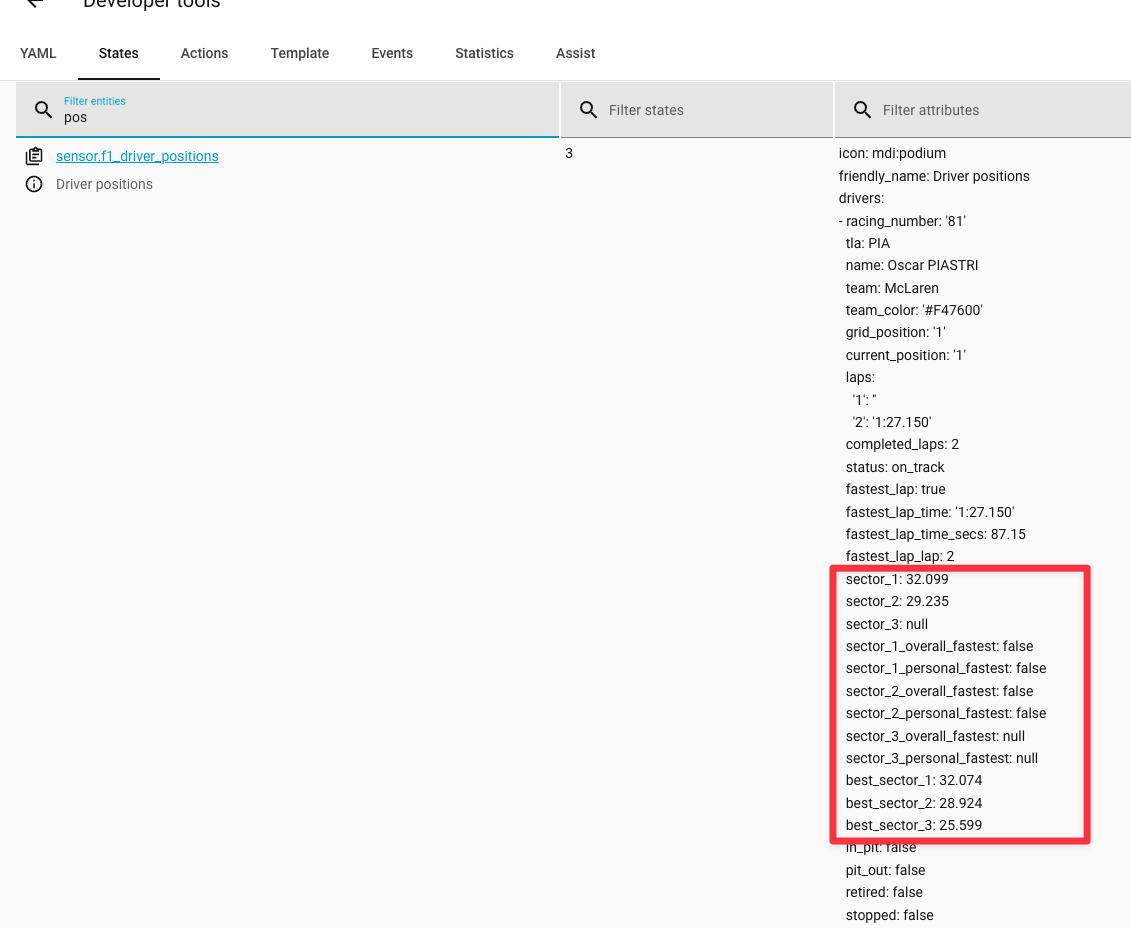
What I am currently missing in the integration is sector times, but your proposal gave me some new ideas. It might actually be enough to show sector times for the latest lap only. That got me thinking
This should definitely be possible. It may take some time, but I will get back to you.
And thanks for the coffee!
Great blueprint, is it possible to use light groups for the light entity field in the blueprint? cheers
That should be possible to sort out, I will take a look at it.
Support for light groups are added, try to update the blueprint and it should work
@Stimo what are your go-to setup things before the first race weekend next week. I already have the lights setup, but am wondering if I should maybe setup a dashboard or mobile notifications etc?
Also how can I easily setup the live delay sync.
To be honest, I am not entirely sure yet. Last season it was mostly lights connected to track status, but over the winter I have added a lot more features and sensors. So I will probably need to experiment a bit at the start of the season.
My initial idea is maybe to have an iPad next to me with a dashboard showing live data, just to get more information as a first iteration.
I am really looking forward to seeing how others set it up and getting some inspiration from that.
You can read more detailed information about live delay sync in the documentation.
That’s my plan. Just not sure what order to put the cards in
For me personally, I think tyre strategy and pit stops are the most interesting, along with delta times and tyre choices. But we will see once I am actually sitting there watching the race.
Thought it worth mentioning that I modified the blueprint to display race control messages on my TV, and it works superbly.
From experience, not all messages are displayed on the TV feeds and those that are tend to have some delay. This method displays everything, as soon as it becomes available.
@Ronny1978, You can let Constantin know that we are making progress. I now have sector times available in a sensor in Home Assistant, and the next task is to build the cards
We are very excited to see, what the card update looks like. 
Can you possibly share it so maybe @Stimo can add it as a new blueprint?
Hardest thing is laying them out, so it doesn’t overcrowd the page
Yeah, I know, there is almost too much information available
I’m lucky. Australia is my home race (although I’m Sydney, not Melbourne) so I can not be sleep deprived while I make my dashboard
I am not that lucky, I am in Sweden and the race starts at 05:00 in the morning. But I will be away on vacation next week, so I will probably miss the race live and will need to use the replay function for the first race when I get back home.
That’s me most weeks
Stimo, would you consider a free text card that can display the state and/or attributes of any card? I’m working on a F1 fact of the day for my son and I would love to keep the theme of your cards for it.