Hi all,
I am using HomeAssistant on a Raspberry with external SSD since years and I am quite happy with it.
Since few weeks, the HA restarts every 2-3 days. I have setup a card for me showing the last restart.
Unfortunalty I dont know on which logs to search, what has caused the restart to fix it.
Hope you can help me to find out the correct logs to find the reason.
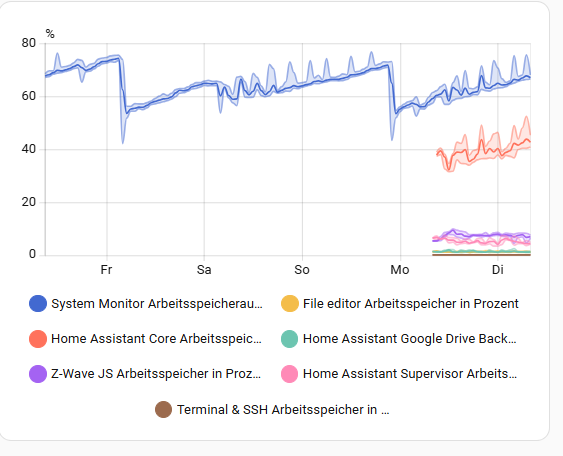
Thanks for the hint, I can see in the monitor, that the memory usage was increasing until the reset, same also with the CPU load.
Main question is now, which add-on or device is using the CPU that much ?
This might only be within the logs, or is there some CPU load per add-on / service ?
Most addons have it’s own memory sensor - look in “Home Assistant Supervisor” integration.
One of memory leaks was studio code. I can’t tell if it still is, but i have an automation which restarts this addon each night thus resetting it’s memory to zero.
Other option is to turn off addons one-by-one and see over days…
This is something that is bugging me as well.
Homeassistant lacks a mechanism to protect itself.
Yes, restarting works around the symptom - but it doesn’t solve the problem. At the very least it should raise a warning on the next restart, stating “had to restart because <insert addon/integration> ate all the memory” or something similar.
I would very much like to see a “Month of stability” as a release title where no new features are added but the overall stability and performance is the only focus.
It is often third party integrations or addons that are the cause and HA have no way of knowing how the integration or addon behave and how it is supposed to behave.
The VS studio bug was affecting the CPU because the linting got stuck in a loop. It was not affecting the memory and it have been resolved a couple of months now.
There is a third party integration for getting prices on electricity that has failed a lot lately. I can’t remember exactly its name, but I think it wmstarted with E, like Ent-sonething.
I have now disabled a bunch of add-ons and integrations. Also I enabled the CPU and monitor sensors for some add-ons in the HA Supervisor. Now it is about time to watch
This is exactly what I mean: HA should know which integration/app is consuming how much.
After all, who else could?
Leaving it up to the integration/app does not work. HA should do that.
That’s why I proposed a “Month of stability” to realize that.
HA does not know it.
HAOS will know it and sometimes also kill a process with a signal 15.
The problem is that sometimes an integration have a memory leak that make it so that memory is not released again and when the integration then restart it will again reserve memory that will not get released later.
This is what kills the OS and HAOS can detect it, but it is hard to gaurd against.
It was in my case. In fact, i didn’t notice CPU load increasing, only memory went sky high over the days.
But i’m glad to hear it’s been resolved. I’ll disable my nightly restarts to see…
After a restart on the weekend, it raced up to almost 8 GB of memory consumption before I started the debugging, etc.
Yesterday I have disabled ONVIF and restarted the instance.
At 16:00 it started with a consumption of a little less than 3 GB and now, about 15 hours later, I am up to a little bit more than 4 GB.
It’s still slowly (sadly steadily) rising - but the increase is a lot less steep.
Settings/System/Logs , Click on the 3 Dots to the right, RAW-Log
Beside every Add-On has it’s own logfile
And Most add-on/integration have a “toggle” to enable “Debug”
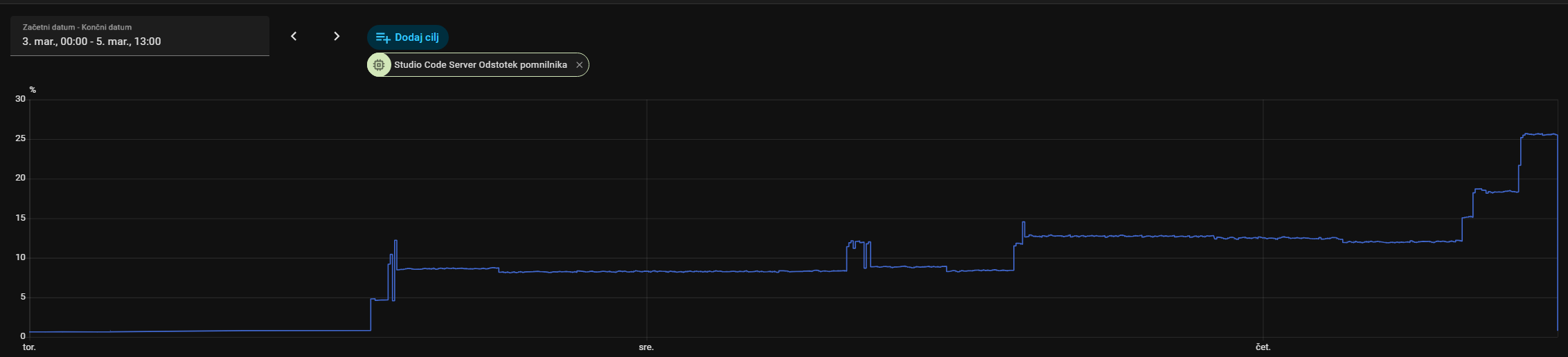
Just for info: VS still IS a memory hog, it’s not resolved. I disabled nightly addon restarts a few days ago and this is the result (drop at the end is because i just manually restarted it):
So, regular addon restarts are back in… it is “kinda” logical, though… if “common thinking” was that CPU was the problem, not memory then this was not addressed, i guess.