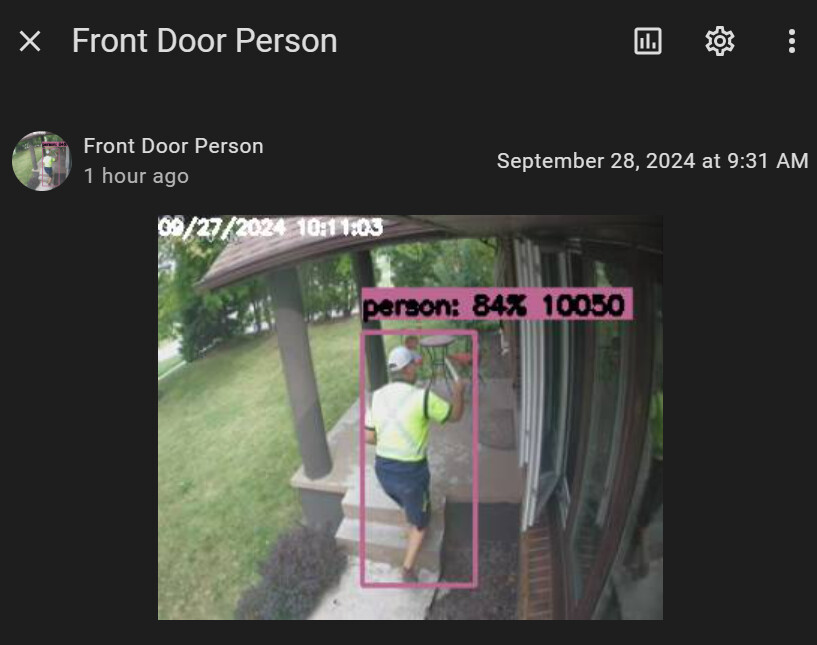
Since the new UI of frigate release, I can´t see the snapshots of the detections in the UI, in the media/frigate/clips are the images of the detections I´m not interested to record it, only snaphots and this is my config:
cameras:
  timbre:
    ffmpeg:
      inputs:
        - path:
            rtsp://192.168.15.206:554/cam/realmonitor?channel=1&subtype=0
          roles:
            - detect
    detect:
      fps: 5
    objects:
      track:
        - person
      filters:
        person:
          min_score: 0.65 # min score for object to initiate tracking (default: 0.5
          threshold: 0.70
    snapshots:
      enabled: true
      timestamp: true
      bounding_box: false
      retain:
        default: 90
        mode: active_objects
    record:
      enabled: false
And in media/frigate/clips are images
At this moment is 09/28/2024 7:40 am
Someone have any idea how to fix it?
jazzyisj
September 28, 2024, 2:39pm
2
Events, alerts changed in the update.
Have a look at the entities in your Frigate integration in Devices. The snapshots for the HA ui are now image entities, not camera entities.
You need to review this section of the Frigate docs where the changes are explained.
The Review page of the Frigate UI is for quickly reviewing historical footage of interest from your cameras. Review items are indicated on a vertical timeline and displayed as a grid of previews - bandwidth-optimized, low frame rate, low resolution...
If you mean in the Frigate UI, they show up under “Events” in the individual camera views.
They will also show up in the Live view at the top for a persiod (I’m not sure how long they stay there yet though).
Hi!
If I´m not wrong in your screenshots you have events but these are video, I only want to see the snapshots (images).
When I say snapshots I mean images taken by frigate at the detection of an object in my case persons, in my last screenshot you can see the images taken of the detections that ones are the ones i want to see it in the frigate UI
for these last hour I change the config to this:
  timbre:
    ffmpeg:
      inputs:
        - path:
            rtsp://192.168.15.206:554/cam/realmonitor?channel=1&subtype=0
          roles:
            - detect
    detect:
      fps: 5
    objects:
      track:
        - person
      filters:
        person:
          min_score: 0.65 # min score for object to initiate tracking (default: 0.5
          threshold: 0.70
    snapshots:
      enabled: true
      timestamp: true
      bounding_box: false
      retain:
        default: 90
        mode: active_objects
    record:
      enabled: false
      retain:
        days: 1
        mode: active_objects
      events:
        retain:
          default: 1
          mode: active_objects
and now I see the alerts
But their are video and I don´t want to spend that amount of space in my disk to save each video of the alerts I only want images of each detection/alert/event.
crzynik
September 28, 2024, 5:08pm
4
like it says in the docs and the release notes, recording is required to be enabled for review items to show in the UI
One thing more… as i see in
The Review page of the Frigate UI is for quickly reviewing historical footage of interest from your cameras. Review items are indicated on a vertical timeline and displayed as a grid of previews - bandwidth-optimized, low frame rate, low resolution...
I add the review part in my camera, but despite I have like this:
  timbre:
    ffmpeg:
      inputs:
        - path:
            rtsp://192.168.15.206:554/cam/realmonitor?channel=1&subtype=0
          roles:
            - detect
    detect:
      fps: 5
    objects:
      track:
        - person
      filters:
        person:
          min_score: 0.65 # min score for object to initiate tracking (default: 0.5
          threshold: 0.70
    review:
      detections:
        labels:
          - person
    snapshots:
      enabled: true
      timestamp: true
      bounding_box: false
      retain:
        default: 90
        mode: active_objects
    record:
      enabled: true
      retain:
        days: 1
        mode: active_objects
      events:
        retain:
          default: 1
          mode: active_objects
The person detection apears as alert no detection.
Do you see something wrong?
crzynik
September 28, 2024, 5:56pm
7
Yes, putting person as a label in detections doesn’t remove it from alerts
I can remove it from alerts to be only detections? as it is it only appear in alerts
crzynik
September 28, 2024, 8:07pm
9
is there a reason you’d rather do that vs just restrict person alerts to specific zones?
in any case, you can remove person from alerts by setting alerts to an empty list Review | Frigate
1 Like
pkacp1
December 22, 2024, 9:32am
10
I have problem with Custom Action (Manual Trigger). I would like this button to run my SCRIPT. This is script that opens my gate. The button simply doesn’t work - nothing happens when I press it. Do you have any idea what is wrong? If I run script manually from Automation UI it works.
alias: AAAA - Frigate TEST
description: ""
use_blueprint:
  path: SgtBatten/Stable.yaml
  input:
    presence_filter:
      - ""
    camera: camera.kamera_przed_garazem
    notify_device: 460d9e0a8d92eae07fcbc125c936a86e
    base_url: http://homeassistant.local:8123/
    message: Osoba wykryta przed komem
    update_thumbnail: false
    tap_action: "{{base_url}}/api/frigate{{client_id}}/notifications/{{id}}/snapshot.jpg"
    button_1: Pokaż nagranie
    button_2: Brama
    custom_action_manual:
      - action: script.brama_garazowa
        metadata: {}
        data: {}
    update_sub_label: false
    url_2: custom-{{ camera }}