I wanted to share a Home Assistant project that has slowly grown into something much bigger than I originally planned. 
Home Assistant has been the central brain of my house for quite a while. I now have dozens of dashboard pages covering lighting, shutters, heating, security, energy monitoring, rooms and various custom projects.
At first, most of my homemade devices were based on ESP32 boards over Wi-Fi. More recently I started moving many of the physical control modules to ESP32-H2 using Zigbee, and that opened the door to a completely new generation of wall controls.
The idea
I wanted to keep all the power and flexibility of Home Assistant, but I didn’t want to depend on a phone or tablet every time I wanted to turn on a light, adjust the heating or operate a shutter.
So the idea became very simple:
Home Assistant remains the brain of the house, while physical wall panels become the user interface.
The large central panel gives an overview of the whole house, while individual rooms can have their own smaller dedicated control modules.
A universal ESP32-H2 module
Instead of designing different electronics for every room, I developed a universal PCB that can be adapted to many different functions.
The board is based around a small ESP32-H2 using Zigbee, together with an I/O expansion section.
Depending on the application, I can connect:
-
rotary encoders
-
push buttons
-
status LEDs
-
small colour displays
-
sensors
-
additional inputs and outputs
The same PCB can therefore become a heating controller, lighting controller, shutter controller, room panel, scene controller or another specialized Home Assistant interface simply by changing the front panel and software configuration.
I had a batch of these PCBs manufactured so I can gradually deploy them around the house.
Zigbee communication
The ESP32-H2 modules communicate with Home Assistant over Zigbee.
That has worked very well in practice. The Zigbee mesh network means the modules do not all need a direct path back to the coordinator, and devices distributed around the house can help provide a robust network.
Even with the modules mounted behind aluminium front panels, communication has been reliable in my installation.
The main control panel
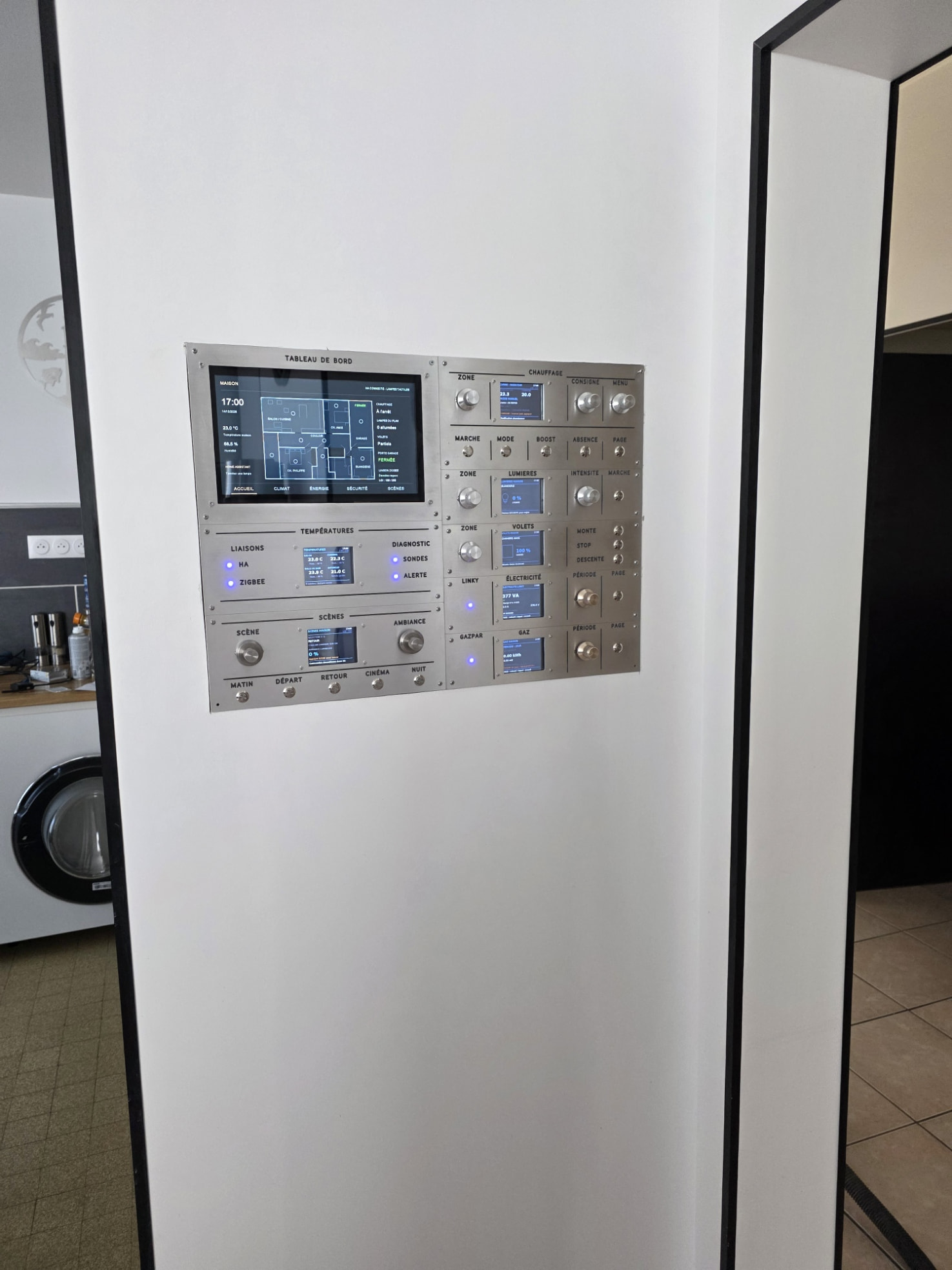
The largest part of the project is the central Home Assistant panel, which is now finished and installed.
It combines a large touchscreen with several independent physical modules.
From this panel I can access or monitor things such as:
Heating
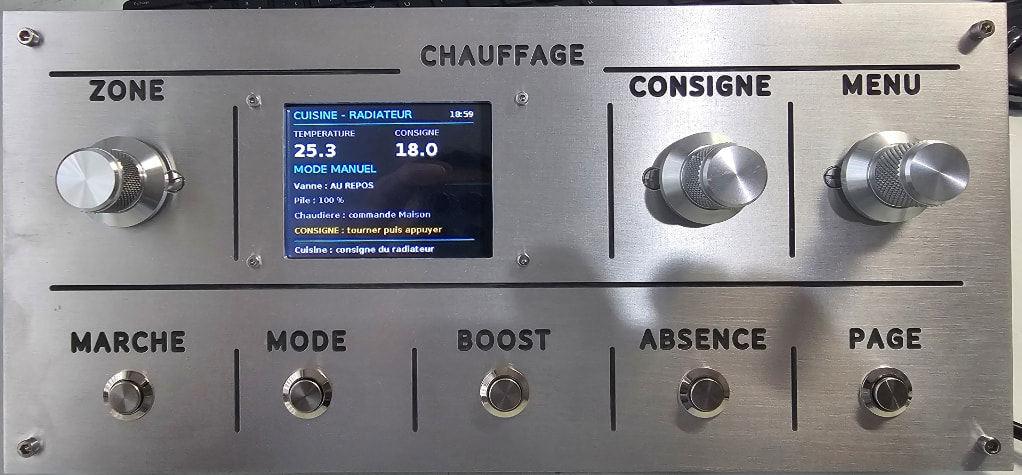
Zone selection, temperature setpoint, operating mode, boost, away mode and diagnostic information.
Lighting
Room selection, on/off control and brightness.
Shutters
Zone selection, position and physical Up / Stop / Down controls.
Temperatures
Indoor temperature information from different parts of the house.
Energy
Live electrical consumption and Linky information.
Gas
Gas consumption and history.
Scenes
Morning, leaving home, returning home, cinema, night, “Good Night” and other Home Assistant scenes.
System status
Home Assistant connection, Zigbee network and diagnostics.
The displays are not simply decorative.
The physical controls send commands to Home Assistant, and Home Assistant sends the current state back to the modules.
This means the information displayed on the panel reflects what is actually happening in the house.
Context-sensitive rotary controls
One feature I particularly like is using rotary encoders whose function changes depending on the current screen.
For example, the same type of control can:
-
select a heating zone
-
change a temperature setpoint
-
select a lighting zone
-
adjust brightness
-
navigate through pages or parameters
Pressing the encoder can also validate a selection.
This makes it possible to have quite a lot of control without filling the front panel with dozens of buttons.
Heating control
One of the modules now provides a complete physical interface to the Home Assistant heating system.
It shows the current room temperature, requested setpoint and operating mode, and also gives access to more technical information such as the PWM heating regulation, current applied power and thermostat status.
The original ESP32 experiments for the heating system were actually one of the things that eventually pushed me toward the ESP32-H2 / Zigbee architecture.
Room modules
The large panel is only the central dashboard.
The plan is for individual rooms to have smaller local modules.
For example, the bedroom module provides direct access to:
-
lighting
-
shutters
-
temperature information
-
heating setpoint
-
a “Good Night” scene
This means normal everyday functions remain available through physical controls even though Home Assistant is coordinating everything behind the scenes.
The idea is that the large panel gives the global view, while each room has a simpler interface for the functions that matter most locally.
Weather and information displays
I’ve also built dedicated Home Assistant information displays.
One of them shows local weather information, indoor temperature and humidity, together with tide information for Les Sables-d’Olonne.
These small projects are another thing I really enjoy about Home Assistant: information that normally exists only inside a dashboard can become a permanent physical object in the house.
CNC-machined aluminium
Another major part of the project has been moving away from my older wood and plastic panels toward CNC-machined aluminium.
Every control panel is designed around the electronics, then the aluminium front plates are machined and engraved.
It completely changes the feel of the finished system.
Instead of looking like experimental electronics, the modules start to look like permanent pieces of equipment.
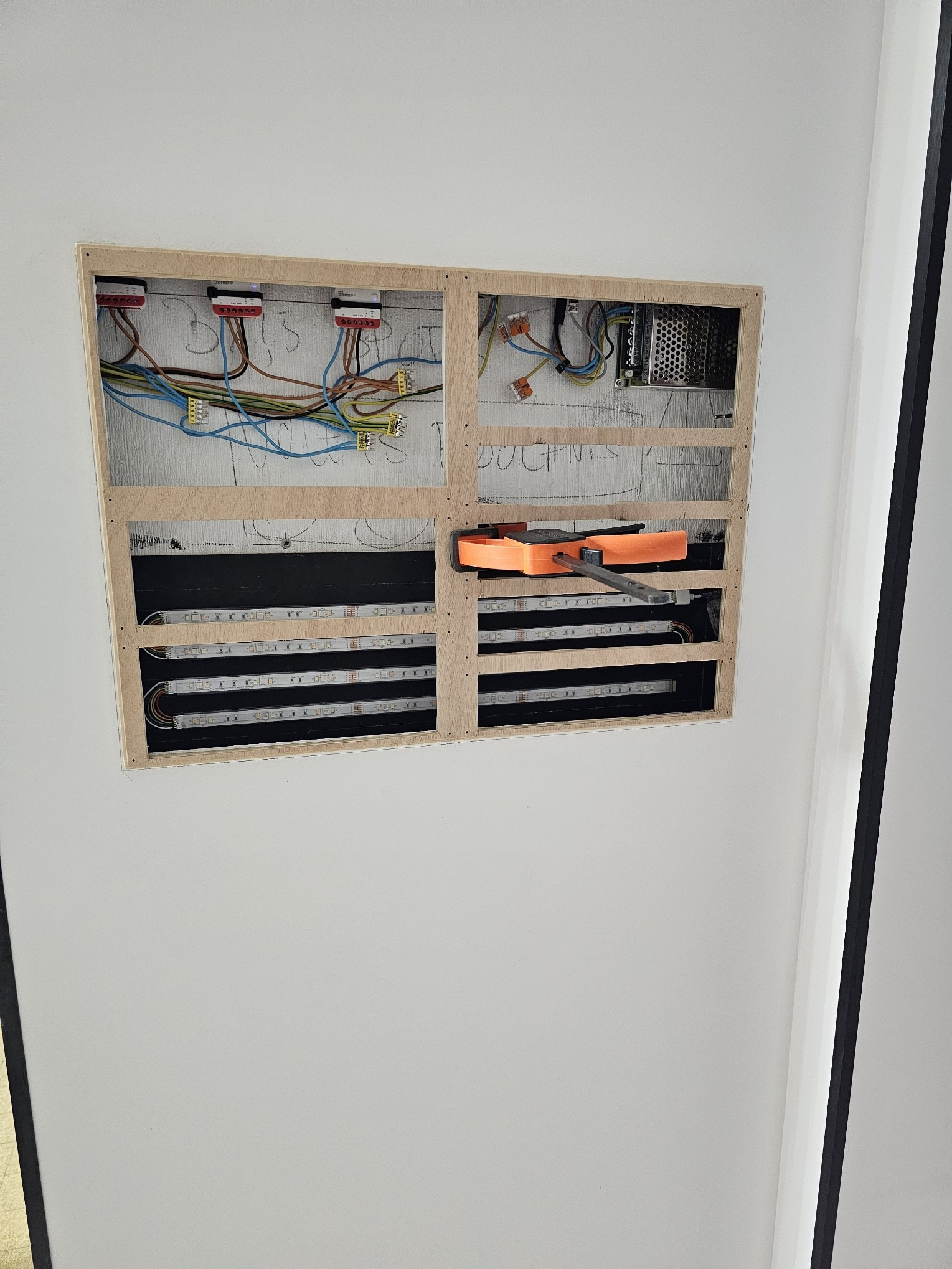
The central panel is now flush-mounted into the wall, so only the aluminium controls, displays and touchscreen remain visible.
Developed step by step with ChatGPT
A major part of this project was developed step by step with ChatGPT as my technical partner.
Rather than starting with a finished design, I would usually begin with an idea — sometimes something as simple as:
“I’d like a physical Home Assistant controller for this room.”
From there, we would work through the project together until it became a real working device.
ChatGPT helped me throughout the process with:
-
ESPHome and YAML configurations
-
ESP32 and ESP32-H2 programming
-
Zigbee communication and integration
-
Home Assistant entities and automations
-
heating and PWM control logic
-
troubleshooting hardware and software problems
-
PCB architecture and I/O organisation
-
display layouts and user-interface logic
-
rotary encoder and button behaviour
-
CNC panel organisation and mechanical design
-
testing, corrections and improvements
The interesting part for me is that the work doesn’t stop at software.
An idea can start as a discussion with ChatGPT, become an electronic architecture, then a PCB, some YAML and firmware, a CNC-machined aluminium panel, and finally a real device installed in the house.
So although I physically machine, assemble and wire everything myself, the design and development process has very much been a collaboration between ChatGPT and me.
That way of working has made it possible for me to attempt projects that I probably would not have considered building on my own a few years ago.
Still evolving
The system is definitely not finished.
There are still more room modules to build and plenty of ideas to try, but the universal ESP32-H2 board means I now have a common platform for future additions.
The most satisfying part is that all of these physical controls are still just another interface to Home Assistant.
I can change the behaviour, automations or logic later without rebuilding the entire system.
If anyone is interested in building something similar, I’m happy to share what I can from the project, including ideas around the ESP32-H2 / Zigbee architecture, YAML configuration, PCB files and the JLCPCB side.
This project has taken quite a lot of time, but it has also been a lot of fun.
For me, that is one of the best things about Home Assistant: it allows you to build exactly the system you want, instead of adapting your house to the limitations of a commercial ecosystem.