I know this topic has been discussed countless times, but I’m starting a fresh 2026 thread to act as a comprehensive reference for anyone looking to build the ultimate, stable, and future-proof Home Assistant mini PC — something that’s quiet, cool, powerful, and ready for the next decade of smart home growth.
My Goal
I’m moving from a Raspberry Pi 4 to a mini PC setup.
With HA development accelerating and my full dependence on it for daily automations, I want reliability, simplicity, and longevity — a one-time investment that lasts 10+ years.
Budget: Not a concern for a one-time, rock-solid build
Priority: Set-and-forget stability and ease of setup (minimal tinkering)
Environment: Hot climate, so thermals, dust, and noise matter
Power efficiency: Important but not at the expense of stability
Core Use Cases
Home Assistant OS (HAOS) or a simple Proxmox + HA VM (only if it’s truly worth the effort)
Ryzen 7840HS / 8845HS — excellent performance; curious about idle draw and heat
Industrial fanless PCs — only if they truly hold up under continuous NVR load
When sharing your build, please include:
Model / CPU / RAM / SSD details
Idle & load power, temperatures, and noise level
Your stack setup (HAOS, Proxmox, Docker) and Frigate acceleration method
Any modifications (thermal pads, fan swaps, dust filters)
Notable issues or fixes
Power & Storage Plan
UPS with clean shutdown support
NVMe SSDs with high TBW and data segregation (HA vs Frigate)
Prune recordings often; use external drives only if necessary
Keep it simple, stable, and easy to maintain
What “Success” Means for Me
Set-and-forget stability for 10 years
Cool and quiet operation even in heat
Low idle power but instant responsiveness
Frigate detections and AI tasks running without bottlenecks
Local voice working smoothly and reliably
Handles frequent, complex automations without lag
If you’ve already gone through this migration, please share your builds, numbers, challenges, and key takeaways.
I’ll compile the best insights here to make this the go-to 2026 guide for everyone moving from Raspberry Pi to a powerful, future-ready HA setup.
PC/server lifecyle is measured in 18 months to 5 yrs MAX. Depending on workload.
The reason Microsoft originally picked 10 years as thier default enterprise software lifecyle support length (and this is fact, I know that dude) is it was literally DOUBLE the expectations of any hardware it was licensed for and easily planned for in personnel.
ZWave and Zigbee sticks 10 years absolutely.
(i plan 5-7 years between wifi generations, 10 for network core)
You obviously used ChatGPT to spit out this 650 words long mega-question. My first instinct was to have ChatGPT generate the answer too. It spit out roughtly 3000 words in return.
Luckily I am not allowed to post the AI generated answer based on the forum rules. Maybe using AI to ask these kinds of mega-questions this way should also be forbidden…
Along with what’s already been said, I can tell you that your descriptions of what you’re looking for vs what you want it to do don’t match.
Frigate with hardware accel - yes, you can do built-in CPU (GPU) accel, but that’s only for ffmpeg encoding, not for object detection. Yes, you can use OpenVino, but that does cost you CPU power. A Coral will not give you great object detection (I know; got one, went back to OpenVino with custom models). You will inevitably want something better and that will require discreet GPU.
Second, you mention Piper, Whisper, etc… and the “etc…” piece is probably where you’ll want to run Ollama, and that will “work” on CPU, but it won’t run big models, and it will suck CPU… if you’ve got any left from running all your other things. I have tried running Ollama on an i3 and gave up; it worked, but it drained what remaining CPU I had and it wasn’t worth it. Again for this, you will want a GPU card.
Those two things alone mean you’re going to need an x8 or x16 slot, which means you’re looking at desktop or server mb’s.
You forgot to mention no software updates for 10 years to go with your specific requirement of no hardware updates? Dream on. Ain’t going to happen when HomeAssistant has at least a weekly upgrade cycle.
Thanks for the feedback. Just to clarify, I’m not a native English speaker, so I use AI to help me phrase my questions more clearly.
Let’s keep the focus on the topic and continue making Home Assistant an open, welcoming community for everyone around the world, regardless of language or technical background. Receiving discouraging comments can make people hesitant to ask questions and have to clarify in other forums or social media platforms. I hope we can keep this space supportive for all users.
I appreciate the insights shared so far and welcome any constructive input on the hardware and questions I raised.
From the replies, I understand there are a few key questions I need to clarify so I can plan the upgrade properly and benefit from the community’s experience:
Hardware specifications: What hardware specs would you recommend that can reliably serve me for the next 5 years? For example, would an i7 with 16 GB RAM be a good choice, and are there any specific mini-PC models you suggest which will work smoothly? Suggested products is appreciated…
Power and thermal considerations: For a device running 24/7 in a warm climate, what should I consider? Is built-in mini-PC cooling sufficient, or should I look into extra cooling or a custom ventilation setup?
Storage and SSD endurance: What storage type and SSD endurance level would you recommend for a stable and long-lasting Home Assistant installation?
I’m taking all of this into account as I plan my build, and I welcome any practical guidance that can help me set everything up correctly from the start.
Only one answer possible here and even that isn’t a guarantee that it will last long enough.
Getting a fanless industrial grade mini pc is your best shot here. Yes, they are more expensive but hopefully they also last longer. About that, at my job we found a running industrial pc locked up in a dusty cabinet in a cenent factory that noboby knew about anymore. It was still running Win NT for more than 25 years for all sake…
The problem is that you’re making a huge, massive ask. To be honest, it sounds like you’re trying to gather information to put together some blog/story whatever to profit off of our information. I very much doubt you’re going to get people willing to contribute several hours of their time to curate their research for you in a nice presentable package. I personally would definitely not do that for free.
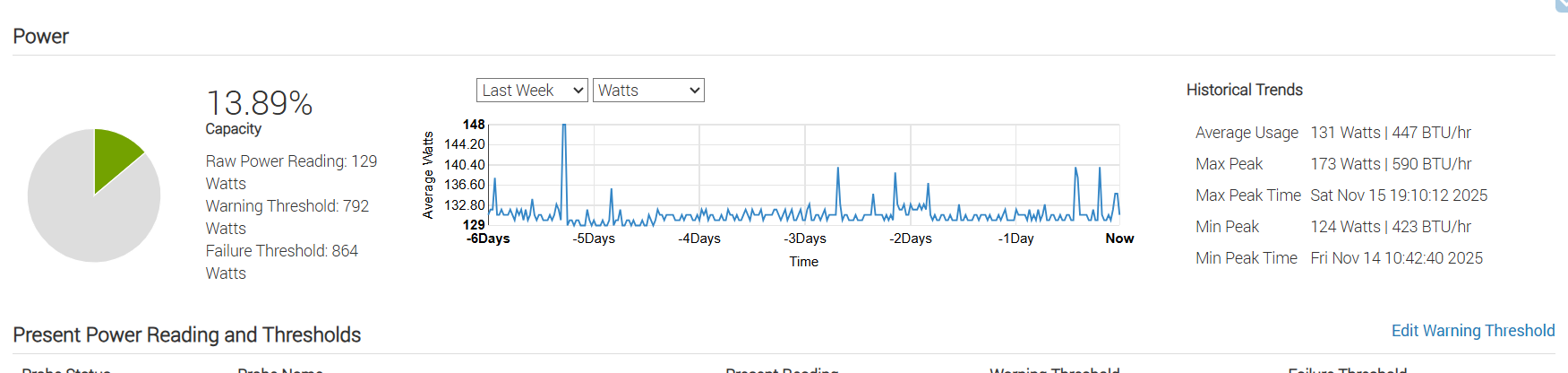
For longevity, uptime and performance, take a look at a “real” (enterprise) server. I’ve been running my current HA installation as a virtual machine for over five years on my Dell 740xd, and I can probably squize at least 3 more years out of it if I need to. It is not a good choice based on your other criteria, but maybe you have somewhere to place it where it does not matter? Mine lives happily in my garage. I run several other workloads on it, averaging at around 130W.
Honestly for a 5 year build (the ABSOLUTE LONGEST I ever plan for hardware btw… Plan three to be more realistic…)
For HA average garden variety i5 variant minipc with the most ram and biggest SSD the you can afford to buy two of.
Put ha image in both SSD and put one onthe shelf. That’s your disaster recovery.
No industrial whatnot just a minipc.
Why. It’s commodity standard hardware and will continue to be available so you can get one in a pinch. They’re stupid cheap comparatively (200 per unit as compared to hundreds or thousands) I can literally buy two for the price of some industrial PCs you pay through the Nose for industrial hardening.
As an ex fireman I LOVE me a Panasonic toughbook but I really don’t love the price on a Panasonic tough book they’re spendy…
Because if you go industrial sure it will be more reliable. But does the cost for that reliability help a consumer. No. They’re usually 3* the cost. I just did it for two by buying two of a cheap commodity box. In failure the boxes are identical. Just in my plan I already have the replacement hw on the shelf and know it fits.
Now do I ACTUALLY have a second NUC in reserve? No but I ALWAYS can get one here under $200 in less than 24 hours (thanks Amazon) and the replacement drive is already sitting there with a recent ha image waiting to pull my backup. So I can recover most failure in less than 30min or a complete hw failure in less than 24h…
Yes I can survive without Friday that long because the rest of the house is designed to work even without HA or internet. (everything has local control first no hard dependence on ha or internet for basic lights, security etc.)
So by designing this way I don’t NEED industry grade and the cost drops significantly…
Good planning saves money every single time. My Dr plan costs me exactly 250 bucks and is on that shelf over there.
I managed to move the a NUC 150 device and all is working smoothly.
I will update the thread later with the improved performance after activating local voice and Cameras related upgrades!
This my first time posting. I opened this title because I was interested in the same thing. I’m on PI wanting to migrate to more power.
I felt more compelled to post because of all the negative comments about the ask. Only a few of the negatives comments I thought were constructive. Some, of course were constructive and very positive and helpful.
The request as I read it was basically for sharing insights and the requester offered to compile them all for the benefit of the community. I don’t know if that is his intent or not, but I’ll give him the benefit of the doubt.
I agree that a complete build as requested is a huge ask, but any insight on any part of it is probably not a big deal for a lot of people and would be helpful for people like me, who would like some of the same information and am willing to synthesize it for my next build.
Helpful suggestions would be appreciated on the sections in the posted request.
Is it known what the important characteristics are for home assistant?
Clock speed?
Threads?
Ram speed?
CPU Architectural?
I have the impression a lot of the hardware discussion is based on personal opinions with little objective evidence.
A HA Yellow can run a ton of heavy automations without breaking a sweat. UI responsiveness is significantly faster on an old-ish i3. It seems very hard to find objective information on the performance of various platforms and hardware characteristics.
Looking at builds people commonly use to meet certain criteria, some relations emerge:
Running HA: anything >= potato (with SSD)
Low power: ARM (alternatively N100/150/N200)
Other relations are mainly related to Homelab functionality:
AI: GPU/NPU and (V)RAM to accommodate model
Virtualization: Core count, RAM, x86 architecture?
NAS: multiple data ports, 2.5" drive for NVR
Homelab purists: Fast Ethernet and ECC memory
Looking at the criteria of the original post, a homelab build seems to fit best. A low power cpu such as i3 seems sufficient. RAID 1, separate 2.5 HDD for NVR, ECC memory and good quality PSU would contribute most to reliability.
Personally, I’m a big fan of raspberry pi because of the unbeatable low power, excellent home assistant support and hat flexibility. I have a spare pi hooked up on PoE power which I can spin up with a backup from Nabu Casa within minutes using my phone. The main compromise is that I need to run some time sensitive or heavy AI tasks in the cloud.
If someone has some good data to back up the performance impact of the various technology choices, let me know.
I hope mine was one of them… Oh, wait- I haven’t commented yet.
I am a big fan of the Intel NUC computers running HAOS bare-metal. You can buy a decent used NUC8i5 on eBay for about the cost of a new Raspberry Pi5, case and power supply. And most mini-computers will outperform the Raspberry Pi in every metric. Migrating is easy. Just do a full-backup on the old system then a full-restore on the new.
There is no one best for everyone. With more than a million Home Assistant installations around the world, there aren’t any two alike.

 they’re spendy…