Fun with Bali ZWave Motorized Shades

Back in May 2025, I finally ordered and replaced the manual shades in our home with a combination of motorized and manual shades. After communicating with folks here and after doing some further research, I chose to go with Bali (part of Graber) since I could see samples at my local Lowes, but ultimately placed the order through Costco which has a special relationship with Bali (also a Costco shareholder). The process was seamless and they all arrived VERY WELL packaged, undamaged, missing no parts, and the order was exact. My particular order was packaged in Mexico, and each shade was individually wrapped and contained a note from the person who packed it. A nice touch.

When placing your order, they provide detailed instructions on how to take measurements to ensure a perfect fit and how to install. The also provide a form where you can enter all your measurements in one place, along with a LABEL that they actually put on the packages so you know which shade is for which window. Installation was very simple (mine were all inside mount) and were fairly large windows (which has an impact on battery life). I chose the rechargeable Li-Ion battery pack over the pack that takes replaceable batteries. I bought 6 chargers (inexpensive) so I could do bulk recharge if needed. They are basic plug bricks with a USB-C connector. Charging takes 3-5 hours depending on depletion.

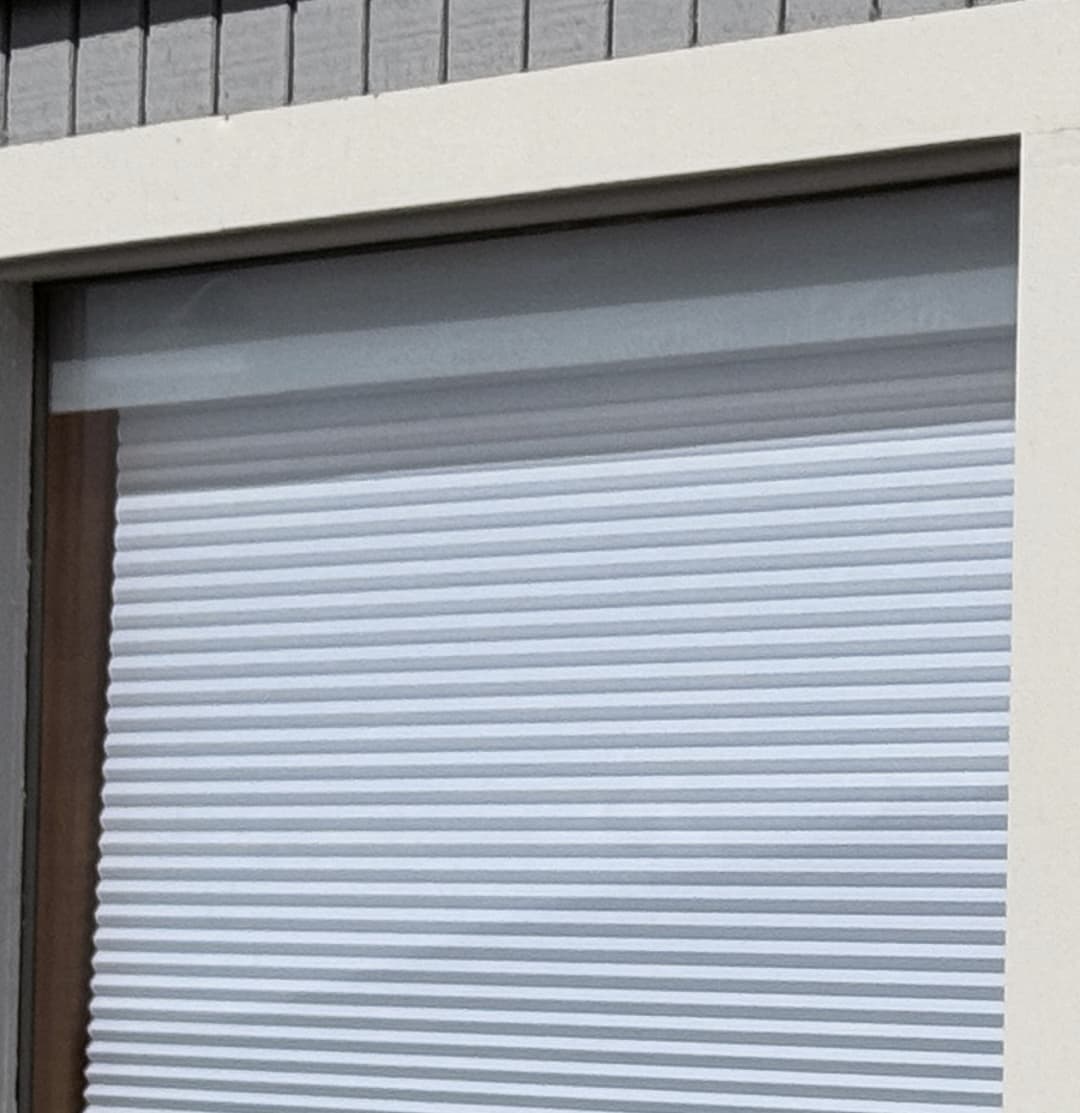
Prior to committing, I spent a LOT of time communicating with the guy who works with BALI’s motorization technical support who is most familiar with Home Assistant. He and I discussed at length the integration with HA, how it all works, which shades work best, battery life, what is reported to HA, and all the capabilities it supports; he was extremely helpful. Only after I was satisfied did I place the order. I chose the battery hanger that hangs from the top rail of the shades behind it, out of sight (from the inside), versus the one that attaches to the window frame (for external mounted shades). The battery can be seen from the outside, which bugged me, so I decided to buy some frosted window sheeting that you put on with water and a squeegee, and really liked the result. You can see it in this photo.
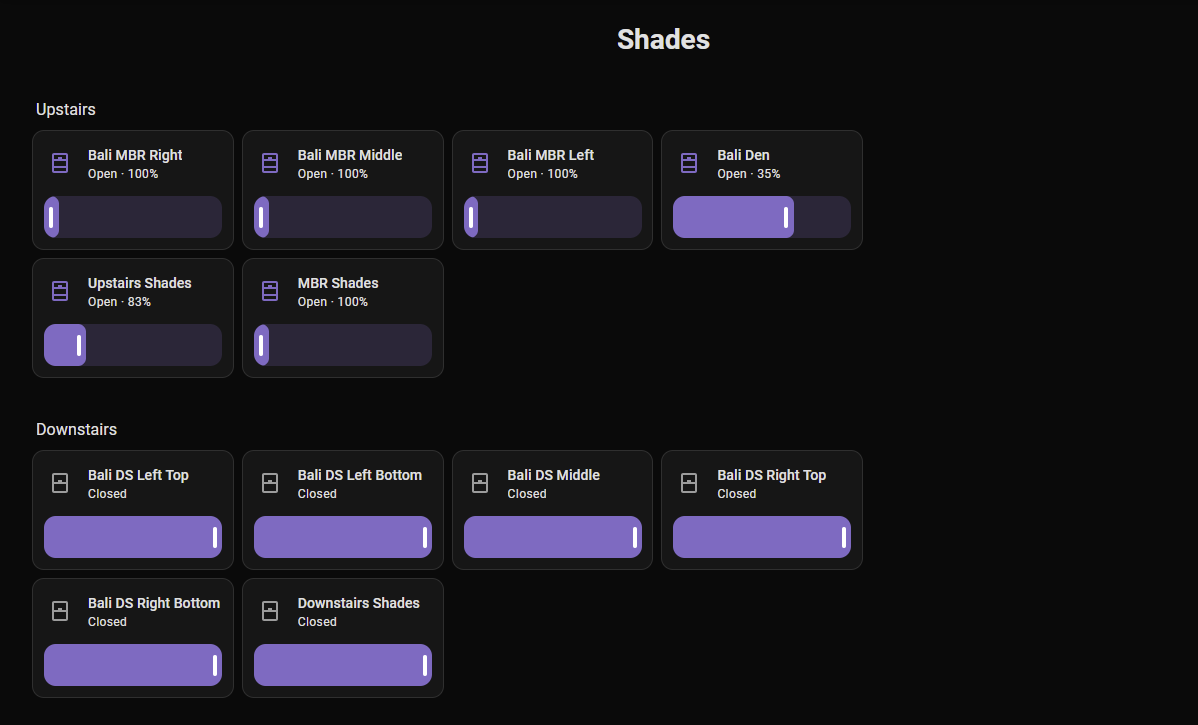
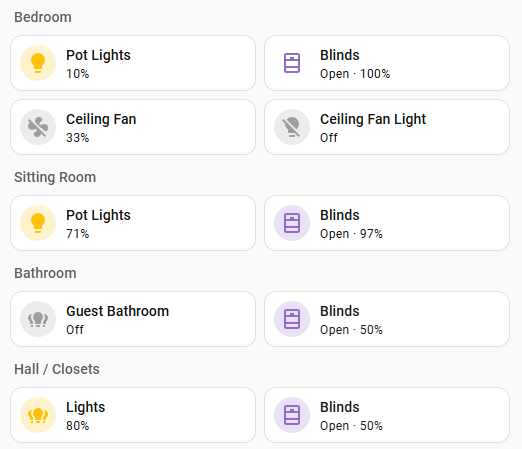
These shades are added just like any other ZW device. The only difficulties I had were with the most distant shades. I had to keep waking them up repeatedly so HA could finalize the initial interview and integration due to the long, multi-hop routes. The appear as shades in HA, and HA reports both Open/Closed status as well as intermediate, and they update as they are moving, intermittently (it is not a smooth display). If I stop the shade at 35% open, that is what HA will show. I have found occasionally that HA will show the incorrect state of the most distant shades (the same ones I had trouble adding initially. I contribute this to the extreme range). I talk more about this later. Here is my dashboard:
From this point forward, I will only be discussing the motorized shades I bought. I purchased the 1/2" double cell cellular shades, with smart shade motorized lift, Z-Wave & Bluetooth, with the rechargeable Li-Ion battery pack, 6 chargers, and 1 Premium Remote. The total for these was just shy of $3k. given the quality of the shades, the motorization, the -Wave integration, and ease of order/installation, they were worth every penny, and I’d do it again.

I’ve waited before posting my experience to assess the battery life so I could report on it. Bali (and the tech support guy) note that battery life depends on a number of factors, such as how often articulated, size of shade, type of shade, and distance from the controller. The most optimistic values I saw ere 2 years, with 1 year being ā€œtypicalā€. The tech guy said that his experience was more like 6 months if you use them every day. I typically open all of them every morning and close them all again every night, so on average, one cycle per day. They are all the same material, although their sizes vary sometimes considerably. So, I suspect the major factor affecting my battery life is distance from controller, at least my battery data seems to indicate that.

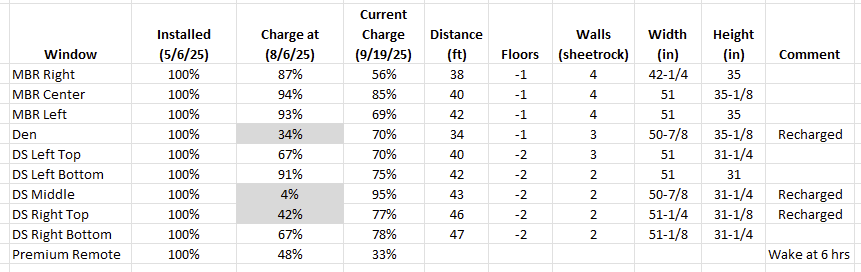
In the table below, I’ve listed each window along with the battery levels at two different dates, along with the estimated distance the shade is from the controller, the width and height of each shade, and the number of floors and walls between the shade and the controller. They are either 1 floor or 2 floors below the floor where my ZW controller is. I recharged 3 of them on 8/6, which I’ve indicated by shading. I don’t know what to make of the DS Middle, other than it is probably the furthest away from any solid powered repeater, like an in-wall light switch (which are all over the house). But it does seem to bear out the theory that the length of route and number of hops plays a roll in the battery drain. Although, it also could have nothing to do with it. But the data is here:
One last thing: the Premium Remote is very nice, with 12 channels that you can program to any combination of shades. Below I show how I programmed mine, which just fits with my number of shades. As you can see below, I can control any shade individually, or as a group, for example all upstairs or all downstairs, or just those in the master bedroom.
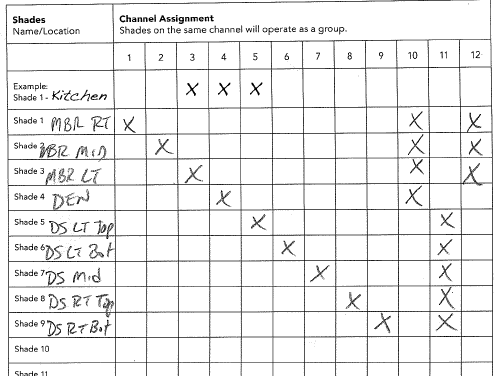
Very simple to program. The button battery life could be better IMO. Even though I have wake time set at 6 hours, I see a small LED on the remote flash every 5 minutes or so, regularly, so I don’t know what’s going on (and haven’t called in to support about it yet). But it is definitely worth having it. It stays in the MBR, and works great for the 5 on the floor below too. Pressing it makes all the shades move at (almost) the same time, whereas using HA, you can see the traffic flowing on the network (there’s a small, 1-2 second delay before each shade moves in turn).

At any rate, I hope this helps someone else struggling like I was trying to find a solid Z-Wave motorized shades solution. My experience with Bali/Costco has been fantastic, and I don’t hesitate to recommend them to anyone looking for such a solution. Just a heads up, you will initially work on the Bali website setting everything up, then you’re transferred to Costco to place the order. Costco does some weird stuff in how it groups everything together in the order, with none of the details you see on the Bali site just before being transferred. It concerned me, but was told that’s just the way it works between them. As I stated earlier, my shipment came to me as ordered and in perfect condition. Shipping was only $75 to Alaska, which was excellent for 3 fairly good-sized, heavy boxes.

Cheers!
EDIT: Adding a few helpful details.

My blinds are all Product Code: CRZB in Z-Wave-JS UI, FW V14.7, SDK: v6.82.0. My Multi-channel Premium Remote is MCZ1, FW V12.3 and is set up to use Z-Wave comms (it appears in HA as a device, but talks directly to the blinds - I guess like a scene controller). All devices seem to report battery levels correctly and consistently to HA. I can control them equally well with both HA and via the remote. I periodically have some shades not respond to HA commands, especially when they are part of a Group, predominately those the farthest from the controller. This was true with my Aeotec Z-Stick 5+ controller, which I have JUST replaced with the HA ZWA-2 controller. I’ll report back here whether that improves the failed commands.

Also to note if you have multiple shades and a z-wave remote. The Bali tech told me that in order for the remote to work correctly/reliably, it must have a node HIGHER than any of the shades it controls. I did not test this since, if you follow their instructions, the remote is added AFTER all the shades. But if you end up adding additional shades, you may have to re-include your remote to move it up in node count if you are having issues.

Also, the ā€œhubā€ they sell, is indeed a hub, NOT a repeater, which any powered Z-Wave device should act as. If you are controlling with HA, you do not need the Bali Hub.

Below is a few questions I asked before purchasing and the responses from the Bali tech. They may help some with similar questions:

(1) Realistically, how long would a charge last on the rechargeable Li-Ion battery pack assuming a daily full cycle, and are they pretty reliable, i.e., not have to be replaced regularly. I believe the Costco/Bali site said 2 years, but the Lowes site says 1 year (or maybe that was in your documentation). Just trying to set expectations.

This will depend on the size of the shade, but as a rough estimate we anticipate 6-12 months. Larger sized shades will draw more than a smaller shade, so the range is intended to capture large size differences.

<<<< I’ve only had ONE blind last 6 months of the NINE and it’s at 42%, surprisingly. All the others have been recharged. I would assume 5 months MAX on avg for daily cycling. >>>

(2) From the drawings, it appears the rechargeable battery is slimmer than the battery case. Is that really the case, or are the pictures deceiving? Also, the battery case has an optional attachment bracket, but I don’t see one with the rechargeable. Is the rechargeable inside the blind casing, or is it attached to it the back of the top bar, or will it need to be separately mounted? I could not find that answer in the installation instructions.

The battery packs are similar, but they do vary slightly. The reloadable battery packs are 9 1/4" x 1 1/4" x 7/8" (WxLxD) and the rechargeable battery packs are 8 9/16" x 1 7/16" x 15/16" (WxLxD).

(3) You mention the percentage slider, which I assume will let you move it to tell ZWave to move the blind to that open/closed position. Is that really true? does the blind keep track of its position so that you can change it from, say, 50% closed, to 80% closed by moving the slider (like a dimmer?). Or does it have to go to one full extend (open/closed) first to determine where it is before moving to a percentage position?

This is correct. The motor maintains memory of its positioning and reports it back to the controller. Shades can be moved from one intermediate position to another without needing to hit either limit first.

(4) Do the remotes work via Zwave, or do they use Bluetooth? I was thinking of getting only a single Home (premium) remote to control all shades, and I would like To know if I can control shades downstairs from upstairs with the remote, or would it be line-of-sight or Bluetooth range? that would determine if I need to buy a second, perhaps Room, remote.

The remotes do work via ZWave. You may be able to control shades on another floor with a single remote, however, this can vary based on the range and the construction of the building. If you wanted to try to start with one remote, another can be ordered after the fact if signal propagation is an issue. A second remote will be fairly easy to set up, given that your Home Assistant will be what is actually maintaining the network; a second remote would just be paired to the Home Assistant and then it can find shades on the same network directly.

(5) Questions about your app: In order to control the shades or do OTA FW updates, are we required to permit the shades themselves to connect to WiFi (other than normal internet connections apps have via the iPhone iOS)? In other words, to manually manage the shades via Bluetooth on the iPhone, we aren’t required to connect the HW to our WiFi as we would in order to control, say, a door lock, with a vendors app to control it remotely from home. I will be, of course, using Home Assistant for all management, both local and remote, and do not allow any of my automated devices to have their own WiFi access. Local Bluetooth between the iPhone and the blind motor controllers is fine. If the App manages the internet access via iOS to download the FW from your servers and then uses Bluetooth to connect to the shades, that would be perfect, and actually, what I would expect. Can you confirm?

Our motorization app, by itself, will communicate with the shades via Bluetooth — this would be a local control option only without use of our ZWave gateway, which you do not need since you are having Home Assistant fill this role. The shades are incapable of connecting to WiFi directly, so it would require being within Bluetooth range of the shades with the app loaded on your phone/tablet to be able to control them and push OTA firmware updates; OTA updates are also done over Bluetooth.

I plan to have a single Home remote for all motorized shades, and one charger, and order rechargeable Li-Ion battery packs for each motor. I would like to be able to control each motorized shade both individually and perhaps, as two distinct groups, i.e, the 4 upstairs, and the 5 downstairs. I’m assuming that will be possible with the Home remote and with Home Assistant. As indicated in #4 above, I assume the remotes work via ZWave, and therefore I can control the shades from anywhere in the Home with the Home remote.

I am not incredibly familiar with Home Assistant, but I believe this can be done via setting up rooms as I understand it. Outside of that, setting automations that you can manually trigger to move a group of shades should also be doable. The remote can definitely achieve independent control as well as the groups you specified – due to a channel limitation on the remote, however, you would not be able to put all 9 shades on a single channel at once. The remote has a max of 8 shades assigned to a given channel at a time.

Additionally, I would recommend considering an additional charger or two given your number of shades. One charger would work, however, please be aware that the battery packs arrive only about 30% charged due to shipping regulations. A full charge cycle for a completely depleted battery pack is about 4.5 hours. The more chargers you have, the less charging cycles you need to go through. We recommend 1 charger per 3 shades; I am personally partial to a 1:2 ratio instead, as this allows one to get through both charging cycles in a day with some leniency.

==========
I addressed how I programmed the remote to create groups above. I will also add that I did purchase 6 chargers and found that to be too many (but they are cheap). I’m looking now to buy a couple more rechargeable battery packs to have at the ready to rotate into the system when a battery goes dead. Otherwise your shade is inoperable the 3-5 hours it takes to recharge the battery pack. Also looking at picking up a directly power supply plug just to have a means to control a shade if all else fails.

6 Likes

I have 25 Bali blinds installed, the first in Sept. 2023, and the most recent in June 2025. Five with product code RSZ1, and 20 with code CRZB. All but one are hardwired, the other has the lithium battery.

The quality control has not been good on the blinds I received; two RSZ1 blinds failed with surface mount components that literally fell out of the blind when I opened the box (they weren’t soldered on), and multiple blinds had their cords pinched internally - the bottom rail was grossly not parallel with the header rail. I was able to fix the pinched blinds myself, and Blinds.com replaced the two defective RSZ1 blinds with new CRZB.

Here’s some comments and pointers on using them with HA.

The CRZB is the replacement for the RSZ1. The main difference is the CRZB has Bluetooth, and the RSZ1 does not. The blinds are connected to HA via Z-Wave, and the Bali Motorization app connects directly to the blinds with Bluetooth.

Bali / Graber / Spring Window Fashions does not make firmware updates available for Z-Wave OTA, but they do make firmware updates available to flash blinds via Bluetooth. HA will not notify when a firmware update, you must view the blind in the Bali app to see / flash updates.

The appear as shades in HA, and HA reports both Open/Closed status as well as intermediate, and they update as they are moving, intermittently (it is not a smooth display).

I don’t believe this statement is correct; the blinds (RSZ1 and CRZB) only send a ZW update when the blind stops moving:

This behavior persists in current v14.7 firmware. I have written some workaround code for it; I have window sensors and don’t allow the blinds to close while the windows are open. The Bali app seems to show current position while the blind is in transit; it’s worth investigating if the current position can be obtained using HA’s Bluetooth functionality.

There is a very specific order to include devices and pair the blinds with HA and additional remotes; I included it in the ZW JS device file I wrote - you should see it in the device Help section when you view the node in ZW JS UI. I may update the file to remind people to use the Bali app to get firmware updates.

There was a dramatic improvement to the HA group helper in the 2025.8 release:

I recommend using the new group helper for your blinds. This simple interface controls 12 blinds in 5 rooms, with only four HA buttons - click the icon to toggle the blinds up/down, touch the text portion to control individual blinds, or to select intermediate up/down levels.


I use the remotes only for direct physical control, but notifications that a remote button was pushed are useful for preventing the blinds from closing when the window is open. You could use the notifications to trigger other actions also, such as turn off a light.

I agree the lithium battery longevity is excellent. I bought a spare battery to swap rather than waiting to charge and then replace. There is an HACS add-on that makes dealing with batteries much easier:

I purchased my blinds through blinds.com, but I’m also a Costco member - have you complared Costco vs online pricing?

1 Like

I have 8 RSZ1 (fw 13.2) models running for a few years now under Zwave JS UI. Not sure what the newer FW adds/fixes?

Also, for these shades I use the Enhanced Shutter card, and made/shared custom YAML…

and if you want a Blueprint to alert you to low battery states…
https://community.home-assistant.io/t/battery-report-easy-customize-includes-excludes-to-do-list-notifications-more

1 Like

True. I was told this by their tech support guy. It may come in the future. But at least you can update via their app.

Not exactly, but neither is the statement you quoted from OctAA, at least in my experience. It is true that the blinds don’t provide real-time moving position updates to HA, but it is not true that they only report after the blinds stop moving. I’ve found (and just tested it again) that when I open a blind (or a set of blinds using a group), that the HA slider/display on some of them immediately pop to the end state, while others wait until they finish moving to pop there. There is no intermediate, real-time moving display. I knew that before buying them, and realistically don’t require it as it is just extraneous traffic on the network. I do believe I have seen the sliders pop to an intermediate static position before finally popping to the end state after movement stops. This is also true of the Group sliders that pop to a percentage calculated by the sum of the positions of all the blinds in a group (if they aren’t all open or all closed), sometimes at the start, sometimes at the end. Note, that this is as experienced with the current tile cards I show on my dashboard. Other cards, buttons, tiles, etc., may/probably work differently.

This is all outlined well in the documentation and I had no issues; it’s pretty straightforward.

I had not yet tried these since they appeared after I created my own groups. I just created one and it looks pretty sweet. It appears you used the Mushroom Cover Card, but neither the default Button Card and Entity Card shows the percentage Opened/Closed (by default), and when it does, it’s pretty crude (on buttons it’s not even a option), and clicking anywhere on them opens the bottom dialog box you posted. With the Mushroom Card, you indicated that touching the text would bring up that dialog, but that did not work for me. Clicking anywhere on that card did a full open/close, not other control. Long press does bring up the additional dialog though.

This is very nice! I’ll give it a shot. I currently do this all myself via various methods, templates, etc., even using groups to define fast/slow reporting devices to prevent false reporting, as well as, templates to report low batteries on my dashboard. This is typically using static values on battery devices that normally aren’t static, such as temp or lux or humidity. Most of my battery powered devices report one or more of these. I’ve found that many devices don’t report battery power well at all, in most cases with HA still reporting sometimes 60% battery level even though the device is clearly dead. Others even report 0% battery level even though they continue to report correctly. This is why I chose to rely on static values in HA to determine dead batteries. Lithium batteries can go from good to dead very quickly. This is the card I use to pop up when a device stops reporting:

type: custom:auto-entities
card:
  type: entities
  title: Check Batteries
  show_header_toggle: true
  state_color: false
filter:
  template: |
    {{ expand('group.battery_sensor_overdue_normal_grp')
      | selectattr('last_changed', 'lt',now()-timedelta(hours=states("input_number.time_till_sensor_overdue_in") | float)) 
      | map(attribute='entity_id') | list  | join('\n') ~ '\n'
      ~ expand('group.battery_sensor_overdue_extended_grp')
      | selectattr('last_changed', 'lt',now()-timedelta(hours=24 | float))
      | map(attribute='entity_id') | list  | join('\n')
    }}
show_empty: true
sort:
  method: none

A time_till_sensor_overdue_in value of 3 (hrs) works well.

Since Costco directs you to Bali’s own site, which is filled with helpful instructions, documents, and videos, I didn’t look any further. But out of curiosity, I just went on blinds.com and Costco/Bali sites, and built the exact same Bali shade and the Costco shade was $435 and the blinds.com shade was $787. I double checked it multiple times. YMMV.

2 Likes

I found when setting a % open value in HA, the GUI card / slider often changes to the set value, not where it actually is. I did my testing in the ZW debug console, and found ZW messages are only transmitted by the blind when it stops moving.

When I setup my blinds in 2023, the Bali tech support told me it wasn’t possible, but I stumbled across the sequence on my own. Glad to hear they’ve updated the documentation.

It’s actually a ā€œTileā€ card in the new ā€œSectionsā€ view. Nabu Casa hired the Mushroom card developer to further develop the HA dashboards.

Did you take into account the ā€œalwaysā€ sale on blinds.com? The discount varies 40-55% of the list price. If not, it’s about the same price. I’ll definitely check Costco the next time I order a blind.

1 Like

I don’t know either. The only problem I’ve had with the blinds is they sometimes freeze (both RSZ1 and CRZB - they won’t even respond to pressing the physical button on the blind frame. I put the blind power supplies on ZW switched receptacles; I restart them every night automatically, and anytime a blind stops responding.

1 Like

I love to see HA incorporating good ideas into the core functionality! I did not take into account or assume a sale discount. I only quoted the price they showed on their web site after building the blinds. It would have left me with the impression that THAT was the price, so they might do a better job if there is a lower price. Personally, I felt better dealing directly with the manufacturer directly than with a jobber who markets many different brands. I’m a huge Costco shareholder, so perhaps I’m a bit biased by that anyway. :wink:

Luckily, I’ve never experienced that. Hopefully, this has been fixed. Usually when I have issues with devices that have historically worked great, I blame in on overload of my vast ZWave network. :rofl:

2 Likes

hold on, hold on… its quite well-known that you cannot control the top rail of either the RSZ1 or the CRZB blinds, right?!? Have I been living a lie? Everything published says that with 14.7 firmware, you cannot move the top at all. There’s not even an exposed second motor…

The tech at Bali that I spoke at length with, who knows HA and Zwave, and his product, said no. He recommended you don’t get the two way if you want to control via zwave.

I sure wish that I had made the calls to Bali (Springs) support before laying out the money. We have one tdbu cellular shade in our bedroom with their plug gateway and the premium remote. I’ve been so unhappy with the performance that I figured it must be able to work better with HA. And details such as staying connected, getting the correct shade battery percentage are 180 degrees better than the Bali app itself.

However, we cannot control the top (mid) bar. This is a deal breaker and now with over $1,000 on a single shade and the other doodads, have this shade that is not easily managed.
The remote is wonky at best, their gateway is constantly offline and needs to be unplugged and replugged. Yet, HA does everything except supporting the top down function. I do not understand that if Z-wave is identifying each control id why this functionality isn’t possible. And I am not a programmer, so am unable to dig in and figure it out for myself.

That’s interesting. Do you have HA’s ZWaveJS-UI AddOn? If yes, take a look at the CC’s for the blind. I don’t have a tdbu version so I don’t know, but in theory a tdbu shade in ZWave could have two endpoints, each with instances of the same CC (one for each motor). Also wondering if the top rail is controlled by BlueTooth and the bottom rail is controlled by ZWave?

Hi wmaker, what are cc’s? Sorry for my ignorance, I’ve been running ha as a hobby for a few years yet haven’t yet dug in deep. I have zwave js installed and just installed zwave js ui and need to configure it.

I thought I had seen a post of it being required to have Instances setup for one shade controlling top and bottom separately. I can’t find that post and grizzlyak has discussed with spring fashion tech support who verified td not being a gap. The remote uses Bluetooth, I’m not sure how their controller connects. I would suspect that the shade could be interrogated to setup attributes to configure all attributes.

So far the Bali product has been a huge let down. Having blackout has been wonderful. Yet we want to easily control and set routines. I spent too much money buying this one shade with blinds.com 50% off. When I looked at Costco, I didn’t see the side rails available in the configurator. So I went with blinds.com.

I’ve talked to both the mfg and blinds.com about our battery going dead days after charging, the zwave controller disconnecting, and the wonkiness of the remote. Each has pointed to the other. Bali saying blinds.com is responsible for the 1st year of warranty, and blinds.com saying that I must talk with the motorized dept at bali. Back and forth. There is one support person who’s been helping navigate who’s been wonderful and attentive. Yet orders from bali to replace the controller were out on hold by blinds com, the unit being out of stock and other issues

The battery issue we were having was actually their application being poorly written. Ha shows the battery at 97% while the app has a red icon indicating it’s dead.

I never thought I’d need to put so.much effort into making things work. Now we have the shade installed and I am determined.

CC is an abbreviation for a ZWave term called Command Class. Some examples for a Bali Cellular shade would be:

  • Multilevel Switch - This Command Class is used to control and view the up/down position
  • Binary Switch - This Command Class simply lets you open/close the blinds
  • Battery - This command class shows what the shade is reporting in terms of % remaining.

BTW, I re-edited my earlier post. I had forgotten that a ZWave device can support multiple endpoints, and each endpoint has its own set of CCs, so theoretically a Bali tdbu shade with two motors could possible have two endpoints, each with a multilevel CC.