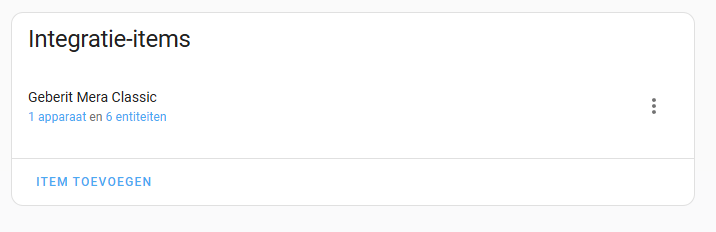
Here is a simple HACS integration with communication to the toilet.
With the help of this, others can also start analyzing and decode the communication.
More eyes see more 
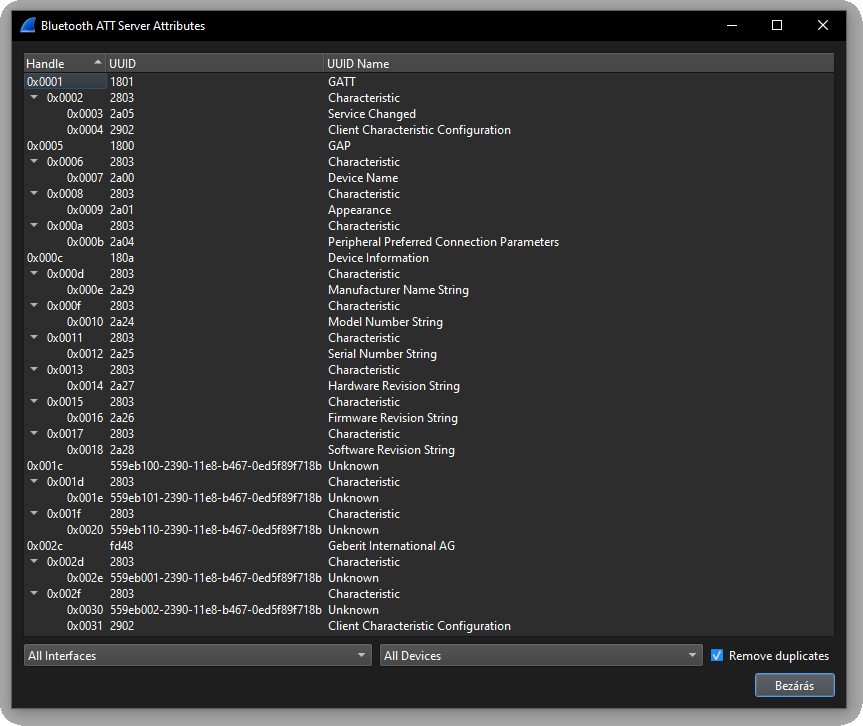
I think UUID: 559eb110-2390-11e8-b467-0ed5f89f718b is where the magic happens, but it needs to be decoded for all option changes, BUT I cant connect with the app to the toilet if the integration is connected (for logging state changes).
I am stuck here a little.
custom_components/geberit_duofresh_bt/
manifest.json:
{
  "domain": "geberit_duofresh_bt",
  "name": "Geberit Duofresh Bluetooth",
  "version": "1.0.0",
  "requirements": ["bleak"],
  "dependencies": [],
  "config_flow": true
}
__init__.py:
from homeassistant.config_entries import ConfigEntry
from homeassistant.core import HomeAssistant

from .const import DOMAIN
from .bluetooth_processor import BluetoothProcessor

async def async_setup(hass: HomeAssistant, config: dict) -> bool:
    return True

async def async_setup_entry(hass: HomeAssistant, entry: ConfigEntry) -> bool:
    address = entry.data["address"]
    processor = BluetoothProcessor(address)
    await processor.connect()

    await processor.start_watchdog(retry_interval=5.0)

    if DOMAIN not in hass.data:
        hass.data[DOMAIN] = {}
    hass.data[DOMAIN][entry.entry_id] = processor

    await hass.config_entries.async_forward_entry_setups(entry, ["sensor"])
    return True

async def async_unload_entry(hass: HomeAssistant, entry: ConfigEntry) -> bool:
    processor = hass.data[DOMAIN].pop(entry.entry_id, None)
    if processor:
        await processor.disconnect()
    return await hass.config_entries.async_unload_platforms(entry, ["sensor"])
bluetooth_processor.py:
import logging
import asyncio
from bleak import BleakClient
#from .const import NOTIFY_UUID, WRITE_UUID
from .const import WRITE_HANDLE

_LOGGER = logging.getLogger(__name__)

class BluetoothProcessor:
    def __init__(self, address):
        self.address = address
        self.client = None
        self.data = None
        self.polling_task = None
        self.watchdog_task = None
        self._char_cache = {}
        self._excluded_chars = set()

    async def connect(self):
        if self.client and self.client.is_connected:
            _LOGGER.debug(f"Already connected to Geberit Duofresh at {self.address}")
            return

        _LOGGER.debug(f"Connecting to Geberit Duofresh at {self.address}...")

        self.client = BleakClient(self.address)

        try:
            await self.client.connect()
            _LOGGER.info(f"Connected to Geberit Duofresh at {self.address}")

            #await self.client.start_notify(NOTIFY_UUID, self._notification_handler)
            #await self.client.start_notify(NOTIFY_HANDLE, self._notification_handler)

            for char in self.client.services.characteristics.values():
                _LOGGER.debug(f"Characteristic found. UUID: {char.uuid}, handle: {char.handle}, properties: {char.properties}")
                if "notify" in char.properties or "indicate" in char.properties:
                    try:
                        await self.client.start_notify(char.handle, self._notification_handler)
                        _LOGGER.info(f"Enabling notify on characteristic: {char.uuid} (handle: {char.handle})")
                    except Exception as e:
                        _LOGGER.warning(f"Failed to start notify on {char.uuid}: {e}")

            await self.poll_characteristics(0.1)

        except asyncio.CancelledError:
            _LOGGER.warning("Connection attempt cancelled.")
            raise
        except Exception as e:
            _LOGGER.warning(f"Initial connection failed: {e}")

    async def disconnect(self):
        if self.polling_task:
            self.polling_task.cancel()
            self.polling_task = None
        if self.client and self.client.is_connected:
            await self.client.disconnect()
            _LOGGER.info(f"Disconnected from Geberit Duofresh at {self.address}")

    async def start_watchdog(self, retry_interval: float = 5.0):
        async def monitor():
            while True:
                if not self.client or not self.client.is_connected:
                    _LOGGER.info("Not connected to Geberit Duofresh. Attempting to connect...")
                    await self.connect()
                await asyncio.sleep(retry_interval)

        self.watchdog_task = asyncio.create_task(monitor())

    async def write_command(self, value: bytes):
        if self.client and self.client.is_connected:
            #await self.client.write_gatt_char(WRITE_UUID, value, response=False)
            await self.client.write_gatt_char(WRITE_HANDLE, value, response=False)
        else:
            _LOGGER.error("Client is not connected; cannot write command")

    def _notification_handler(self, handle, data):
        self.data = data
        _LOGGER.info(f"Notification received. Handle: {handle}, value: {data.hex()}")

    async def read_notify(self):
        _LOGGER.debug(f"read_notify() called, returning: {self.data.hex() if self.data else 'None'}")
        return self.data or b""

    async def poll_characteristics(self, interval: float = 0.1):
        if self.polling_task:
            self.polling_task.cancel()

        if not self.client or not self.client.is_connected:
            _LOGGER.warning("Cannot poll characteristics: not connected")
            return

        async def poll():
            while True:
                for char in self.client.services.characteristics.values():
                    key = f"{char.uuid}:{char.handle}"
                    if key in self._excluded_chars:
                        continue
                    if "read" in char.properties:
                        try:
                            value = await self.client.read_gatt_char(char.handle)

                            #_LOGGER.debug(f"Polled UUID: {char.uuid}, handle: {char.handle}, value: {value.hex()}")

                            prev = self._char_cache.get(key)
                            if prev != value:
                                _LOGGER.info(f"State changed. UUID: {char.uuid}, handle: {char.handle}, value: {value.hex()}")
                                self._char_cache[key] = value
                        except Exception as e:
                            if "NotPermitted" in str(e):
                                self._excluded_chars.add(key)
                                _LOGGER.warning(f"Excluded UUID {char.uuid} (handle {char.handle}) due to permission error: {e}")
                            else:
                                _LOGGER.warning(f"Failed to read characteristic {char.uuid} (handle {char.handle}): {e}")
                await asyncio.sleep(interval)

        self.polling_task = asyncio.create_task(poll())
config_flow.py:
from homeassistant import config_entries
import voluptuous as vol
import re
from .const import DOMAIN

MAC_REGEX = re.compile(r"^([0-9A-Fa-f]{2}:){5}([0-9A-Fa-f]{2})$")

class GeberitConfigFlow(config_entries.ConfigFlow, domain=DOMAIN):
    VERSION = 1

    async def async_step_user(self, user_input=None):
        errors = {}
        if user_input is not None:
            mac = user_input.get("address", "").strip()
            if not MAC_REGEX.match(mac):
                errors["address"] = "invalid_mac"
            else:
                return self.async_create_entry(title="Geberit Duofresh", data={"address": mac})

        return self.async_show_form(
            step_id="user",
            data_schema=vol.Schema({
                vol.Required("address", description="Geberit Duofresh MAC address (format: XX:XX:XX:XX:XX:XX)"): str
            }),
            errors=errors
        )
const.py:
DOMAIN = "geberit_duofresh_bt"

#NOTIFY_UUID = "559eb102-2390-11e8-b467-0ed5f89f71b"
#NOTIFY_HANDLE = 0x0014
#WRITE_UUID = "559eb101-2390-11e8-b467-0ed5f89f71b"
WRITE_HANDLE = 0x0011
sensor.py:
import logging
from homeassistant.components.sensor import SensorEntity
from .const import DOMAIN

_LOGGER = logging.getLogger(__name__)

CHARACTERISTIC_MAP = {
    "00002a24-0000-1000-8000-00805f9b34fb": "Model Number",
    "00002a25-0000-1000-8000-00805f9b34fb": "Serial Number",
    "00002a26-0000-1000-8000-00805f9b34fb": "Firmware Revision",
    "00002a27-0000-1000-8000-00805f9b34fb": "Hardware Revision",
    "00002a28-0000-1000-8000-00805f9b34fb": "Software Revision",
    "00002a29-0000-1000-8000-00805f9b34fb": "Manufacturer"
}

class GeberitStaticSensor(SensorEntity):
    def __init__(self, processor, uuid, name):
        self._processor = processor
        self._uuid = uuid
        self._attr_name = f"{name}"
        self._attr_unique_id = f"geberit_duofresh_{uuid.replace('-', '')}"
        self._value = None

    @property
    def native_value(self):
        return self._value

    async def async_update(self):
        if not self._processor.client or not self._processor.client.is_connected:
            return
        try:
            value = await self._processor.client.read_gatt_char(self._uuid)
            decoded = bytes(value).decode(errors="ignore")
            self._value = decoded
        except Exception as e:
            _LOGGER.warning(f"Failed to read {self._uuid}: {e}")

async def async_setup_entry(hass, config_entry, async_add_entities):
    processor = hass.data[DOMAIN][config_entry.entry_id]
    entities = []
    for uuid, name in CHARACTERISTIC_MAP.items():
        entities.append(GeberitStaticSensor(processor, uuid, name))
    async_add_entities(entities)
You need to set the loglevel to debug (in configuration.yaml) for the integration to see the messages in home-assistant.log.
logger:
  ...
  logs:
    custom_components.geberit_duofresh_bt: debug
    ...
Possible log messsages:
Connecting to Geberit Duofresh at E4:85:01:04:60:FF...
Connected to Geberit Duofresh at E4:85:01:04:60:FF
Characteristic found. UUID: 559eb002-2390-11e8-b467-0ed5f89f718b, handle: 47, properties: ['notify']
Enabling notify on characteristic: 559eb002-2390-11e8-b467-0ed5f89f718b (handle: 47)
Characteristic found. UUID: 00002a05-0000-1000-8000-00805f9b34fb, handle: 2, properties: ['indicate']
Enabling notify on characteristic: 00002a05-0000-1000-8000-00805f9b34fb (handle: 2)
Characteristic found. UUID: 559eb001-2390-11e8-b467-0ed5f89f718b, handle: 45, properties: ['write-without-response']
Characteristic found. UUID: 559eb101-2390-11e8-b467-0ed5f89f718b, handle: 29, properties: ['write-without-response']
Characteristic found. UUID: 559eb110-2390-11e8-b467-0ed5f89f718b, handle: 31, properties: ['read']
Characteristic found. UUID: 00002a24-0000-1000-8000-00805f9b34fb, handle: 15, properties: ['read']
Characteristic found. UUID: 00002a25-0000-1000-8000-00805f9b34fb, handle: 17, properties: ['read']
Characteristic found. UUID: 00002a26-0000-1000-8000-00805f9b34fb, handle: 21, properties: ['read']
Characteristic found. UUID: 00002a27-0000-1000-8000-00805f9b34fb, handle: 19, properties: ['read']
Characteristic found. UUID: 00002a28-0000-1000-8000-00805f9b34fb, handle: 23, properties: ['read']
Characteristic found. UUID: 00002a29-0000-1000-8000-00805f9b34fb, handle: 13, properties: ['read']
State changed. UUID: 559eb110-2390-11e8-b467-0ed5f89f718b, handle: 31, value: 0105fc00b1900d0095040120010500010002
State changed. UUID: 00002a24-0000-1000-8000-00805f9b34fb, handle: 15, value: 3833312e3439372e30302e30
State changed. UUID: 00002a25-0000-1000-8000-00805f9b34fb, handle: 17, value: 3437353838
State changed. UUID: 00002a26-0000-1000-8000-00805f9b34fb, handle: 21, value: 31302e37204f5441342e33203230323430323032
State changed. UUID: 00002a27-0000-1000-8000-00805f9b34fb, handle: 19, value: 3036
State changed. UUID: 00002a28-0000-1000-8000-00805f9b34fb, handle: 23, value: 312e352e3020312e302e32
State changed. UUID: 00002a29-0000-1000-8000-00805f9b34fb, handle: 13, value: 47656265726974