Hi everyone,
I’m trying to solve a German TTS problem and could really use some help.
I’m using a voice assistant setup (Home Assistant + LLM (Ollama, Gemini or OpenAI) + ElevenLabs TTS or Gemnini TTS), and I’m trying to force correct pronunciation of German numbers, dates, temperatures, ZIP codes, and score formats. I’ve attempted to solve this purely through prompt engineering by adding very explicit rules, for example:
speak German dates in the format “zwanzigster Februar zweitausendfünfundzwanzig”
pronounce ZIP codes digit by digit, for example: “sechs zwei null vier eins” for 62041
pronounce scores like “eins zu zwei” for 1:2
write temperatures as “acht Komma fünf grad celsius”
avoid symbols such as %, :,°, and similar
write everything in a form that TTS can read without interpreting
The problem: even with very strict and detailed instructions, the model doesn’t consistently follow the rules. Most numbers are written as numbers, only sometimes they are translated in text correctly.
Is it actually possible to reliably enforce number formatting in German purely through prompt engineering? Or is this a known limitation of current LLM models or TTS pipelines?
Any advice, best practices, or examples would be greatly appreciated. Thanks!
I don’t think this problem is exclusive to German, and as far as I know “prompt engineering” is the only way to handle it. Of course, these are instructions to the LLM, not to the TTS service, which just speaks what it’s given.
In English I also found that the LLM would render common numbers (usually the low ones) as words and others as digits, and it needed quite precise instructions in the prompt to get it right. The precision of the instructions seemed to make a difference. For example, these worked quite well:
Use ordinals instead of Roman numerals in names and titles. For example, say “Henry the eighth”, not “Henry VIII”.
When speaking dates, use ordinal date format and pronounce the year as separate two-digit groups. For example, say March 5 1760 as “March the fifth, seventeen sixty”.
When speaking large numbers, state the value of each digit group based on its positional notation. For example 1,100,110 should be spoken as “one million, one hundred thousand, one hundred and ten”.
If you familiar with jinja you can use macros. Paste this code bellow to Developer tools > Template and translate to German corresponding items.
{%- macro num2word(number) -%}
{%- set words = "" -%}
{%- set unitsMap = [ "zero", "one", "two", "three", "four", "five", "six", "seven", "eight", "nine", "ten", "eleven", "twelve", "thirteen", "fourteen", "fifteen", "sixteen", "seventeen", "eighteen", "nineteen" ] -%}
{%- set tensMap = ["zero", "ten", "twenty", "thirty", "forty", "fifty", "sixty", "seventy", "eighty", "ninety"] -%}
{%- if number | int == 0 %}
  {% set words = " zero " %}
{%- endif -%}
{%- if number | int < 0 %}
  {% set words = " negative " + num2word(number|int * -1) %}
{%- endif -%}
{%- if ((number / 1000000000) | int > 0) %}
  {%- set words = words + num2word((number/1000000000) |int) + " billion " -%}
  {%- set number = (number%1000000000) |int -%}
{%- endif -%}
{%- if ((number / 1000000) | int > 0) %}
  {%- set words = words + num2word((number/1000000) |int) + " million " -%}
  {%- set number = (number%1000000) |int -%}
{%- endif -%}
{%- if ((number / 1000) | int > 0) %}
  {%- set words = words + num2word((number / 1000) |int) + " thousand " -%}
  {%- set number = (number%1000) |int -%}
{%- endif -%}
{%- if ((number / 100) | int > 0) %}
  {%- set words = words + num2word((number / 100) |int) + " hundred " -%}
  {%- set number = (number%100)|int -%}
{%- endif -%}
{%- if number | int > 0 -%}
  {%- if words != "" -%}
    {%- set words = words + "and " -%}
  {%- endif -%}
  {%- if number|int < 20 -%}
    {%- set words = words + unitsMap[number|int] -%}
  {%- else %}
    {%- set words = words + tensMap[(number/10)|int] -%}
    {%- if (number%10) | int > 0 %}
      {%- set words = words + "-" + unitsMap[(number%10)|int] -%}
    {%- endif -%}
  {%- endif -%}
{%- endif -%}
{{ words }}
{%- endmacro -%}

{{ num2word(-123456789) }}
For my language (Lithuanian) its kinda works is not perfect but sometimes enough for TTS to pronounce numbers which sounds more natural. I can show my code if that helps.
Another way is to try Google Gemini integration its very good at correctly understanding (STT) generating grammatically correct answer and theirs TTS is incredible too try it here
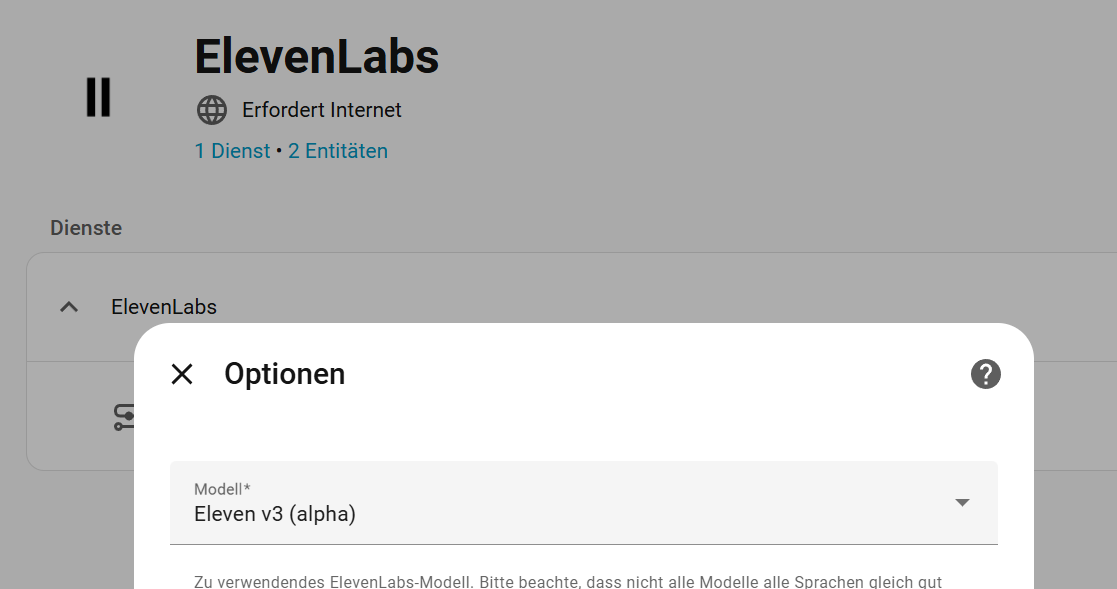
Thank you very much! I’m glad to hear I’m not alone. I found a nice solution, maybe it’s interesting for you, too.
I’m using Elevenlabs TTS and I switched the model to Eleven v3 (alpha). My impression is, that it handles numbers much better.