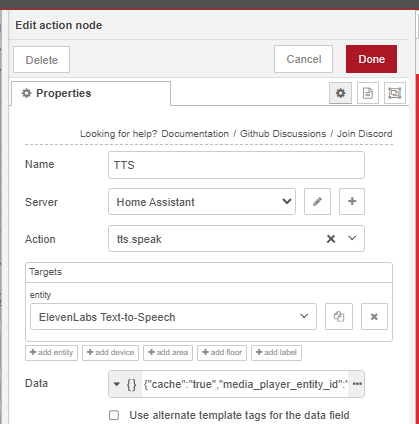
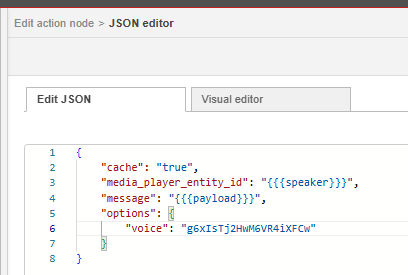
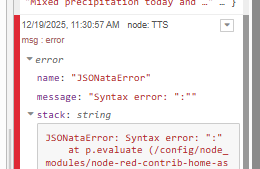
I’ve re-vamped the way I’m doing my TTS and I’m now using the ElevenLabs integration. I’m building a string and passing it along to an action node… but, I’m getting an invalid JSON error.
This works in Dev Tools → Actions:
action: tts.speak
target:
  entity_id: tts.elevenlabs_text_to_speech
data:
  cache: true
  media_player_entity_id: media_player.sonos_office
  message: This works, what the heck
  options:
    voice: g6xIsTj2HwM6VR4iXFCw
However, passing a (admittedly long) string to this node does not work:
Invalid JSON: {"cache":"true","media_player_entity_id":"media_player.sonos_kitchen","message":"Good morning. It is 8:38 on Friday, December 19. It is 46 degrees and Foggy in xxxxxxx. The temperature later will reach 55 degrees, but it will feel more like 44. Mixed precipitation today and Tuesday, with high temperatures bottoming out at 28°F on Monday. The wind is blowing 9 miles per hour from the south-southeast with gusts up to 27 miles per hour. There is a 95 percent chance of rain today, with less than one inch of accumulation. It's going to be very cloudy today. Bring an umbrella. Sunset tonight is at 4:02. There are 9 hours of daylight today. Sunrise tomorrow is at 7:45 A.M. There is one piece of mail arriving today.","options":{"voice":"g6xIsTj2HwM6VR4iXFCw"}}
It looks like good JSON to me… no? Where am I going wrong?
Is the message multi line? Try jsonata instead, mustache templates can have problems with escapes. Change the data field from JSON to Jexpression. Then remove the quotes and mustaches.
I’ve been using the same (length) string for a few years with a Sonos API “say” command… that is to say, that payload has been passing successfully for awhile.
Yes, that did it! Thanks for the help. The payload is passing successfully. I wasn’t getting any output from the speakers until I removed the voice key, though. I’ll have to investigate that.
EDIT: The easiest thing to do is just configure the ElevenLabs integration for the voice I’m looking for. It’d be nice to change on the fly, but definitely not necessary.