As a Home Assistant newbie with no experience I’m eager to step in . With tons of options and choices, it’s kind of a puzzle to determine the proper starting point and next steps.
In this post I’ll ‘log’ my journey towards -probably- a Home Assistant installation. I will share my situation and my questions about Home Assistant, the hardware, protocols, brands/devices, etc.
The idea is that I’ll update and answer my own questions and insights along the way. By sharing hopefully other newbies in a similar situation can also benefit from my findings and considerations. If others like to jump in and give me pointers, that of course would be much appreciated.
Starting point
About 15 years ago we started with home automation from HomeMatic, using various actors, sensors and remotes (I guess 50+) for lights, screens, curtains, security.
Not very sophisticated, but -once setup- everything works and is easy to use for wife/children and other guests. Beside some timed programs (eg blinds) we use some wall buttons and an eight button remote for daily use.
Our house has quite thick concrete floors, where one central Wifi point simply doesn’t work. So we’re using 3 Ubiquiti access point (one on each floor). Despite the Wifi challenges, all HomeMatic (868mhz) devices worked flawless with the server in the electrical cabinet downstairs (there are no HomeMatic devices on the top floor, so I don’t know if the HomeMatic signal would reach there).
At the time a third party has setup the installation from scratch. During the years of use little to no maintenance was necessary. Very easy adjustments I can do myself (eg change curtain timer, or simple ‘programs’), but for adding of swapping a device of other more complex changes (eg external access) help of the third party was needed. A couple of years ago the HomeMatic CCU1 server is replaced with a standard CCU3.
In the last period 5 light dimmers and a light switched went dead. For some lights we’re back to the regular (non smart) hardware switch. Of course I could replace the broken HomeMatic switches, but given the age of the other devices it gets more likely that they will also encounter some issue’s in the (nearby) future.
Most HomeMatic switches are inside a central cupboard downstairs. The light switches on top are almost all dead (on the picture marked: RIP). The DIN rail switches (mostly screens & lighting outsite) still work fine.
I’m keen to start with Home Assistant with a new and fresh base, which can (1) control the still working/existing HomeMatic devices and (2) control the new and replacement devices (protocol tbd).
I was thrilled to see that an integration between HomeMatic and HomeAssistant is available. Happy days! Many many thanks to all who created this and contribute to the further improvements/updates.
The HomeMatic integration enables a gradual shift to HA, where I can -step by step- replace old devices using the Home Assistant eco system (starting with the dimmers/light). Great that I don’t need to remove all the still good working HM devices (It would be a pity to ditch them, just because upgrading the OS to Home Assistant).
I really dig the Home Assistant philosophy (like local control, open, fresh UX. Also the continues developments and promising roadmap are solid (broad support of brands and devices by Open Home Foundation) and of course the very active community, which is really awesome.
Once the new Home Assistant base is in place, I’m interested to add other products and features and learn along the way. This varies from adding window sensors (to receive a message when windows are still open), movement detection when on holiday and perhaps installing camera’s to monitor and trigger events based statuses (I’ve seen some LLM use cases, really impressive)
Able to work with video surveillance in the future
Able to run local LLM (preferably?)
Noise/silence? (depending on the location), related with reach of the actors
Possible to use the same server/hardware as a media server for movies?
2.Server location (Reach / max distances)
Position of the HA server
Reach top floor
Reach spots outside
Concrete/armoured flooring limit the range (eg no wifi on 3rd floor when wifi point is only on ground floor). For wifi I work with an access point on each floor.
3.HomeMatic Integration
How to connect the CCU3 with HA server?
Is Advanced SSH & Webterminal needed to install the HACS/ HomeMatic integration?
How to load the existing HM devices and redo the existing Programs in HM?
How to set alarm, with existing code panels
Possible to re use the existing HomeMatic remote
4.Home Assistant setup
How to make Automations
Use Node Red? (based on the 2025.9 release it seems visual automations from Home Assistant are around the corner)
Now to make a (scheduled) backup, where
Nabu Casa subcription?
Other smart things to set up (like triggering a signal/warning when batteries sensors are (nearly) empty)
How to give instructions to devices when away from home
Fixed IP adress or not??
5.Which protocol for new devices?
What is MQTT?
Zigbee: seems interesting with the huge pool of devices, at a lower price. Which band (other than wifi). Sky Connect dongle?? (has future Thread support??)
Z Wave: seems interesting, given the long range devices (concrete flooring at home) and trustworthy devices. To set up as a Star or Mesh network? (both is not necessary??). Potential wider use cases with the new HA Z Wave stick.
Thread: new future standard? Still early day it seems (less extensive possibilities per device). Dependency with Wifi network? Would wifi changes (eg other ISP/modem) impact the HA setup??
Wifi. Interference wifi range? higher power consumption. Potential issues when changing modem/router/ISP?
Bluetooth, for setup purpose only?
6.Lights: Central switches/dimmers vs smart bulbs/spots
1 central dimmer switch (DIN rail) for lighting groups with GU10 spots, or individual smart spots without central actor? Durability smart spots? Some smart spots are longer then regular spots?
New Ikea LED/Matter products coming up in early 2026
New Z wave LR devices expected H2 2025?
No light at 0%? (currently ‘ dumb’ led spots with central switch give small amount of light, even when spots are at 0%)
Big in ceiling spots have a small buzz when turned on. How to avoid
7.Control
Possible to re use exitsing HomeMatic Remote control (8 buttons) and wall buttons? (6 buttons)
Voice control? Possible to use HomePods/Siri?
8.Sensors
PIR vs Motion detection (different zone detection with one sensor??)
Battery vs powered (Life span battery)
Increase motion sensor to reduce use of lighting switches? (automate?)
In the last month quite some progress has been made, per subject I’ll share my findings/choices/updates below. Hopefully some are helpfull for others who are getting started.
Ok,
As one old man said, There is no free lunch.
Meaning you will have to pay it one way or another.
You need a dedicated comp that will run 24/7 with ha on it. You can choose will it be haos or docker.
I decided to go for a Asus NUC N150 as a server. For my current setup/usage an N150 is powerful and probably a bit overkill and is still quite efficient on power consumption. I bought the server at a specialized ‘smart home’ shop, with Home Assistant and the antenna’s pre installed.
When I would expand with video surveillance in the future it’s nice to have some headroom. For this reason the internal storage is 2TB (to enable recordings of 2-4 camera’s). I prefered an Asus brand mainly for reliability reasons and (hopefully) reduce noise (which would open up options to place the server is various room).
I didn’t dive too deep in the LLM possibilities. As I understand is possible to add a Google Coral usb stick for (simple) LLM work. With this option available I closed the LLM box for now, first focus on the basics. I guess an alternative would be a very powerfull server that is powerfull enough for LLM’s calculations, but that would increase hardware cost and power consumption upfront significantly.
I went for a Home Assistant only install. So no Proxmox etc. I wanted to keep it simple and I understood that -on a later stage my an eg Proxmox would be benifitial- it still would be possible to move/combine the existing HA only install with Proxmox. With this I also passed on the dual use for a local media player. This would require addistional storage (cost) and increase the power consumption. It would be nice, but isn’t that important. Maybe later.
After a few weeks, the NUC is great: dead silent (I hope the fan remains this silent). In use the speed is awesome, very responsive/snappy.
+1
I did quite some reading to better understand the options with their pro’s and cons. Youtube has also been a valuable source, lots and lots of informative ‘blogs’. I was (and still am) impressed by this: as many, many topics are covered I didn’t feel alone in the journey, it gave me confidence to determine my prefered setup/install.
There is nothing and a lot of things to understand.
Ha is just a hub with home automations avilable.
You know like tuya hub or whatever hub. It is just device that support much more devices to work within your network. And you can automate it.
But this just live on top of your network.
If your network is bad, or unsecured then everything else will be like that.
It is like golden pipe in your home. If your home is a shit no golden pipe will fix it.
This was just awesome. Thanks to the HA Homematic integration more than 30 Homematic devices and numerous entities have been flawlessly integrated in Home Assistant As a precondition I had to install Advanced SSH.
A very big shout out to the team who create and continue to improve/update the Homematic integration. Great work. I’m keen to donate for the efforts (have to look how that works). Thanks to the integration all Homematic devices can be reused, even the remotes, motion sensors, and quite odd devices (no e-waste, no effort/cost to replace all the devices) and now controled with one single Home Assistant UI. Happy camper!!
All basic devices work properly. I only haven’t found the time to have a look at the code panels (which are not from Homematic, but where connected with Homematic).
To get the Automations working. I think it’s important to out-think the setup and naming conventions upfront. Then it’s easy to select the right device/entity in the eg Automations.
In addition there are great Blueprints available. The power realy struck me. After a couple of weeks I’m using a handfull Blueprints, eg for battery notifiation of the motion sensors and there are even some specific Homematic Blueprints are available. Great.
When I want to add an automation/script, I’ll first have a look at the available Blueprints. This also triggers the my blindspots (sometimes the need for an automation seems simple, but can get quite complex later). Good to be aware of that and decide on a simple DIY automation or start with a more advanced Blueprint as a base. I still have to dive in the benefits of Helpers.
I don’t use NodeRed at the moment. The current HA UI/interface is good to understand. At first I was overwhelmed with all the options / flavours (automations, helpers, building blockes, scripts, etc etc). But with just trying out things are getting clear. I think I only understand a tiny bit of all available options, but these already give me enough possibilities to setup my basic needs.
A scheduled backup is quite easy. Luckily Onedrive is also supported as a backup destination, very convenient. ps. Only later I learned that I need to backup the z wave antenna manually (apparently z wave devices are stored on the antenna. So when the antenna breaks, all devices need to manually connected/installed again).
After some pondering I prioritized to (1) keep it as simple as possible, (2) have a save, strong and reliable network/mesh, (3) keep an eye on the future, and (4) reduce risk/conflicts of Wifi network disturbance (and vise versa)
So I decided to work with:
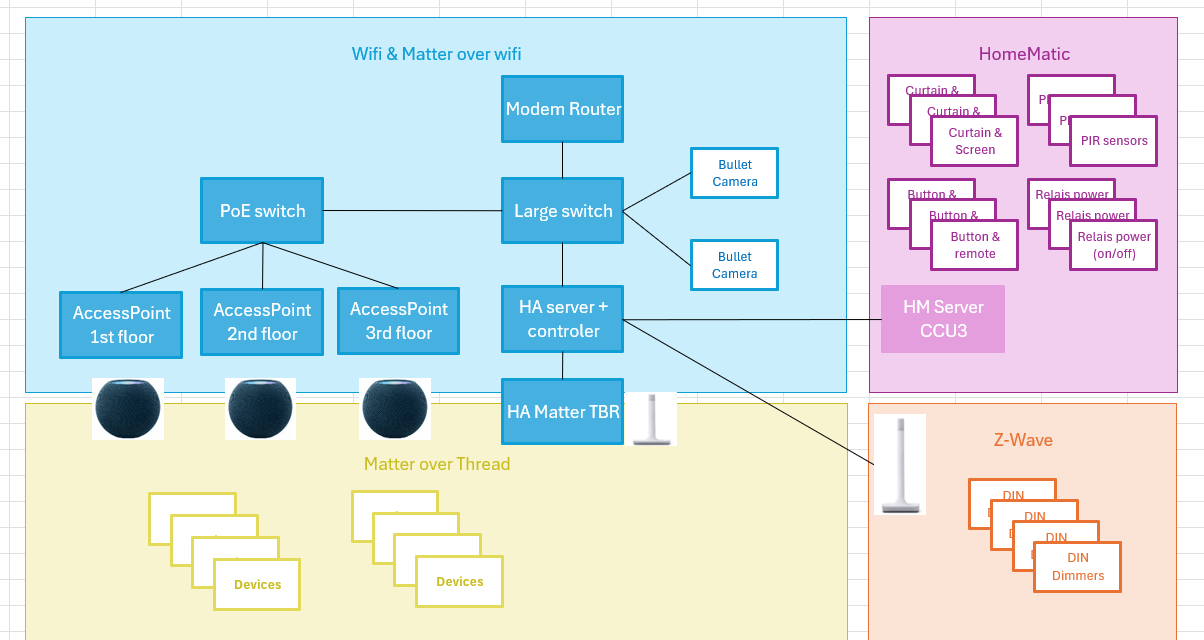
Z Wave for devices which are ‘part of the house’ itself (eg devices which are build inside the walls and need to be very reliable). The choice is also based on the steady availability of various Z wave devices, as where the offering of Matter over Thread still getting started.
Matter over Thread for the ‘flexible’ devices which are easy to install / replace, like a lamp bulb or portable switch/remote. So when an issue occurs its easy to solve it, eg by simpy swapping a bulb). I expect/hope that the product offering will increase in the (near) future. The introduction of the new Ikea Matter over thread line up is already promissing.
I could have added Wifi, Bluetooth and of course Zigbee. But I’m keen to keep it simple and therefore also enable a stronger mesh network. The very recent announcement that Matter support with Home Assistant will be improved is very promising (article: Giving matter.js a new home). Great that Ingo Fisher will join the Open Home Foundation and brings Matter.js along. I really like the approach and look forward to the collaboration and improved Matter support with Home Assistant
For both I use the Home Assistant antenna’s, also to support HA. I Learned that the Apple Homepods already act as a Matter over Thread hub (Thread Border Router), which is great. But sometimes they are disconnected (in example when the kids want to listen somewhere else or simply need the wall power socket , which would kill/reduce the signal path). So working with a dedicated Matter over Thread antenna a basic 24/7 signal is always in place.
As a first step I wanted to replace the broken Homematic (dimmer) lights. I replaced them with Shelly DIN Dimmers and in-wall socket switches.
Everything works flawless (and fast). I usin the S2 security, with looooong ID code. ps for an easy installation I scanned the QR code with an iPad, then copied the ID/code and pasted it in the Text import option in the Z Wave JS UI panel. Then, when powering up the devices, it is recognized.
To add on “6. Lights” (I couldn’t edit the previous post):
I prefered one brand for all light dimmer/switches. This way the installation- and update procedures are the same or very similar. Based on the positive reviews/experiences I went for Shelly.
As mentioned above: for devices that are wired to the house (eg DIN or install behind a physical wall switch) I’m using the Z Wave devices/protocol (based on the reliability and reach), these just have to work. I’ll be starting with Matter (over Thread) for ‘flexible’ devices which are easier to replace and/or easier to work around them (eg a smart light bulb).
When more Matter products hit the market ánd more experience is out there on (ease of use, competibility in Home Assistant, signal range, reliability, etc) I can add Matter as an alternative (but it’s still early days I guess)
With the new Shelly DIN Dimmers 0% is really 0%. (the Homematic Dimmers apparently had a small power leakage, resulting that some LED spots remain slightly ‘on’ at 0%). Now they’re completely off
Also the small buzz on the big ceiling lights is gone with the new Shelly DIN Dimmer. Great!
ps Yesterday I edited the previous replies above (updates 1-5)
I’m very pleased that the Homematic remote control and wall switches also work with the Home Assistant integration. This way all functions that are used in the household (and by familiy members) remain the same. So no change effort needed .
I’m realy gratefull that the Homematic integration is build and maintained. Great to have one place to setup and maintain the existing devices/entities (Homematic) and new devices/entivties (Zwave/Matter). My ideal scenario as mentioned in one of the first posts is now reality. Just awesome
On a later stage I’ll have a look at voice control. Hopefully the Homepods or even mobile phones (?)) can be (re)used for this. I’ll have to do some research first.
 . With tons of options and choices, it’s kind of a puzzle to determine the proper starting point and next steps.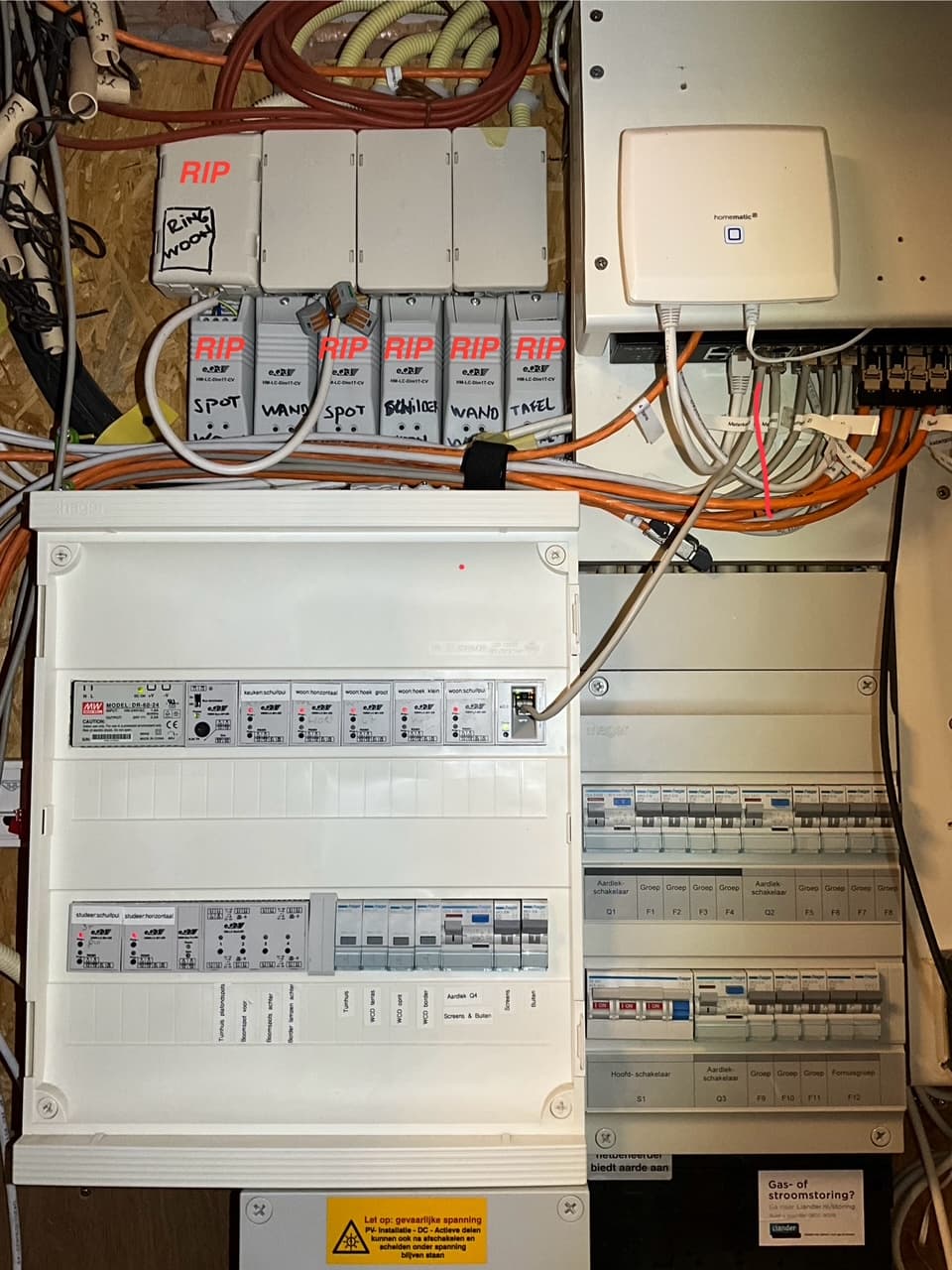
 As a precondition I had to install Advanced SSH.

 , which would kill/reduce the signal path). So working with a dedicated Matter over Thread antenna a basic 24/7 signal is always in place.