Going all-in with Voice Assistant (help needed)

tl;dr Scroll down to the “Needs” section where I list what phrases I need and how most don’t work.

Background

By the end of this week, when all my speakers have finally come in the mail, I’ll be fully transitioning over to only using Home Assistant Voice Preview Edition after 10 years of Google Home and Alexa.

I currently use a combination of:

  1. Amazon Echo Dot for basic smart home tasks.
  2. Google Home Mini for music and broadcasts.
  3. Google Chromecast Audio for music to speakers over a 3.5mm cable.

Reasons I use both

  1. Alexa announcements broke this year because of added noise cancellation. Announcements end up getting chopped up to the point where you couldn’t understand them, or they’re mostly slience. Google Home Mini is also louder than my 2nd Gen Echo Dots.
  2. My 1st gen Google Home Mini devices are super slow for smart home tasks. I mean, for the first year of ownership, they couldn’t even give me the time. On the other hand, their ability to play music is wonderful. I wouldn’t use them if not for that feature.
  3. I like that Alexa lets me find my phone and works 99.9% of the time no matter what I ask it. It even has a feature where you can whisper to it, and it whispers back as well as the ability to talk to another Alexa device (intercom) by using the “drop-in” keyword. You can even call people’s phones when you’re still in bed!

Needs when using only Home Assistant Voice PE

Voice Assistant phrases I use just about every day:

  1. “What time is it?”
  2. “What day is it?”
  3. “What’s the temperature [outside]?”
  4. “Turn on Exhaust Fan for 10 minutes”.
  5. “Broadcast (or Announce) Dinner’s ready!”.
  6. “Drop in on Kitchen”: intercom feature.
  7. “Find my phone” feature (rings the phone by calling it or playing an alarm).
  8. “What did you do?” for recalling the last action.

It’s more rare to ask “what sound does a badger make” or “what’s 5 times 8042?”. While fun, those are effectively irrelevant because I can always use my phone. The other ones, I want immediate feedback.

Another issue, Voice Assistant always does weird stuff like this:

What it does today

:white_check_mark: 1. “What time is it?”

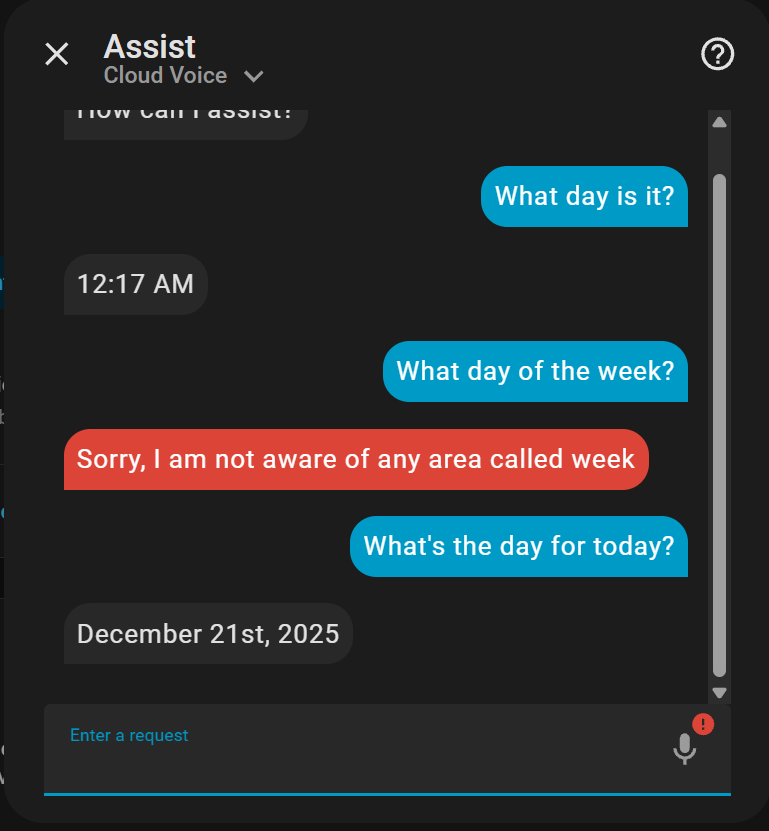
:no_entry: 2. “What day is it?”

This question always does some wild stuff when it runs directly on the AI without local.

:white_check_mark: 2.1. “What’s the date?”

This works, but any deviation gives weird responses again.

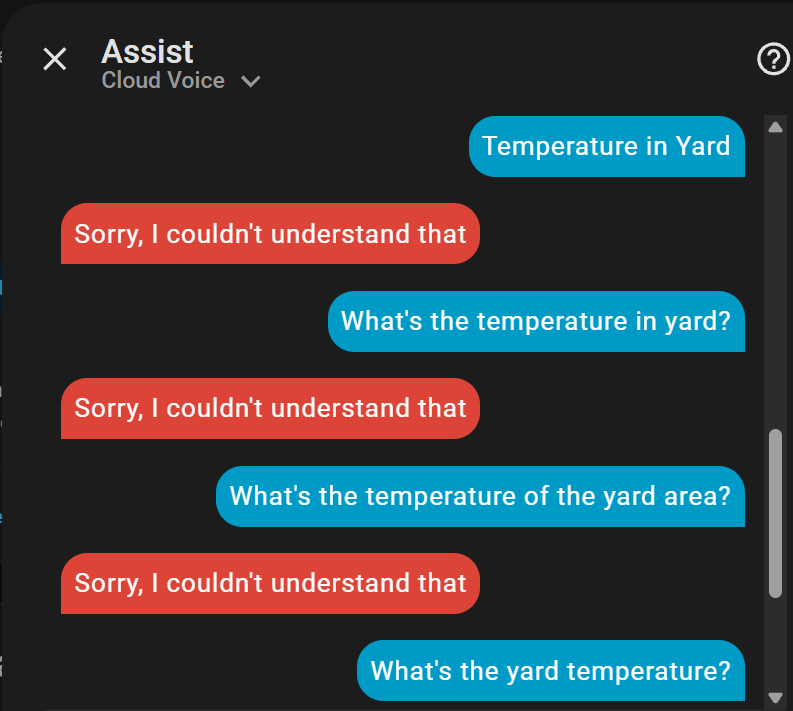
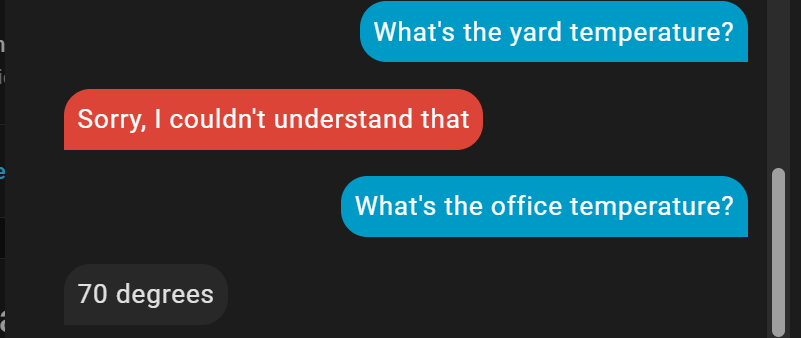
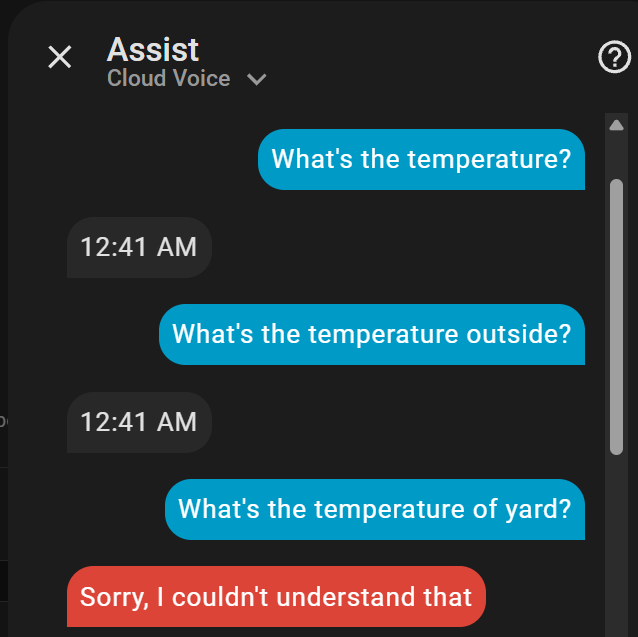
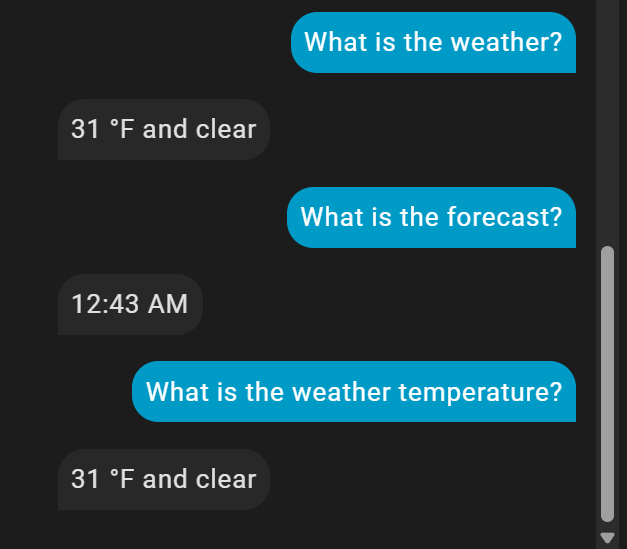
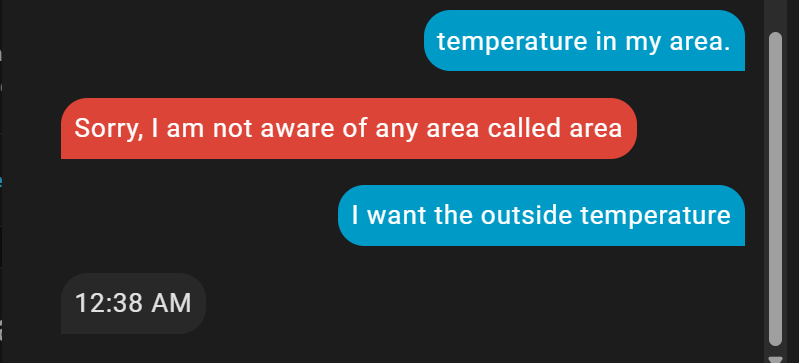
:no_entry: 3. “What’s the temperature [outside]?”


:no_entry: 3.1 Exposing weather entities

It appears I didn’t have any weather entities exposed, so I did that:

And it still didn’t work :cry::

:white_check_mark: 3.2. Ask for the weather

After asking for the weather directly, now I’m getting the outside temperature.

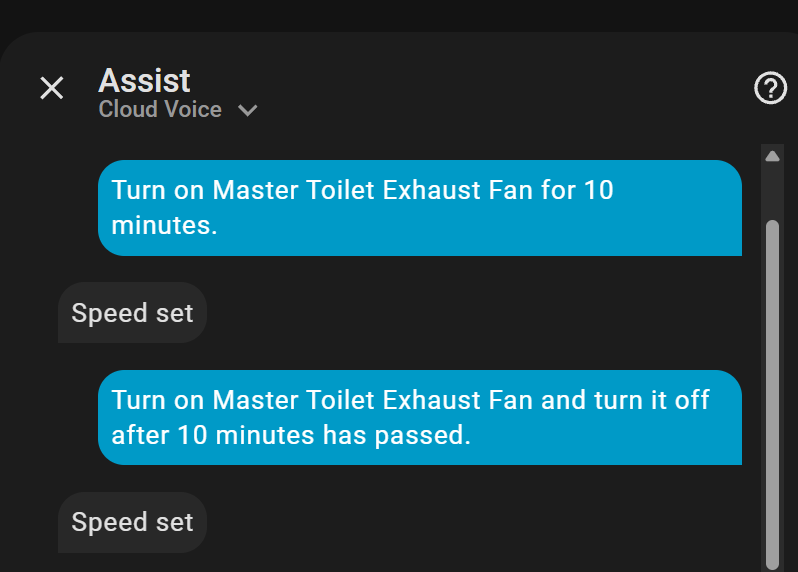
:no_entry: 4. “Turn on Exhaust Fan for 10 minutes”.

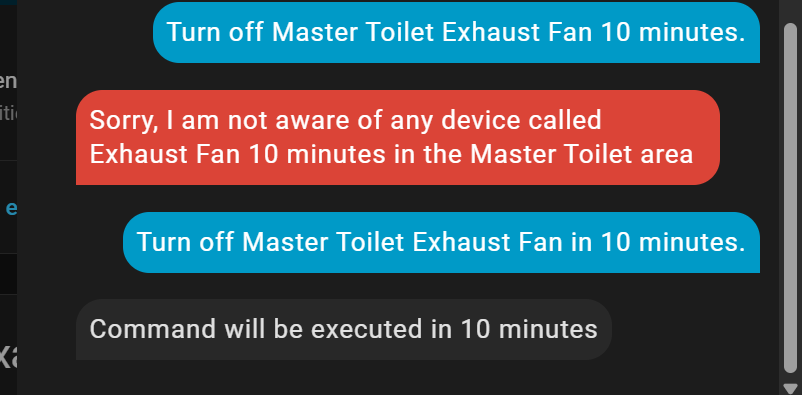
:white_check_mark: 4.1 “Turn off Exhaust Fan in 10 minutes.”

Since turning it off on a timer using the “Turn On” command didn’t work, I tried something simpler:

I’ll find out in 10 minutes. Timers like these work correctly in my testing earlier this month.

UPDATE: It worked.

It sucks to have to turn it on first and then ask it to run a command in 10 minutes rather than a 2-for-1 situation.

:no_entry: 5. “Broadcast (or Announce) Dinner’s ready!”.

It’s late, so I’ll have to do this another day. As far as I understand, this does not work.

My earlier test tonight, trying to announce to a single room, also didn’t work.

:no_entry: 6. “Drop in on Kitchen”: intercom feature.

Simply doesn’t work. There’s no voice transfer or recording functionality sadly.

Maybe Sendspin will make this possible in the future, but I’d like something working now.

:no_entry: 7. “Find my phone” feature.

It can’t tell what I’m asking.

It’s also late, so I can’t verify if I can announce to my phone. The most I know I can do is probably send a notification.

:no_entry: 8. “What did you do?” for recalling the last action.

It has no clue what I’m asking when I say this.

It’s useful to have this to check what it did if it says “yes, I did that thing you wanted” and the thing didn’t happen. Now you have to wonder what actually happened.

Conclusion

Pretty much all Voice Assistant can do for me is give me the time and “date”, not “day”.

Music Playback :+1::+1:

The other thing I needed from Voice PE is streaming music, and it does that fantastically well with Music Assistant!

While the onboard speaker is complete and utter trash, not useful unless it’s right by your ear, I’ve attached every single Voice PE to a nice speaker over 3.5mm. This also replaces all my Google Chromecast Audio devices!

I suddenly remembered some other stuff I say (I keep remembering more):

  1. "Turn off <ROOM_NAME> lights."
  2. “Play <SONG_NAME> on <SPEAKER_GROUP_NAME>.”
  3. “Set volume in <ROOM_NAME> to 30%.”

And as I said before, whispering commands to avoid it shouting “OK, TURNING ON LIGHTS IN <ROOM_NAME>” back at me. This probably won’t ever work unless a context like “user is shouting” or “user is whispering” is integrated into Home Assistant.

Wide variation depending on STT provider
Speech to Phrase STT is good but vary specific. I find that it does not take kindly to low input volume (speak loudly or be close to device). It had set dictionary and i think my TV in the background (loud) interferes and prevents it from matching.

Faster Whisper STT is good but if mistakenly woken by TV it will ramble on with its “It didnt understand … 30 seconds later…command”.

Nabu cloud was very good for some reason. no complaints but havent used in a while.

I use both Speech2phrase and faster whisper currently. Alexa and Hey Jarvis wake words enable one or other. doing this so I can test each.

Drop in feature currently does not exist.
You can directly send TTS message to a device. I use this for now but drop in is much needed. Maybe by end of 2026

1 Like

I can appreciate you testing and giving a rundown on what didn’t work but… You also did not tell us what method (speech to phrase or llm) you’re using for voice. It’s NOT plug and play quite far from it.

The folks here can help you get better accuracy but we’ll need more info and honestly lower your expectation a tad - it is still not a finished product at all (preview edition) I say this because I note you bounce products when one didn’t do something you wanted. The vpe will have a lot you don’t like about it for a while Im sure.

Voice needs if you’re not using an LLM. extensive tools. Read: you need to ensure tools exist for your ask. And if they don’t write them yourself or pull blueprints. There’s a great one for music control by music assistant for instance.

If not using an LLM, speech to phrase would trip over time of day for sure. No tool.

If you are using an llm, tools and extensive grounding. Are required (see the grandma’s cardboard box problem on Fridays party - search it’ll be like hit #1) simply exposing entities is NOT enough, you also have to prompt effectively to tell the llm what to do. Without, we’ll you see the result - it’ll feel like a drunk college student. But you already found that out.

So are you using llm or speech to phrase?

Default keyword recognition is bad

@tmjpugh Even shouting, it’s not great at understanding me.

Even next to it, it sometimes does nothing when I say the wake word. Maybe it needs more consonants?

I also have the mic on “High” sensitivity.

AI models

@NathanCu I’m using Home Assistant Cloud with “Ok Nabu” as the keyword and “prefer local”.

I set up Ollama with a bunch of different models and the only decent experiences were with llama3.2 and qwen3. Anything else I tried had a lot of trouble. llama3.2 was the best overall, but it seemed to get worse as I used it. Like it would respond correctly a couple times, then suddenly gave me weirdo responses a minute later for the same question even with a new context. In the end, I decided to avoid any Ollama setup for now.

I also tried changing the prompt, but it seemed like that only made things worse.

Speech to Phrase

@NathanCu What’s Speech to Phrase?

Explorations

I was asking ChatGPT for some ideas last night, and it was telling me to use 100% YAML custom intents and phrases. It’s okay, but I don’t like the idea of putting entity ids in YAML without a UI component. Seems like an easy way to break stuff until you find out months later.

I couldn’t find that Grandma’s Voice Box thing you were talking about either.

Here you go

STT (speech to text) is used to convert words you say into text (a sentence) that may be used as input command to AI, LLM, your voice assistant basically.

Speech to Phrase is a STT provider
Whisper is another STT provider

When setting up your voice assistant you should have setup one of these.

TTS (text to speech) is opposite. It is used by voice assistant to convert the output text response into a audible speech response for playback

Piper is generally used for this.

In case of STT and TTS there are others available but those above are the HA recomendations I beileve. In both case you can use Nabu Cloud. I think that used Speech-to-phrase for STT and piper for TTS. I used Nabu for a while and it worked the best I believe but I think I need to test again to have good comparison


I can check off almost everything for you except Drop in which im not sure is even possible with a Voice PE :grin:

just added Broadcast and Find My Phone this morning

prob need to tweak the critical alert sound on your phone to make Find My Phone useful

1 Like

Are you saying that I only need to add Tater to Ollama, and I’m good? What prompt are you using? Default?

After that I’m still not sure what you use now for processing the commands itself.
Is it another LLM model now?

If you’re not sure if the problem is your local model, or if HA simply doesn’t provide the needed tools / capabilities for your requests, you could try one of the cheaper cloud models (e.g. gtp-<any-number>-mini would be a good starting point).
Once you got things running here, try a local model and find out what’s not working anymore and investigate why.
Might be easier than trying to solve all problems out there at once. :wink:

As you seem to use LLMs instead of speech to phrase based on your comments, I would suggest also disabling “prefer local” for the time being.
Otherwise you’re fighting against 2 systems, where one or both might not support what you’re testing and you end up with mixed results.

What you then need, is a good prompt to tell the AI important stuff about how you want to control things to get repeatable results and how it should behave / control things.

The other part are user intends / scripts that the AI can call to do what you want.
HA simply hasn’t everything on board so far to make power voice users happy.
That might change over time, as they are adding more and more intends.

Even a search tool for entities is very helpful if you expose a lot entities, so the LLM can easily lookup the needed ones for rooms, user tags, …
Home Assistant only provides a large lists of entities with state and some attributes, so based on how “smart” your LLM is and how large the entity list
Otherwise simple requests like “turn off all lights in the living room” might not always work as expected.


Once you're at that point you should be ready to add your own scripts to add "capabilities" to your assistant.

Not sure how Tater’s setup is exactly structured. I’ve seen it’s a whole addon, so wasn’t able to find any single scripts at a glance.
Is it using HA intents / scripts Tater, or are you using a different approach to control things externally, as your package also adresses other things beside HA?

Nate’s Friday’s Party thread that he linked above, offers the most advanced collection of tooling and prompt shared in the forums.
He’s also bundling up everything for an easier start to use it at the moment.


About your music control: You most likely use the script from TheFes to control Music Assistant (as it offers more options compared to the internal Music Playback script, at least this was the case until 1 or 2 months ago)?

I wrote another script to do music search capabilities for the LLM instead of just playback by search terms, which opens new possibilities.
Wrote about that here.

If you need even more inspiration on some simple scripts or prompting, I try to write down all the problems / solutions I run into while setting up Assist to use in our house:

https://community.home-assistant.io/t/about-making-inexpensive-models-smarter-by-providing-tools-and-context-local-models-gpt-5-mini-gpt-4-1-mini-gpt-4o-mini/

Edit, about your list:

  1. “What time is it?”
    Should be possible out of the box with an LLM based assist.

  2. “What day is it?”
    Should be possible out of the box with an LLM based assist.

  3. “What’s the temperature [outside]?”
    Needs some prompting how it should retreive that to be reliable and always the same way. Also tell it in the prompt if you want to use a temperature sensor or a weather entity for questions like that (which also needs a tool if that didn’t change recently. I use this one).

  4. “Turn on Exhaust Fan for 10 minutes”.
    I think delayed commands are already possible with a default intent from HA. Not 100% sure, don’t use this often myself.

  5. “Broadcast (or Announce) Dinner’s ready!”.
    Will need a script to do TTS to a media player in a specific room.
    Also currently on my todo list.

  6. “Drop in on Kitchen”: intercom feature.
    As you mentioned, this is most likely not easily possible atm.

  7. “Find my phone” feature (rings the phone by calling it or playing an alarm).
    A script that allows to send notifications to mobile phones would allow for that too, if you allow the script to also send criticalk notifications (and allow this for the HA companion app in the iOS settings).
    Then you can send notifications with sound that is also played if the device is muted.

  8. “What did you do?” for recalling the last action.
    An LLM based assist should be able to tell you that without additional tools / information. If not, something is broken with conversation history in your LLM setup or the LLM integration you use (which means each request will become a new conversation and the LLM won’t have any information about what you asked before)

3 Likes

yes basically tater is just a middle man homeassistant → tater → ollama

its also a addon now so you can install it right in home assistant.
you just enable/disable what plugins/tools you want to use or not use

if your really interested in how the prompting works, every platform has its own discord, irc, matrix, homekit, home assistant, and OG Xbox

you can take a look in each platform and look under System prompt section

1 Like

also just because I dont have a lot a stuff documented… once you enable the home assistant platform, it has a built in notification system similar to the Alexa devices, the Voice PE LED will light up when you have a notification, and you can ask whats the notification.

currently only the door bell plugin takes advantage of this and will take a snap shot of your doorbell when it rings, describe the image and stores it in your notifications

1 Like