Hello, looks great! I could never even connect mine to wifi from the grohe app. Anybody else had troubles?
Does this integration work without internet (Grohe cloud servers), is it fully local?
@Schilli ping ^^
Hey, sorry for the late reply.
No the integration is communicating with the Grohe Servers as there are - at least what I know - no possiblities to directly communicate with the device unfortunatelly 
Hey 
can you just create a issue on the Github page for the project with a debug log so we can look into that.
Thanks
./schilli
Hey @Raley
thanks for getting in contact with Grohe and sharing the information you got from them. It’s good to know that the servers keep active for the foreseeable future 
To be honest I haven’t had any issues with the Sense Guard and wi-fi connections on my side, but it’s in a separate wi-fi which only has a 2.4GHz network. I did this mainly to separate all the IoT devices. Also I had some problems with other devices when they had been connected to a mixed network.
Hi, I’m having a problem. I’m seeing two Grohe Sense sensors displayed, even though I only have one. One is online, the other offline.
I’ve already tried deleting the offline one, but it reappears after every Home Assistant restart.
I’ve also deleted the entire integration and reinstalled it after a Home Assistant reboot. Unfortunately, the same thing happens; the offline Grohe Sense sensor is immediately back.
Furthermore, I have a question: the “sensor.grohe_sense_water_consumption” sensor tracks daily water consumption, correct?
I’m using the sensor for the energy monitoring feature integrated into Home Assistant.
I’ve simply deactivated the secound Grohe Sense sensors for now.
That’s all for now.
Thanks.
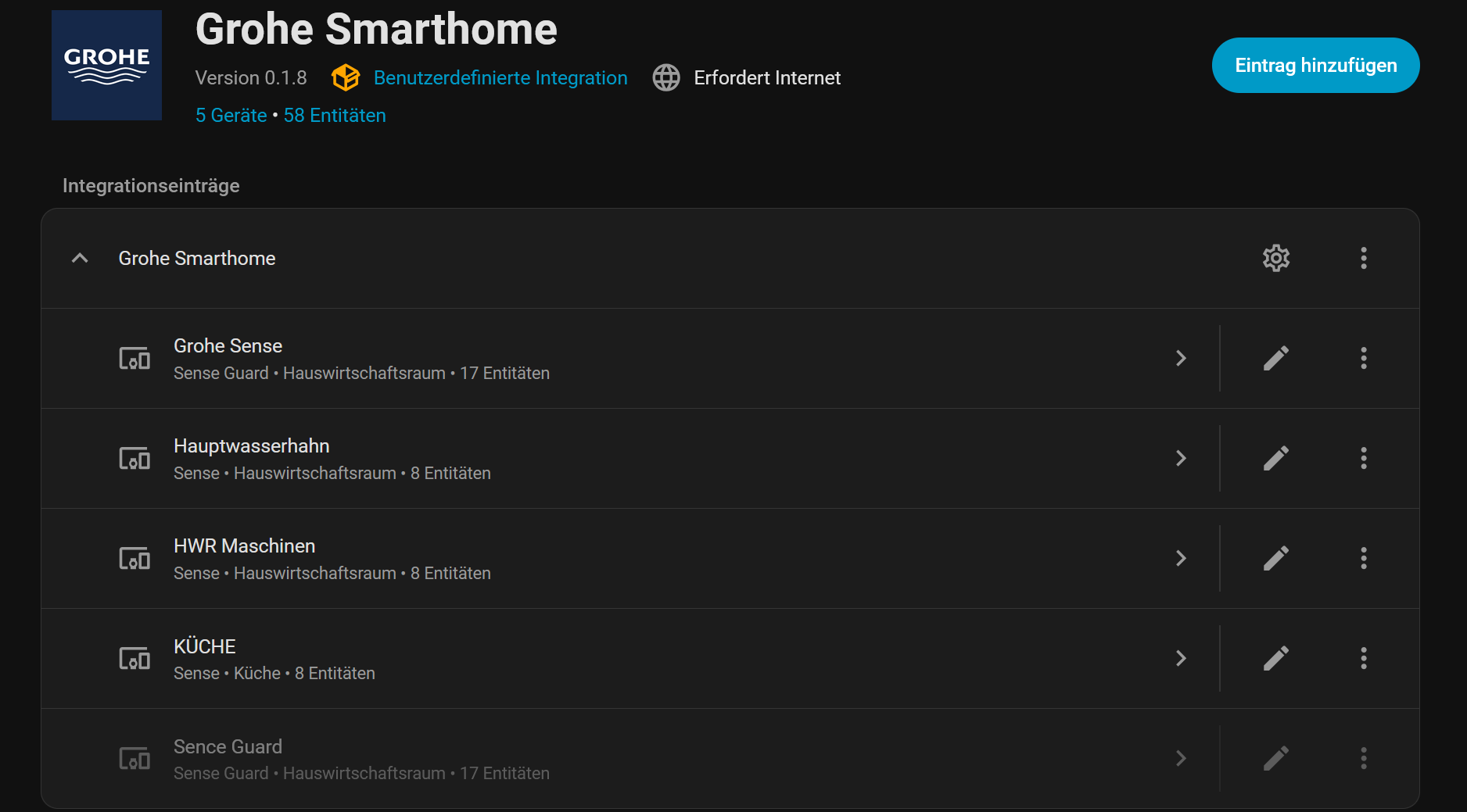
Hi @n02m4n
I’m also using the sensor.senseguard_water_consumption for my energy dashboard as it is - as you said - the one for the daily water consumption.
For the Sense Guard which is always reappearing after a reboot even though you deleted it from the integration. Can you please check in the Grohe app if it is still shown there, as after a reboot all the devices - which are available from Grohe - are retrieved and added accordingly. So if it is still available there, it will be added again. Maybe you can give that a try.
./schilli
Thank you for your reply.
The Grohe app shows four devices: one Grohe Sense Guard and three Grohe Sense devices.
But no other Grohe Sense Guard.
That’s why I asked.
Hey,
can you check within the Developer Tools -> Actions -> Get Dashboard Data how many appliances are returned.
The path should be locations[].rooms[].appliances[]. Can you check if the one Sence Guard is returned there somewhere.
./schilli
Yes, it’s there. Two appliances.
          - appliance_id: df9eee56-5209-4e0e-bc62-b1e1b9f4196c
            installation_date: "2022-12-20T13:44:59.000+01:00"
            name: Sence Guard
            serial_number: "no"
            type: 103
            version: ""
            tdt: "0"
            timezone: 0
            role: owner
            registration_complete: false
            calculate_average_since: "2022-12-20T12:44:59.000Z"
            snooze_status: NON_EXISTENT
            data_latest:
              measurement:
                flowrate: 5.7
                pressure: 3.3
                temperature_guard: 13.5
                timestamp: "2023-01-31T08:27:56.000+01:00"
              withdrawals:
                starttime: "2023-01-31T08:24:41.000+01:00"
                stoptime: "2023-01-31T08:24:45.000+01:00"
                waterconsumption: 0.4
                maxflowrate: 8.1
              average_daily_consumption: -1
              average_monthly_consumption: -1
              daily_consumption: 0
              daily_cost: 0
            command:
              temp_user_unlock_on: false
              reason_for_change: 0
              pressure_measurement_running: false
              buzzer_on: false
              buzzer_sound_profile: 2
              valve_open: true
              measure_now: false
            status:
              - type: update_available
                value: 0
              - type: connection
                value: 0
              - type: wifi_quality
                value: -1
            notifications: []
            installer:
              name: ""
              email: ""
              phone: ""
Grohe might still have it in the cloud.
I would only consider devices where “registration_complete” is true.
That would certainly solve it easily.
Hey,
thanks for the info. Once back home I’m gonna add the registration_complete to the integration. Will let you know once there is a new release.
./schilli
Hey @n02m4n,
I’ve just released version 0.1.9. Maybe you can give it a try as it should solve you’re problem with the one sense guard being setup which is not fully registered.
./schilli