I created together with @koproduction-codes a new integration for all the Grohe Smarthome devices. These are namely:
Grohe Sense (small leak sensor)
Grohe Sense Guard (main water pipe sensor/breaker)
Grohe Blue Home (water filter with carbonation)
Grohe Blue Professional (water filter with carbonation)
A detailed list of all the implemented features can be found on the wiki site of the repository.
The project can be found here and can be used with HACS:
Some words about the history of the project
When I started with the project, I first forked the awesome repo from @gkreitz as a starting point. Over time I was looking into getting the integration updated and running again, implemented the config and options flow and so on to have it working for my Grohe SenseGuard and Grohe Sense.
Once everything was working, first tickets where created about also integrating the Grohe Blue devices. I also implemented them and got in contact with ‘koproduction-codes’ who was having an integration for the Blue devices. We both joined forces, as both devices use the same API, and created the integration now for all the Smarthome devices from Grohe.
Wow, talk about perfect timing here. This integration is EXACTLY what I was looking for! I have previously had it working using Node-RED with a setup I found in the community forums. Though, recently it has not been working at all. As I don’t really fully undertstand Node-RED this integration will also allow me to remove this addon. Now that’s a bonus!
Will set it up later today. Many thanks for adressing this!!
Hi, first of all, many thanks for providing this integration!
I have set it up with for my Grohe Blue Home device, and I can see the device in Home Assistant, with the correct type, firmware info, the controls (notifications, reset co2, reset filter).
However for some reason none of the sensors have been created.
If I run the Action “Grohe Smarthome: Get Dashboard Data”, I can see all the info about my device.
I tried to reconfigure the integration a couple of times, but I always end up with the same issue.
Do you have any idea why no sensors are being added?
first of all, thanks for using the integration and thanks for the feedback that there are some issues on your side during setup.
Do you see some errors in the log from home assistant? Also have you enabled the debug logging for the integration?
I would hope there is something shown Also yesterday (or a few days ago) there had been some 502 (Bad Gateway) errors from Grohe side.
If you want, you can just create a new issue on the Github page with the logs for the integration and I would check whats going wrong and why you’re not seeing any sensors
This is really timely as I’ve been looking at water leak detection & remote switch-off systems, and the Grohe device ticks most of the boxes.
This integration looks amazing so thanks for creating!!! Regarding the reading taken from the Actual Flow Rate sensor - am I right in thinking that this would be the most recent water flow? I’m looking to create some some custom water shutoff scenarios with HA automations which would be largely driven by reading the current water flow rate, alongside other variables (time of day, house occupancy etc). I understand that that the sensors will be reading every 15 mins so not real-time.
To be honest I was not checking on the water flow and the measurements that deep until now, as I am mostly using it for monitoring purposes throughout the day. But as far as i know, those readings are updated once the water flow is finished (latest max flow rate) or when the flow takes longer (actual flow rate). But what ´takes longer´ means in minutes I am not sure but will check on that
I haven’t finished all the implementations for the Sense Guard, as there are - at the moment - no real configure settings like the ones you do have within their app. I guess once we’re using all the garden watering at home I’ll have a look into that as well, so that you can set limits for the max amount of water with one withdrawal and so on (I guess default is 300l per withdrawal) and also the ‘ignore the limit for the next XX minutes’. And I guess these settings are saved directly on the device and handled there, as it definitely stops water withdrawal once the limit is exceeded.
sorry for the late reply but I’ve been busy the last couple of weeks.
I’ve just released the beta @juskalalie is mentioning.
Please give it a try @Fvanoost. If it is still not working, it would be great to get some logs
Just to let you know that I’ve heard from Grohe (I emailed them with a few questions which weren’t addressed on the data sheet such as lifespan, extended warranties etc) who have told me that the Grohe Sense has been discontinued with no direct replacement. Having just spoken to them on the phone (0208 2832840), I was told that it will continue working for the next 2 years and then will probably stop.
The person on the phone was quite vague about that, and admitted that they had very little info as the announcement had only been made last week. I would have thought that at some point the server would be taken down, which would mean that the app (at a minimum) would stop working?
Have any owners received formal comms from Grohe about this yet?
Thank you, @Raley, for your answer! I also called them and today they know a bit more. They guarantee updates of the app and service till 2034. The device can be ordered from Grohe till the end of June 2025.
I’ve now heard slightly differently. From Grohe:
“We can confirm that the Grohe cloud servers that support the Sense Guard and app connectivity will remain active for the foreseeable future. There is currently no planned end date for server support. The Grohe Sense Guard is being discontinued primarily due to high production costs, which lead to expensive warranty repairs, and a high volume of failures due to wi-fi connection issues. The decision to discontinue the product applies only to the UK market.”.
That said it’s good news that it will continue working 'til 2034.
According to Grohe,it only has an expected lifespan of 5 years - how long have you had yours for?
From what I’ve read, the wi-fi connection issue could potentially be resolved by switching to a 2.4GHz network (as opposed to 5GHz), though I’m now a bit twitchy about getting this given the “high volume of failures due to wi-fi connnection issues”…
[apologies if this is seen as hijacking the thread - from what I’ve seen this is the only actively online group that discusses the Sense Guard, and it could be helpful for other people who are considering buying it]
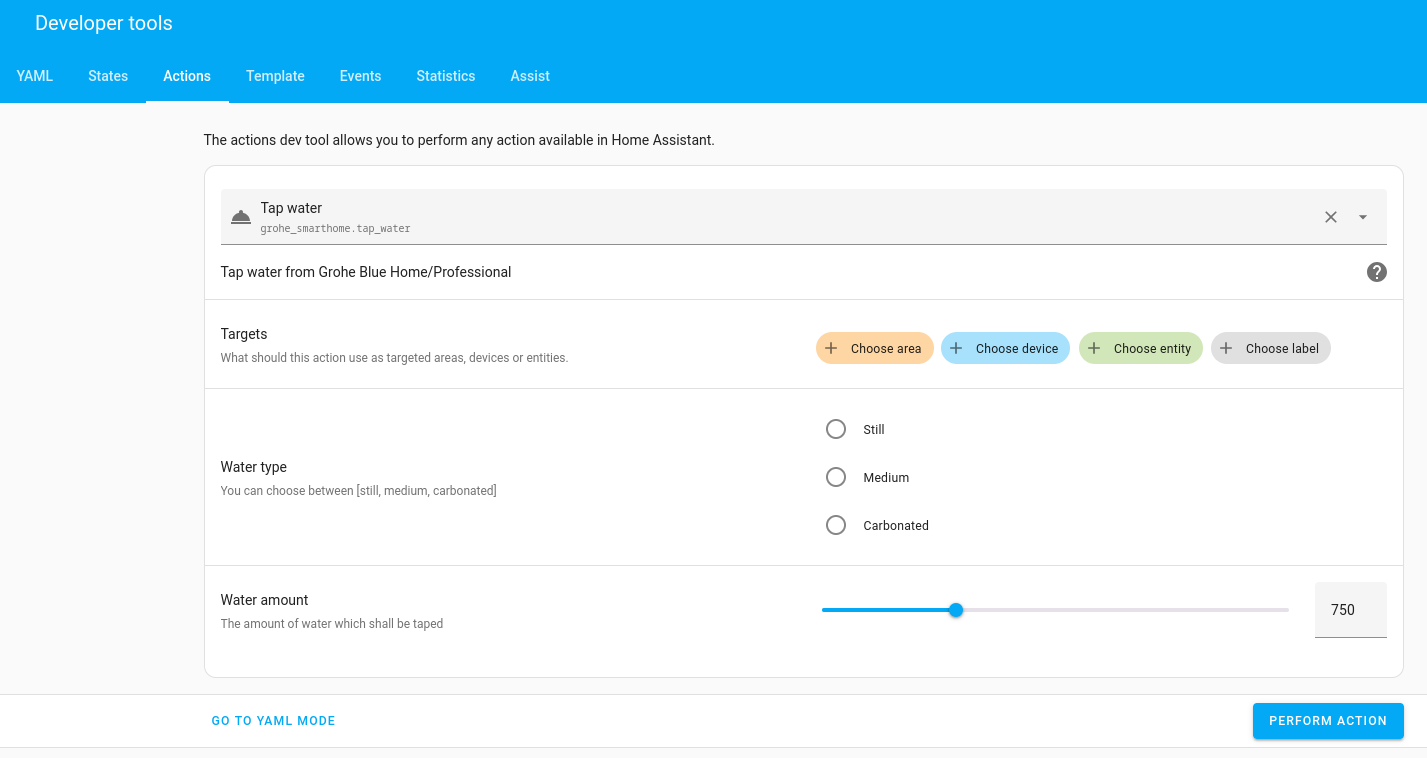
Great, everything works. I have a Blue Home. Will the water dispensing function with the setting of how many ml will ever be available? It’s very convenient to dispense a glass from the app.
Hello,
When I run this via automation, the following error occurs:
“Script requires ‘response_variable’ for response data for service call grohe_smarthome.tap_water”