[GUIDE] Controlling ITHO Daalderop fan with ESP8266 and CC1101

I just set this up for my home, and thought I’d share my config for anyone else who comes across it.
I have the ITHO CVE ECO RFT SE, which supports 3 modes - low, medium, and high. It also has the timer function.

I followed the guide in Dutch to install using ESPEASY on my ESP32, and connect it to homeassistant via mqtt.
Unfortunately I struggled a lot with the code that in the google doc, I think there might be some errors there. It also seems somewhat outdated.
In the end I settled on the following:

mqtt:
  fan:
    unique_id: itho-daaderop-cve-eco-rft-se
    device:
      name: "central ventilation"
      model: "ITHO daalderop Ecofan"
      model_id: "CVE ECO RFT SE"
      identifiers: "545-5026-001"
      configuration_url: "http://192.168.1.145"
    name: Ecofan
    availability:
      - topic: "ITHO-ventilation/status/LWT"
        payload_available: "Connected"
        payload_not_available: "Connection Lost"
    command_topic: "ITHO-ventilation/Fan/cmd"
    state_topic: "ITHO-ventilation/Fan/State"
    state_value_template: "{% if value|float==0 %}State 0{% endif %}{% if value|float >0 %}State 1{% endif %}"
    payload_on: "State 1"
    payload_off: "State 1"
    optimistic: true
    preset_modes:
      - "low"
      - "medium"
      - "high"
      - "timer"
    preset_mode_command_topic: "ITHO-ventilation/Fan/cmd"
    preset_mode_command_template: >
      {% if value == 'low' %}
      State 1
      {% elif value == 'medium' %}
      State 2
      {% elif value == 'high' %}
      State 3
      {% elif value == 'timer' %}
      State 13
      {% else %}
      State 1
      {% endif %}
    preset_mode_state_topic: "ITHO-ventilation/Fan/State"
    preset_mode_value_template: >
      {% if value_json == 0 %}
      low
      {% elif value_json == 1 %}
      low
      {% elif value_json == 2 %}
      medium
      {% elif value_json == 3 %}
      high
      {% else %}
      timer
      {% endif %}


  sensor:
    - name: "timer"
      unique_id: itho-daaderop-cve-eco-rft-se-timer
      device:
        identifiers: "545-5026-001"
      device_class: "duration"
      state_class: "total"
      unit_of_measurement: "s"
      suggested_display_precision: 0
      icon: mdi:timer
      state_topic: "ITHO-ventilation/Fan/Timer"
      value_template: "{{value}}"

    - name: "speed"
      unique_id: itho-daaderop-cve-eco-rft-se-speed
      device:
        identifiers: "545-5026-001"
      icon: mdi:transfer-right
      device_class: enum
      options: ["low", "medium", "high", "high (timer)", "unknown"]
      state_topic: "ITHO-ventilation/Fan/State"
      value_template: >
        {% if value|float==1 %}
          low
        {% elif value|float==2 %}
          medium
        {% elif value|float==3 %}
          high
        {% elif value|float>=11 %}
          high (timer)
        {% else %}
          unknown
        {% endif %}


  button:
    - name: "pairing"
      unique_id: itho-daaderop-cve-eco-rft-se-pairing
      device:
        identifiers: "545-5026-001"
      enabled_by_default: false
      entity_category: "config"
      command_topic: "ITHO-ventilation/Fan/cmd"
      payload_press: "State 1111"
      availability:
        - topic: "ITHO-ventilation/status/LWT"
          payload_available: "Connected"
          payload_not_available: "Connection Lost"

    - name: "unpairing"
      unique_id: itho-daaderop-cve-eco-rft-se-unpairing
      device:
        identifiers: "545-5026-001"
      enabled_by_default: false
      entity_category: "config"
      command_topic: "ITHO-ventilation/Fan/cmd"
      payload_press: "State 9999"
      availability:
        - topic: "ITHO-ventilation/status/LWT"
          payload_available: "Connected"
          payload_not_available: "Connection Lost"

This is how it looks in HA:
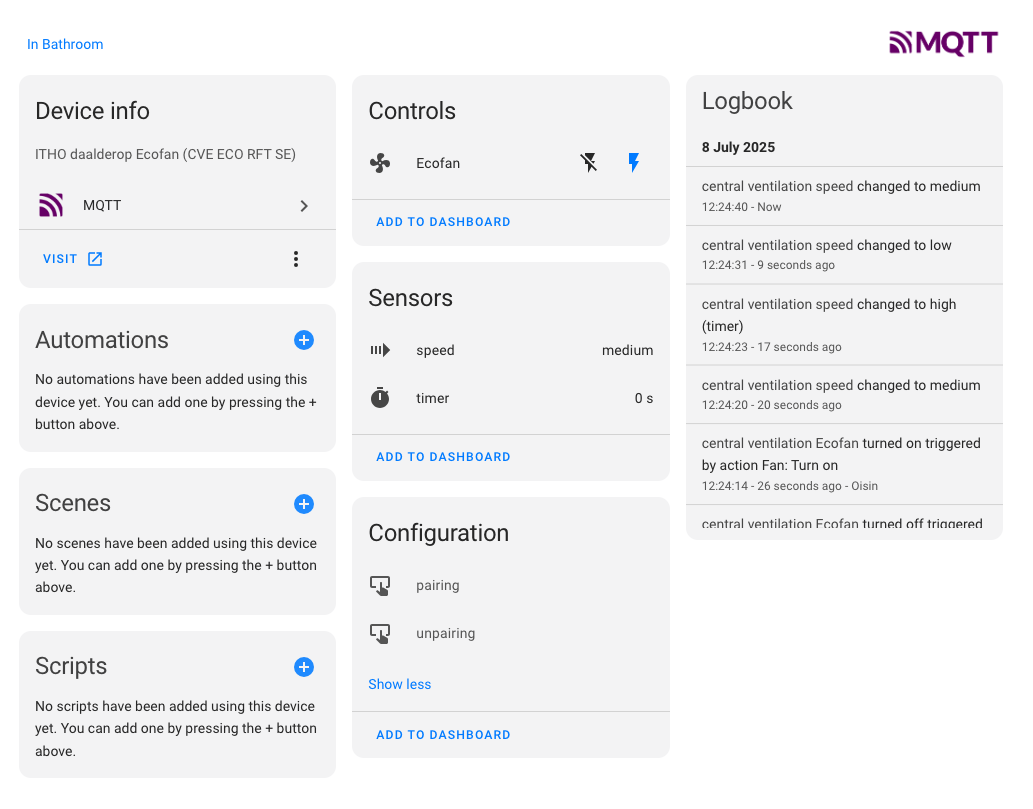
There’s a few changes there, but the most significant ones are:

  • my fan can’t be turned off (State 0), only set to “low” so I changed the state payload to reflect this
  • I updated the presets to match my possible states
  • I fixed the preset mode value template, which seemed to be wrong and caused errors
  • I added buttons for pairing and unpairing
  • I added device config so that everything is grouped together under a single device

Hope this is helpful for someone!

ESPHome 2025.12 now has native support for CC1101 :slight_smile:

My current (work in progress) configuration seems to work without any additional libraries on a esp32 and cc1101 to receive fan speed changes.

# https://esphome.io/components/cc1101/
# Configuration based on IthoCC1101::initReceiveMessage()
# See: https://github.com/letscontrolit/ESPEasy/blob/15830d38268eb28c3fe234413a81f6cf015aeda9/lib/Itho/IthoCC1101.cpp#L238
cc1101:
  cs_pin: GPIO22
  # Base/carrier frequency: 868.299866MHz
  frequency: 868.2999MHz
  # 2-FSK modulation
  modulation_type: 2-FSK
  # Symbol rate: MDMCFG4=0x5A, MDMCFG3=0x83 = 38.3835 kBaud
  symbol_rate: 38383
  # Filter bandwidth: ~203kHz (based on MDMCFG4=0x5A)
  filter_bandwidth: 203kHz
  # Frequency deviation: DEVIATN=0x50 = 50.78125kHz
  fsk_deviation: 50kHz
  # Output power
  output_power: 10
  # Enable packet mode
  gdo0_pin: GPIO16
  packet_mode: true
  # Packet mode configuration
  sync_mode: 16/16  # MDMCFG2=0x02 = 16-bit sync word
  sync1: 0xB3      # SYNC1=179 (0xB3)
  sync0: 0x2A      # SYNC0=42 (0x2A)
  packet_length: 63  # Fixed packet length (sync bytes removed by CC1101)
  crc_enable: false  # CRC disabled in ITHO
  whitening: false   # Data whitening disabled
  on_packet:
    then:
      - lambda: |-
          // ITHO packet decoder based on IthoCC1101::messageDecode()
          // Decode Manchester-like encoding with 1-0 pattern every 8 bits
          // STARTBYTE=2: Skip first 2 bytes after sync word

          if (x.size() != 63) {
            ESP_LOGW("itho", "Invalid packet length: %d", x.size());
            return;
          }

          // Decoded data buffer
          uint8_t decoded[32] = {0};
          uint8_t decoded_len = 0;

          // Decoding parameters - start from byte 2 (STARTBYTE)
          const int STARTBYTE = 2;
          uint8_t out_i = 0;         // byte index
          uint8_t out_j = 4;         // bit index (start at bit 4)
          uint8_t in_bitcounter = 0; // process per 10 input bits

          // Decode the packet starting from STARTBYTE
          for (int i = STARTBYTE; i < x.size(); i++) {
            for (int j = 7; j >= 0; j--) {
              // Select even bits (0, 2, 4, 6) for output
              if (in_bitcounter == 0 || in_bitcounter == 2 ||
                  in_bitcounter == 4 || in_bitcounter == 6) {
                uint8_t bit = (x[i] >> j) & 0x01;
                decoded[out_i] |= (bit << out_j);
                out_j++;
                if (out_j > 7) { out_j = 0; }
                if (out_j == 4) {
                  out_i++;
                  if (out_i >= 32) break;
                }
              }

              in_bitcounter++;
              if (in_bitcounter > 9) { in_bitcounter = 0; }
            }
            if (out_i >= 32) break;
          }
          decoded_len = out_i;

          // Log decoded packet
          std::string decoded_hex = format_hex_pretty(decoded, decoded_len);
          ESP_LOGI("itho", "Decoded (%d bytes): %s", decoded_len, decoded_hex.c_str());

          // Check for valid ITHO packet (min 12 bytes)
          if (decoded_len < 12) {
            ESP_LOGW("itho", "Decoded packet too short");
            return;
          }

          // Extract command bytes - check bytes 5-10 against command patterns
          // Based on IthoCC1101::checkIthoCommand() and command byte arrays
          std::string command = "Unknown";

          // Command bytes are at decoded[5..10]
          // Low:    22 F1 03 00 02 04 (0x22, 0xF1, 0x03, 0x00, 0x02, 0x04)
          // Medium: 22 F1 03 00 03 04 (0x22, 0xF1, 0x03, 0x00, 0x03, 0x04)
          // High:   22 F1 03 00 04 04 (0x22, 0xF1, 0x03, 0x00, 0x04, 0x04)
          // Timer:  22 F3 03 00 00 0A (0x22, 0xF3, 0x03, 0x00, 0x00, 0x0A/14/1E)

          if (decoded_len >= 11) {
            // Check common bytes: decoded[5]==0x22 and decoded[7]==0x03
            if (decoded[5] == 0x22 && decoded[7] == 0x03) {
              // Timer: byte[6]==0xF3, byte[9]==0x00, byte[10]==0x0A/0x14/0x1E
              if (decoded[6] == 0xF3 && decoded[9] == 0x00) {
                command = "Timer";
                id(itho_command).publish_state("Timer");
                id(itho_last_command).publish_state("Timer");
              }
              // Low/Medium/High: byte[6]==0xF1, byte[10]==0x04
              else if (decoded[6] == 0xF1 && decoded[10] == 0x04) {
                // Distinguish by byte[9]
                if (decoded[9] == 0x02) {
                  command = "Low";
                  id(itho_command).publish_state("Low");
                  id(itho_last_command).publish_state("Low");
                } else if (decoded[9] == 0x03) {
                  command = "Medium";
                  id(itho_command).publish_state("Medium");
                  id(itho_last_command).publish_state("Medium");
                } else if (decoded[9] == 0x04) {
                  command = "High";
                  id(itho_command).publish_state("High");
                  id(itho_last_command).publish_state("High");
                }
              }
            }
          }

          ESP_LOGI("itho", "Command: %s", command.c_str());

          // Clear command state after 2 seconds
          id(clear_command_timer).execute();

spi:
  clk_pin: GPIO18 # CC1101 SCK
  miso_pin: GPIO19 # CC1101 MISO/GDO1
  mosi_pin: GPIO23 # CC1101 MOSI

# Text sensors for ITHO commands
text_sensor:
  - platform: template
    name: "ITHO Command"
    id: itho_command
    icon: "mdi:fan"

  - platform: template
    name: "ITHO Last Command"
    id: itho_last_command
    icon: "mdi:fan-clock"

# Script to clear command state after 2 seconds
script:
  - id: clear_command_timer
    mode: restart
    then:
      - delay: 2s
      - lambda: |-
          id(itho_command).publish_state("");

todo: add pairing button and buttons to set speed/timer

2 Likes

Thanks for sharing. I am trying to get it to work. Can you share the wiring between the esp32 & CC1101?
How do I pair this with my fan?

Hardware Connections

CC1101
ESP32

CC1101 Pin ESP32 Pin Description
1 - VCC 3V3 3.3V power
2 - GND GND Ground
3 - MOSI GPIO23 Data input to CC1101
4 - SCK GPIO18 Clock pin
5 - MISO/GDO1 GPIO19 Data output from CC1101
6 - GDO2 GPIO4 Programmable output (not used)
7 - GDO0 GPIO16 Packet ready interrupt
8 - CSN GPIO22 Chip select (SPI_SS)

Pairing (todo)

I didn’t implement the pairing option yet. The only thing I can do at this moment is monitor the requested fan speed from the ITHO remote

I need to check the ESPEasy repo (or some other source) to see how they implemented the pairing and see if I can do the same with ESPHome.

To enable pairing, I think I need to add a button which sends the pairing request command. After that, I also need some buttons to send the commands Low, Middle and High.

@hiemstra.ronald , thnxs for pointing out that ESPhome now has its own CC1101 library embedded and the example you provided. I was already started in the “deadtime” during christmas, to convert my orginal implementation to the new external components model currently used in esphome, when i saw your post, i decided to go for the full yaml implementation with lambda. You can find the new implemenation on a fork i created: Native ESPhome C1101 library use

ESPhome accepts the yaml.config and will compile. I was not able yet to test this on a physical device , because i first have to setup a breadbord with the C1101 to test the new implementation. I am not able to this the coming week myself, because of my ski-holiday, but perhaps someone can already give it a try.

Hey i compiled in a esp and can flash sucessfully and got log ! But i am getting confused with C1101 antenna, what did you get ? I think i got a 433 Hz and it is getting me crazy. Back in the days, i could pilot my itho with this antenna but now i can’t do anything with it. Doin’t know if it is dead or what but if anyone has a link for a new one i would gladly take it

@jodur It seems like your code is missing Manchester-like decoding.
I also continued development:

  • I took some goodies from your code :love_you_gesture:
  • I can see status messages from the remote and the ventilation unit.

See GitHub - RonaldHiemstra/esphome-itho: Control and monitor the state of a ITHO ventilation unit

Unfortunately, pairing still does not work :frowning:
I guess I need to deep dive by myself since AI could not figure it out :sweat_smile:
Or maybe the community could help me out :grin:

My cc1101 looks like esphome-itho/cc1101.png at 349e736782bd90d031ef8d60ba10bdfb7d2347ba · RonaldHiemstra/esphome-itho · GitHub
I think most cc1101 devices should be able to do 868MHz. But many are tweaked for 433MHz

Oh cool, I only just saw this. I gave up on the ITHO cc1101 project a while ago. Also could not get it to pair, but no idea where it was going wrong. I might pick this up again

I tried your code on a working ESP + CC1101 setup but I cannot get it to work fully. Debug is showing various RF signals and I managed to configure my remote as valid input. However, the remote is not changing the status in HA and I am also not able to send commands or join.

@Chris92 I now have setup a esp8266 + c1101, so i am now able to do testing myself. I first completed the branch that uses the original c1101 libraries used in espeasy / esphome versions, with the new ESP external component setup.

This one i can conform is now working: https://github.com/jodur/ESPHOME-ITHO/tree/copilot/restructure-itho-component

1 Like

This is so nice to see. When I I have a free day I will update my ESPhome with this new way… always good to be up-to-date

native esphome configuration is finally working. pairing and sending low, medium and high commands :sweat_smile:

Good to hear! Going to try it anytime soon.

Do you think everything is compatible with the older ESP8266 as well?

Yes, I think that should also work.

I figured out that the ITHO ventilation unit is also providing humidity. I updated my esphome project with that.
Also solved an issues where my mqtt connection dropped due to rapid asynchronous communication.
See GitHub - RonaldHiemstra/esphome-itho: Control and monitor the state of a ITHO ventilation unit

The link to the software package that is used in combination with home assistant seems to be broken:

Itho Ventilatie bedienen en monitoren met Home Assistant

Can somebody with the original documents please share?

@hiemstra.ronald Should your code also work with older Itho ventilation units?
Having trouble to pair my esp8266 and CC1101 module with my CVE-ECO P-001 V001.

Addition 27-05-2026.
Bought a second hand Itho CVE-S. Mine was just to old.

1 Like

If have tried your configuration. I receive my humidity and fan speed. But i cannot pair it with my Itho fan.

I have an Itho CVD-S Eco roof fan. It supports remote controll.

Any idea why i cannot pair my Fan ?

Since you do receive humidity and fan speed from the unit, your esp is located close enough to the unit.
I used the code from espeasy as a starting point and checked the messages send by my Itho remote control to get things running.
If you also have an Itho remote control, you could try to find the error in the protocol. If not, you could try the fix that CoPilot suggested (I did not check it, it seems to mainly increase the pairing timeout). branch copilot/fix-unsuccessful-pairing-issue

Did you completely power off the unit? The pairing sequence is:

  • Turn the unit off at the breaker (or the unit’s power switch)
  • Wait for 15 seconds for capacitors to discharge
  • Turn it back on
  • The unit will be in pairing mode for approximately 2 minutes

I paired my esp, ~10 seconds after enabling the power to the unit.