Got this $16-20 ESP32 S3 + 3.5" 320x480 LCD dev board working with ESPhome - if anyone is interested the details are here:

3 Likes
Nice. Done any LVGL on it yet?
1 Like
Not yet but I will eventually  only using LVGL these days
Happy that I found your post ! Well done, any suggestion how I can use this ESP32 display in Arduino with TFT_eSPI I cannot get it to work. Thank you
LVGL is now working! And updated the display driver is now supported by native component - link to my github above goes to updated files.
The touchscreen also now has support in ESPHome.
1 Like
LOL that’s why the touch was working without the external component! I didn’t even pay attention as to why/how but it just worked with the same exact include without the external component! because you added it of course Thanks!
I’m trying to flash my guition screen with esphome but I can’t seem to find a way to do that. The device disconnects from the COM port as soon as I connect to it.
Same problem with esptool.
Is there a way to put it in safe mode or something like that so I can flash it? I would like to backup the original ROM as well.
Sorry if this is a noob question, but I’m relatively new to ESP32 and never had this problem before.
There are two little buttons inside hole on the back corner, hold down the boot button and then plug into USB.
OR hold the boot button and press the reset button briefly. Then it goes into bootloader mode and can be programed.
You can unscrew the back cover to see them better at first.
Flash with https://web.esphome.io/ with the bin file from “download” option in your config.
I have no experience backing up original ROM - its just a demo so dont need it…
Thanks for your answer.
I managed to get a beautiful Hello World on my screen and will start playing around with the interface.
I also managed to backup the original ROM using this esptool.exe command:
esptool.py --port COM10 read_flash 0x00000 0x400000 image.bin
1 Like
You can find some good work here GitHub - NorthernMan54/JC3248W535EN: LVGL-480x320
- Working with LVGL
- Original ROM in the “Burn” subfolder
I used it as a boilerplate for my LVGL project and the only thing you have to keep in mind is the partitions.csv for the 16 MB flash that this device got from the manufacturer.
Happy coding!
Hello,
The problem with these displays with esphome is almost always:
They use I2C, but don’t route the connections.
On this Board Pins 4+8.
How are you supposed to use I2C? You could create a second I2C port, but most components in esphome only support one I2C bus.
EDIT: found a solution, your i2c bus für the touchscreen has an id.
so one can use:
i2c:
  sda: 9
  scl: 10
  id: default_i2c

i2c:
  sda: 4
  scl: 8
  id: touchscreen_bus
am i right?
I’m having a problem with the audio output on the display.
I connected a speaker via the speaker connector on the back.
But no sound is coming out.
Here’s the code I’m using.
i2s_audio:
  id: i2s_port_1
  i2s_lrclk_pin: GPIO02  #GPIO02
  i2s_bclk_pin: GPIO42   #GPIO42
  i2s_mclk_pin: GPIO00

speaker:
  - platform: i2s_audio
    id: speak
    dac_type: external #external
    i2s_audio_id: i2s_port_1
    i2s_dout_pin: GPIO41  #GPIO41
    channel: stereo # mono
    buffer_duration: 2s


# Media Player using speaker
media_player:
  - platform: speaker
    id: esphome_speaker
    name: "ESPHome Speaker"
    announcement_pipeline:
      speaker: speak
      num_channels: 1

rtttl:
  speaker: speak
  id: my_rtttl
  gain: 70%
#----------------------------------------------------------------------------------

i2c:  #Original
  sda: 4
  scl: 8
  scan: true
  id: touchscreen_bus
When I have the Arduino firmware on the display, the sound works.
But I’ve customized the display in esphome the way I need it.
But now I’d really like to have audio as well.
I need a little help with that.
i use the [GUITION 3.5” 320X480 JC3248W535EN]
Thanks.
I have the same display and managed to get the audio:
# Define the I2S audio bus
i2s_audio:
  id: i2s_bus_audio_main
  i2s_lrclk_pin: GPIO2
  i2s_bclk_pin: GPIO42
  i2s_mclk_pin: GPIO00


# Speaker component using I2S audio
speaker:
  - platform: i2s_audio
    id: board_speaker
    i2s_audio_id: i2s_bus_audio_main # Link to the i2s_audio component ID
    i2s_dout_pin: GPIO41  # Connected to DATA_I on U4 (as per schematic)
    dac_type: external      # The board uses an external amplifier chip (U4)
    channel: mono           # Assumed mono output from U4
    use_apll: true

# Media player component that uses the speaker
media_player:
  - platform: speaker
    id: onboard_media_player
    name: "${friendly_name} Audio"
    announcement_pipeline:
      speaker: board_speaker
      format: WAV
    codec_support_enabled: false
    buffer_size: 6000
    on_pause:
      - logger.log: "Playback paused!"
    on_idle:
      - logger.log: "Playback finished!"
however the volume is very low and not really usable at this stage.
I use esp-idf framework:
esphome:
  platformio_options:
    upload_speed: 921600
    board_build.flash_mode: dio
    board_build.f_flash: 80000000L
    board_build.f_cpu: 240000000L

esp32:
  board: esp32-s3-devkitc-1
  flash_size: 16MB
  framework:
    type: esp-idf
    sdkconfig_options:
      CONFIG_ESP32S3_DEFAULT_CPU_FREQ_240: "y"
      CONFIG_ESP32S3_DATA_CACHE_64KB: "y"
      CONFIG_ESP32S3_DATA_CACHE_LINE_64B: "y"
      CONFIG_SPIRAM_FETCH_INSTRUCTIONS: y
      CONFIG_SPIRAM_RODATA: y

psram:
  mode: octal
  speed: 80MHz
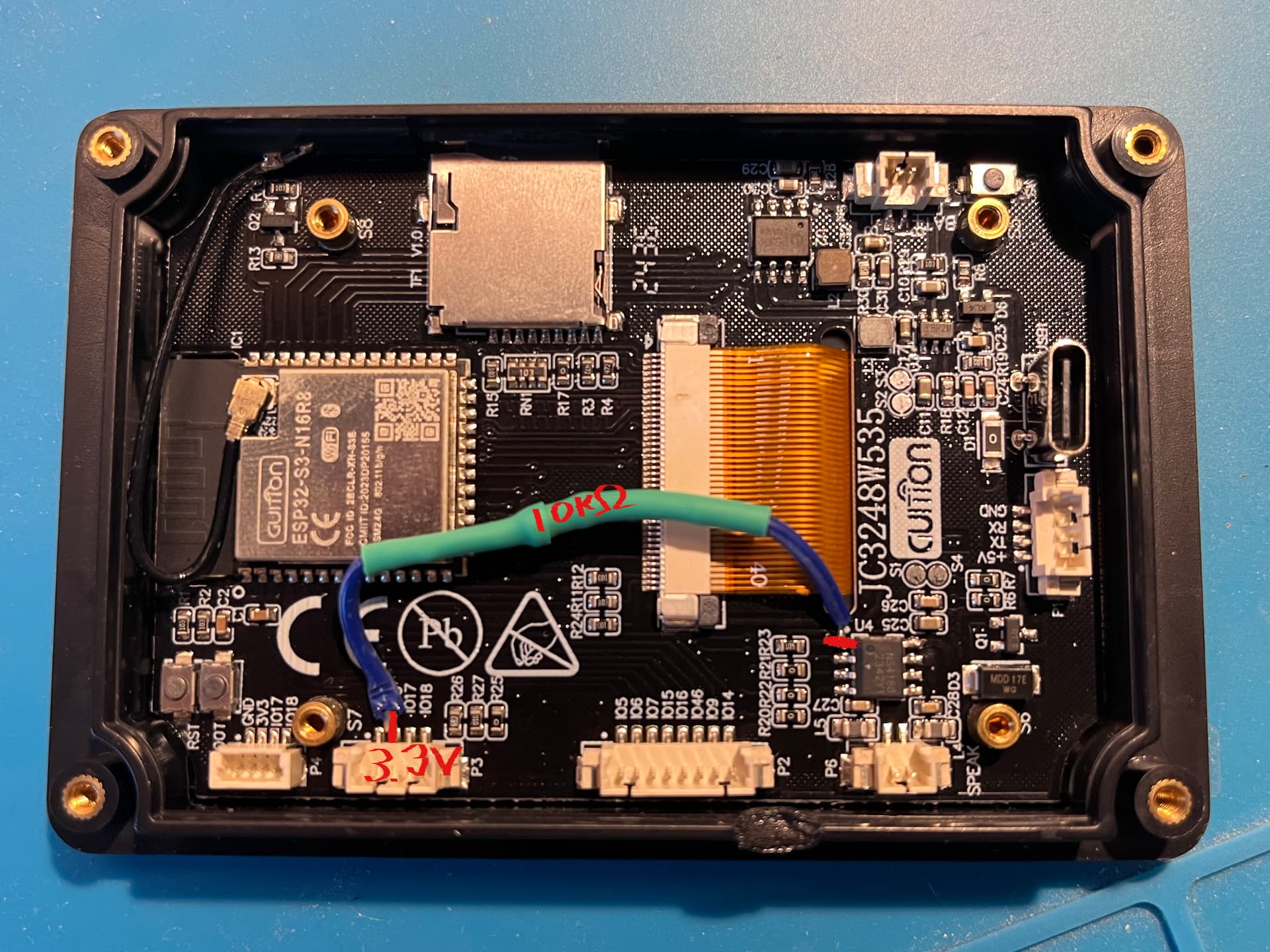
I got the audio volume up to a good level by soldering a 10kΩ pull-up resistor to the amplifier chip (Pin 1 of U4, the NS4168) connecting it to a 3.3V source.
1 Like
I’ve copied the code so far.
When I start a song, there’s a very brief crackle in the speaker.
But no sound comes out, even when I turn it up to full volume.
I haven’t soldered in the resistor yet.
Do you get any sound without the resistor?
Yes without the resistor sound was there but very quiet even with 100% volume.
Hmm, strange.
Nothing’s coming out for me.
Did you play a song via Home Assistant? Or how do you use the media player in esphome?
Are you still using an external component?
i use this
external_components:
  - source: github://pr#7592
    components: [axs15231]
  - source: github://pr#7591
    components: [touchscreen]
I don’t use any external components
substitutions:
  friendly_name: Guition Display

esphome:
  on_boot:
    priority: -100
    then:
      - lvgl.page.show:
          id: energy_page
  name: display-guition-01
  platformio_options:
    upload_speed: 921600
    board_build.flash_mode: dio
    board_build.f_flash: 80000000L
    board_build.f_cpu: 240000000L

esp32:
  board: esp32-s3-devkitc-1
  flash_size: 16MB
  framework:
    type: esp-idf
    sdkconfig_options:
      CONFIG_ESP32S3_DEFAULT_CPU_FREQ_240: "y"
      CONFIG_ESP32S3_DATA_CACHE_64KB: "y"
      CONFIG_ESP32S3_DATA_CACHE_LINE_64B: "y"
      CONFIG_SPIRAM_FETCH_INSTRUCTIONS: y
      CONFIG_SPIRAM_RODATA: y

psram:
  mode: octal
  speed: 80MHz

logger:
  baud_rate: 921600
  level: INFO

api:
  encryption:
    key: !secret api_key

ota:
  - platform: esphome
    password: !secret ota_password2

wifi:
  networks:
  - ssid: !secret wifi_ssid
    password: !secret wifi_password
  - ssid: !secret wifi2_ssid
    password: !secret wifi_password
  manual_ip:
[redacted]
    dns1: !secret dns_1
    dns2: !secret dns_2

i2s_audio:
  id: i2s_bus_audio_main
  i2s_lrclk_pin: GPIO2
  i2s_bclk_pin: GPIO42
  i2s_mclk_pin: GPIO00

speaker:
  - platform: i2s_audio
    id: board_speaker
    i2s_audio_id: i2s_bus_audio_main
    i2s_dout_pin: GPIO41
    dac_type: external
    channel: mono
    use_apll: true

media_player:
  - platform: speaker
    id: onboard_media_player
    name: "${friendly_name} Audio"
    announcement_pipeline:
      speaker: board_speaker
      format: WAV
    codec_support_enabled: false
    buffer_size: 6000
    on_pause:
      - logger.log: "Playback paused!"
    on_idle:
      - logger.log: "Playback finished!"

spi:
  id: display_qspi
  type: quad
  clk_pin: 47
  data_pins: [21, 48, 40, 39]

i2c:
  sda: 4
  scl: 8
  id: touchscreen_bus

output:
  - platform: ledc
    pin: GPIO1
    id: backlight

light:
  - platform: monochromatic
    output: backlight
    name: "backlight Light"
    restore_mode: ALWAYS_ON

display:
  - platform: qspi_dbi
    model: axs15231
    data_rate: 40MHz
    id: my_display
    spi_id: display_qspi
    dimensions:
      height: 480
      width: 320
    cs_pin: 45
    rotation: 90 # 90 for landscape, 0 for portrait
    auto_clear_enabled: false

touchscreen:
  - platform: axs15231
    id: my_touch
    display: my_display
    i2c_id: touchscreen_bus
    calibration:
      x_min: 0
      x_max: 461
      y_min: 0
      y_max: 310
    transform:
      swap_xy: true
      mirror_y: true
    on_touch:
      - lambda: |-
          ESP_LOGI("cal", "x=%d, y=%d, x_raw=%d, y_raw=%0d",
            touch.x,
            touch.y,
            touch.x_raw,
            touch.y_raw
          );
[REDACTED FOR BREVITY]
Regarding media playing - I played mp3 from home assistant media, and tested it with TTS (again via home assistant media player.
The redacted bit at the bottom that’s just my sensors and lvgl config.
Somehow it’s not working.
I need the external components for the display to work properly.
I just tried it without the external components. But almost nothing works anymore.