Hello everyone, I have some updates concerning the projects, communication matters, and so forth. The news is a mixture of good and bad. Some may perceive it as good, others perhaps not so, it rather depends on one’s perspective. So, here it is:
ELVAF is presently frozen. There are numerous reasons for this:
a) This project was intended to simplify the installation of my firmware from the Home Assistant user interface. However, given that the firmware itself automatically pulls device capabilities via the entity, and the entities are defined through substitutions, the usefulness of such a service is negated.
b) For those who still find the process difficult, there will be a PRO version (more on that below).
c) The core issue is time and resources. Essentially, it would necessitate redeveloping all the widgets for lit-elements, and considering the periodic design changes, it constitutes double the work. It would consume temporal resources for support, while in fact, ELVAF offers the user nothing new apart from convenience.
d) The Guition ESP32-4848S040 device has constrained resources. Therefore, constructing widgets in the ELVAF designer does not guarantee that the firmware will operate stably with your specific set of widgets, as this cannot be automatically calculated.
For approximately another week and a half, I shall be occupied with work on the demonstration version of PRO. Subsequently, I will return to both projects (Guition and Waveshare) on ESPHome to prepare them for release, addressing shortcomings and functionality. They are scheduled for release just before the New Year.
Concerning communication… Given the lack of discussion, both in the Telegram group and on the forum, with the exception of a few questions, this group will be repurposed into a news channel in two languages (EN and RU) following the publication of the PRO demo video, with commenting enabled. Followers will be granted access to a private chat where daily live discussions on the progress of work across all firmware versions take place, and even participation in development is possible.
Now, what is PRO? The PRO version is firmware for Guition and Waveshare devices (work is currently progressing on the waveshare-esp32p4-86-panel), written in native C/C++, not ESPHome. Its purpose is as follows:
a) The most significant aspect is DYNAMIC operation. It subscribes to ALL of your Home Assistant devices. Subscription to 597 entities has been tested successfully at present. The loading time upon device start-up is approximately 2 seconds!!! What advantage does this provide? It allows you to select and configure the devices you require directly from the interface. Any of your devices for which widgets are available. For instance, if you configured 5 thermostats and 20 lights and later wish to alter them, you simply do so. There will be no need to modify any code, as you won’t even possess any code – just the firmware file which needs to be flashed to the device.
b) For devices based on ESP32-P4, the capability to operate using either Ethernet or Wi-Fi! It will be possible to select the desired Wi-Fi network.
c) For ESP32-P4 devices, enhanced graphics! 16 million colours compared to the current 65 thousand in the ESPHome version. This permits improved gradients and entirely different design possibilities.
d) Other capabilities for which one currently must write custom components in ESPHome.
e) The disappointing news for many will be that the PRO version will not be free of charge. The matter of monetisation for this version is currently undecided. However, I can state with certainty that PRO will be accessible to regular subscribers and sponsors. Why is it paid? The fact is that this project, much like the ESPHome projects, consumes a great deal of time. To engage in this work constantly, as I have mentioned previously, besides time, it is also stressful. Furthermore, I wish to show gratitude in this manner to the people who consistently support me financially; one of them is even taking a direct part in the development, so we are already a small team. Therefore, please await the demonstration video for the PRO version and decide for yourselves whether you require it or not.
I partly agree with you, but let me ask some counter-questions:
How many users actually check the code they download? To be more precise, will the users who download the code check every single line for malicious code?
How would I then be able to protect my subscribers and sponsors who support me, to prevent someone from leaking this code into the public domain? This is a rhetorical question.
Inserting malicious code is of no interest to me, and I couldn’t even write it. “Why would I bite the hand that feeds me?”
And at the very least, it’s a criminal offense, including in my country.
P.S. But I understand your concern. Therefore, no final decision has been made on this matter.
Thank you for your reply. I also managed to find these materials, but I wanted to make sure before connecting whether anyone had already used such a power supply solution. I’ll try
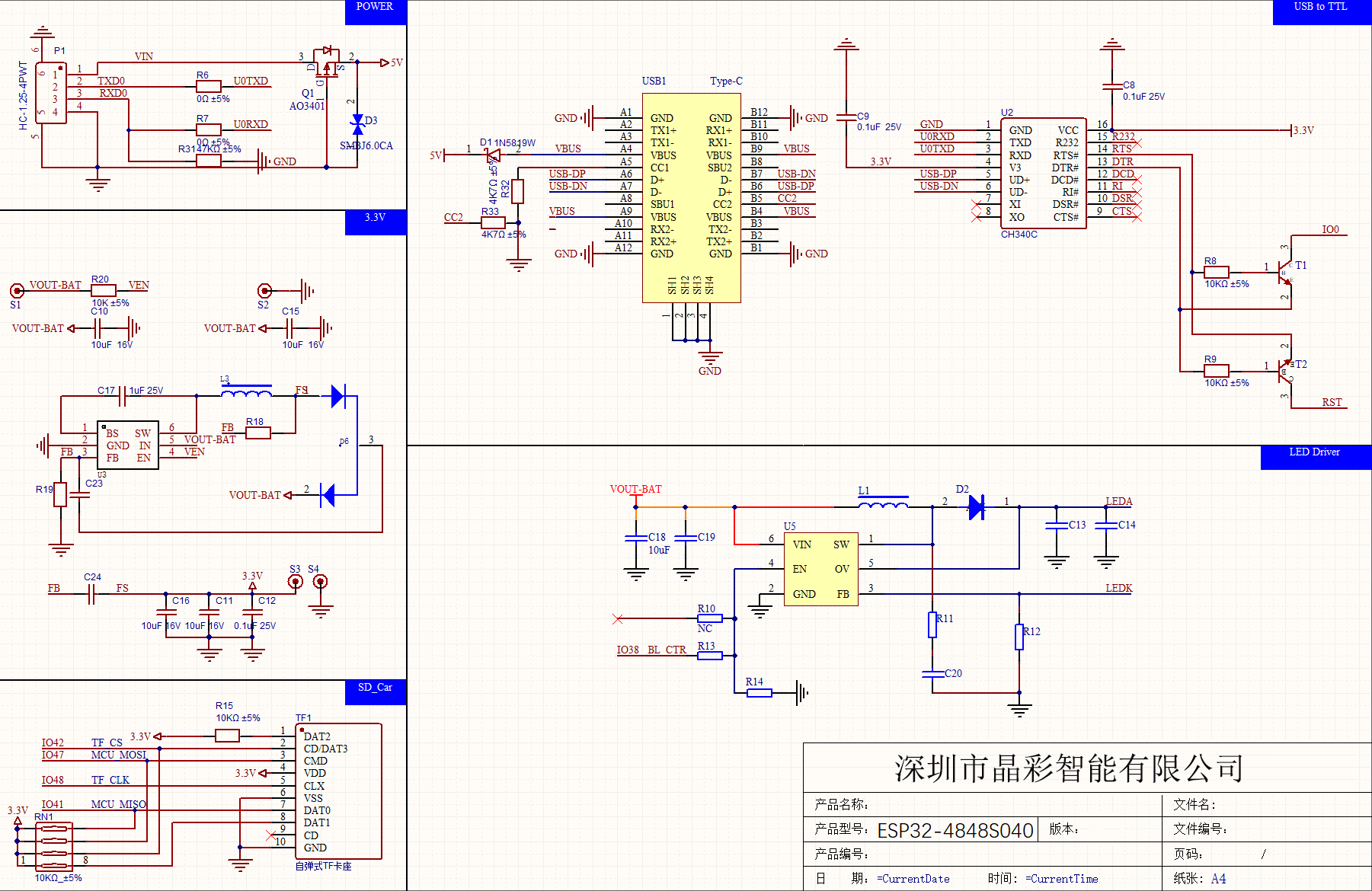
Hello, I tried to flash the display using the USB-C port and also by connecting the UART pins on the back. While both serial ports are discovered on my machine, I could not successfully flash the display (ESPHome is stuck on the “Connecting” screen).
I tried holding the BOOT button while connecting, also holding RST and BOOT (BOOT a little longer) while connecting and this did not work for me.
Can anyone direct me on how to successfully flash it?
Do not connect 5V to the 3.7V battery connector. That 2-pin port is designed for a single Li-Ion/LiPo cell, which typically has a voltage between 3.0V and 4.2V.
Powering it with 5V is dangerous because it bypasses the board’s normal power regulation and goes directly into the battery management circuitry. This can easily damage the charging IC, the power terminals, or even the entire board. In some cases, it can also cause overheating.
If you want to power the board with 5V, you must use the 5V/VIN (or USB) input, which is the path that actually includes the voltage regulators designed to handle 5V.
So, in short:
5V into the battery connector = high risk of burning out the board.
Use the correct 5V input instead.
Don’t power the panel with 5v and the USB C at the same time it will possibly burn out.
If you need to program the panel only use the USB C to power it.
I meant the screen within the ESPhome dashboard is stuck at “Connecting” - I already entered my WiFi info there as I have multiple devices flashed successfully. Or do you mean that I have to connect the display once to WiFi so that I can flash it successfully?
So does this mean I cannot program it via USB-C? I would then instead attach it via the serial on the back to TX, RX and power. But what button sequence do I need so that I get it into bootloader mode?