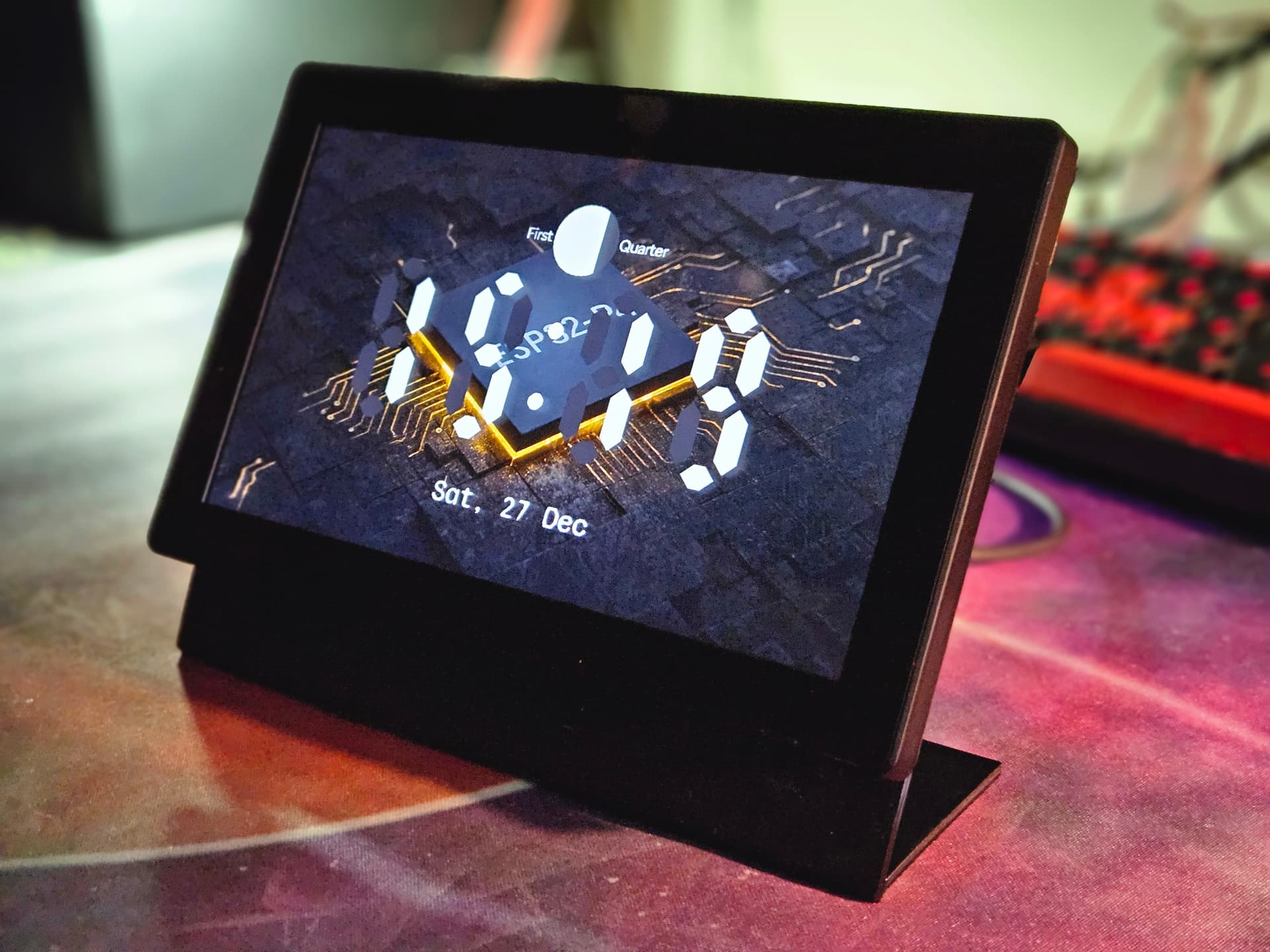
Guition esp32-p4-jc1060p470

Thanks for that! I realised I haven’t posted the repo I’ve been sending PRs: guition-esp32-p4-jc1060p470.yaml

My SciFi one is a bit…tired - however, I’ve just pushed the latest working config which also includes RTC support.

Yep - spotted that also - wasn’t included in initial push, now is.

Yeah - also missing from my initial push, now, is.

I put es7210 as it was on the schematics - and I’ll be the first to admit brute forcing the address :smile:. I haven’t really tried it without es7210 - something else for me to try, EDIT but it failed for me when using 0x32.

Apologies, I didn’t post where the updates were going - and got a bit lazy pushing my own Sci Fi one.

Thanks,
Charlie

Edit Fixed github URLs to point to HEAD.

Just spotted - I use 0x14 for the rx8130 RTC controller. I’m really missing something with these addresses where the touch screen can also use 0x14.

Finding the address was looking at the demos and trial and error :smile: I’m hoping there’s a more scientific approach to this.

That’s a cool little screen. Start a new thread for it and keep this for the Guition esp32-p4-jc1060p470

See if your screen has a model number and manufacture and put that in your thread topic.

can confirm leaving out the audio.dac: (es7210) still works, same with leaving out bus addresses, they default to what they should :+1:

oh yeah and battery voltage is on gpio53 (testet with connected battery, didn’t last long but worked, this display needs bigger battery :sweat_smile:)

This is all new to me with the audio parts - but I assumed by using the as7210 component this offloads the ADC processing - but I could be wildly misunderstanding things here.

Thanks for confirming and checking everything - really appreciated.

However, for the addresses the defaults seem to be per component - and I don’t believe are effected by the esp32 variant. [Need to confirm by reading the source for the component and esp32p4 variant]

With all of my addresses commented out, es8311 works fine (according to the docs the default is 0x18 which matches and does indeed make mine redundant).

The es7210 fails though (which according to the docs has a default of 0x40 vs. the one I use 0x36):

[18:19:06.747][C][es7210:028]: ES7210 audio ADC:
[18:19:06.747][C][es7210:028]:   Bits Per Sample: 16
[18:19:06.747][C][es7210:028]:   Sample Rate: 16000
[18:19:06.748][E][es7210:035]:   Failed to initialize
[18:19:06.749][E][component:188]:   es7210.audio_adc is marked FAILED: unspecified

And the other to fail was the rx8130 RTC controller which takes the CR1220 coin cell (which according to the docs has a default of 0x32 vs the one I use 0x14)

[18:19:06.861][C][rx8130:063]: RX8130:
[18:19:06.861][C][rx8130:064]:   Address: 0x32
[18:19:06.862][C][time:029]: Timezone: 'GMT0BST,M3.5.0/1,M10.5.0'
[18:19:06.863][E][component:188]:   rx8130.time is marked FAILED: unspecified

Which makes me think we’re possibly using different boards, or versions of the board. Mine is the JC1060P470C_I_W_Y with the black case, for comparison.

Thanks again - I’m always trying to get rid of unnecessary configuration and keeping it lean - only including exceptions to the rule.

Edit: Here’s the i2c address in the log during startup:

[18:55:02.675][C][i2c.idf:090]: I2C Bus:
[18:55:02.675][C][i2c.idf:091]:   SDA Pin: GPIO7
[18:55:02.675][C][i2c.idf:091]:   SCL Pin: GPIO8
[18:55:02.675][C][i2c.idf:091]:   Frequency: 400000 Hz
[18:55:02.676][C][i2c.idf:101]:   Recovery: bus successfully recovered
[18:55:02.677][C][i2c.idf:111]: Results from bus scan:
[18:55:02.677][C][i2c.idf:117]: Found device at address 0x14
[18:55:02.678][C][i2c.idf:117]: Found device at address 0x18
[18:55:02.678][C][i2c.idf:117]: Found device at address 0x32
[18:55:02.679][C][i2c.idf:117]: Found device at address 0x36
[18:55:02.680][C][i2c.idf:117]: Found device at address 0x5D

And I’ve got the SD card support working, as well as voice bits as well as the audio amplifier on GPIO11 - including link again as I know it can be difficult to put together a good config from separate posts: Guition-esp32-p4-jc1060p470-Sci-fi-dashboard/guitron-p4-7in-touch.yaml at 052c79940cd92a19a456ea773f8e9907dafa26ef · charrus/Guition-esp32-p4-jc1060p470-Sci-fi-dashboard · GitHub

Thanks,
Charlie

i’m using same board, and i didn’t notice any different when not using the es7210, but we can leave it there just because…

SD card support i will wait with until it’s not a external component, i don’t really need it, same with sendspin, on todo when stable.

also added it to the xiaozhi-esphome project:

made a stand for it, super simple but it does the job :grin:

That’s a really great repo - been trying it out and impressed!

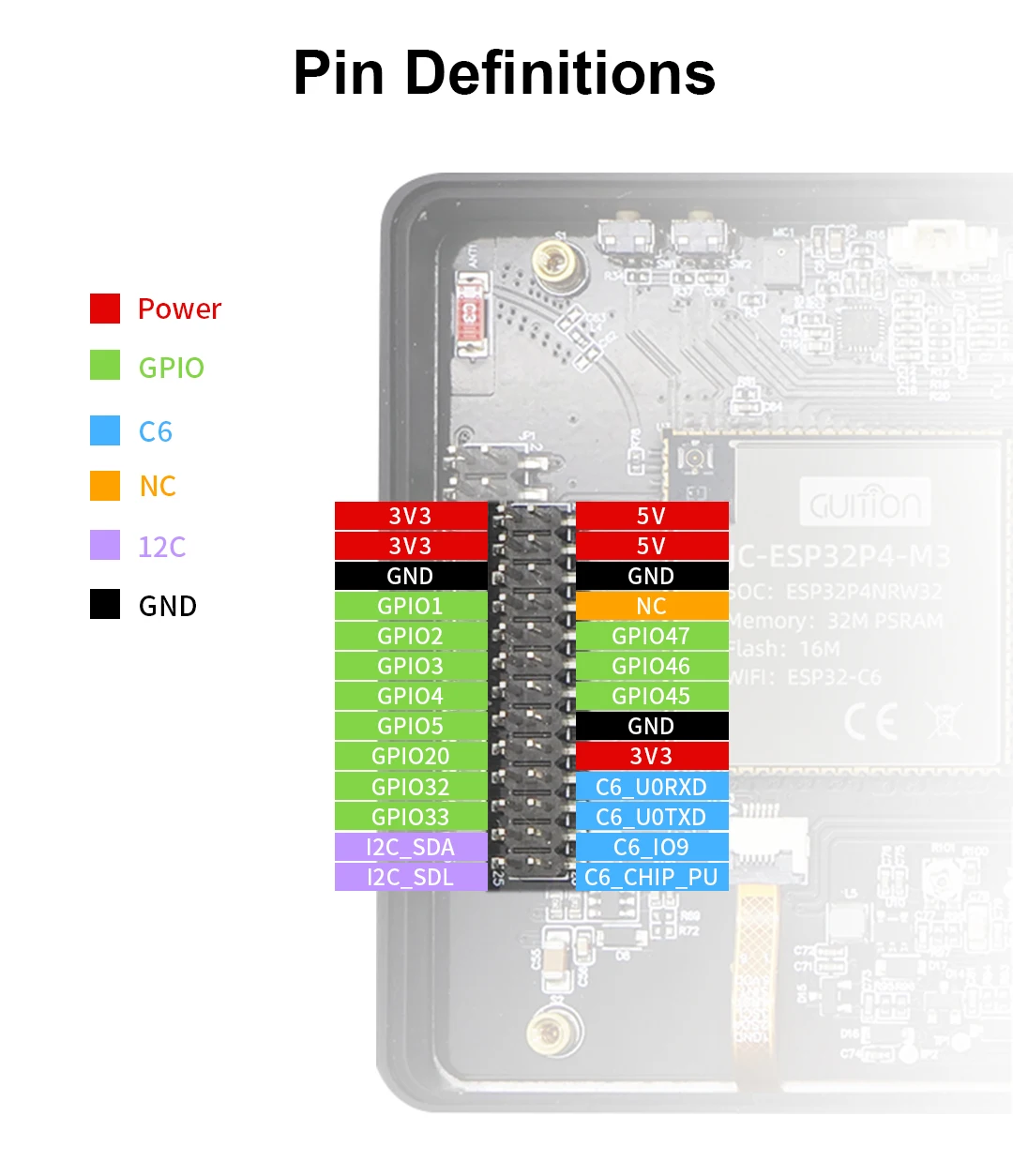
Has anyone tested connecting a device via the pins on the back? (Pinout from the listing)

I’ve got a SEN55 that isn’t getting picked up by the I2C bus but no other devices to test with.

You aren’t using the 1mm pitch Qwiic / Stemma QT connector are you? I asked them to put that connector on their dev boards over a year ago - and they added a 1mm pitch connector… but missed the part about the pinout matching the standard :wink: So the SCL/SDA are backwards.

You can pull out those two pins on your cable and swap them, use a small pointy tool to bend back the retaining plastic tab gently, don’t just rip it out. But I have done it…

Just to say thanks for being a wonderful community.
I got the board early last year, and after playing with lvgl, seeing the early support requests in various iot repos, and then finding a tinyusb issue for my work projects, caused me to put it away after stashing my work on github.
Now revisiting P4’s with tinyusb fun again, and pulled out this board, then tried to find the GPIO for the switch (user button) :person_facepalming:
Eventually ended up here as my tired eyes couldn’t see the switch in those png datasheets, super pleased to see people using it, and the 3d case. Still can’t seem to see the gpio for switch sw1 (user button at the top), so if anyone see’s this soon, please do pipe up / shout.
User button (Switch SW1) on the top is connected inline with the boot button (GPIO35).

Thanks to all in the thread/community.

I have also the display working, only with OTA my display is flickering.

I have this, is there somthing additional to fix this?

esp32:
  variant: esp32p4
  board: esp32-p4-evboard
  flash_size: 16MB
  cpu_frequency: 360MHz
  framework:
    type: esp-idf
    advanced:
      enable_idf_experimental_features: true

I found this, but this is not working and the device stay in boot loop

    sdkconfig_options:
      CONFIG_SPIRAM_XIP_FROM_PSRAM: y

Meanwhile I ordered one of these “Guition-ESP32-P4-JC1060P470 7” Capacitive touch" as well.
I used your @gingermist yaml for first install and it worked so far.

about a few things I wonder:

  1. what is about the status led? there is nothing to see from outside the case.
  2. did you find a way for dimming the backlight?
  3. is this a standard ESPHome display “Hello World, Button,QR,…” when nothing in LGVL is configured?

Somehow I would like to have a slider in HA to dimm backlight. Does sombedy have anything like this to share?

edit:
to point 3 → INFO No pages or widgets configured, creating default hello_world page

edit2:
point 2 → stupid me, I found the slider in HA now.

esp32:
...
  framework:
    type: esp-idf
    advanced:
      execute_from_psram: true

You must clean the build before recompiling and flash with USB.

Is got error, this feature is only for esp32s3.

esp32: [source hapanelkantoor7.yaml:58]
  variant: ESP32P4
  board: esp32-p4-evboard
  flash_size: 16MB
  cpu_frequency: 360MHZ
  framework: 
    type: esp-idf
    advanced: 
      enable_idf_experimental_features: True
      
      'execute_from_psram' is only supported on ESP32S3 variant.
      execute_from_psram: True
      compiler_optimization: SIZE
      enable_lwip_assert: True
      ignore_efuse_custom_mac: False

You aren’t using the latest ESPHome version (2026.3.0)

The one with all the extra goodies that are so relevant?
They are going to get excited reading the release notes!

You are right, I was on 2026.2.4, I now upgraded tot 2026.3.0, and than the option solved the issue. Thnx

another thing…
I have problems with WiFi connectivity. In general there is a week signal shown on the device, but it is directly beside to the router. So it should be nearly 100% signal strength.
When I send a OTA, many times the device can’t be found and I have to repeat the process.
And when I toggle “backlight”, “speaker” or “status led” in HA, it does not send to the device. I have to set it again and again until it is saved on the device.

Is this a known problem on this device or do I have to search on my WiFi network settings?

In the ESPHome log with verbose logging turned on it should show you lots of detail for signal strength. Is it in the -50’s or -90’s?

Maybe it is TOO close and getting interference from other devices such as BlueTooth, BLE, and a host of other things that chatter on 2.4Ghz.

What does a heavy bout of ping say about dropped packets?

Have you inadvertently set up a Faraday Shield with device placement or enclosure?

Do you have many other devices on your LAN or live video packets that may be overloading it?

Does your router display connection status and performance statistics. For connections on LAN and WiFi? CPU and memory usage? Some do.

How about for your HomeAssistant server?