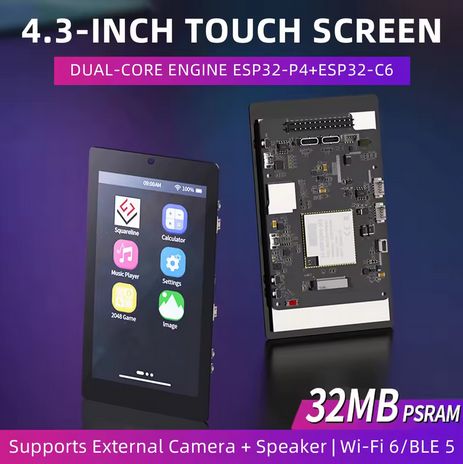
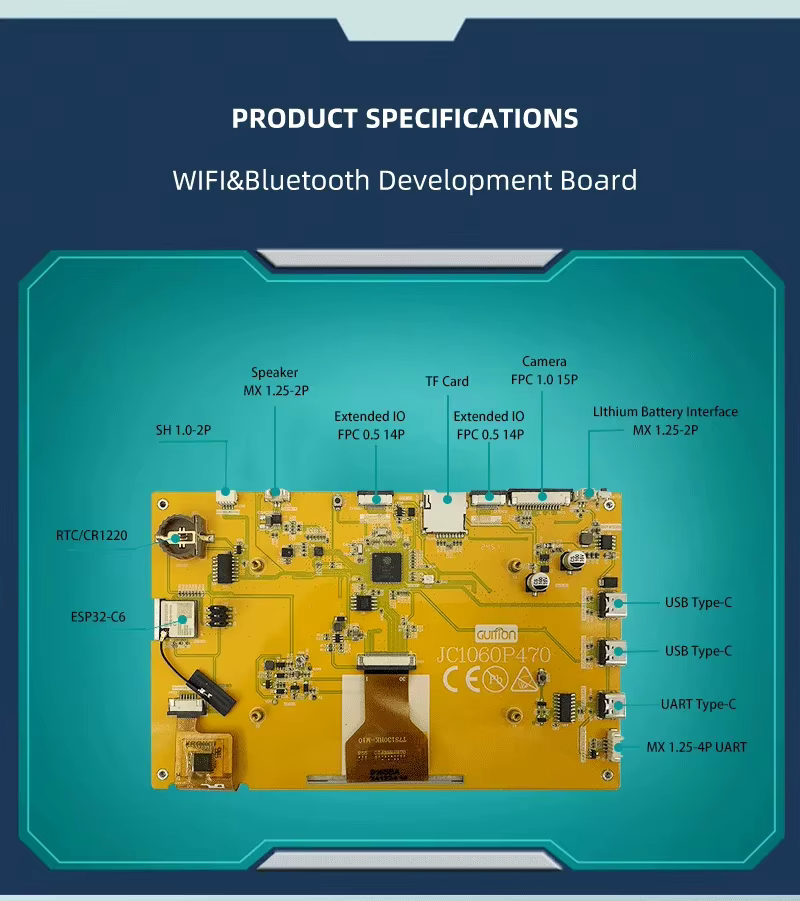
one is yellow pcb, the other is black with full case.
on ali I was reading about quality problems of the display connection/connector and people where arguing because there are no cables with the tiny connectors at the black version.
should have ordered it as well when I shared the link this morning.
now the price is on high level again. if you want to get it for a good price, then it is a little less then €40. (this morning it was at €38.50 shipping incl.)
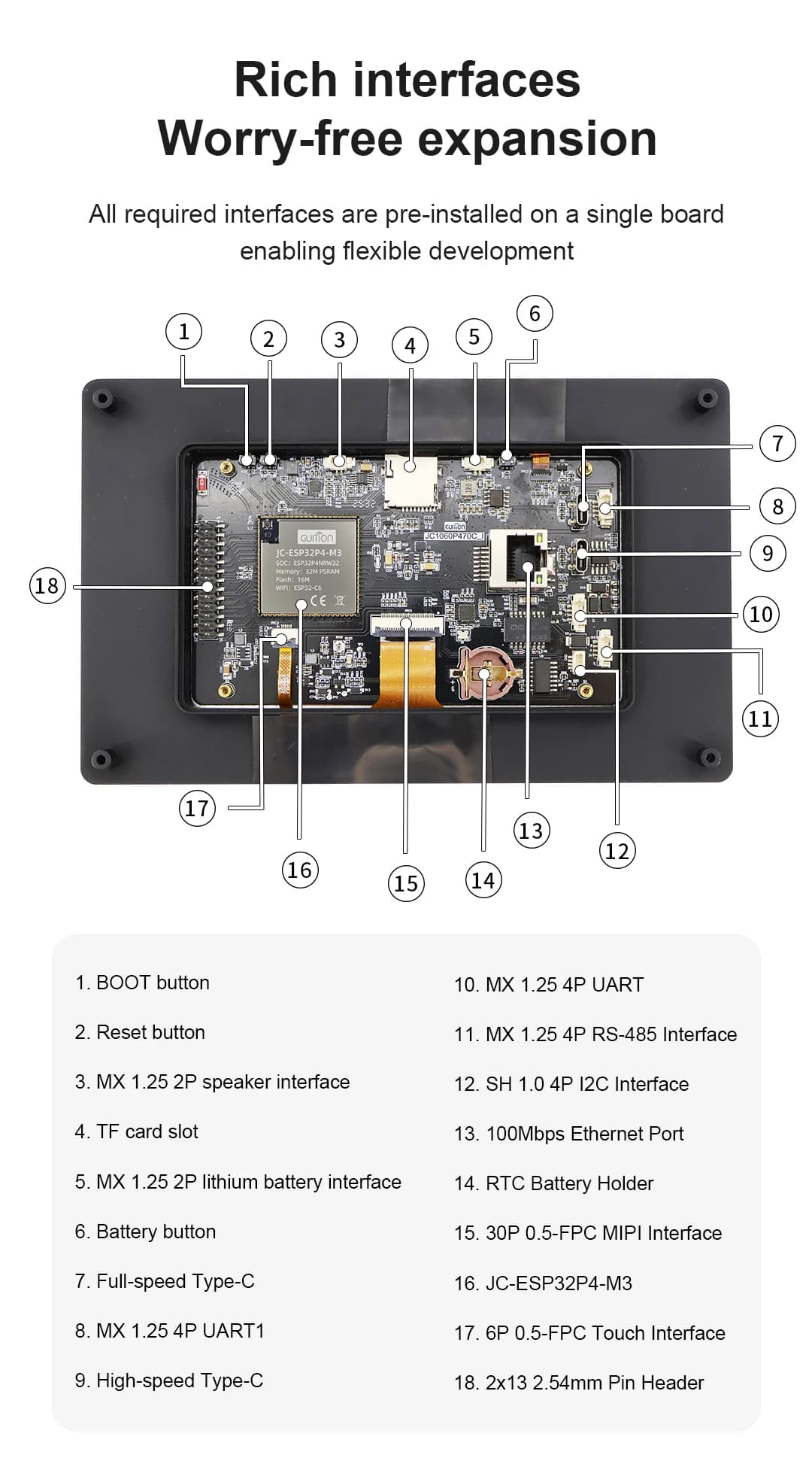
I like the big header on the black version that exposes power and some I/O pins. the yellow one has very little I/O.
Ali in the US is all over the place they will lower the price on something but charge more shipping. $46USD is still the cheapest I have seen with free shipping.
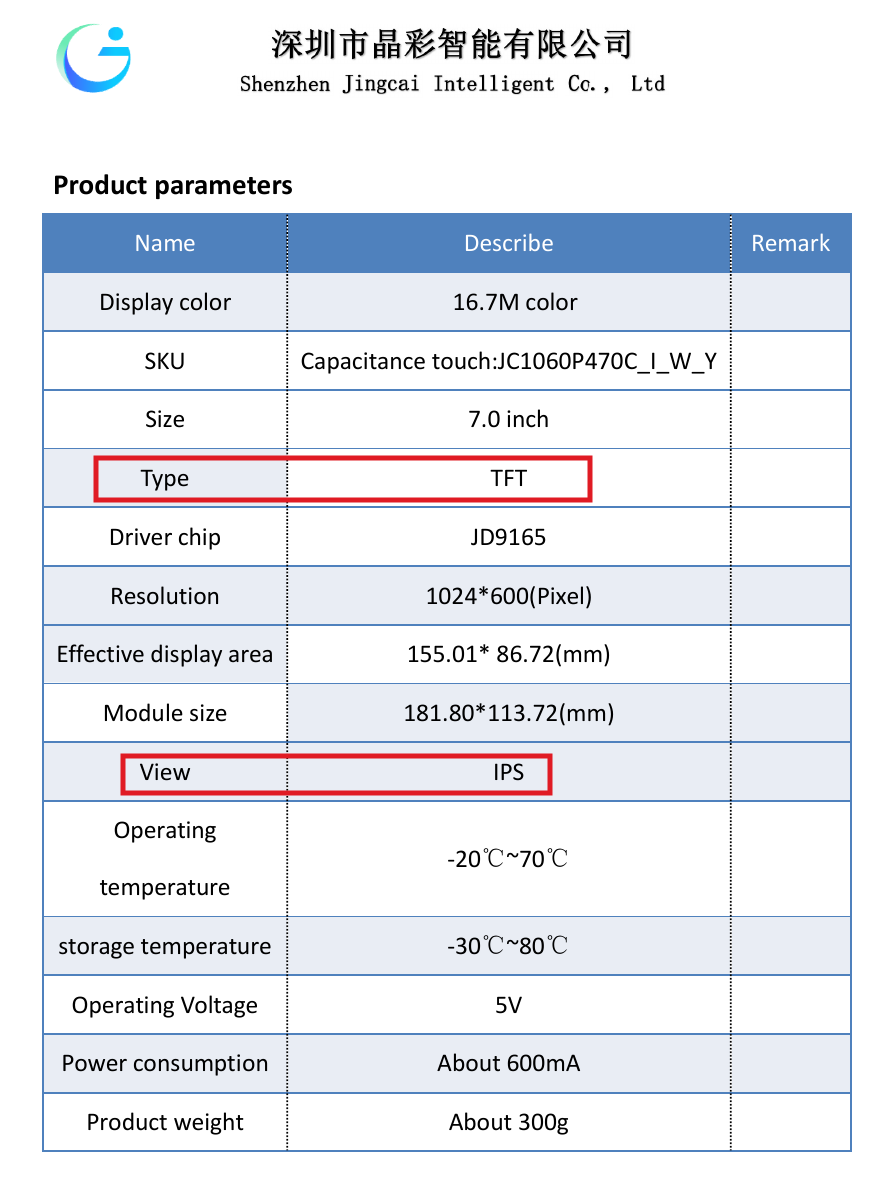
Another interesting thing I see is the LCD screen on the black version has a slightly larger resolution then the yellow. At least in the specs.
Mine has just arrived - looks a bit different from the pics - this one has the back enclosed in the case, so aesthetics-wise it’s great.
Will have a go this evening and weekend.
Edit: Got the LVGL demo installed and working - and it looks like the same display as the Waveshare one (WAVESHARE-ESP32-P4-WIFI6-TOUCH-LCD-7B):
I (1126) ESP32_P4_EV: Install MIPI DSI LCD control panel
I (1130) ESP32_P4_EV: Install EK79007 LCD control panel
I (1135) jd9165: version: 2.0.1
I (1420) ESP32_P4_EV: Display initialized
Second Edit: Works OK with the same config as the waveshare - but have two errors:
[17:18:29.035][E][es7210:035]:   Failed to initialize
[17:18:29.035][E][component:154]:   es7210.audio_adc is marked FAILED: unspecified
Will RTFM
Third edit: So leaving it for a while - only display works - touch screen is off a bit, backlight not working, so on second flash that’s until demo is reflashed, and haven’t looked at the audio. Some progress - and lots for better qualified folks to work out.
Happy with the Waveshare P4 as I’ve got it dispensing Tommy his dry food with voice assist - but the black with full case makes this model look really decent.
One gotcha is the reset GPIO is shared between the backlight and the display. In the examples, the display was set to GPIO_NUM_NC (-1), so I just commented it out in the display.
And to clear the es7210 FAILED (to be honest, I’m not even sure it has one - not having a speaker yet, haven’t been able to spend too much time on that) was to change the default address from 0x40:
So the WAVESHARE-ESP32-P4-WIFI6-TOUCH-LCD-7B display kinda worked - but the init sequence for JC1060P470 is a direct match for the examples included in the above zip file - which is obvious in hindsight as it’s a match for this model.
It’s nice as it doesn’t need any external_components pointing to PR’s as it’s already in ESPHome.
The one I got came with no cables - so you’ll need to stock up on Micro JST MX 1.25mm (yes - I know that’s not the correct name ) connectors — available from the usual outlets and here.
A couple of 2 pin and 4 pin ones should do it (for connecting a speaker etc).
It’s very much work in progress - voice doesn’t work at all (since I don’t have a speaker) and cam needs to be added.
Edit: Sorry about the AI slop used for README and licence.
Edit2:@andrew_NH I’ve checked out your repository as a submodule in the esphome directory and added guition-esp32-p4-jc1060p470.yaml to hardware and examples.
It’s not complete (no camera support etc) but fancy a draft PR?
I think my Sci-fi dashboard is looking a bit long in the tooth
I tried that - but it didn’t get much further than the initialisation bit’s looking at the serial monitor before freezing.
It’s no biggie - it’s just @andrew_NH has a progress bar in his repo during OTA updates - so was reporting it flashes.
I’m not sure if that’s by design, or not (I can’t remember all the workarounds; there’s turning off the backlight and I vaguely recall something to do with LVGL pages or alpha settings).
It’s nice that you’ve been adding config options that fix this as well by executing from the PSRAM.
I’ll look into it in due course. The problem is that when writing to flash the cache is disabled and that limits the data rate available for the display interface, leading to the flashing.
I tried it again to troubleshoot - and this time it worked.
Not really sure what I did differently, but including it here for anyone else wanting to get rid of the flashing during OTA updates, and confirm that sdkconfig option works on this board:
esp32:
...
  framework:
...
    sdkconfig_options:
      CONFIG_SPIRAM_XIP_FROM_PSRAM: y
Thanks for the pointer - and the explanation of what’s causing the flashing.
For the RTC (rx8130) to work for this model, it needed a different address (0x14) so including it here as well to help other folks:
time:
  - platform: rx8130
    # repeated synchronization is not necessary unless the external RTC
    # is much more accurate than the internal clock
    update_interval: never
    timezone: Europe/London
    address: 0x14
And follow the rest of RX8130 Time Source in the ESPHome docs. The coin cell to power the RTC is a CR1220 (as per discord).
Problem was it stopped the device coming up past the usual initialisation bits before it invokes main() I think? Just had to use serial to upload to fix. Haven’t seen this behaviour since so it’s all good, and I probably messed something else up.
Hello everyone, i purchased a [ ESP32P4 + ESP32-C6 Development Board 4.3 Inch Display 480*800 IPS Capacitive Touch Screen 32MB PSRAM WiFi 6 Bluetooth 5] from AliExpress and finding a way to use it with esphome. My question is can I use ESPHome builder [.yaml] to integrate with my homeassistant? If yes, I would appreciate if you point me to the right direction. Thank you
it’s interresting that the schematics show a es7210, but the board configuration guition supplied for xiaozhi they don’t use it, also tried using 0x32 and it does not change, still works and error in logs gone. so i think we could just remove that component.
touch seems to work with both 0x14 and 0x5D
and touch reset is GPIO22 not 23. interrupt is GPIO21 but none of them is needed for touch to work.



 ) connectors — available from the usual