HA 2025.8.2 ESPHome 2025.7.5 sh: 1: xtensa-esp32-elf-g++: not found

Hi all,

Just upgraded to HA 2025.8.2 and now getting an error I’ve never seen before:
sh: 1: xtensa-esp32-elf-g++: not found

INFO ESPHome 2025.7.5
INFO Reading configuration /config/esphome/package-monitor.yaml...
INFO Detected timezone 'Europe/London'
INFO Generating C++ source...
INFO Compiling app...
Processing package-monitor (board: esp32dev; framework: arduino; platform: https://github.com/pioarduino/platform-espressif32/releases/download/53.03.13/platform-espressif32.zip)
--------------------------------------------------------------------------------
HARDWARE: ESP32 240MHz, 320KB RAM, 4MB Flash
 - framework-arduinoespressif32 @ 3.1.3 
 - framework-arduinoespressif32-libs @ 5.3.0+sha.489d7a2b3a 
 - tool-esptoolpy @ 4.8.6 
 - tool-mklittlefs @ 3.2.0 
 - tool-riscv32-esp-elf-gdb @ 14.2.0+20240403 
 - tool-xtensa-esp-elf-gdb @ 14.2.0+20240403 
 - toolchain-xtensa-esp-elf @ 13.2.0+20240530
Dependency Graph
|-- Networking @ 3.1.3
|-- WiFi @ 3.1.3
|-- ESPmDNS @ 3.1.3
|-- Update @ 3.1.3
|-- noise-c @ 0.1.10
Compiling .pioenvs/package-monitor/src/esphome/components/api/api_connection.cpp.o
sh: 1: xtensa-esp32-elf-g++: not found
*** [.pioenvs/package-monitor/src/esphome/components/api/api_connection.cpp.o] Error 127
========================== [FAILED] Took 2.42 seconds ==========================

How do I fix this?

1 Like

Only happens on ESP32 products. Tried rebooting etc…

Whatever the issue is, it’s surely unrelated to your HA upgrade.
Is this on HAOS, i.e. the ESPHome addon?
Did you try cleaning the build files?

Yes it’s the ESPHome addon running on HAOS (which also just upgraded to 16.1). How does one clean the build files?

That error indicates that you are missing a component that is normally installed without your knowledge (platformio/Arduino/ESP-IDF). That process normally works fine, but sometimes something gets messed up. When that happens to me I usually rename/delete the folder that platformio uses to install its components. That causes it to redownload them all, which generally fixes the issue.

You just need to figure out which folder to delete, which depends on how it is installed. This is part of the reason I always install esphome (standalone) on a different computer from HA. It makes it much easier to fix these types of issues.

Unfortunately this did not work. Same error.

Any hints on the folder location??

That depends on how your install of esphome places things. Your log didn’t provide much of a clue. You also need to have access to the file system and know how to delete things safely.

HA tries to make things easy. That mostly works, until it doesn’t. When then happens the fact that it has hidden the complexity makes it even harder to understand.

If you are using the builder add-on, I can’t help, since I don’t use that.
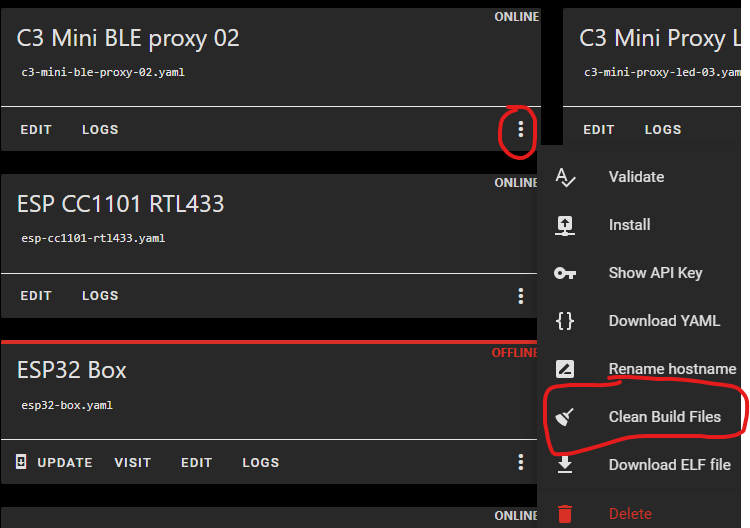
1 Like

Delete the add-on, and reinstall it. Your source code is not in add-on anyway.

1 Like

I had same issue today. A clean reinstall of add-on resolved the issue.

The latest upgrade fixed it for me, most likely because it reinstalled the files, rather than anything in the upgrade.

For future reference, for those of you running ESPHome as an addon in Home Assistant - here is how you delete the platformio folder. Note that this worked for me. I am not responsible for any mishaps. As with anything where you start tinkering with the internals, BACKUP FIRST.

  1. In HA install the “SSH & Web Terminal Addon”.
  2. In the Info tab for the Addon and turn OFF “Protection mode” (ie: move the slider to the left).
  3. SSH in using your favorite client app (if you do this, check the Configuration tab of the Addon to verify the port to SSH into.
  4. At the “~” prompt, type the following command:
    ~ docker ps | grep -i esph
  5. Get the name of the ESPHome docker container (last column)
  6. At the “~” prompt, type the following command (
    Note, replace insert_container_name with the name you got in step 4 (something like: addon_5c53de3c_esphome)
    ~ docker exec -it insert_container_name /bin/bash
  7. You’ll get a prompt like this:
    root@5c53de3c-esphome:~#
  8. Change to the platformio directory
    root@5c53de3c-esphome:~# cd /data/cache/platformio/
  9. Make SURE YOU ARE IN THE CORRECT FOLDER NOW
  10. Delete!
    root@5c53de3c-esphome:/data/cache/platformio# rm -r *

You can now try whatever others have suggested, but for me, after doing that I can once again success compile/update.

5 Likes

This actually works, thank you!