HA Alias Manager — Bulk manage entity aliases and Assist exposure via Lovelace Card
The problem
If you use Home Assistant's voice assistant (Assist) with a large number of entities, you know the pain: to add an alias or toggle Assist exposure, you have to navigate to each entity individually, click the settings icon, and make your changes one by one. With 200, 500, or 1800+ entities, this is extremely time-consuming.
I built a custom Lovelace card that solves this with a spreadsheet-like interface.
What it does
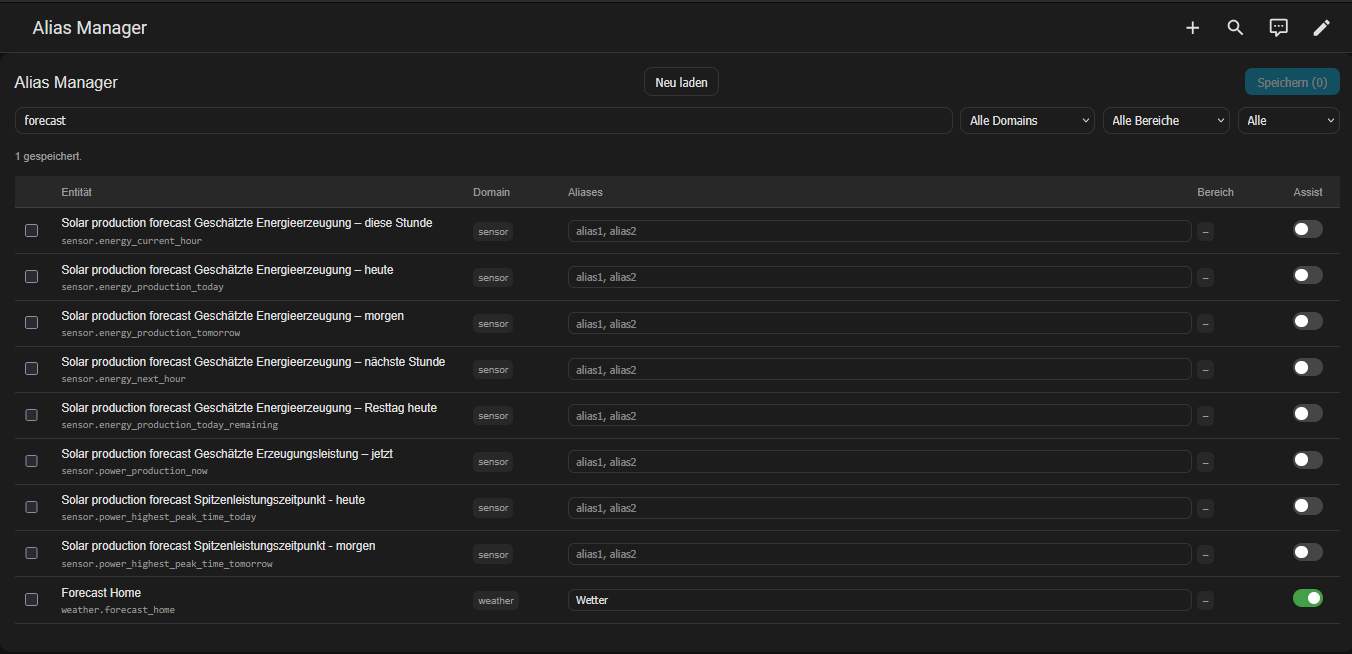
HA Alias Manager gives you a full table view of all your entities where you can:
-
Edit aliases directly in the table (comma-separated)
-
Toggle Assist exposure with a single click
-
Filter by domain, area, Assist status, or free-text search
-
Save all changes at once with the bulk save button
-
Reload the entity list without refreshing the page
![Screenshot showing the HA Alias Manager with a table of entities, alias input fields, and Assist toggles]
How it works
The card uses the Home Assistant WebSocket API directly via this._hass.callWS():
-
Entity list:
config/entity_registry/listfor basic data -
Aliases:
config/entity_registry/getper entity (lazy-loaded, 50 per page) -
Save aliases:
config/entity_registry/update -
Toggle Assist:
homeassistant/expose_entitywithassistants: ['conversation']
Aliases are lazy-loaded per page (50 at a time) to avoid flooding the WebSocket with thousands of requests at startup. The card caches already-loaded pages so navigating back is instant.
 Installation
Option A: HACS (Recommended)
Note: Currently in the official HACS inclusion process.
- Open HACS in your Home Assistant instance.
- Search for
HA Alias Manager. - Click Download.
- Refresh your browser.
- Add the card to your dashboard via the Card Picker.
Option B: HACS (Custom Repository)
Use this method to install it immediately before the official approval:
- Navigate to HACS → Frontend.
- Click the three dots in the top right corner and select Custom repositories.
- Paste the URL:
https://github.com/andreasbloch/HA-Alias-Manager - Select Dashboard as the category and click Add.
- You can now find and install the
HA Alias Managervia the HACS search. - Add the card to your dashboard via the Card Picker.
Option C: Manual Installation
- Download the
ha-alias-manager.jsfile from this repository. - Copy the file into your Home Assistant config folder:
/config/www/. - Go to Settings → Dashboards → Resources.
- Add a new resource with the following settings:
URL: /local/ha-alias-manager.js

Type: JavaScript Module
- Hard-refresh browser (Ctrl+Shift+R)
- Add card to dashboard:
type: custom:ha-alias-manager
 How to use
Tip: Since this tool provides a comprehensive table view, it works best when used in Panel Mode (Dashboard → Edit View → View Type: Panel).
GitHub
https://github.com/andreasbloch/HA-Alias-Manager
Background / motivation
I'm building a smart home voice assistant setup using Home Assistant with a custom AI pipeline:
-
Wake word detection (Hey Jarvis, local on HA Voice PE - ESP32)
-
Voxtral STT (Mistral Cloud API)
-
Mistral ministral-8b as conversation agent
-
ElevenLabs TTS
With 1800+ entities in my setup, managing aliases through the default UI was simply not feasible. I needed to carefully curate which entities are exposed to the AI and add meaningful aliases so the voice assistant can understand natural language commands in German.
The HA Alias Manager saved me hours of clicking.
Known limitations
-
No bulk Assist toggle for multiple selected entities
-
Pagination is fixed at 50 per page
Feedback welcome
This is my first published Lovelace card. Any feedback, bug reports, or pull requests are very welcome!
Tested on Home Assistant 2026.4.1


 ) are now functional