If you’re already using Claude Code (or another MCP-capable assistant) to help with your codebase, HA Dev Tools lets it do the same for your Home Assistant automations, sensors, helpers, and dashboards — through HA’s own native mcp_server integration. No separate server to run.
What it does:
- Layout-aware, package-safe read/write for automations, scripts, and template sensors/entities (won’t silently duplicate something defined in a package)
- Helpers, derived sensors, dashboards, entity registry cleanup
- Home Assistant core logs and Supervisor add-on logs, entity history, logbook, MQTT topic snapshots — real diagnostic context instead of pasting log excerpts back and forth
- Entity health reports and automation audits (duplicate IDs, references to unavailable entities)
- Optional dry-run mode (nothing touches your live config) and git mirroring (a private, before/after audit trail on GitHub) — turn both on together to review every proposed change as a chat preview and a GitHub diff before anything applies
See it in action
I noticed my Doorbird doorstation has regular outages, so I asked:
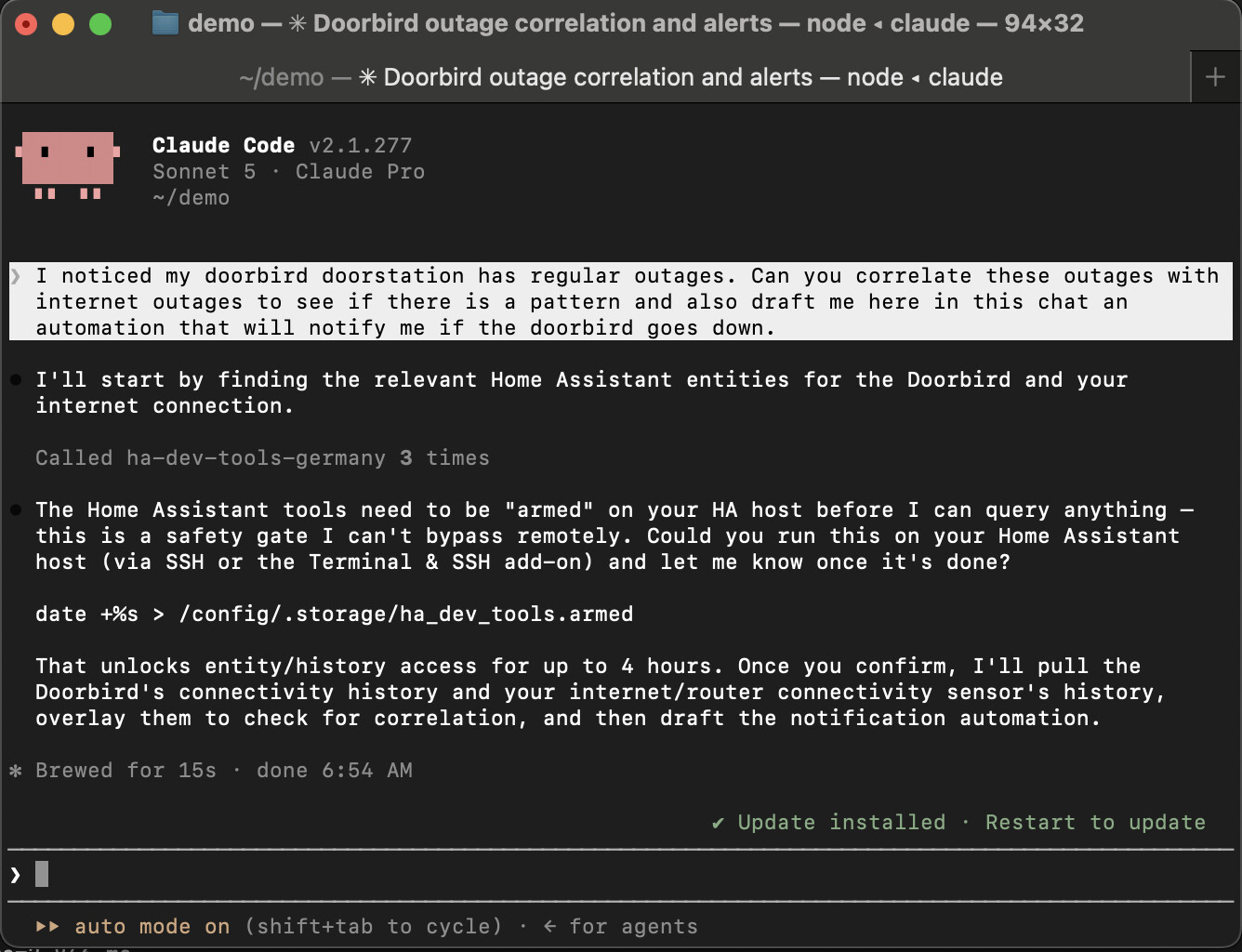
“I noticed my doorbird doorstation has regular outages. Can you correlate these outages with internet outages to see if there is a pattern and also draft me here in this chat an automation that will notify me if the doorbird goes down.”
First, the safety gate — every tool refuses to run until you prove real filesystem access on the HA host itself (SSH/Terminal add-on), so there’s no remote bypass:
Once armed, it pulled 10 days of recorder history for both sensors, found they don’t correlate (the Doorbird drops are local/device-side, not an internet issue), and as a bonus caught that my existing automation only fires after 10 minutes down — but 8 of the last 9 outages were shorter than that, so it had been silently failing to notify me almost every time:

Then it drafted a fix as a preview — nothing applied until I explicitly confirm:
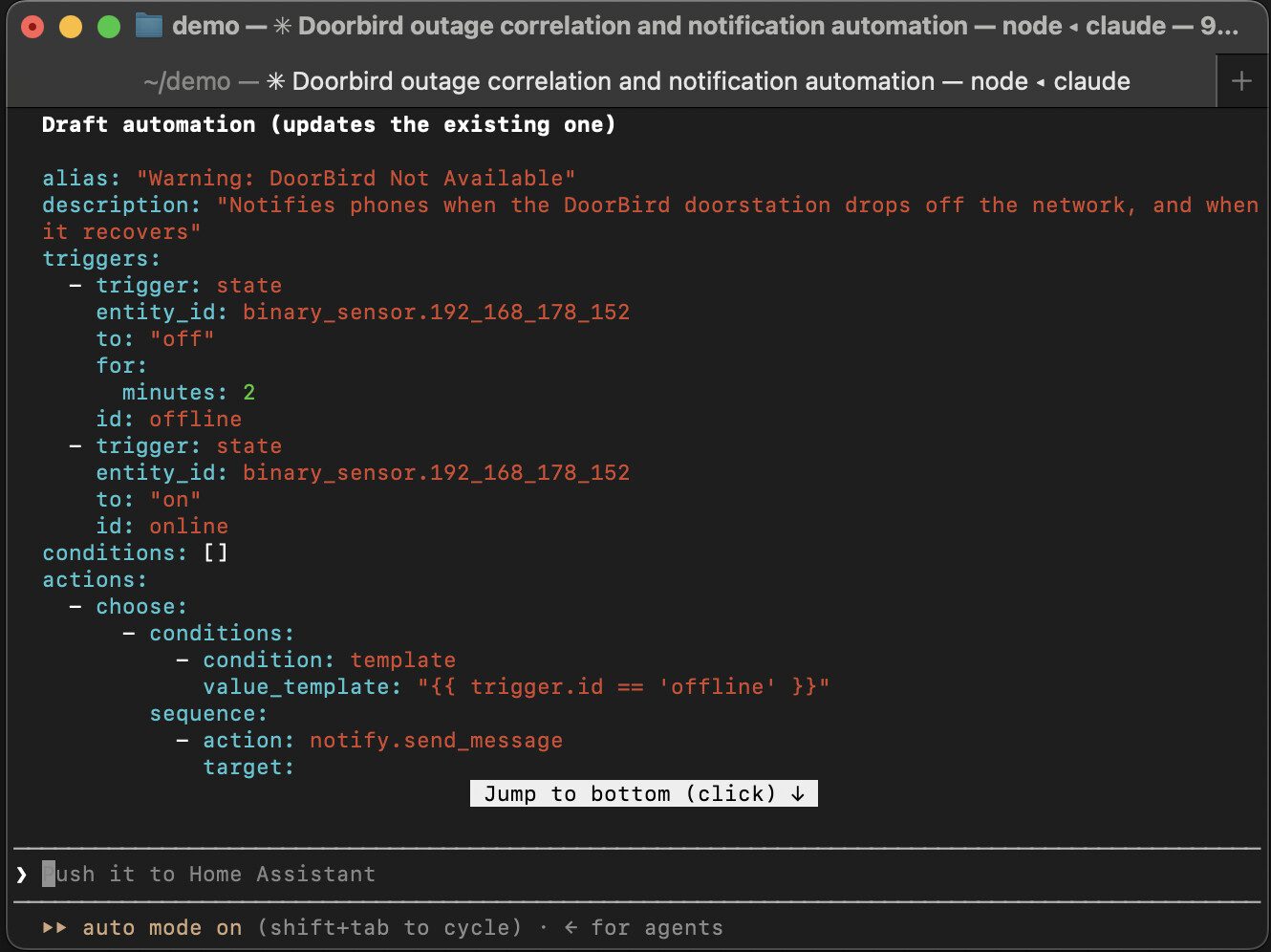
At this point I’d tell it to go ahead and apply this to my live instance. I’m comfortable with that specifically because every change here gets mirrored to GitHub before and after — if anything looks wrong, I can just copy the old automation straight back from git history. And worst case, I’ve got daily HA backups as the actual safety net underneath all of it.
A few more things you can ask it:
- “Write an automation that turns down my living room shutters while I’m at home if the weather forecast is expecting rain and my rain sensor is detecting the first drops.”
- “Add a new trigger to my existing automation and make it more robust.” (e.g. catching edge cases the original didn’t handle — like the outage example above)
- “Delete the 50 orphaned entities left over in my device registry from that Zigbee device I removed.”
On safety (this matters more than the feature list): every write always requires a propose-then-confirm pair — you can see that play out above, where it stopped at a preview rather than just applying the change. Optional dry-run mode goes further: a hard guarantee that nothing reaches disk while it’s on. Optional git mirroring pushes a before/after audit trail to a private repo. None of this is a substitute for reviewing what your agent proposes — see the README’s “safety model” section for the honest breakdown of what’s a real guarantee vs. what’s just friction.
Requires HA 2026.8.2+. Already in HACS. MIT licensed, 99% test coverage, actively developed.
GitHub: GitHub - alexlenk/ha-dev-tools: Home Assistant custom integration for development tools · GitHub
This is a community project built in spare time — feedback, issues, and PRs welcome.