HA GitOps treats your /config like production infrastructure: nothing
force-pushes, every change becomes a reviewable pull request, and CI
validates your config against pinned Home Assistant versions - including a real
smoke boot - before it can merge.
Most config-sync App upload your files straight onto a branch - some even
force-push. That gives you a copy, not control.

What you get here that other apps don’t
 True two-way sync - not a one-way upload. Merged PRs flow back onto
the box on the next run. Box and repo converge onmain, both directions in
the same run (pull first, then push drift). Nothing ever force-pushes - every change is an additive PR on a dated
auto-backup/…branch. Yourmainhistory is never rewritten. PR-gated, not auto-committed - drift becomes a reviewable pull
request. Diff it, comment, merge or close. Your config never mutatesmain
behind your back. CI smoke boot - the pinned HA Core container actually starts with your
config and must answer HTTP with noInvalid config. Not just a lint — a real
boot test. Upgrade breakage surfaces in CI, not on your Pi at 2am. HA version matrix - validates against a pinned version and a
 stable
early-warning leg, so you see breakage from the next HA release before you take it. Secrets never leave the box - CI runs with stub secrets only. Seeded
.gitignoreexcludessecrets.yaml,.storage/, databases, logs. Review and merge from your phone - it’s just a GitHub PR.
 Optional status sensor - exposes last-run status back into HA.
 Template CI workflows included - copy one file into your config repo,
done. No pipeline to hand-build.
Why another config-backup apps?
| Direct-push sync tools | HA GitOps | |
|---|---|---|
Changes land on main |
Immediately, sometimes force-pushed | Never - every drift becomes a PR |
| Review before accept | No | Yes - diff, comment, merge (or close) |
| CI validation | No | Yes - HA version-matrix check + smoke boot gate the merge |
| Bidirectional | Usually one-way upload | Yes - merged PRs flow back on the next run |
| Secrets safety | gitignore defaults | gitignore defaults + CI runs with stub secrets only |
How it works
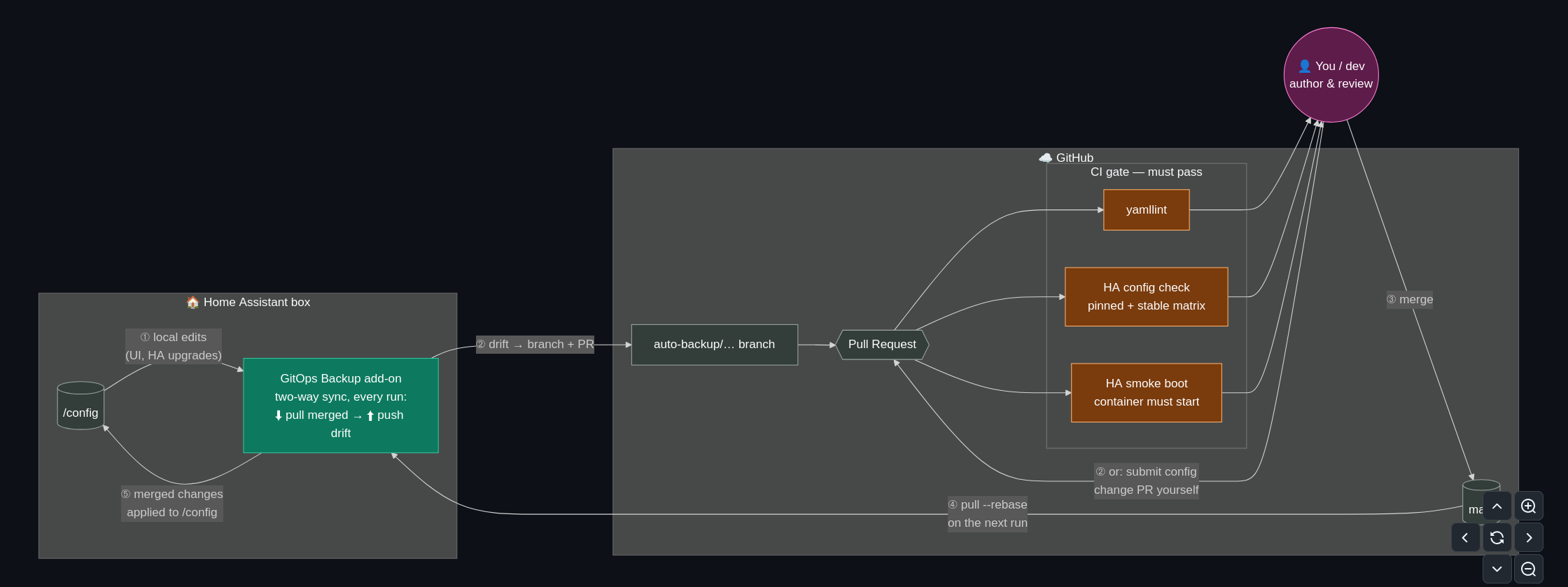
Every scheduled run (default daily) on your HA box:
- Stash local drift →
pull --rebasefromorigin/main(picks up PRs you
merged) → re-apply → if the live config changed, commit to a dated
auto-backup/…branch and open a PR via the GitHub API. - CI on the PR (template workflows included): yamllint + full
frenck/action-home-assistantvalidation against a pinned HA version (with a
stableearly-warning leg) + a smoke boot — the pinned HA Core container
starts with your config and must answer HTTP with noInvalid config.
Upgrade breakage surfaces in CI, not on your Pi. - You merge (from your phone, if you like). The next run rebases the merged
state back onto the box.
Both directions go through the same run: it pulls first, then pushes drift,
so box and repo converge on main.
Install (short version)
- Add the repo to your App store (badge above), install
GitOps Config Backup. - Create a GitHub repo (private recommended) + a fine-grained PAT with
Contents: read/write and Pull requests: read/write. - Point the app at it, start with
dry_run: true, check the log, flip to
false. - Copy the included
template/workflows/validate-ha-config.yamlinto your
config repo’s.github/workflows/. - (Recommended) Protect
main, require the HA Config Validation check.
Security notes
- Token lives in Supervisor-encrypted app options, never in git.
- Seeded
.gitignoreexcludessecrets.yaml,.storage/, databases, logs. - CI validates with stub secrets - your real
secrets.yamlnever leaves the box. - Nothing force-pushes or writes to your base branch after the initial import.
- This is change tracking, not disaster recovery - pair it with HA’s native
encrypted backups for full system state.
Feedback, issues, and PRs welcome. Would love to hear how it holds up on other
people’s setups. I’ve been using this setup in the HA config. Hopefully, this is
useful to others in the community. 
