HA LG ThinQ Washer/Dryer Time Remaining Script Triggered Via Amazon Alexa

The task is to get Alexa to trigger an announcement that provides the details of the time remaining on my LG ThinQ enabled washer and dryer. Alexa does not have access to that data but HA does. Below is the script that HA can use to announce that detail. Now the task is to get Alexa to trigger that script.

I found AI answers for how to get Alexa to call a HA script no longer work so here is a slightly kludgy work around. Previously, Alexa would show an exposed HA script as a device. That device could then be placed in an Alexa scene with the voice command that would then trigger that HA script.

Alexa no longer presents HA exposed scripts as a device, but they are visible in the Alexa group’s creation dialog. The kludgy trigger now is to say “Alexa group name on”. In this case “Alexa Dryer Time on”. Better than nothing until Alexa can access the LG ThinQ time remaining data and/or scripts can be exposed and shared to Alexa scenes. Create the script via settings>automations> scripts and then expose the HA script to Alexa via the settings>voice assistants>alexa. Here is my HA ThinQ dryer time remaining script.

action: notify.send_message
target:
  entity_id:
    - notify.all_dots_announce
    - notify.lance_s_echo_show_8_3rd_gen_announce
    - notify.lance_s_2nd_echo_dot_announce
data:
  message: >
    {% set sensor = 'sensor.dryer_2' %} {% set time = state_attr(sensor,
    'remain_time') %} {% set completed = state_attr(sensor, 'run_completed') %}

    {% if completed == 'on' %}
      The dryer cycle is finished.
    {% elif time and ':' in time %}
      {% set parts = time.split(':') %}
      {% set h = parts[0] | int %}
      {% set m = parts[1] | int %}
      {% if h > 0 %}
        The dryer has {{ h }} {{ 'hour' if h == 1 else 'hours' }} and {{ m }} {{ 'minute' if m == 1 else 'minutes' }} remaining.
      {% elif m > 0 %}
        The dryer has {{ m }} {{ 'minute' if m == 1 else 'minutes' }} remaining.
      {% else %}
        The dryer is finishing up now.
      {% endif %}
    {% else %}
      The dryer does not appear to be running.
    {% endif %}

Can you have the washer changing from a running status to a finished status be the trigger and the Alexa announcement be the action in your automation?

1 Like

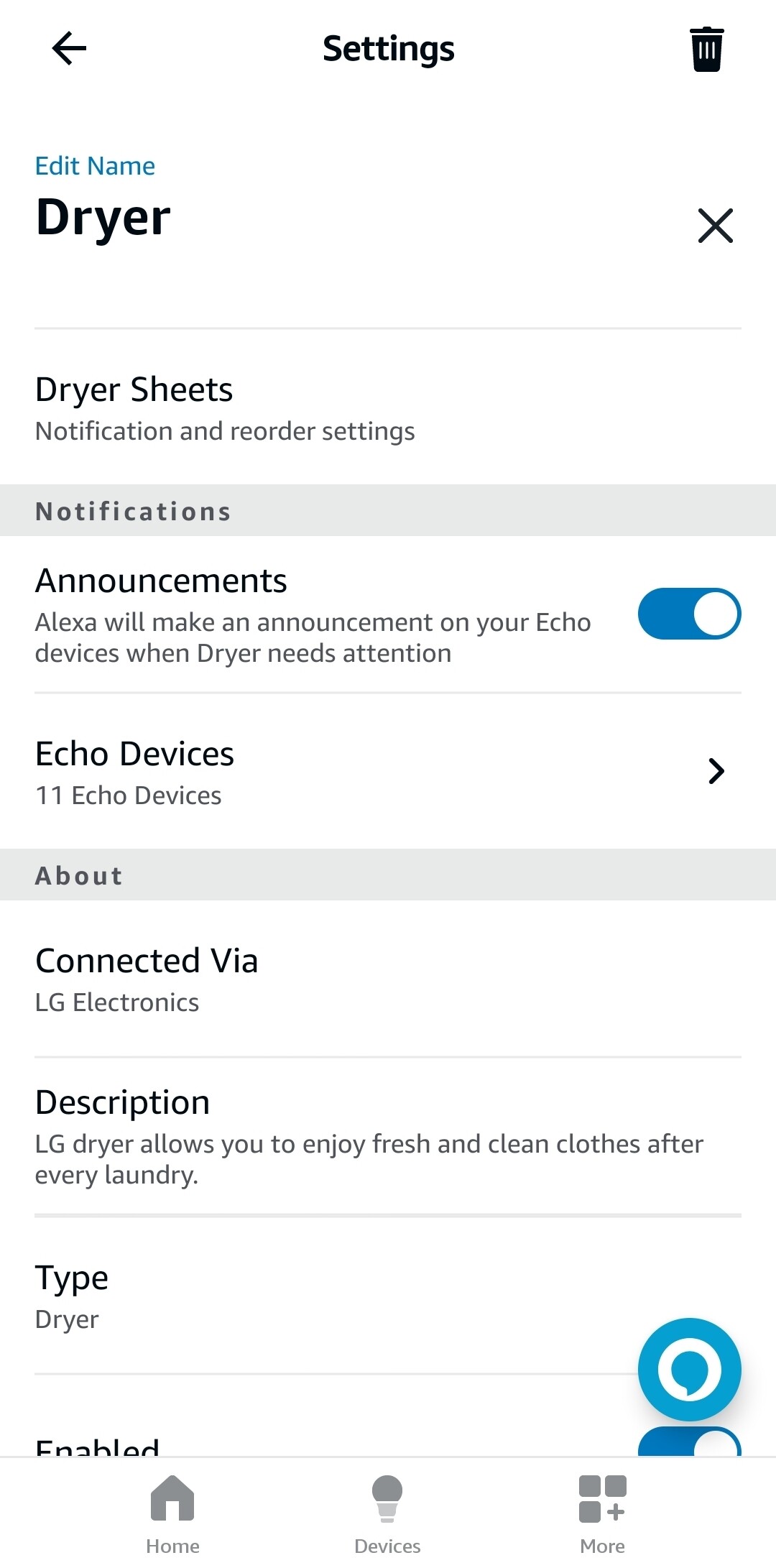
Yes the ThinQ skill in Alexa will support that directly. Just add the skill and look at the device (Dryer or Washer) settings and toggle the announcement button pictured below

Or you can use a HA automation like this

alias: Dryer Complete
description: Dryer Complete
triggers:
  - type: turned_on
    device_id: b96dc70c4cdf9dc0c6b8e5e7a6761ca6
    entity_id: 2cdb5661e1dfea5e47bc9acb1ec2cf4c
    domain: binary_sensor
    trigger: device
conditions: []
actions:
  - data:
      message: Dryer Complete
    enabled: true
    action: notify.notify
  - action: notify.send_message
    target:
      entity_id:
        - notify.all_dots_announce
        - notify.lance_s_echo_show_8_3rd_gen_announce
        - notify.lance_s_2nd_echo_dot_announce
    data:
      message: Dryer complete
  - data:
      title: Dryer complete
      message: Dryer complete at {{now().strftime('%H:%M:%S') }}
      notification_id: dryer complete
    action: persistent_notification.create
mode: single

I have a GE washer and dryer. I set up a HA automation where if one of the two finishes a run then it makes and announcement and in the announcement it mentions the remaining time on the other if it is currently running. So if the Washer finishes a load and the Dryer is still running it will tell you the wash is done and the dryer has x minutes remaining.
1 Like

I create 2 automations for announcement , when washer and dryer finished.

alias: Washer Notification-2
description: ""
triggers:
  - alias: Washer Power OFF
    entity_id:
      - switch.washer_power
    from:
      - "on"
    to:
      - "off"
    for:
      hours: 0
      minutes: 0
      seconds: 10
    id: Washer Power OFF
    trigger: state
conditions: []
actions:
  - data:
      cache: false
      entity_id: media_player.lenovosmartdisplay107143
      message: The Washing Machine  has finished. You should remove clothes.
    action: tts.google_translate_say
    enabled: true
  - alias: Volume UP
    action: media_player.volume_set
    metadata: {}
    data:
      volume_level: 0.65
    target:
      entity_id: media_player.lenovosmartdisplay107143
  - delay:
      hours: 0
      minutes: 0
      seconds: 45
      milliseconds: 0
  - alias: Volume Down
    action: media_player.volume_set
    metadata: {}
    data:
      volume_level: 0.5
    target:
      entity_id: media_player.lenovosmartdisplay107143
mode: single
alias: Washer Notification-2
description: ""
triggers:
  - alias: Washer Power OFF
    entity_id:
      - switch.washer_power
    from:
      - "on"
    to:
      - "off"
    for:
      hours: 0
      minutes: 0
      seconds: 10
    id: Washer Power OFF
    trigger: state
conditions: []
actions:
  - data:
      cache: false
      entity_id: media_player.lenovosmartdisplay107143
      message: The Washing Machine  has finished. You should remove clothes.
    action: tts.google_translate_say
    enabled: true
  - alias: Volume UP
    action: media_player.volume_set
    metadata: {}
    data:
      volume_level: 0.65
    target:
      entity_id: media_player.lenovosmartdisplay107143
  - delay:
      hours: 0
      minutes: 0
      seconds: 45
      milliseconds: 0
  - alias: Volume Down
    action: media_player.volume_set
    metadata: {}
    data:
      volume_level: 0.5
    target:
      entity_id: media_player.lenovosmartdisplay107143
mode: single

Your script is great, will try it to compare , which one my wife like more :grin:

TY

2 Likes