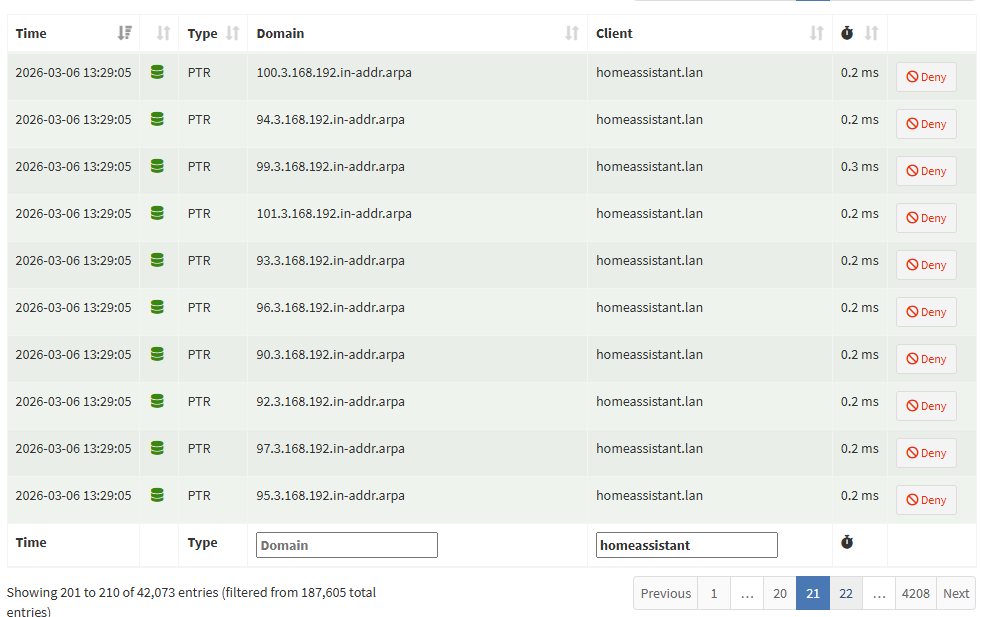
I’ve been investigating this, working to tie together multiple threads from github, reddit and HA community on the cause and options to fix
This is sort of the short summary as I understand it:
it’s a feature not a bug , albeit viewed as overly aggressive by most
HA is scanning your LAN for new devices to add
When you see a “new device has been found, would you like to add it?” in your HA settings, it was discovered through these scans
Ideally, it would be nice to have an HA parameter or configuration change that rate limits the number of DNS queries (X/hr) to a more reasonable number that limits HA and Router CPU and network bandwidth.
HA uses DHCP module, which is looking for new devices on your LAN (subnet)
reverse the IP address numbers in the error message - (192.168.X.Y) is your LAN IP pool.
Sometimes HA gets carried away after an update, increasing the number of scans/hour; that may be what happened recently (Oct 2025)
It can be stopped by disabling one or more features of HA, including DHCP
BUT you may break things in future updates, others have done this and forgot to check when they experience other issues (especially when HA can no longer auto-discover new devices)
That would only explain PTR lookups for private address ranges wouldn’t it? From the screenshots PTR lookups seem to be happening for internet addresses?
Not that we don’t appreciate the investigation. Having more configuration options for the default integrations would be very welcome and good to highlight. Possibly two issues though.
I’ve noticed that this only happens to me if I have HA’s GUI DNS server set to a different IP than the gateway. I run AdGuard Home on xx.179 with the router address/gateway/DHCP server on xx.1.
If HA is set to use xx.1 it works fine (no weird requests, even with NMAP tracker and the DHCP integration) and only does an PTR lookup maybe 5-10 times an hour. If I set HA’s DNS server to AdGuard’s xx.179 address it spams hundreds of PTR requests every hour on the same minute. I also get periodic DNS requests to a ‘.’ domain.
HA works fine with the wrong DNS IP set, it just shows up in AdGuard’s logs as originating from the router and not HA.
I wonder if there is another DNS server setting within HA that doesn’t agree with the GUI DNS server setting because this is definitely 100% reproducible on my end.
I still see the DNS blast being limited by my piHole server on a regular basis. While I get HA wants to discover new devices, I’m still not sure how that correlates to so many DNS calls? Does it spin through all IPAddresses in my subnet to look for a name? If so, shouldn’t it detect if there is something at that address first?
I am hesitant to start disabling native features to the HA install. It was put there for a reason and I’m concerned about what else that might screw up (as described in the comments that speak to re-enabling it before an upgrade, or that an upgrade may naturally re-enable it).
Anyone from HA have a more reasonable solution? I could raise the throttling threshold on my piHole…but sounds like I would be compensating for something that strikes me as poor design?
BTW: My piHole is acting as the DHCP for my network. I also manually set the DNS address in the HA GUI to reflect the address for my piHole.
I did a little digging in the query log. It is not looking just for local addresses. Here is a sample:
FYI: I changed the warning/throttling threshold in piHole DNS to 2000 in 60 seconds and restarted HA and did not receive the warning this time. Problem solved?
True dat. I hid the problem, but there doesn’t appear to be a fix nor admission it is a problem. It strikes me as erroneous behavior, and it certainly appears unnecessary and/or inefficient, but perhaps I’m the only over that thinks so?
I’m not sure if this is related, but I block outbound ports 53 and 853 on my router. I know there is(was?) an issue in HA around hard-coded cloudflare DNS. I was using the Core DNS Override app/addon to fix it, but I’ve just noticed it seems to be broken.
Seems odd that would cause this, but given it is DNS/DHCP it seemed worth a mention.
I created a small test using the same library with a debugger attached. Two things make me think this is expected functionality:
The .in-addr.arpa PTR lookups are local addresses, but in reverse order. So the lookup for 192.168.3.4 would be 4.3.168.192.in-addr.arpa. This is normal: https://www.whatsmydns.net/dns-lookup/ptr-records
The PTR lookups are for every address on the network to try find hosts. My network is using a subnet of /21, which would be 2,048 addresses and PTR lookups when it is attempting to discover hosts.
The PTR lookups are to try find the hostnames for a given IP address.
I was thinking some more on this, and although it is expected functionality, I suspect it shouldn’t fire this many requests at a DNS server in such a small period of time. It should probably have a rate limiter/batching in place so that it spreads the requests out a bit.
 , albeit viewed as overly aggressive by most