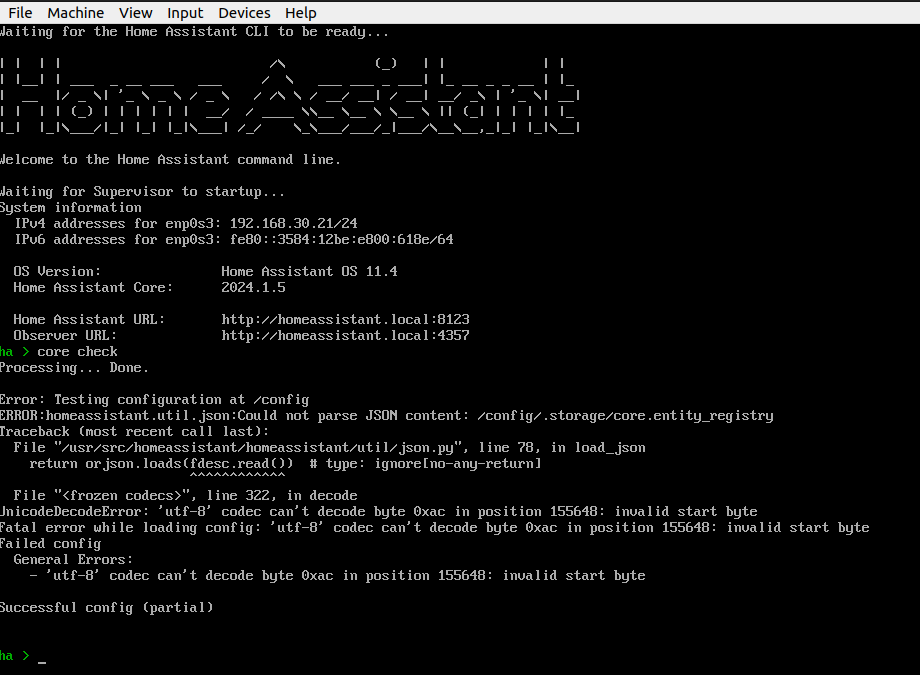
I have been running quite nicely for some time. Did a reboot of home assistant VM today and when it came back it won’t load the UI. I do get greeted with the standard has startup on the console for the VM. From the cl I ran core check and got the output below. Any guidance on how to address?
I am running on ubuntu VM vertualbox, headless.
try core rebuild
and
su repair
1 Like
Thanks for the help. here is what happened from those:
The web UI is not up. will try a reboot then core check again
no go  different error now
well, that doesn’t look nice
you can type … login (hit enter)
then
cd /mnt/data/supervisor/homeassistant ( enter )
You are now in your /config folder, where you can type
more home-assistant.log
however , if you know what you are doing you can also enter .storage BUT
first hit
core stop
ls -la , shows the files / folder , where you are
you might have some corrupted date in your config folder, or a corrupt filesystem ( SD-card , or disk ? )
Maybe a
host update
core update
su update
will help ? , not sure whether it works when you already are on latest
other vice you can perform a … restore, from latest backup, then run update
in /supervisor you have your /backup etc
1 Like
Thanks so much for trying to help. much appreciated. Lukily I have a full VM backup from early December. trying a restore of that to see how out of date it is. As you might guess, I tinker with it daily. probably lost some configs of automation etc…
any way I can ssh into my VirtualBox and get file system access for the corrupt VM?
Why you ask me that ?  … try
… try
or access the files in /Supervisor and /backup from the CLI , where you also can run backup
However when you SSH you end up in the SSH add-on Container , not the same place as the CLI access
1 Like
my vm backup appears to be working. I have it up and running the web UI, currently updating the HA core/os. will then see if I can restore a backup of HA that is newer then early December.
1 Like
working great now. thanks again for the help. Glad I have an “ok” backup strategy .
–pat
1 Like
Do them more frequent, then you’ll have an “ok” strategy 
1 Like