Hello all,
I’m asking on behalf of my father-in-law who is running Home Assistant on a Raspberry Pi 4b 4GB.
He has daily automatic backups enabled and this saves to a file on the local drive. The backup size is about 13.1GB. It includes apps and history. The history is especially important to him as he wants to look back through the energy dashboard.
We’re upgrading the Pi from a 120GB SSD to a 500GB SSD, but everything else is otherwise staying the same.
Here’s the process we have followed so far:
- Downloaded the automatic backup tar file to his PC.
- Used the Raspberry Pi imaging tool to put HAOS on a new 500GB SSD.
- Shut down Home Assistant on the Pi and removed the power cable.
- Disconnected the 120GB SSD and connected the 500GB SSD in its place.
- Waited a few moments for homeassistant.local:8123 to bring up the onboarding UI.
- In the onboarding UI, selected the option to restore from a backup.
- Started uploading the automatic backup tar file from earlier.
After transferring the 13.1GB, the UI shows that a 500 error occurred:
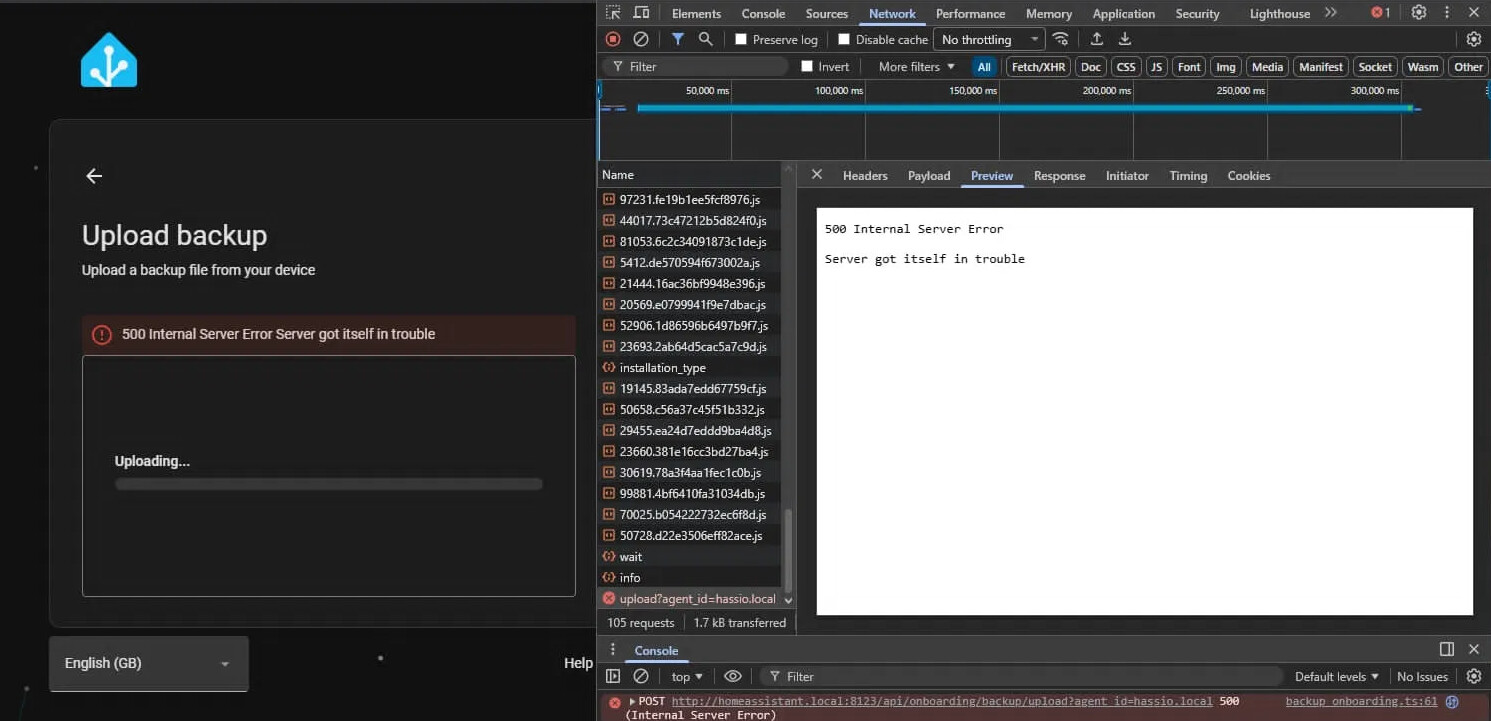
We then tried just continuing with a fresh setup anyway. Once presented with the default dashboard we went to Settings → System → Backups and clicked the button at the top right to reveal the option to upload a backup, then tried to upload the tar file here too. But unfortunately it resulted in the same error after the 13.1GB was transferred.
We then checked the supervisor logs and saw this entry:
ERROR (MainThread) [supervisor.backups.backup] Can't read backup tarfile /data/tmp/tmpalnyqlil/upload.tar: "filename './backup.json' not found"
We decided then to just put the old 120GB SSD back in while I did some research and ask some questions (hence me being here!) to figure out what might be wrong. The old drive booted up fine and he is back up and running for now, just with not much headroom on his drive.
I have access to his Home Assistant via Tailscale, so set up the Samba share add-on and copied the file to my desktop running Arch Linux so I could run the command: tar -tvf ha-backup.tar and it shows:
-rw-r--r-- 0/0     14083331845 2026-07-12 19:44 homeassistant.tar.gz
-rw-r--r-- 0/0            2214 2026-07-12 20:20 a0d7b954_wireguard.tar.gz
-rw-r--r-- 0/0        14669962 2026-07-12 20:20 a0d7b954_vscode.tar.gz
-rw-r--r-- 0/0            7317 2026-07-12 20:20 core_ssh.tar.gz
-rw-r--r-- 0/0           61919 2026-07-12 20:20 core_mosquitto.tar.gz
-rw-r--r-- 0/0            2121 2026-07-12 20:20 45df7312_zigbee2mqtt.tar.gz
-rw-r--r-- 0/0            2680 2026-07-12 20:20 a0d7b954_aircast.tar.gz
-rw-r--r-- 0/0            4707 2026-07-12 20:20 cebe7a76_hassio_google_drive_backup.tar.gz
-rw-r--r-- 0/0         1620149 2026-07-12 20:20 core_duckdns.tar.gz
-rw-r--r-- 0/0            1952 2026-07-12 20:20 core_configurator.tar.gz
-rw-r--r-- 0/0            2652 2026-07-12 20:20 core_samba.tar.gz
-rw-r--r-- 0/0           18518 2026-07-12 20:20 a0d7b954_nginxproxymanager.tar.gz
-rw-r--r-- 0/0         1424624 2026-07-12 20:20 core_mariadb.tar.gz
-rw-r--r-- 0/0         1232677 2026-07-12 20:20 core_matter_server.tar.gz
-rw-r--r-- 0/0           10074 2026-07-12 20:20 a0d7b954_tailscale.tar.gz
-rw-r--r-- 0/0           10699 2026-07-12 20:20 ssl.tar.gz
-rw-r--r-- 0/0            1933 2026-07-12 20:20 ./backup.json
Which does show the backup.json file. So perhaps the tar isn’t corrupted after all? And maybe something else is going wrong.
Are there any other methods I can use to try to restore the backup, or any other logs I can check to find out what the root cause of the failure is?
Some other things I noticed during this process:
- The automatic backup UI says that the expected size of the backup is around 25GB, but ends up being 13.1GB.
- The backup took 37 minutes to complete and downloading the file from the Pi took a long time as it seemed to be capped at 5MB/s.
- Uploading the backup seemed to go much faster at around 45MB/s.
Thanks in advance 