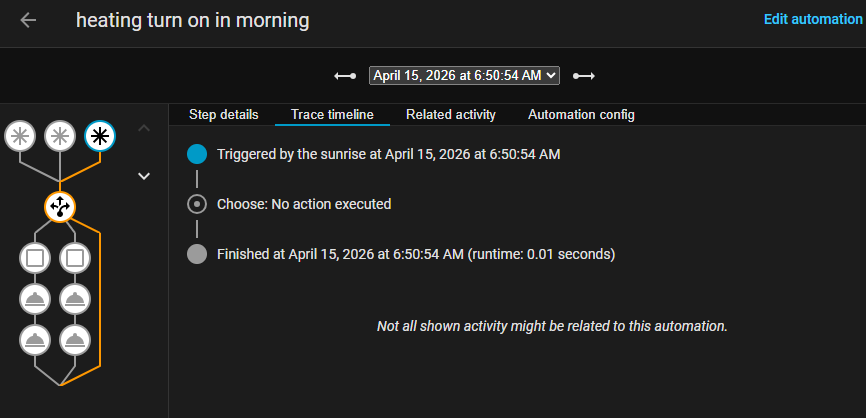
Hey kings. I made this automation a while ago and it was working (summer months) but now as winter has kicked in, I have found this not turning the heat mode on. Any suggestions or insight as to what I’ve done wrong?
Thank you.
alias: "heating turn on in morning "
description: ""
triggers:
  - trigger: sun
    event: sunrise
    offset: 0
    id: sunrise
  - trigger: numeric_state
    entity_id:
      - sensor.alfresco_motion_sensor_temperature
    below: 18
    id: below
  - trigger: numeric_state
    entity_id:
      - sensor.alfresco_motion_sensor_temperature
    above: 24
    id: above
conditions: []
actions:
  - choose:
      - conditions:
          - condition: trigger
            id:
              - below
        sequence:
          - action: climate.turn_on
            metadata: {}
            data: {}
            target:
              entity_id: climate.jake_s_device
          - action: climate.set_temperature
            metadata: {}
            target:
              entity_id: climate.jake_s_device
            data:
              temperature: 22
              hvac_mode: heat
      - conditions:
          - condition: trigger
            id:
              - above
        sequence:
          - action: climate.turn_on
            metadata: {}
            target:
              entity_id: climate.jake_s_device
            data: {}
          - action: climate.set_temperature
            metadata: {}
            target:
              entity_id: climate.jake_s_device
            data:
              temperature: 24
              hvac_mode: cool
mode: single
Some climate devices perform more reliably if you separate it into two actions, setting the mode first and then setting the temperature.
It may also be a timing issue. If splitting the actions doesn’t fix it on it’s own, try adding a short delay between each action.
thanks mate. ill give it a whirl.
I have also got a screen shot of the trace from this morning.
That trace is for a firing event of the sunrise trigger, which you don’t have a Choose option for…
I have updated for an option for sunrise to repeat until one of the other IDs triggers ( i think )
or would it be easier to create a seperate automation for both.
Are you able to use trigger ID’s in the “and if” section.
thank you
alias: "heating turn on in morning "
description: ""
triggers:
  - trigger: numeric_state
    entity_id:
      - sensor.alfresco_motion_sensor_temperature
    below: 18
    id: below
  - trigger: numeric_state
    entity_id:
      - sensor.alfresco_motion_sensor_temperature
    above: 24
    id: above
  - trigger: sun
    event: sunrise
    offset: 0
    id: sunrise
conditions: []
actions:
  - choose:
      - conditions:
          - condition: trigger
            id:
              - below
        sequence:
          - action: climate.turn_on
            metadata: {}
            data: {}
            target:
              entity_id: climate.jake_s_device
          - delay:
              hours: 0
              minutes: 0
              seconds: 10
              milliseconds: 0
          - action: climate.set_temperature
            metadata: {}
            target:
              entity_id: climate.jake_s_device
            data:
              temperature: 22
              hvac_mode: heat
      - conditions:
          - condition: trigger
            id:
              - above
        sequence:
          - action: climate.turn_on
            metadata: {}
            target:
              entity_id: climate.jake_s_device
            data: {}
          - delay:
              hours: 0
              minutes: 0
              seconds: 10
              milliseconds: 0
          - action: climate.set_temperature
            metadata: {}
            target:
              entity_id: climate.jake_s_device
            data:
              temperature: 24
              hvac_mode: cool
      - conditions:
          - condition: trigger
            id:
              - sunrise
        sequence:
          - repeat:
              until:
                - condition: trigger
                  id:
                    - below
                    - above
              sequence: []
mode: single
That action will never do anything… Beside the fact that it has no actions in its sequence, the trigger ID of the current run of the automation cannot change. The most likely outcome is that the automation just crashes due to an out of memory error. In theory you could use a Wait action, but there is no real reason to do that.
What is the purpose of the sunrise trigger? The automation doesn’t include any conditions to stop it from working overnight, so why trigger it at sunrise?
If it’s just a convenient point to check the temperature, mirror your temperature triggers as the conditions in the Choose option instead of trigger IDs… that way the sunrise trigger can go down either path as necessary. For the most reliable functionality I would also add a for duration to each of the temperature triggers.
alias: "heating turn on in morning"
description: ""
triggers:
  - trigger: numeric_state
    entity_id:
      - sensor.alfresco_motion_sensor_temperature
    below: 18
    for: "00:00:30"
    id: below
  - trigger: numeric_state
    entity_id:
      - sensor.alfresco_motion_sensor_temperature
    above: 24
    for: "00:00:30"
    id: above
  - trigger: sun
    event: sunrise
    offset: 0
    id: sunrise
conditions: []
actions:
  - choose:
      - conditions:
          - condition: numeric_state
            entity_id:
              - sensor.alfresco_motion_sensor_temperature
            below: 18
        sequence:
          - action: climate.turn_on
            metadata: {}
            target:
              entity_id: climate.jake_s_device
          - delay: 2
          - action: climate.set_hvac_mode
            metadata: {}
            target:
              entity_id: climate.jake_s_device
            data:
              hvac_mode: heat
          - delay: 2
          - action: climate.set_temperature
            metadata: {}
            target:
              entity_id: climate.jake_s_device
            data:
              temperature: 22
      - conditions:
          - condition: numeric_state
            entity_id:
              - sensor.alfresco_motion_sensor_temperature
            above: 24
        sequence:
          - action: climate.turn_on
            metadata: {}
            target:
              entity_id: climate.jake_s_device
          - delay: 2
          - action: climate.set_hvac_mode
            metadata: {}
            target:
              entity_id: climate.jake_s_device
            data:
              hvac_mode: cool
          - delay: 2
          - action: climate.set_temperature
            metadata: {}
            target:
              entity_id: climate.jake_s_device
            data:
              temperature: 24
mode: single
If you wanted to be extra thorough you could use an Or condition that includes both the trigger condition and temperature condition… but it’s probably overkill.
...
  - choose:
      - conditions:
          - or:
              - condition: trigger
                id: below
              - condition: numeric_state
                entity_id:
                  - sensor.alfresco_motion_sensor_temperature
                below: 18
...
Ill give it a whirl and see how it goes.
i had the sunrise so it would turn on in the morning and have the lounge area somewhat warm when we get up and utilise the solar panels. it had never triggered overnight before. but i do have a seperate automation to turn it off at sunset.
basically. i wanted it to turn on if the temp goes either above or below the stated outside temp and then do heating mode if cold and cool mode if hot in the one automation instead of having 2 seperate ones. I havent really used trigged ID’s before.
thank you
There may be well developed climate control intgrations/addons/apps using solutions like opentherm that may be easily integrated into HomeAssistant and your sensors and heater you may wish to investigate instead of reinventing the wheel. Start by searching if your heating system is already supported, and then search for the sensors you are using. You haven’t mentioned the make and model of either which makes any advice necessarily very broad.
ill also look at this. I am using a sensibo to then control a TCL split system.
You may find existing integrations for both that may solve your requirements.