Heliograph: ESP32 firmware that speaks your inverter's native protocol — MQTT/HA, Modbus TCP, REST, Prometheus (looking for testers)

Short version: firmware for an ESP32-S3 that sits next to any inverter with an RS485 port, reads it in whatever protocol that inverter happens to speak, and republishes it as MQTT with HA discovery, Modbus TCP, REST/JSON and Prometheus. The point is to be brand-agnostic. Right now the coverage doesn’t match that ambition yet, which is why I’m posting.

Why build it this way

There are a lot of good ESPHome configs and integrations out there, and I’ve used several. But they’re generally one project per brand, and each one reimplements the same stack: read the bus, decode the fields, publish somewhere. So the moment you have a second inverter, or a brand nobody bothered with, you’re starting over.

Heliograph splits it: transport → driver → a canonical measurement model → output adapters. Brand knowledge lives only in the driver. Everything downstream sees canonical measurements, so a new driver gets MQTT, HA discovery, Modbus TCP, REST and Prometheus for free without touching any of that code. For Modbus devices, adding one is a data file rather than C++.

And it’s deliberately not tied to a single protocol family. Modbus RTU is in there, but so is EverSolar’s proprietary AA55/PMU framing, because plenty of hardware predates anyone standardising on anything. That’s the whole idea, the stuff SunSpec covers is the easy half.

There’s a discovery wizard too: wire A/B, run it, it fingerprints the device and picks the driver. That matters more as coverage grows.

Where the coverage actually is

Family Connection Status
EverSolar / Zeversolar legacy (TL series) RS485 (PMU/AA55) **Stable** — in production, validated over eight consecutive unassisted sunrises
Sungrow SH residential hybrid Modbus RTU Experimental, best-sourced here — vendor’s own protocol spec, cross-checked register by register against a widely deployed integration
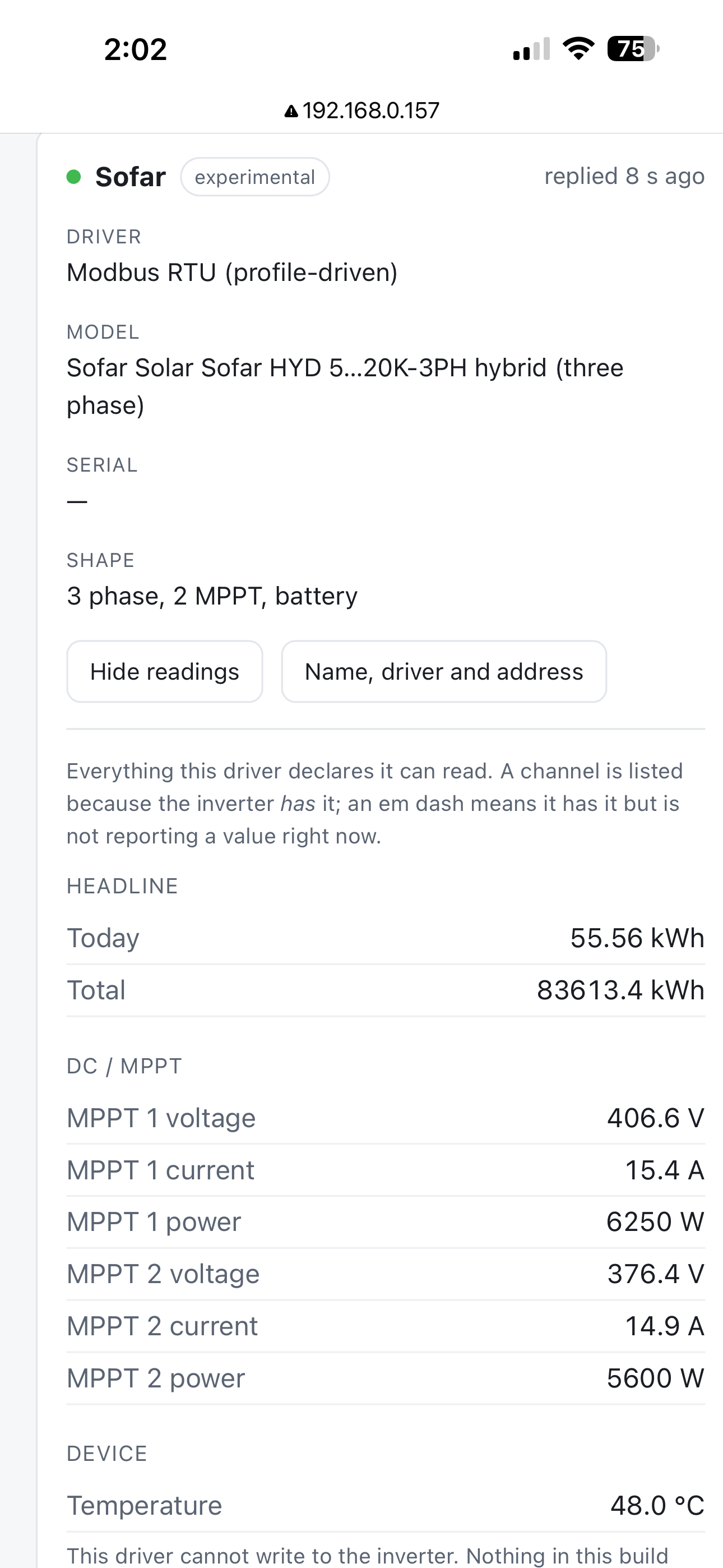
Deye/Sunsynk SUN-xK-SG · Solis/Ginlong RHI · Sofar HYD EP and 3PH · Growatt MIC TL-X and MIN TL-X Modbus RTU Experimental, two-sourced — every mapped row corroborated by two independent implementations that agree
Growatt SPH hybrid · Huawei SUN2000 (± LUNA2000) · GoodWe ET/EH/BT/BH Modbus RTU Experimental, single-sourced
SolarMax S/C/MT/TS RS485 (MaxTalk) Experimental — vendor went bankrupt and took the portal with it, so this is the only way these report anything. No SolarMax has ever answered the driver
SolaX X1 Mini G1/G2/G3 RS485 Experimental — first attempt on real hardware returned no data at all
Anything implementing SunSpec Modbus RTU Experimental — one generic driver for the published standard

That’s it, and I want to be straight about it. It started with EverSolar because that’s what’s on my wall, a 2009 TL whose monitoring portal died with the company. ZeverCloud is gone, and the HA integration reads home.cgi, a plain text blob where the field you want sits at a position that shifts between firmware revisions, which is where all those `invalid literal for int() with base 10: ‘ZL’` reports come from. Talking RS485 directly sidesteps all of that and gives you far more than two values.

But it was never meant to be an EverSolar tool. The architecture is the point; EverSolar is just the first thing that proved it.

The ask

I own one inverter. Everything below that first row is educated guesswork until it meets real hardware, and the roadmap: Deye/Sunsynk, Sungrow, GoodWe, Huawei SUN2000, more of the SolaX and Growatt range, is going to stay a roadmap unless people with those boxes get involved.

So: if you have an inverter with an RS485 port and you’re willing to hook this up and report back, I’d be really grateful. Even “it connects and then returns garbage” is useful! garbage tells me where the framing is wrong. If your brand isn’t listed at all but you know something about its protocol, tell me and let’s see whether it fits; that’s a more interesting conversation than another Growatt config.

What it costs you: a Waveshare board (~€25), a cable to the COM port, twenty minutes. I’ll debug it with you rather than dumping it on you. Issues and discussions are open on the repo, or just reply here.

Everything is read-only. I’m not writing setpoints to somebody’s inverter based on a register map I haven’t verified on hardware. Worst case for a tester is that nothing shows up.

One deliberate choice worth mentioning: a value that couldn’t be read is published as absent, never zero. Zeros end up in your energy dashboard looking like the sun went out for five minutes.

Practical bits

Hardware is a Waveshare ESP32-S3-RS485-CAN a transceiver on board, so no MAX485 module to wire up backwards. Easiest way in is the web installer at Heliograph — web installer → plug in over USB-C and click connect. Chrome and Edge, and as of Firefox 151 that works too (desktop only, Web Serial finally landed). Otherwise take the factory bin from releases and flash it with esptool. OTA after that, with a watchdog-backed bootloader rollback that has already earned its keep once.

The protocol core runs on the host, so pio test -e native gives you 390-odd tests with nothing plugged in, and a mock environment feeds a simulated inverter through the entire output stack, you can work on the MQTT/HA side without an RS485 bus on your desk.

Obvious disclaimer: the COM port is on a box with live DC behind it. Know what you’re doing, or get someone who does.
Hi Timdebruijn,

first of all, thank you for this work. It seems to be a really interesting and logical approach to the topic of reading different inverters.

I stumbled upon your project whilst I was looking to read out my Deye SG05 3-phase inverter.

In the beginning I did not further look into it, as your pre-defined Deye implementation seems to be a 1-phase device, so it got no readings on my Deye.

After not being successful with some other approaches, I came back to your project and noticed that it is possible to define your own “Driver” and make my own Build.

Even though I don’t have the biggest experience with programming myself, I managed to create a new Inverter-File and was able to define the modbus register numbers for my Inverter.

After building the firmware and uploading it to the Waveshare, I finally got some readings.

A bit tinkering forth and back between different Registers and values I think I have a pretty stable readout of my SG05:

Some questions and feedback about the general project:

  • Existing Canonical names and my comments / questions to them:

ac.power.total - This readout is displayed in the web-interface as “Solar production now” The name in the web interface can be confusing, as it can be run from battery in the night. I use it to read out the current inverter-load (I think there is no dedicated value for this?) Where could I put the current inverter-load? Reading the actual power flowing through the “grid” ports would be wrong as well
dc.power.total - I could not find a PV total register on my SG05. Would it be possible to let this be combined automatically? If not - I can do this in Homeassistant.
battery.xxx - I have more than one battery connected. Could you add the possibility to add more than one battery readouts to your model, like for PV? (Including several readouts for temp, Voltage, Ampere and so on). In my Inverter I could not find a “combined” power information and was also not able to read out more than one battery information at the same time. So I can not combine it in HA later like I did with PV- total power.
grid.power - Seems to be working
load.power - The SG05 has a “Backup” port. In my case, my whole house is connected behind this port. So I am reading that information into the “load.power” and all is working fine. But my Inverter also has a Generator port - Maybe you could add an “aux.power” or “generator.power” for an additional in/out port on the AC side? (Even though I am not actively using the generator port, so I could not test it)

  • Functionality / Feature request

Modbus Register Reader
Would it be possible, to have a Testing / Debugging tab where you could manually read out Register values?
As my Inverter is located in my Garage, I don’t have direct access from my computer.
For Now whenever I am trying to find the correct register number, I have to modify my inverter file and make a new Build, Upload the build, check if the numbers are correct and continue from there.
If there would be a testing environment in which I can type a register number, select the value type expected and simply get the readout-data displayed in a small textbox, it would be really helpful to identify unknown registers or test existing information.

Invert Battery display in web-interface Checkbox
I know it it possible to invert readout-data in the inverter file. But in your web-interface the battery data is “Reversed” compared to usual inverter readouts. By default the power flowing towards the battery is seen as “Negative” from the inverter perspective. If I read these numbers without inverting them, the web-interface shows “discharging” whilst charging the battery.
So I inverted the values, but in Homeassistant I have to revert them back.

inverter.status model / canonical name
There currently is no canonical name for the inverter status. Sometimes the inverters have different status numbers which can mean different things, but it would be interesting to read them out, so I could identify if my inverter lost the Grid connection or has other errors. For example my SG05 has 5 states:

0 Standby The inverter is powered on but idle.
1 Self-check The unit is currently booting up, performing internal diagnostic checks, or executing a grid-synchronization countdown sequence.
2 Normal The inverter is working normally.
3 Alarm A non-critical anomaly or warning flag is active. The inverter will continue running, but you should check the active alarm codes.
4 Fault A critical hardware, grid, or battery error has occurred. The inverter has safely shut down or isolated itself to protect the hardware.

grid.status
The “little brother” of the inverter status. Some inverters allow direct information reading about the grid status. SG05 has the following values

Value (Dec) Binary Interpretation
7 0000 0111 Grid Connected. All 3 phases are healthy and tied to the inverter.
0 0000 0000 Grid Disconnected / Blackout. The grid is entirely down, and the inverter is running off-grid/island backup mode.
Any other value (e.g., 1, 3, 5) Varies Grid Fault / Phase Loss. For example, a value of 3 (0000 0011) means Phase L1 and L2 are live, but Phase L3 has dropped. The inverter will reject the grid connection.


So far I did not dare to go into the "writing" area of modbus, even though this is an interesting topic as well, as I would like to be able to modify certain settings in the future.

Thank you very much for your work and I hope I could give you some valuable feedback. If you have any questions, or you would like more Information, please don’t hesitate to ask and If I can run further tests for you on a Deye SG05 3-phase hybrid inverter, please let me know, I will gladly help.

Kind regards
Stig