Would love to get some help getting my Zigbee coordinator to be recognized in HA that is running on my QNAP NAS in Container Station. My NAS is a TS-251D running QTS 5.2.7, Container Station is v3 and the Container was using Privilege Mode and I added the 4 TTY devices in the Add Device tab, also set to Host for networking.
When I fire up HA (brand new installation) it connects fine and finds some wifi devices but when I try to add the Zigbee integration it does not recognize the dongle and asks me to specify the serial port. From my research the serial port should be something like /dev/ttyusb and I should be able to find that by running lsusb from an SSH command line, however, this is what I see:
Annapolis:/config# lsusb
Bus 001 Device 001: ID 1d6b:0002 Linux 5.10.60-qnap xhci-hcd xHCI Host Controller
Bus 001 Device 002: ID 10c4:ea60 Silicon Labs CP2102 USB to UART Bridge Controller
Bus 002 Device 001: ID 1d6b:0003 Linux 5.10.60-qnap xhci-hcd xHCI Host Controller
Bus 001 Device 003: ID 1058:2627 Western Digital My Passport 2627
When I try to see the /dev/tty* paths I see this:
Annapolis:/config# ls /dev/tty*
/dev/tty /dev/tty15 /dev/tty22 /dev/tty3 /dev/tty37 /dev/tty44 /dev/tty51 /dev/tty59 /dev/tty9
/dev/tty0 /dev/tty16 /dev/tty23 /dev/tty30 /dev/tty38 /dev/tty45 /dev/tty52 /dev/tty6 /dev/ttyS0
/dev/tty1 /dev/tty17 /dev/tty24 /dev/tty31 /dev/tty39 /dev/tty46 /dev/tty53 /dev/tty60 /dev/ttyS1
/dev/tty10 /dev/tty18 /dev/tty25 /dev/tty32 /dev/tty4 /dev/tty47 /dev/tty54 /dev/tty61 /dev/ttyS2
/dev/tty11 /dev/tty19 /dev/tty26 /dev/tty33 /dev/tty40 /dev/tty48 /dev/tty55 /dev/tty62 /dev/ttyS3
/dev/tty12 /dev/tty2 /dev/tty27 /dev/tty34 /dev/tty41 /dev/tty49 /dev/tty56 /dev/tty63
/dev/tty13 /dev/tty20 /dev/tty28 /dev/tty35 /dev/tty42 /dev/tty5 /dev/tty57 /dev/tty7
/dev/tty14 /dev/tty21 /dev/tty29 /dev/tty36 /dev/tty43 /dev/tty50 /dev/tty58 /dev/tty8
In HA when I try to add the dongle I am picking Silicon Labs:
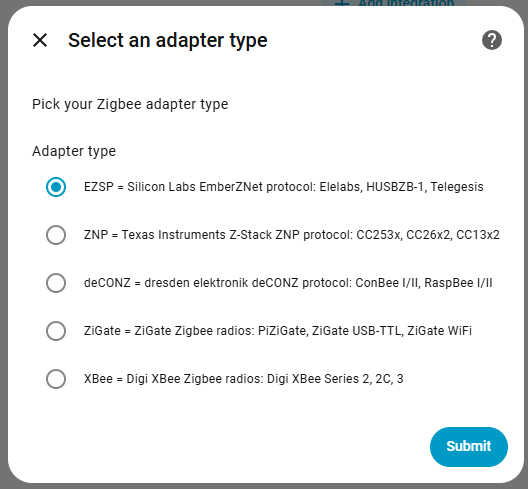
but then it cannot find the serial path and I don’t know how to resolve that
Appreciate any guidance on how to resolve!
Please and thank you!