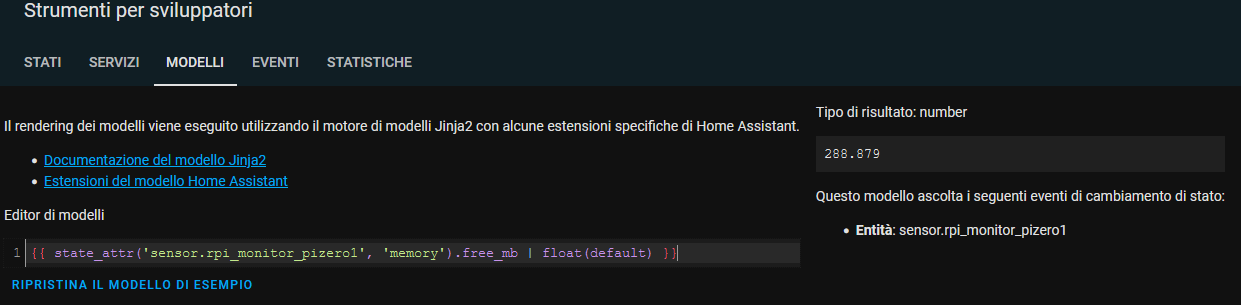
Help with templating from json

Hi, unfortunately I am not able to fix my template sensor (noob here!). When I reboot HA, the sensor is not ready (the mqtt value is not pubblished yet), so I get a render error.
I read to use state_attr so it will render to None if no attributes → error
I tried to use the float(default) → error
I tried to give a value float(0) → error

I tried other things with the same result, so… HELP!

I have a json that contains:

{"info": {"timestamp": "2022-02-15T13:41:56+01:00", "rpi_model": "RPi Zero W r1.1", "ifaces": "e,w,b", "host_name": "pizero1", "fqdn": "pizero1", "ux_release": "bullseye", "ux_version": "5.10.92+", "up_time": "4 days,  17:38", "last_update": "2022-02-15T05:11:52+01:00", "fs_total_gb": 32, "fs_free_prcnt": 8, "networking": {"wlan0": {"IP": "192.168.xxxxx", "mac": "xxxxxxxxxx"}}, "drives": {"root": {"size_gb": 32, "used_prcnt": 8, "device": "/dev/root", "mount_pt": "/"}}, "memory": {"size_mb": "429.633", "free_mb": "288.867"}, "cpu": {"hardware": "BCM2835", "model": "ARMv6-compatible processor rev 7 (v6l)", "number_cores": 2, "bogo_mips": "797.66", "serial": "00000000d101c7f6", "load_1min_prcnt": 10.5, "load_5min_prcnt": 6.0, "load_15min_prcnt": 4.0}, "throttle": ["throttled = 0x0", "Not throttled"], "temperature_c": 30.9, "temp_gpu_c": 30.9, "temp_cpu_c": 29.9, "reporter": "ISP-RPi-mqtt-daemon v1.6.0", "report_interval": 5}}

the sensor I made:

  - sensor:
      - name: "Memoria libera PiZero1"
        unique_id: "sensor.rpi_monitor_pizero1.free_mem"
        icon: mdi:memory
        unit_of_measurement: "MB"
        state: >
          {{ state_attr('sensor.rpi_monitor_pizero1', 'memory').free_mb | float(default) }}

and the error on HA start:

2022-02-14 23:46:04 ERROR (MainThread) [homeassistant.helpers.event] Error while processing template: Template("{{ state_attr('sensor.rpi_monitor_pizero1', 'memory').free_mb | float(default) }}")
Traceback (most recent call last):
  File "/usr/src/homeassistant/homeassistant/helpers/template.py", line 407, in async_render
    render_result = _render_with_context(self.template, compiled, **kwargs)
  File "/usr/src/homeassistant/homeassistant/helpers/template.py", line 1814, in _render_with_context
    return template.render(**kwargs)
  File "/usr/local/lib/python3.9/site-packages/jinja2/environment.py", line 1291, in render
    self.environment.handle_exception()
  File "/usr/local/lib/python3.9/site-packages/jinja2/environment.py", line 925, in handle_exception
    raise rewrite_traceback_stack(source=source)
  File "<template>", line 1, in top-level template code
  File "/usr/src/homeassistant/homeassistant/helpers/template.py", line 1584, in forgiving_float_filter
    return float(value)
jinja2.exceptions.UndefinedError: 'None' has no attribute 'free_mb'

The above exception was the direct cause of the following exception:

Traceback (most recent call last):
  File "/usr/src/homeassistant/homeassistant/helpers/template.py", line 523, in async_render_to_info
    render_info._result = self.async_render(variables, strict=strict, **kwargs)
  File "/usr/src/homeassistant/homeassistant/helpers/template.py", line 409, in async_render
    raise TemplateError(err) from err
homeassistant.exceptions.TemplateError: UndefinedError: 'None' has no attribute 'free_mb'
2022-02-14 23:46:04 ERROR (MainThread) [homeassistant.components.template.template_entity] TemplateError('UndefinedError: 'None' has no attribute 'free_mb'') while processing template 'Template("{{ state_attr('sensor.rpi_monitor_pizero1', 'memory').free_mb | float(default) }}")' for attribute '_attr_native_value' in entity 'sensor.memoria_libera_pizero1'

how to change the state not to have an error on HA start?

I believe you are missing the info.

state_attr('sensor.rpi_monitor_pizero1', 'info').memory.free_mb

Thanks for your reply, but the sensor works:


the problem is only while booting. When the json is pubblished (after HA boot), it works as per my templete check

Use the availability option.

Provide it with a template that tests if sensor.rpi_monitor_pizero1 exists.

the document lacks of examples :frowning: could you please share some info how to use it? Thanks

  - sensor:
      - name: "Memoria libera PiZero1"
        unique_id: "sensor.rpi_monitor_pizero1.free_mem"
        icon: mdi:memory
        unit_of_measurement: "MB"
        state: >
          {{ state_attr('sensor.rpi_monitor_pizero1', 'memory').free_mb | float(0) }}
        availability: "{{ state_attr('sensor.rpi_monitor_pizero1', 'memory').free_mb | float(0) != 0  }}

nope :frowning:
I had to make a small modification otherwise it doesn’t pass the verification

  - sensor:
      - name: "Memoria libera PiZero1"
        unique_id: "sensor.rpi_monitor_pizero1.free_mem"
        icon: mdi:memory
        unit_of_measurement: "MB"
        state: "{{ state_attr('sensor.rpi_monitor_pizero1', 'memory').free_mb | float(0) }}"
        availability: "{{ state_attr('sensor.rpi_monitor_pizero1', 'memory').free_mb | float(0) != 0  }}"

but I get this error

2022-02-15 15:15:56 ERROR (MainThread) [homeassistant.helpers.event] Error while processing template: Template("{{ state_attr('sensor.rpi_monitor_pizero1', 'memory').free_mb | float(0) }}")
Traceback (most recent call last):
  File "/usr/src/homeassistant/homeassistant/helpers/template.py", line 407, in async_render
    render_result = _render_with_context(self.template, compiled, **kwargs)
  File "/usr/src/homeassistant/homeassistant/helpers/template.py", line 1814, in _render_with_context
    return template.render(**kwargs)
  File "/usr/local/lib/python3.9/site-packages/jinja2/environment.py", line 1291, in render
    self.environment.handle_exception()
  File "/usr/local/lib/python3.9/site-packages/jinja2/environment.py", line 925, in handle_exception
    raise rewrite_traceback_stack(source=source)
  File "<template>", line 1, in top-level template code
  File "/usr/src/homeassistant/homeassistant/helpers/template.py", line 1584, in forgiving_float_filter
    return float(value)
jinja2.exceptions.UndefinedError: 'None' has no attribute 'free_mb'

The above exception was the direct cause of the following exception:

Traceback (most recent call last):
  File "/usr/src/homeassistant/homeassistant/helpers/template.py", line 523, in async_render_to_info
    render_info._result = self.async_render(variables, strict=strict, **kwargs)
  File "/usr/src/homeassistant/homeassistant/helpers/template.py", line 409, in async_render
    raise TemplateError(err) from err
homeassistant.exceptions.TemplateError: UndefinedError: 'None' has no attribute 'free_mb'
2022-02-15 15:15:56 ERROR (MainThread) [homeassistant.components.template.template_entity] TemplateError('UndefinedError: 'None' has no attribute 'free_mb'') while processing template 'Template("{{ state_attr('sensor.rpi_monitor_pizero1', 'memory').free_mb | float(0) != 0  }}")' for attribute '_attr_available' in entity 'sensor.memoria_libera_pizero1'
2022-02-15 15:15:56 ERROR (MainThread) [homeassistant.components.template.template_entity] TemplateError('UndefinedError: 'None' has no attribute 'free_mb'') while processing template 'Template("{{ state_attr('sensor.rpi_monitor_pizero1', 'memory').free_mb | float(0) }}")' for attribute '_attr_native_value' in entity 'sensor.memoria_libera_pizero1'

@tom_l with availability it gives error on startup, but with the code you edited it works without problem:

        state: >
          {% if state_attr('sensor.rpi_monitor_pizero1', 'memory').free_mb %}
            {{ state_attr('sensor.rpi_monitor_pizero1', 'memory').free_mb | float(none) }}
          {% else %}
            unknown
          {% endif %}

The drawback of your solution is that unknown isn’t treated the same way as unavailable when the sensor’s data is graphed. If you have no need for ever graphing its data then you’ll be fine, otherwise you’ll soon discover what I mean.

It’s why the availability option exists.

I got what you mean, thanks for your info. I don’t need to collect/make a graph with the data (I have just an alert if the free memory goes down), so I don’t worry too much of it, but I really didn’t get how to use availability. The documentation has no examples and what tom_I wrote doesn’t solve my problem (error on start up with the sensor is not created. The sensor relies on mqtt and that value is not retained).

How would you use the availability? Could you please write it? Thanks!

I suggest a template that uses the states() function to report the sensor’s state value.

        availability: "{{ states('sensor.rpi_monitor_pizero1') not in ['none', 'unavailable', 'unknown'] }}"

If the result of the states() function is none or unavailable or unknown then the template will report false (in which case the template in the state: option will not be evaluated).

1 Like

that works! Perfect! No error on start up. The sensor is “unavailable” on boot until the new value is written on the mqtt topic.

Thanks :slight_smile:

You’re welcome! Glad to hear it solves the problem.

and I learnt how to use it! Very valuable