HLK-LD2450 Initial experiments to connect to HomeAssistant

Had some little problems but looks like i’m getting there, thanks!

Edit: I try to add it as a device in HA but i get the error: Unable to connect to the ESPHome device. Please verify that the device’s YAML configuration contains an api section.

I changed the encryption key to one generated by the ESP Home website.

I can ga to the ‘website’ of the LD2450 and can see al the data

Edit 2: Didn’t do anything but now it’s working.

I am receiving fluctuating data. For example, Target 1 y constantly fluctuates from 243 mm to -28.123 mm and then back to 1022 mm. The same thing happens with Target 1 speed, which goes from -2.00 ms to 302 ms, for example.

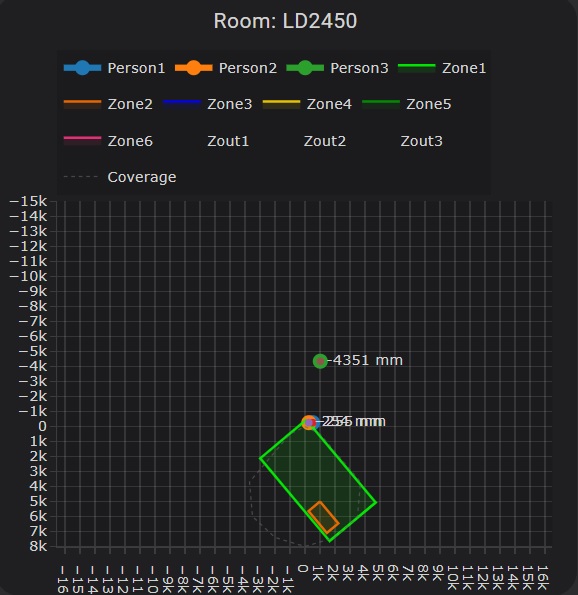
On the map, I occasionally see a zone light up or target 1 around 0 mm, which is the location of the sensor.

In the HLink app, I do see 1 or 2 targets in the space as expected.

What could be causing this?

If i set the axis below zero i can see person 1 (sensor?) and person 2 and 3…

I also noticed this. The Apollo R PRO-1 uses the LD2450 and they mount it “upside down” if this manual is to believed. Thinking of flipping all of mine over and seeing if it otherwise affects usability.

1 Like

Hi all,

I just dug up an LD2450 I had laying around and never used. What’s the latest/best esphome config to everyone is using for it?

I have been messing around with a couple of the LD2450 sensors for the better part of a week now. The issue that I am having is with ZONEs. I have flash a probably 5 or 6 different yamls none of which give me the desired result. Which is occupancy of zones. The latest yaml that I tried is straight off the esphome webpage. I can setup zone in the HLK Radar Tool app on my phone. Those numbers are being transferred over into HA. However my big issue is that when I go to setup an automation. Can setup an automation for presence detection but NOT in any particular zone. Is there an easy way to resolve this? My yaml is below.

uart:
  id: uart_ld2450
  tx_pin: GPIO20
  rx_pin: GPIO21
  baud_rate: 256000
  parity: NONE
  stop_bits: 1
ld2450:
  id: ld2450_radar
  uart_id: uart_ld2450

binary_sensor:
  - platform: ld2450
    ld2450_id: ld2450_radar
    has_target:
      name: Presence
    has_moving_target:
      name: Moving Target
    has_still_target:
      name: Still Target

number:
  - platform: ld2450
    ld2450_id: ld2450_radar
    presence_timeout:
      name: "Timeout"
    zone_1:
      x1:
        name: Zone-1 X1
      y1:
        name: Zone-1 Y1
      x2:
        name: Zone-1 X2
      y2:
        name: Zone-1 Y2
    zone_2:
      x1:
        name: Zone-2 X1
      y1:
        name: Zone-2 Y1
      x2:
        name: Zone-2 X2
      y2:
        name: Zone-2 Y2
    zone_3:
      x1:
        name: Zone-3 X1
      y1:
        name: Zone-3 Y1
      x2:
        name: Zone-3 X2
      y2:
        name: Zone-3 Y2

switch:
  - platform: ld2450
    ld2450_id: ld2450_radar
    bluetooth:
      name: "Bluetooth"
    multi_target:
      name: "Multi Target Tracking"

select:
  - platform: ld2450
    ld2450_id: ld2450_radar
    baud_rate:
      name: "Baud rate"
    zone_type:
      name: "Zone Type"

button:
  - platform: ld2450
    ld2450_id: ld2450_radar
    factory_reset:
      name: "LD2450 Factory Reset"
      entity_category: "config"
    restart:
      name: "LD2450 Restart"
      entity_category: "config"

text_sensor:
  - platform: ld2450
    ld2450_id: ld2450_radar
    version:
      name: "LD2450 Firmware"
    mac_address:
      name: "LD2450 BT MAC"
    target_1:
      direction:
        name: "Target-1 Direction"
    target_2:
      direction:
        name: "Target-2 Direction"
    target_3:
      direction:
        name: "Target-3 Direction"


i2c:
  sda: GPIO8
  scl: GPIO9
  scan: true
  id: bus_a  


sensor:

  - platform: bh1750
    name: "Illuminance"
    accuracy_decimals: 1
    id: bh1750_light
    update_interval: 30s


  - platform: ld2450
    ld2450_id: ld2450_radar
    target_count:
      name: Presence Target Count
  - platform: ld2450
    ld2450_id: ld2450_radar
    still_target_count:
      name: Still Target Count
  - platform: ld2450
    ld2450_id: ld2450_radar
    moving_target_count:
      name: Moving Target Count
  - platform: ld2450
    ld2450_id: ld2450_radar
    target_1:
      x:
        name: Target-1 X
      y:
        name: Target-1 Y
      speed:
        name: Target-1 Speed
      angle:
        name: Target-1 Angle
      distance:
        name: Target-1 Distance
      resolution:
        name: Target-1 Resolution
    target_2:
      x:
        name: Target-2 X
      y:
        name: Target-2 Y
      speed:
        name: Target-2 Speed
      angle:
        name: Target-2 Angle
      distance:
        name: Target-2 Distance
      resolution:
        name: Target-2 Resolution
    target_3:
      x:
        name: Target-3 X
      y:
        name: Target-3 Y
      speed:
        name: Target-3 Speed
      angle:
        name: Target-3 Angle
      distance:
        name: Target-3 Distance
      resolution:
        name: Target-3 Resolution
    zone_1:
      target_count:
        name: Zone-1 All Target Count
      still_target_count:
        name: Zone-1 Still Target Count
      moving_target_count:
        name: Zone-1 Moving Target Count
    zone_2:
      target_count:
        name: Zone-2 All Target Count
      still_target_count:
        name: Zone-2 Still Target Count
      moving_target_count:
        name: Zone-2 Moving Target Count
    zone_3:
      target_count:
        name: Zone-3 All Target Count
      still_target_count:
        name: Zone-3 Still Target Count
      moving_target_count:
        name: Zone-3 Moving Target Count


Hi, you need to do that via entity > numeric_state; you can’t select the zones through the device.

alias: Presence Whatever
description: ""
triggers:
  - trigger: state
    entity_id:
      - sensor.presence_01_zone_1_all_target_count
    for:
      hours: 0
      minutes: 0
      seconds: 2
conditions: []
actions:
  - if:
      - condition: numeric_state
        entity_id: sensor.presence_01_zone_1_all_target_count
        above: 0
    then:
      - action: light.turn_on
        metadata: {}
        target:
          device_id: ....
        data:
          transition: 1
    else:
      - action: light.turn_off
        metadata: {}
        target:
          device_id: ....
        data:
          transition: 1
mode: single

I hope that helps.

Sort of but where do I add entities. I am assuming I need to go into the HA config?

No, if you took the ESPHome YAML from the official ESPHome docs, your device already has the entities. You just need to select them in your automations via Entity, not Device.
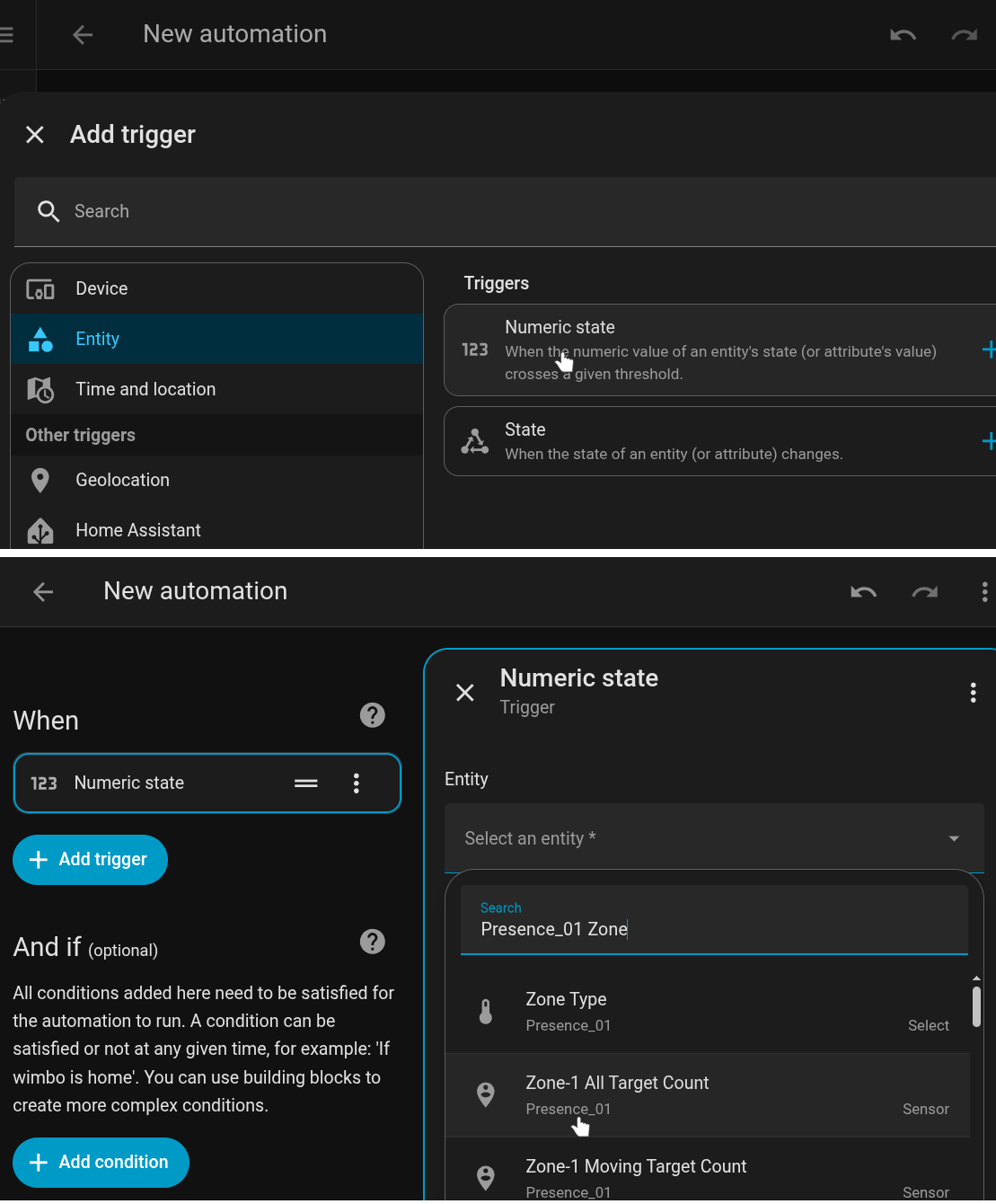
The name of the device is the name you defined in ESPHome.