Any other suggestion? I lose connection every 16 minutes and I don’t see any errors in supervisor and in chrome
I also have very regularly this problem, but i see a message (not an error) in the console : Websocket died, forcing reconnect…
a refresh temporarly fix it, but always come back.

As an FYI, since I’ve been tinkering with voice Assist stuff, I finally decided to pull the trigger on moving HA over to some more powerful hardware (an old gaming PC) and I don’t think I’ve noticed this issue since.
All I did was move the existing SSD into the new machine, and assigned the appropriate cores and memory in Proxmox for the new hardware, and it’s been great so far.
Since many others have been complaining of this issue also running on a VM, I’m wondering if I potentially had too many cores assigned in total across my VMs, and that was causing sporadic issues.
Wow, yes!! Issue solved after removing all voice assist stuff. “Peak” every 16 min in Proxmox is still visible but websockets now stays alive. Thanks for your suggestion and will try other resources for the voice.
Mmm, now I’ve installed Studio Code and the issue returns. This cannot be due to resources, something else must be an issue here.

Can you tell me what log this is? I am on a mission to track down my connection issues with my Home Assistant companion app. I know there is a log in the /homeassistant/home-assistant.log directory. And there are also several other logs in settings/system/logs. Is the log you attached from the settings/system/logs/supervisor? My disconnects happen at the most inopotrune time while I am trying to disarm the house, and leave for work. I switched to Nabu Casa a few months ago and although people tell me they have NEVER had any problems with Nabu Casa, it seems when my problems started. Do any of these logs track when a user connects in(launches companion app)?
Yes, this is the log from settings >> system >> logs >> supervisor. I can confirm that for me it is also happening locally (so without Nabu Casa). I see a peak in my proxmox VM every 16 minutes which is when I lose connection.
Good to know, thank you. Mine most likely is related to local resources but where the heck do I start? I don’t run a VM, I just have a mini PC(Nuc knockoff) and I don’t have a console hooked up to it. If I log in as root using ssh, can I run commands to monitor system resources? This never happend with my Pi 4 that I upgrade from. Thought I was going in the right direction, but now I don’t know. My problem seems to go away after a couple minutes and killing the companion app, and restarting the app, then it logs in fine. My supervisor log has nothing like the web/socket errors you displaed.
Same challenge here, disconnecting every 16 min without errors in supervisor (I guess above screenshot was “lucky”). I am unclear if it has to do with resources (as there is sufficient available (running at ~15%). Anybody else ideas what we can do? Or ways to debug this?
I don’t think my issue is hardware related. I just don’t have enough experience to troubleshoot this. Just today, while at work i had my Chrome browser open connected into HA using the nabu casa link. As soon as I got the dreaded “connection lost. Reconnecting”, I immediately opened up another browser and connected to my HA using my duckdns address, and it connected just fine. So I then wend back to my Nabu Casa page and refreshed it, and it would NOT load. this is why I think it has something to do with Nabu Casa, or DNS somehow. I am currently using 8.8,8.8 for my dns, maybe I need additional dns? Wish I could figure this out, my family is losing confidence in HA when they go to lets say, arm/disarm the house, or try to open/close the garage door.
I started having issues and spent way too much time and money to solve, but it's solved. I started with my home assistant adventure with homeway and thought that was the problem. Switched to nabucasa, with no change. Btw, internal local connection has always been 99 percent stable. I switched out my home router to Unifi UDM pro, with no change. Purchased and added access points thinking I was dropping wifi devices, no change. I purchased a micropc (Beelink with M.2) thinking the processor in my home assistant server was too slow, no change. I swapped out all of my cat 5 cables, no change. Changed all of my network switches (10 of them), still no change. I did some network (external) diagnostics and was having certain hops dropping on Comcast, so dumped that and switched to Att Fiber, with no change. Redid my dashboard removing all complicated calculations from lovelace and moved them to the backend yaml coding, no change. Since my local home assistant was stable decided to try remote access with Tailscale and Duckdns and have had almost NO DROPS or connection issues since. There are times when Duckdns and Tailscale are down, so I have nabucasa as a backup on the companion app but that is rare. If your local is stable and your companion app is giving you grief, considering a tunneling solution. Tailscale has been a godsend for me. I would highly recommend you trying it. On the flip side I have much more robust and faster home assistant system. If I could save anyone else the expense or grief of dropped connections, this post has done its job. Losing connections is one of the most frustrating issues I have dealt with. Good luck to anyone else having the similar issues I did.
Thank you very much for this extensive explanation of your diagnosis with Nabu Casa connection issues! I may just pursue using a tunneling solution with Tailscale if I can figure it out. Thanks!
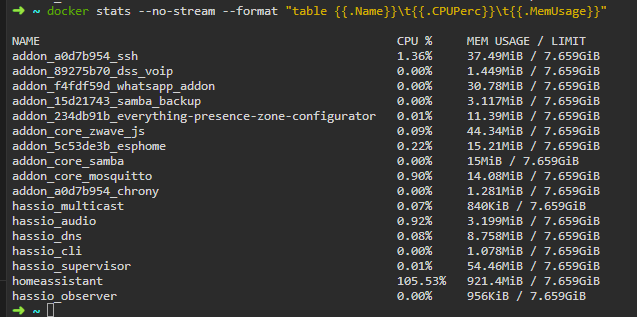
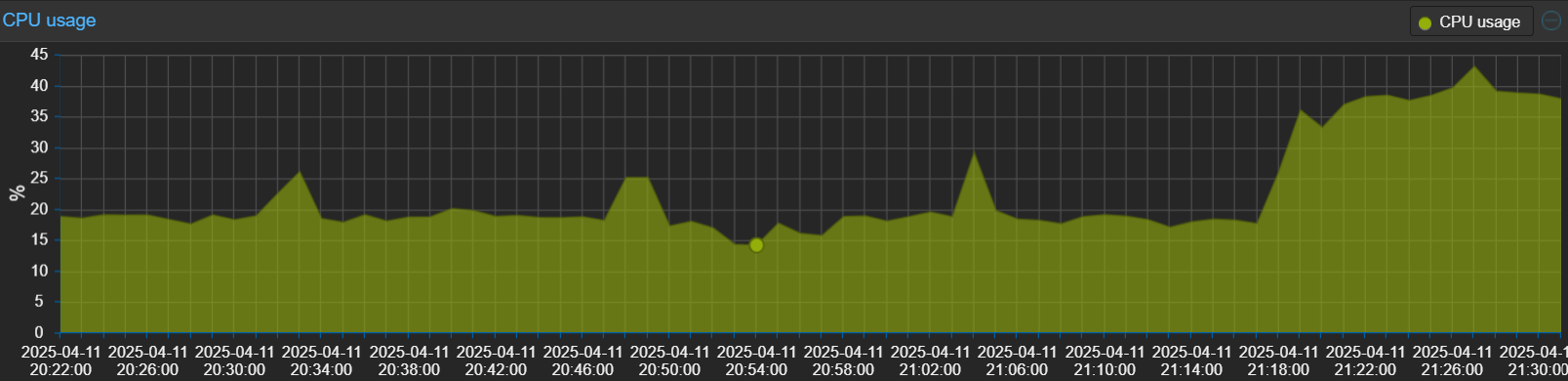
This issue is still persistent - at least in my case.
Interesting side-node: when I am using Home Assistant Desktop https://github.com/DustyArmstrong/homeassistant-desktop there also is this reconnect issue.
Maybe the solution allready was here (I didn’t read the whole topic)
But maybe I can help anyone with my solution for disconnecting sensors :
I was struggling with a disconnecting problem too, only with just ONE sensor, not with all other sensors, the sensor keep connected to the wifi router and was constant online “http://devicename.local” …
Then I came up with this link : Home Assistant API keeps closing connection · Issue #3108 · esphome/issues · GitHub
and pushed me into the right direction, I replaced the sensor a few weeks ago with another one (prob not in the right way) and the new one keeps hanging in HA at the old IP adress, what I did was just ‘reconfigure’ the device with :
Settings > Devices & Services > ESPHome > click on ‘devicename’ 3-dots and choose ‘Reconfigure’ and put the right ip adress what it has in my router (there was another IP adress registered in option ‘reconfigure’ , the IP from the old replaced device)
Problem solved here many thanks to “HumanSkunk” on github.
PS the removing and re-adding the device wasn’t working for me but took me into the right direction …
Peace out and may the ESP be with you …
I started having this issue last night, I tried several things that others had tried but nothing helped sadly. In the end I updated Supervisor to 2025.11.3, not sure what version I was on but my HA version was 5 months old. This resolved my issue. Proir to the update it was stop working on ethernet after 5 mins or so. I left it for a few hours without issue. I have now updated to the latest HA version too.
I installed a fresh copy of 86X64 on a surface book. everything was working until i tried to restore from a backup on setup, The connection would timeout when i ping homeassistand.local. eventually i just created a account and loged in but when i started running updates the same has happend.
Any commands that i can try in HA itself to update/upgrade anything? i will try directly and see if that resolve the issue?
just wanted to add my 2¢ here: i experienced this issue a little while ago when i attempted to set up media sync with my tapo security cameras integrated via tapo_cameras_control hacs integration onto a samba share. enabling this completely hosed HA, frequent disconnections, almost complete lack of responsiveness for zigbee devices, tuya wifi lights going unavailable, just a bad scene. turning that function off made it better but things weren’t quite normally snappy. aside from this all, the tapo cameras had always had problematic stuttery connection.
what finally got my system stable turned out to be changing the wifi channel to set it away from the zigbee channel. (you could change the zigbee channel instead, but changing the router channel seemed easier than potentially re-pairing zigbee devices). my z2mqtt channel was already set to 11, so i changed the wifi channel to 11 since wifi 11 is far from zigbee 11.
this graphic is a great guide: (i stole it from here)


i brought up the media sync issue just because that’s what led me to find this thread before i sorted out that as the cause, but the channel overlap turned out to be the cause of a lot of other issues that sound very much like many of the symptoms ppl here have been describing. the camera stutter behavior (which would often coincide with wifi devices going unavailable) seems consistent as the video needs lots of bandwidth, and i have near constant zigbee communication going on. it was like my cameras were acting as intermittent wifi jammers. they were the hair on the camel’s back for a 2.4GHz space saturated with zigbee and wifi comms.
not sure if it’s related to what’s going on here, but probably worth checking out just in case.
if you need to look at your wifi space and you’re on Android, i recommend this app: