Hi everyone,
I’ve run into an issue with my Home Assistant setup on TrueNAS SCALE, and I could really use some advice from people who’ve dealt with networking inside TrueNAS apps or Docker.
My Setup
TrueNAS SCALE (latest version)
Home Assistant installed as an App (from the TrueNAS catalog)
iPhone with HomeKit integration attempt
Home Assistant is running fine locally on TrueNAS — I can open the UI from the TrueNAS host IP and port 8123.
Guest Wi-Fi is disabled on my router.
AP isolation is OFF, so devices should see each other.
My iPhone can ping the TrueNAS IP directly.
The Problem
Home Assistant is not discoverable from my iPhone / Home app when trying to add it via HomeKit Bridge integration.
After some digging, I found that:
HomeKit uses Bonjour/mDNS (UDP 5353) and sometimes SSDP multicast. These protocols often fail if the container uses NAT or bridge networking instead of host mode. It looks like the Home Assistant app in TrueNAS is running inside an internal Docker network, not directly on my LAN.
Normally, the fix would be to enable “Host network mode”, which exposes the container directly to the LAN.
However:
The official TrueNAS UI doesn’t provide a “Host Network” checkbox for built-in apps.
I found that this option does exist for Custom Apps, so I converted Home Assistant into a Custom App to gain access to its YAML configuration.
Unfortunately, even after conversion, I couldn’t make it work — I tried adding network_mode: host manually in the YAML under the home-assistant service, but TrueNAS either ignored it or refused to deploy the app.
Is there a proper or supported way to run Home Assistant in host network mode on TrueNAS SCALE?
Does TrueNAS actually support network_mode: host for Custom Apps, or is this feature limited internally?
If it’s not supported — is there any workaround (like manual Docker deployment or mDNS bridge) that can make HA discoverable for HomeKit and local integrations?
Everything works perfectly — except HomeKit and local discovery.
I just need Home Assistant to be visible in my local network as if it were running directly on a physical device, not isolated behind TrueNAS Docker networking.
Bump, I don’t have a solution for this either. Been trying to avoid the VM route for HASS and bridging it to Homekit. Commenting to come back to this thread every once in a while to see if someone has a solution.
How did you convert the HA app to a custom app, btw? I’m gonna play around with the YAML files and see if I can’t get something to work.
I got the Truenas native Home Assistant working and auto discovering devices on my network!
Quick Steps.
Setup a MacVlan for your system.
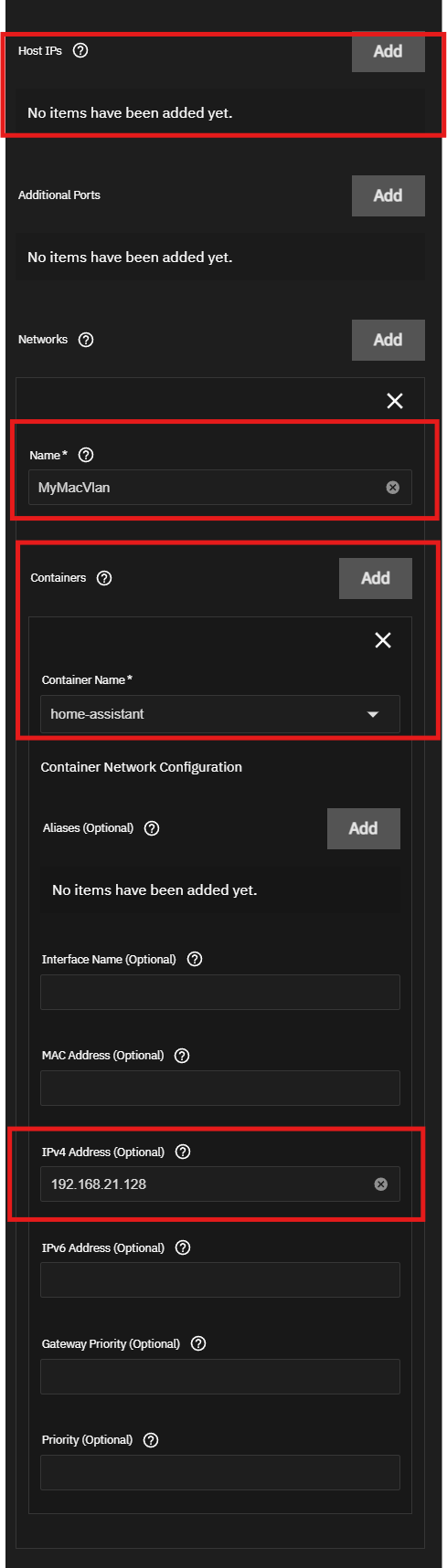
Do not use the Host IPs. Use the Networks area.
mDNS must be working on your network.
Longer steps:
MacVlan Setup.
For MacVlan setup follow along with with video. He will walk you through setting up the two parts of the MacVlan setup using Portainer. https://www.youtube.com/watch?v=4741-YR31fM
Once the MacVlan is setup, you can then add it to your Home Assistant config.
Click on your Home Assistant in Truenas and Click Edit.
Delete the Host IPs entry
Add a Network (Screenshot at bottom of page)
a. Set the Name to the MacVlan name you created in portainer.
b. Select your Home Assistant container
c. Set your IP address.
Make sure mDNS is working on your network. If you are using default settings for your network, then everything should work fine.
Hope this helps someone.
Joel
I also created my own custom docker apps for Piper and Whisper. Here are the YAMLs.
If youMUST use virtualization is better setupis to run bothTruNAS and Home Assitant as clients under ProxMox. Doing that is nearly trivially easy and hase near native perfromance
You do have to decide “who does ZFS?” I would say that depends on the size of the data you store on Truenas..
Home Assistant is such a critical paiece os software that it really does belong on its own hardware. and even then to have a nearby backup. When you get up to use the bathroom and 2:00am and none of the light work or when you are outdoors and the doors will not unlock, then you which you had spent the time to isolat HA and put it on an UPS
A trick custom install under TrueNAS will be hard to replacteis the CPU catches fire and you have to rebuild is all by candle light. With Proxmox you can setup automatic fail over where the virtual images is loaded to a hot spare or you can do it manuly. You basoically just say “run that image on that server and the Home assistant boots up from thje last backup. You can do daily backups
Point is that you should NOT use anything but an easy-to-do install and in the most univious way because it will be you who is there in 3 or 5 years trying to remeber what you did at 2:00am while your wife is upset that the light switches don’t work.
 My Setup
 The Problem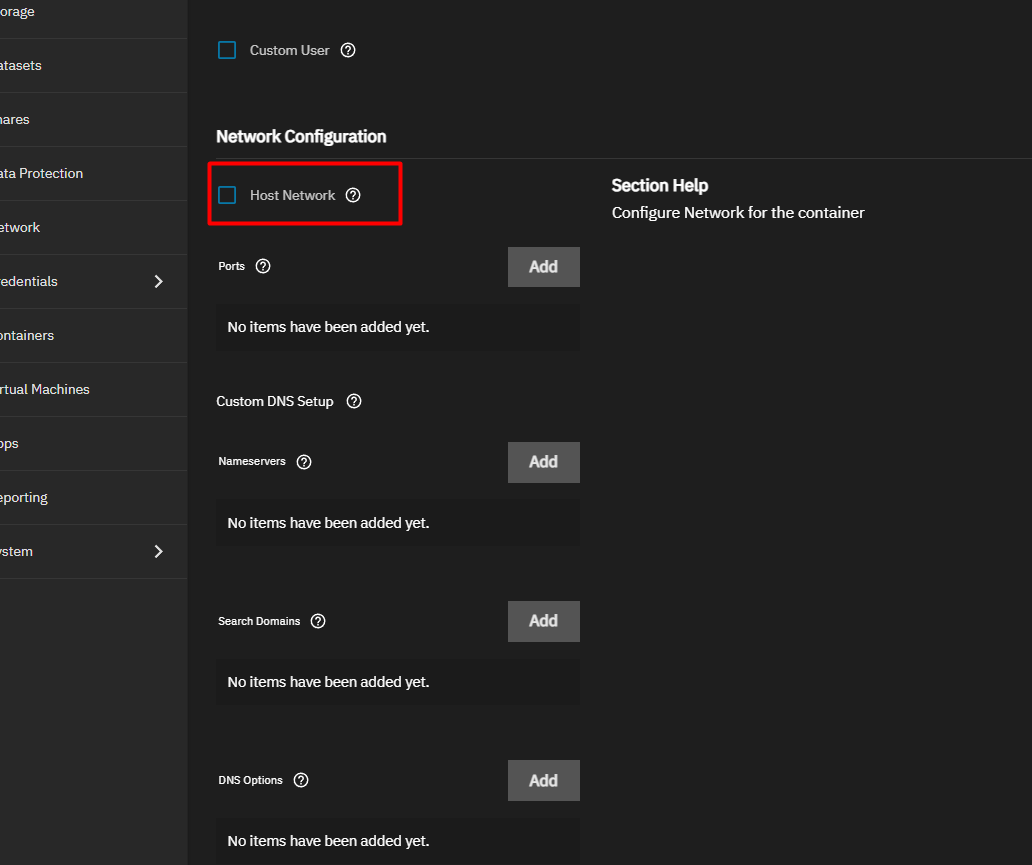
 What I Need Help With