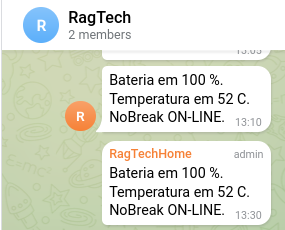
turma, compartilho meu novo script.
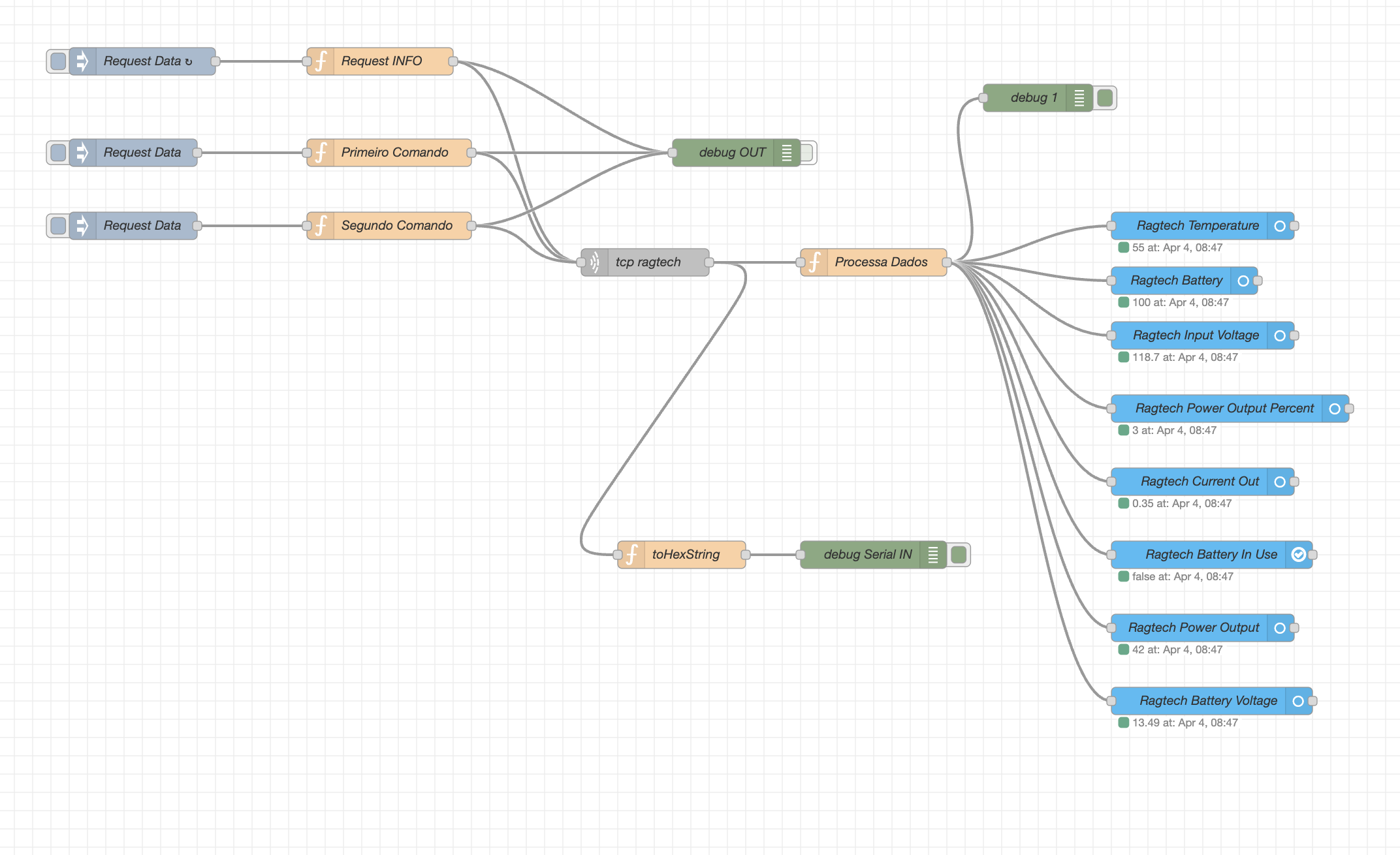
1 - como meu nobreak fica longe do HA (ele fica na impressora 3d), conectei ele em um outro rasp (o mesmo que tem o octopi da 3d) que tem o ser2net fazendo a interface SERIAL-TCP. esse novo nodered foi modificado pra usar uma conexao TCP no lugar da SERIAL.
2 - refinei a parte como o buffer recebido do nobreak eh processado.
se alguem tiver tempo e se animar, poderiamos unificar com o anterior. deixando a opcao de escolher entre usar a serial direto (nobreak conectado no HA) ou remoto via TCP.
[
  {
    "id": "cee84742491cec90",
    "type": "tab",
    "label": "Ragtech Serial",
    "disabled": false,
    "info": ""
  },
  {
    "id": "e01aec5f975a2fe0",
    "type": "debug",
    "z": "cee84742491cec90",
    "name": "debug Serial IN",
    "active": true,
    "tosidebar": true,
    "console": false,
    "tostatus": false,
    "complete": "payload",
    "targetType": "msg",
    "statusVal": "",
    "statusType": "auto",
    "x": 1000,
    "y": 620,
    "wires": []
  },
  {
    "id": "9a8ef3f6c36a13a6",
    "type": "inject",
    "z": "cee84742491cec90",
    "name": "Request Data",
    "props": [],
    "repeat": "5",
    "crontab": "",
    "once": false,
    "onceDelay": "1",
    "topic": "",
    "x": 200,
    "y": 80,
    "wires": [["64ec956feacc9b87"]]
  },
  {
    "id": "f6e354e3b9c0c84c",
    "type": "debug",
    "z": "cee84742491cec90",
    "name": "debug OUT",
    "active": false,
    "tosidebar": true,
    "console": false,
    "tostatus": false,
    "complete": "payload",
    "targetType": "msg",
    "statusVal": "",
    "statusType": "auto",
    "x": 850,
    "y": 180,
    "wires": []
  },
  {
    "id": "64ec956feacc9b87",
    "type": "function",
    "z": "cee84742491cec90",
    "name": "Request INFO",
    "func": "//PEDE STATS\nmsg.payload = Buffer.from(\"AA0400801E9E\", \"hex\")\nmsg.reset = true;\nreturn msg;\n\n\n//PEDE STATS\n//msg.payload = Buffer.from(\"AA0400F301F4AA0401360138AA0402020206AA0400801E9E\", \"hex\")\n//return msg;\n\n\n//PEDE STATS\n//msg.payload = Buffer.from(\"AA0400F301F4\", \"hex\")\n//return msg;\n\n\n",
    "outputs": 1,
    "timeout": 0,
    "noerr": 0,
    "initialize": "",
    "finalize": "",
    "libs": [],
    "x": 460,
    "y": 80,
    "wires": [["f6e354e3b9c0c84c", "915f810edd627e3b"]]
  },
  {
    "id": "8699bb5eef04e00b",
    "type": "function",
    "z": "cee84742491cec90",
    "name": "toHexString",
    "func": "const toHexString = (bytes) => {\n  return Array.from(bytes, (byte) => {\n    return ('0' + (byte & 0xff).toString(16)).slice(-2);\n  }).join(' ');\n};\n\nvar hexString = toHexString(msg.payload);\nmsg.payload = hexString;\nreturn msg;",
    "outputs": 1,
    "timeout": 0,
    "noerr": 0,
    "initialize": "",
    "finalize": "",
    "libs": [],
    "x": 790,
    "y": 620,
    "wires": [["e01aec5f975a2fe0"]]
  },
  {
    "id": "5ed339876d5fa2af",
    "type": "function",
    "z": "cee84742491cec90",
    "name": "Primeiro Comando",
    "func": "msg.payload = Buffer.from(\"A004FFE0088B\", \"hex\")\nreturn msg;",
    "outputs": 1,
    "timeout": 0,
    "noerr": 0,
    "initialize": "",
    "finalize": "",
    "libs": [],
    "x": 470,
    "y": 180,
    "wires": [["f6e354e3b9c0c84c", "915f810edd627e3b"]]
  },
  {
    "id": "f768f62acb1e8f29",
    "type": "inject",
    "z": "cee84742491cec90",
    "name": "Request Data",
    "props": [],
    "repeat": "",
    "crontab": "",
    "once": false,
    "onceDelay": "1",
    "topic": "",
    "x": 190,
    "y": 180,
    "wires": [["5ed339876d5fa2af"]]
  },
  {
    "id": "6ad30b7ec217adb8",
    "type": "function",
    "z": "cee84742491cec90",
    "name": "Segundo Comando",
    "func": "msg.payload = Buffer.from(\"FFFE008E018F\", \"hex\")\nreturn msg;",
    "outputs": 1,
    "timeout": 0,
    "noerr": 0,
    "initialize": "",
    "finalize": "",
    "libs": [],
    "x": 470,
    "y": 260,
    "wires": [["f6e354e3b9c0c84c", "915f810edd627e3b"]]
  },
  {
    "id": "ac2d21ae80912a6a",
    "type": "inject",
    "z": "cee84742491cec90",
    "name": "Request Data",
    "props": [],
    "repeat": "",
    "crontab": "",
    "once": false,
    "onceDelay": "1",
    "topic": "",
    "x": 190,
    "y": 260,
    "wires": [["6ad30b7ec217adb8"]]
  },
  {
    "id": "d6880b42400380a4",
    "type": "ha-sensor",
    "z": "cee84742491cec90",
    "name": "Ragtech Temperature",
    "entityConfig": "5f030e19c85b66d7",
    "version": 0,
    "state": "payload.Temperature",
    "stateType": "msg",
    "attributes": [],
    "inputOverride": "allow",
    "outputProperties": [],
    "x": 1360,
    "y": 260,
    "wires": [[]]
  },
  {
    "id": "557f343d4699e667",
    "type": "ha-sensor",
    "z": "cee84742491cec90",
    "name": "Ragtech Battery",
    "entityConfig": "da00fe0c0350830d",
    "version": 0,
    "state": "payload.Battery_State",
    "stateType": "msg",
    "attributes": [],
    "inputOverride": "allow",
    "outputProperties": [],
    "x": 1340,
    "y": 320,
    "wires": [[]]
  },
  {
    "id": "884f8d7eb8c05e9b",
    "type": "ha-sensor",
    "z": "cee84742491cec90",
    "name": "Ragtech Input Voltage",
    "entityConfig": "1289139e401c0dbb",
    "version": 0,
    "state": "payload.Voltage_In",
    "stateType": "msg",
    "attributes": [],
    "inputOverride": "allow",
    "outputProperties": [],
    "x": 1360,
    "y": 380,
    "wires": [[]]
  },
  {
    "id": "915f810edd627e3b",
    "type": "tcp request",
    "z": "cee84742491cec90",
    "name": "tcp ragtech",
    "server": "192.168.0.147",
    "port": "8888",
    "out": "count",
    "ret": "buffer",
    "splitc": "31",
    "newline": "",
    "trim": false,
    "tls": "",
    "x": 750,
    "y": 300,
    "wires": [["8699bb5eef04e00b", "4d971ed73c6fe453"]]
  },
  {
    "id": "4d971ed73c6fe453",
    "type": "function",
    "z": "cee84742491cec90",
    "name": "Processa Dados",
    "func": "// ----- Configuração -----\nconst TOTAL_BYTES = 31;  // Número esperado de bytes na resposta\nconst HEADER_BYTE = 0xAA; // Primeiro byte esperado\nconst HEADER_BYTE_2 = 0x09; // Primeiro byte esperado\n\n// ----- Buffer para armazenar os dados até completar 31 bytes -----\nvar buffer = flow.get(\"tcpBuffer\") || Buffer.alloc(0);\n\n// ----- Acumular bytes recebidos -----\nbuffer = Buffer.concat([buffer, msg.payload]);\n\n// Se ainda não temos os 31 bytes, armazenamos e aguardamos mais dados\nif (buffer.length < TOTAL_BYTES) {\n    flow.set(\"tcpBuffer\", buffer);\n    return null;\n}\n\n// Se temos mais do que 31 bytes, pegamos os 31 primeiros e descartamos o restante\nconst data = buffer.slice(0, TOTAL_BYTES);\nflow.set(\"tcpBuffer\", Buffer.alloc(0));  // Reset do buffer\n\n// ----- Validação do primeiro byte -----\nif (data[0] !== HEADER_BYTE || data[1] != HEADER_BYTE_2) {\n    node.warn(\"Resposta inválida: primeiro byte não é 0xAA\");\n    return null; // Descarta o pacote inválido\n}\n\n// ----- Extração dos dados -----\nlet iOut = parseFloat((data[13] * 0.1152).toFixed(2));  // Corrente de saída (A)\nlet vOut = parseFloat((data[30] * 0.555).toFixed(1));   // Tensão de saída (V)\nlet wOut = parseFloat((iOut * vOut).toFixed(1));        // Potência de saída (W)\n\nlet vIn = parseFloat((data[12] * 1.06).toFixed(1));     // Tensão de entrada (V)\nlet wIn = parseFloat((iOut * vIn).toFixed(1));         // Potência de entrada (W)\n\nlet batteryInUse = vIn < 20 || wIn < 5;  // Se Voltage_In < 5V ou Power_In < 5W, a bateria está sendo usada\n\nlet status = {\n    \"Power_Out_Percent\": data[14],  // Posição 0x0E\n    \"Current_Out\": iOut,  // Corrente de saída (A)\n    \"Voltage_Out\": vOut,  // Tensão de saída (V)\n    \"Voltage_In\": vIn,  // Tensão de entrada (V)\n    \"Power_Out\": wOut,  // Potência de saída (W)\n    \"Power_In\": wIn,  // Potência de entrada (W)\n    \"Temperature\": data[15],  // Posição 0x0F\n    \"Battery_State\": Math.round(data[8] * 0.392),  // Posição 0x08\n    \"Battery_Voltage\": parseFloat((data[11] * 0.0671).toFixed(2)),  // Posição 0x0B\n    \"Frequency\": parseFloat((data[24] * -0.1152 + 65).toFixed(2)),  // Posição 0x18\n    \"Battery_In_Use\": batteryInUse  // \"ON\" se estiver em uso, \"OFF\" se estiver na energia da rede\n};\n\n// ----- Enviar resposta formatada -----\nmsg.payload = status;\nreturn msg;",
    "outputs": 1,
    "timeout": 0,
    "noerr": 0,
    "initialize": "",
    "finalize": "",
    "libs": [],
    "x": 1000,
    "y": 300,
    "wires": [
      [
        "502581569e316c3d",
        "d6880b42400380a4",
        "884f8d7eb8c05e9b",
        "557f343d4699e667",
        "fc306eafa6a2bced",
        "a8debcd858ca0761",
        "292c6a834da90ce6",
        "4249875880206a83",
        "839eae68fdb6e066"
      ]
    ]
  },
  {
    "id": "502581569e316c3d",
    "type": "debug",
    "z": "cee84742491cec90",
    "name": "debug 1",
    "active": true,
    "tosidebar": true,
    "console": false,
    "tostatus": false,
    "complete": "false",
    "statusVal": "",
    "statusType": "auto",
    "x": 1180,
    "y": 120,
    "wires": []
  },
  {
    "id": "fc306eafa6a2bced",
    "type": "ha-sensor",
    "z": "cee84742491cec90",
    "name": "Ragtech Power Output Percent",
    "entityConfig": "24ba83de7f3c5cad",
    "version": 0,
    "state": "payload.Power_Out_Percent",
    "stateType": "msg",
    "attributes": [],
    "inputOverride": "allow",
    "outputProperties": [],
    "x": 1390,
    "y": 460,
    "wires": [[]]
  },
  {
    "id": "a8debcd858ca0761",
    "type": "ha-sensor",
    "z": "cee84742491cec90",
    "name": "Ragtech Current Out",
    "entityConfig": "aa29efe6fa186870",
    "version": 0,
    "state": "payload.Current_Out",
    "stateType": "msg",
    "attributes": [],
    "inputOverride": "allow",
    "outputProperties": [],
    "x": 1360,
    "y": 540,
    "wires": [[]]
  },
  {
    "id": "292c6a834da90ce6",
    "type": "ha-binary-sensor",
    "z": "cee84742491cec90",
    "name": "Ragtech Battery In Use",
    "entityConfig": "53211f1120a99c42",
    "version": 0,
    "state": "payload.Battery_In_Use",
    "stateType": "msg",
    "attributes": [],
    "inputOverride": "allow",
    "outputProperties": [],
    "x": 1370,
    "y": 620,
    "wires": [[]]
  },
  {
    "id": "4249875880206a83",
    "type": "ha-sensor",
    "z": "cee84742491cec90",
    "name": "Ragtech Power Output",
    "entityConfig": "048810605b0c2c26",
    "version": 0,
    "state": "payload.Power_Out",
    "stateType": "msg",
    "attributes": [],
    "inputOverride": "allow",
    "outputProperties": [],
    "x": 1360,
    "y": 700,
    "wires": [[]]
  },
  {
    "id": "839eae68fdb6e066",
    "type": "ha-sensor",
    "z": "cee84742491cec90",
    "name": "Ragtech Battery Voltage",
    "entityConfig": "026beef6bd22c407",
    "version": 0,
    "state": "payload.Battery_Voltage",
    "stateType": "msg",
    "attributes": [],
    "inputOverride": "allow",
    "outputProperties": [],
    "x": 1370,
    "y": 780,
    "wires": [[]]
  },
  {
    "id": "5f030e19c85b66d7",
    "type": "ha-entity-config",
    "server": "9074df74.a057",
    "deviceConfig": "e2047f52686b2525",
    "name": "Ragtech Temperature",
    "version": "6",
    "entityType": "sensor",
    "haConfig": [
      { "property": "name", "value": "Ragtech Temperature" },
      { "property": "icon", "value": "" },
      { "property": "entity_picture", "value": "" },
      { "property": "entity_category", "value": "" },
      { "property": "device_class", "value": "temperature" },
      { "property": "unit_of_measurement", "value": "°C" },
      { "property": "state_class", "value": "" }
    ],
    "resend": false,
    "debugEnabled": false
  },
  {
    "id": "da00fe0c0350830d",
    "type": "ha-entity-config",
    "server": "9074df74.a057",
    "deviceConfig": "e2047f52686b2525",
    "name": "Ragtech Battery",
    "version": "6",
    "entityType": "sensor",
    "haConfig": [
      { "property": "name", "value": "Ragtech Battery" },
      { "property": "icon", "value": "" },
      { "property": "entity_picture", "value": "" },
      { "property": "entity_category", "value": "" },
      { "property": "device_class", "value": "battery" },
      { "property": "unit_of_measurement", "value": "%" },
      { "property": "state_class", "value": "" }
    ],
    "resend": false,
    "debugEnabled": false
  },
  {
    "id": "1289139e401c0dbb",
    "type": "ha-entity-config",
    "server": "9074df74.a057",
    "deviceConfig": "e2047f52686b2525",
    "name": "Ragtech Input Voltage",
    "version": "6",
    "entityType": "sensor",
    "haConfig": [
      { "property": "name", "value": "Ragtech Input Voltage" },
      { "property": "icon", "value": "" },
      { "property": "entity_picture", "value": "" },
      { "property": "entity_category", "value": "" },
      { "property": "device_class", "value": "voltage" },
      { "property": "unit_of_measurement", "value": "V" },
      { "property": "state_class", "value": "" }
    ],
    "resend": false,
    "debugEnabled": false
  },
  {
    "id": "24ba83de7f3c5cad",
    "type": "ha-entity-config",
    "server": "9074df74.a057",
    "deviceConfig": "e2047f52686b2525",
    "name": "Ragtech Power Output Percent",
    "version": 6,
    "entityType": "sensor",
    "haConfig": [
      { "property": "name", "value": "Ragtech Power Output Percent" },
      { "property": "icon", "value": "" },
      { "property": "entity_picture", "value": "" },
      { "property": "entity_category", "value": "" },
      { "property": "device_class", "value": "power_factor" },
      { "property": "unit_of_measurement", "value": "%" },
      { "property": "state_class", "value": "measurement" }
    ],
    "resend": false,
    "debugEnabled": false
  },
  {
    "id": "aa29efe6fa186870",
    "type": "ha-entity-config",
    "server": "9074df74.a057",
    "deviceConfig": "e2047f52686b2525",
    "name": "Ragtech Current Out",
    "version": 6,
    "entityType": "sensor",
    "haConfig": [
      { "property": "name", "value": "Ragtech Current Out" },
      { "property": "icon", "value": "" },
      { "property": "entity_picture", "value": "" },
      { "property": "entity_category", "value": "" },
      { "property": "device_class", "value": "current" },
      { "property": "unit_of_measurement", "value": "A" },
      { "property": "state_class", "value": "measurement" }
    ],
    "resend": false,
    "debugEnabled": false
  },
  {
    "id": "53211f1120a99c42",
    "type": "ha-entity-config",
    "server": "9074df74.a057",
    "deviceConfig": "e2047f52686b2525",
    "name": "Ragtech Battery In Use",
    "version": 6,
    "entityType": "binary_sensor",
    "haConfig": [
      { "property": "name", "value": "Ragtech Battery In Use" },
      { "property": "icon", "value": "" },
      { "property": "entity_picture", "value": "" },
      { "property": "entity_category", "value": "" },
      { "property": "device_class", "value": "" }
    ],
    "resend": false,
    "debugEnabled": false
  },
  {
    "id": "048810605b0c2c26",
    "type": "ha-entity-config",
    "server": "9074df74.a057",
    "deviceConfig": "e2047f52686b2525",
    "name": "Ragtech Power Output",
    "version": 6,
    "entityType": "sensor",
    "haConfig": [
      { "property": "name", "value": "Ragtech Power Output" },
      { "property": "icon", "value": "" },
      { "property": "entity_picture", "value": "" },
      { "property": "entity_category", "value": "" },
      { "property": "device_class", "value": "power" },
      { "property": "unit_of_measurement", "value": "W" },
      { "property": "state_class", "value": "" }
    ],
    "resend": false,
    "debugEnabled": false
  },
  {
    "id": "026beef6bd22c407",
    "type": "ha-entity-config",
    "server": "9074df74.a057",
    "deviceConfig": "e2047f52686b2525",
    "name": "Ragtech Battery Voltage",
    "version": 6,
    "entityType": "sensor",
    "haConfig": [
      { "property": "name", "value": "Ragtech Battery Voltage" },
      { "property": "icon", "value": "" },
      { "property": "entity_picture", "value": "" },
      { "property": "entity_category", "value": "" },
      { "property": "device_class", "value": "voltage" },
      { "property": "unit_of_measurement", "value": "V" },
      { "property": "state_class", "value": "" }
    ],
    "resend": false,
    "debugEnabled": false
  },
  {
    "id": "9074df74.a057",
    "type": "server",
    "name": "Home Assistant",
    "addon": true
  },
  {
    "id": "e2047f52686b2525",
    "type": "ha-device-config",
    "name": "Nobreak Ragtech Escritorio",
    "hwVersion": "4162",
    "manufacturer": "Ragtech",
    "model": "NEP 1200VA",
    "swVersion": ""
  }
]