Home assistant under heavy load?

Hi community!

I keep noticing in my HA logs entries like this:

Logger: homeassistant.components.websocket_api.http.connection
Source: components/websocket_api/http.py:216
integration: Home Assistant WebSocket API (documentation, issues)
First occurred: 14:42:07 (6 occurrences)
Last logged: 16:46:10

[140121103026112] admin_user from 192.168.1.126 (Mozilla/5.0 (Windows NT 10.0; Win64; x64) AppleWebKit/537.36 (KHTML, like Gecko) Chrome/143.0.0.0 Safari/537.36): Client unable to keep up with pending messages. Reached 4096 pending messages. The system's load is too high or an integration is misbehaving; Last message was: b'{"type":"event","event":{"event_type":"state_changed","data":{"entity_id":"update.zha_network_card_update","old_state":null,"new_state":{"entity_id":"update.zha_network_card_update","state":"off","attributes":{"auto_update":false,"display_precision":0,"installed_version":"b6b05fa","in_progress":false,"latest_version":"b6b05fa","release_summary":null,"release_url":"https://github.com/dmulcahey/zha-network-card","skipped_version":null,"title":null,"update_percentage":null,"friendly_name":"Zha Network Card update","supported_features":23},"last_changed":"2025-12-22T12:42:09.143087+00:00","last_reported":"2025-12-22T12:42:09.143087+00:00","last_updated":"2025-12-22T12:42:09.143087+00:00","context":{"id":"01KD319NBQ29C7A9M2J08N7T31","parent_id":null,"user_id":null}}},"origin":"LOCAL","time_fired":"2025-12-22T12:42:09.143087+00:00","context":{"id":"01KD319NBQ29C7A9M2J08N7T31","parent_id":null,"user_id":null}},"id":528}'
................................

I have tried various things (many suggested by ChatGPT) to reduce the load in the frontend (where I have dahsboards using button-card heavily with javascript processing, lots of entities displaying informaiton, and so on…) to move logic from the forntend to the backend in template sensors. I still get these log messages and sometimes HA slows down.
There are no CPU/memory spikes from what I see. It runs on a Beelink S13 mini PC, with ProxMox and HA running on a VM (4 CPU, 8 GB RAM)

I have subscribed to state_changed even in Developer tools, and counted how many events I see in a minute: approx 550, may of them from power monitoring sensors (i have a lot of Shelly power meters and plugs)
I dont know if this is considered a large number or not. ChatGPT thinks its pretty big.

I dont know what else can cause those messages and why the browser can’t keep up with them.

Any ideas what I can try next?

Thanks
The error mentions this.
Start there.
Do you have a problem in your Zigbee network?
Devices that report back power usage sometimes update too frequently causing this kind of thing.

no, that was just the last message in queue at that time. its different each time. Don’t think there is a connection

You are using a custom card, which has not been updated past 5-6 years, what this card actually does i have no idea, but i know some custom-cards which are ā€œchattyā€ (requesting external resources etc.) which might not exist anymore, and even .js codebase get’s updated from time to time, and so a 5-6 years old codebase, is most likely in some way ā€œoutdatedā€ ( not compatible with HA’s current monthly updated codes, functions/features/integrations )

Note: Dump that Card !

I’m have seen those errors on occasion too. For a couple of months already I think. I have not had any signs of it affecting anything, so I ignored them. I am seeing increased cpu activity on the server lately (10-20%, probably unrelated). I do not have the zha card, nor any zigbee problems. My dashbords also relies heavily on custom button card.

I have the feeling the problems are more front end related than backend. I mostly use a recent ipad air on LAN, Wifi6. so network should not be the problem. I use a N100 based NUC for HAOS on bare metal, so that should be able to cope too.

So the problem you have is the amount of data getting pushed to your phone(?) at 192.168.1.126 is more than it can process. All entity updates get pushed to the phone regardless of what data the displays are looking at. So you have HA pushing the messages to WIFI then to the phone. Possible causes

a) too many entities
b) entities changing too frequently
c) slow network connection to phone
d) underpowered or overloaded HA server
e) misbehaving custom component
f) insufficient processing available on the phone.

1 Like

e+b in that order, that card (based on ā€œoldā€ flex-table-card) frequently updates upon each changes in every single cell

It just displays a list of all devices connected via ZHA. Like the devices page in Zigbee2Mqtt. Like I’ve said, I think its a red herring. This example I’ve pasted here is the first one actually that happened to mention this card. But I will remove it temporarily …see if it helps

The IP in the logs is the IP of my desktop PC (cable network connection), running Chrome browser. Not the phone.

https://github.com/dmulcahey/zha-network-card/issues/30

You could also copy the raw log to your laptop/pc, search and count for
ā€œupdate.zha_network_card_updateā€

And also check the error logging in your browser-tools

It also seems to happen immediately after the restart. I am guessing during the restart HA updates all the entities? Even though I dont have a dashboard open during the restart. (I am still on the ā€˜Developer tools’ page and go straight to the Settings - system - logs page, I still see this :

Logger: homeassistant.components.websocket_api.http.connection
Source: components/websocket_api/http.py:216
integration: Home Assistant WebSocket API (documentation, issues)
First occurred: 20:14:02 (2 occurrences)
Last logged: 20:14:19

[140435366616960] <user>from 192.168.1.126 (Mozilla/5.0 (Windows NT 10.0; Win64; x64) AppleWebKit/537.36 (KHTML, like Gecko) Chrome/143.0.0.0 Safari/537.36): Client unable to keep up with pending messages. Reached 4096 pending messages. The system's load is too high or an integration is misbehaving; Last message was: b'{"type":"event","event":{"event_type":"state_changed","data":{"entity_id":"sensor.shelly_button_2_battery_type","old_state":null,"new_state":{"entity_id":"sensor.shelly_button_2_battery_type","state":"Rechargeable","attributes":{"battery_quantity":1,"battery_type":"Rechargeable","friendly_name":"Shelly Button 2 Battery type"},"last_changed":"2025-12-22T18:14:02.059876+00:00","last_reported":"2025-12-22T18:14:02.059876+00:00","last_updated":"2025-12-22T18:14:02.059876+00:00","context":{"id":"01KD3M9BJBQ9201SD3TYG1YGH1","parent_id":null,"user_id":null}}},"origin":"LOCAL","time_fired":"2025-12-22T18:14:02.059876+00:00","context":{"id":"01KD3M9BJBQ9201SD3TYG1YGH1","parent_id":null,"user_id":null}},"id":118}'
[140435064268704] <user>from 192.168.1.126 (Mozilla/5.0 (Windows NT 10.0; Win64; x64) AppleWebKit/537.36 (KHTML, like Gecko) Chrome/143.0.0.0 Safari/537.36): Client unable to keep up with pending messages. Reached 4096 pending messages. The system's load is too high or an integration is misbehaving; Last message was: b'{"type":"event","event":{"event_type":"state_changed","data":{"entity_id":"sensor.average_outside_temperature","old_state":{"entity_id":"sensor.average_outside_temperature","state":"5.6","attributes":{"state_class":"measurement","entity_id":["sensor.outside_temperature","sensor.terasa_temperature","sensor.outside_north_temperature"],"unit_of_measurement":"\xc2\xb0C","icon":"mdi:temperature-celsius","friendly_name":"Average outside temperature"},"last_changed":"2025-12-22T18:14:19.693604+00:00","last_reported":"2025-12-22T18:14:19.693604+00:00","last_updated":"2025-12-22T18:14:19.693604+00:00","context":{"id":"01KD3M9WSDB6CM9875ZY0YZQY9","parent_id":null,"user_id":null}},"new_state":{"entity_id":"sensor.average_outside_temperature","state":"4.4","attributes":{"state_class":"measurement","entity_id":["sensor.outside_temperature","sensor.terasa_temperature","sensor.outside_north_temperature"],"unit_of_measurement":"\xc2\xb0C","icon":"mdi:temperature-celsius","friendly_name":"Average outside temperature"},"last_changed":"2025-12-22T18:14:19.713716+00:00","last_reported":"2025-12-22T18:14:19.713716+00:00","last_updated":"2025-12-22T18:14:19.713716+00:00","context":{"id":"01KD3M9WT10VAAHEFACAQXP3FW","parent_id":null,"user_id":null}}},"origin":"LOCAL","time_fired":"2025-12-22T18:14:19.713716+00:00","context":{"id":"01KD3M9WT10VAAHEFACAQXP3FW","parent_id":null,"user_id":null}},"id":119}'

Would you happen to own the Shelly zigbee power strip (this one)?

I’ve seen reports here that it’s flooding the network with events, but that usually only seems to affect the zigbee network.

No, I dont have that Shelly device. I mainly have Shelly EM devices (with clamps that monitor the power usage) or Shelly 1PM , or Shelly plugs

thats interesting. I’ve just removed the card from the dashboard and restarted. Immediately saw the log error after the restart

I have 307 state_changed events in a one minute period for comparison. HAOS in a Proxmox VM on an Intel NUC 11 with 8GB RAM and 2 CPU’s.

You might want to take a look at the Glances Add-On to see if anything stands out there.

Can you share the config of one or two of these?

Maintenance and improvements have actually been picked up by someone. There is pretty big new release with some big changes, notable around event processing (sensor updates). It might be best for OP to upgrade. I haven’t upgraded the CBC myself (just not yet; busy with other maintenance).

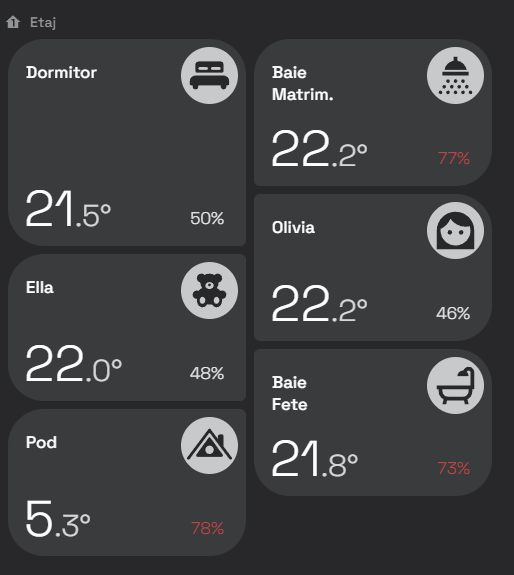
It’s a bit tricky, because my main one (that I currently rewriting / trying to optimize) has over 7000 lines and is difficult to follow. I am using a lot of button card templates. I can give you an example of a bigger one, the ā€œroom cardā€, of which I have 16 instances used on the dashboard, some ā€˜hidden’ using CSS swipe card (but still rendered in the DOM actually)

  room_card:
    template: setup
    variables:
      name: Camera
      icon: mdi:unicorn
      path: '#camera'
      state: null
      background: var(--gray000)
      color: var(--gray600)
      text: var(--gray800)
      radius: 36px 36px 6px 36px
      temperature_sensor: sensor.living_room_temperature
      temperature_sensor_attribute: null
      humidity_sensor: sensor.livingroom_humidity
      humidity_sensor_attribute: null
      light_entity: null
      motion_entity: null
      light_on_background_color: var(--yellow)
      light_on_text_color: var(--yellow)
      room_heating: null
      room_heating_color: var(--red)
    hold_action:
      action: call-service
      service: light.turn_off
      target:
        entity_id: '[[[ return variables.light_entity ]]]'
    icon: '[[[ return variables.icon ]]]'
    name: '[[[ return variables.name ]]]'
    tap_action:
      action: navigate
      navigation_path: '[[[ return variables.path ]]]'
    custom_fields:
      motion: |
        [[[
          return `<ha-icon icon="mdi:motion-sensor"></ha-icon>`
        ]]]
      temp: |
        [[[ 
          var temp, hum;

          if (variables.temperature_sensor_attribute)
            temp = states[variables.temperature_sensor].attributes[variables.temperature_sensor_attribute]
          else
            temp = states[variables.temperature_sensor].state;

          if (variables.humidity_sensor_attribute)
            hum = states[variables.humidity_sensor].attributes[variables.humidity_sensor_attribute];
          else
            hum = states[variables.humidity_sensor].state;
                
          var tempRounded = parseFloat(temp).toFixed(1);
          
          var parts = tempRounded.split(".");
          var intPart = parts[0];
          var decPart = parts[1] ? "." + parts[1] : "";
          
          return `
            ${intPart}<span style="font-size:0.6em;opacity:0.8">${decPart}°</span> 
            
          `;
        ]]]
      hum: |
        [[[
          var hum;
          if (variables.humidity_sensor_attribute)
            hum = states[variables.humidity_sensor].attributes[variables.humidity_sensor_attribute];
          else
            hum = states[variables.humidity_sensor].state;
            
          return `
            <span style="opacity:0.9">${parseFloat(hum).toFixed(0)}%</span>
          `;
        ]]]
    extra_styles: |
      [[[ return `
        @keyframes pulse {
          20% {
            background-color: ${variables.text};
          }
        }
        @keyframes pulse-text {
          20% {
            color: ${variables.text};
          }
        }
        @keyframes shadow {
          0% { box-shadow: 0 0 0 0 rgba(0, 0, 0, 0); }
          50% { box-shadow: 0 0 0 0 rgba(44, 218, 157, 1), inset 0 0 10px 0 rgba(44, 218, 157, 1); }
        }
        
        @keyframes blink-text {
          0%, 100% {
            opacity: 0.8;
          }
          50% {
            opacity: 0.2;
          }
        }
        
      `]]]      
    styles:
      card:
        - padding: 8px
        - height: 100%
        - border-radius: '[[[ return variables.radius ]]]'
        - background: '[[[ return variables.background ]]]'
      grid:
        - grid-template-areas: '"n i" "temp hum"'
        - grid-template-rows: 1fr min-content
        - grid-template-columns: min-content 1fr
      icon:
        - width: 45px
        - color: var(--black)
      img_cell:
        - justify-self: end
        - background: |
            [[[ 
                if (variables.light_entity && states[variables.light_entity].state === 'on')
                  return variables.light_on_background_color
                else
                  return variables.color
              ]]]
        - border-radius: 100%
        - align-self: start
        - width: 57px
        - height: 57px
      name:
        - justify-self: start
        - align-self: start
        - text-align: left
        - font-size: 1em
        - font-weight: 500
        - color: |
            [[[ 
                if (variables.light_entity && states[variables.light_entity].state === 'on')
                  return variables.light_on_text_color
                else
                  return variables.text
              ]]]
        - padding: 14px 0 0 10px
      custom_fields:
        motion:
          - position: absolute
          - padding: 2px
          - right: 10px
          - top: 70px
          - background: var(--gray200)
          - width: 25px
          - height: 25px
          - border-radius: 40%
          - display: |
              [[[ 
                  if (variables.motion_entity && states[variables.motion_entity].state === 'on')
                    return `block`
                  else
                    return `none`
              ]]]
          - line-height: 30px
          - font-weight: 300
          - color: var(--gray800)
          - opacity: '0.8'
          - animation: |
              [[[ 
                  if (variables.motion_entity && states[variables.motion_entity].state === 'on')
                    return `blink-text 1.2s ease-in-out infinite `
                  else
                    return `none`
              ]]]          
        temp:
          - justify-self: start
          - align-self: end
          - font-size: 3em
          - line-height: 45px
          - font-weight: 300
          - color: |
              [[[ 
                  if (variables.room_heating && states[variables.room_heating].state === 'True')
                    return variables.room_heating_color
                  else
                    return variables.text
                ]]]
          - padding: 0 0 0 8px
        hum:
          - justify-self: end
          - align-self: end
          - font-weight: 300
          - line-height: 40px
          - display: flex;
          - align-items: flex-end;
          - color: |
              [[[ 
                  var hum;
                  if (variables.humidity_sensor_attribute)
                    hum = states[variables.humidity_sensor].attributes[variables.humidity_sensor_attribute];
                  else
                    hum = states[variables.humidity_sensor].state;
                    
                  if (hum > 65)
                    return 'var(--bright-red)'
                  else
                    return variables.text
                ]]]
          - padding: 0 14px 0 0
          - animation: |
              [[[ 
                  var hum;
                  if (variables.humidity_sensor_attribute)
                    hum = states[variables.humidity_sensor].attributes[variables.humidity_sensor_attribute];
                  else
                    hum = states[variables.humidity_sensor].state;
                    
                  if (hum > 65)
                  return `pulse-text 1s infinite`
                else
                  return `none`
              ]]]          

Looks something like this:

Even with this card refactored and now using a single template sensor per room (all the entities processed in the template and exposed as attributes) I still get the errors.

Now… I am not sure that by still having the old dashboards (I haven’t removed them yet) while I am refactoring , I am still causing the issue

But, even leaving aside the dashboards… by simply staying on the settings page on desktop and rebooting the HomeAssistant from the phone (so not loading the dashboards in Chrome on my PC), then looking at the logs, I see the error. This makes me think there is a ā€˜storm’ happening on boot, and that Chrome is still somehow subscribing to events and receiving updates and is getting overloaded. Does it make sense?

I’d say it’s a backend issue, and the message is misleading. But backend problem can also arise from errors in the frontend, such as a refresh loop that triggers an action. So I saw this error while stress testing my HA, e.g. I had this:

  1. script
sequence:
  - variables:
      my_var: "v1_{{ now().timestamp()|string }} "
  - repeat:
      count: 4100
      sequence:
        - event: my_stress_event
          event_data:
            action: set
            key: "{{ my_var }}"
            value: "{{ repeat.index }}"
          enabled: true
alias: test3
  1. automation:
alias: test3
description: ""
triggers:
  - trigger: event
    event_type: my_stress_event
conditions: []
actions: []
mode: single

The script runs in a tight loop, posting an event that triggers the automation. Because there’s no delay or wait_for_* in the script, the full count of automation code calls goes into HA queue, overloading it, and that generates the aforementioned error message. Or at least that’s what it seems to me (I didn’t study HA code).
You can avoid this error by reducing the number of iterations (e.g., to 4000) or removing automation (so that no code needs to be scheduled for execution).