fsuk
April 28, 2026, 7:25pm
1
Anyone managed to get ESPHome or any sort of Home Assistant integration on the Seeed D1001?
I couldn’t figure out how to configure ESP Home for it as it seems the board/vender isn’t yet fully supported with a default config.
I’m looking into ESP-IDF and coding a custom app and will post updates if I’m succesfull
fsuk
April 29, 2026, 8:55pm
2
Looks like there is some development for the D1001 and ESPHome going on
next ← clydebarrow:seeed-d1001
opened 11:19AM - 20 Apr 26 UTC
## Description
**Related issue (if applicable):** fixes <link to issue>
**… Pull request in [esphome](https://github.com/esphome/esphome) with YAML changes (if applicable):**
- esphome/esphome#15867
## Checklist
- [x] I am merging into `next` because this is new documentation that has a matching pull-request in [esphome](https://github.com/esphome/esphome) as linked above.
or
- [ ] I am merging into `current` because this is a fix, change and/or adjustment in the current documentation and is not for a new component or feature.
- [ ] Link added in `/src/content/docs/components/index.mdx` when creating new documents for new components or cookbook.
<details>
<summary><strong>New Component Images</strong></summary>
If you are adding a new component to ESPHome, you can automatically generate a standardized black and white component name image for the documentation.
**To generate a component image:**
1. Comment on this pull request with the following command, replacing `component_name` with your component name in **lower_case** format with **underscores** (e.g., `bme280`, `sht3x`, `dallas_temp`):
```
@esphomebot generate image component_name
```
2. The ESPHome bot will respond with a downloadable ZIP file containing the SVG image.
3. Extract the SVG file and place it in the `/public/images/` folder of this repository.
4. Use the image in your component's index table entry in `/src/content/docs/components/index.mdx`.
**Example:** For a component called "DHT22 Temperature Sensor", use:
```
@esphomebot generate image dht22
```
**Note:** All images used in ImgTable components must be placed in `/public/images/` as the component resolves them to absolute paths.
</details>
fsuk
April 29, 2026, 11:05pm
3
With a bit of help from Claude and the latest dev release of the ESPHome builder I have managed to get the screen to boot and display some text.
Disclaimer, I not an expert of this, potentially incorrect settings could damage your device, use at own risk
Some configuration may be redundant, I need to go back through and clean up.
Not sure if network is working yet
esphome:
  name: reterminal-d1001
  friendly_name: reTerminal D1001
  on_boot:
    priority: 800
    then:
      - output.turn_on: lcd_pwr_en
      - output.turn_on: en_lcd_pwr
      - output.set_level:
          id: lcd_backlight_pwm
          level: 100%

esp32:
  board: esp32-p4
  framework:
    type: esp-idf
    version: recommended
    advanced:
      enable_idf_experimental_features: true
      ignore_efuse_mac_crc: false
    sdkconfig_options:
      CONFIG_LV_ATTRIBUTE_FAST_MEM: "y"
      CONFIG_SPIRAM_FETCH_INSTRUCTIONS: "n"
      CONFIG_SPIRAM_RODATA: "n"
      CONFIG_ESP32P4_CACHE_L2_CACHE_SIZE_512KB: "y"
      CONFIG_MIPI_DSI_USES_PSRAM: "n"
  flash_size: 32MB

psram:
  speed: 100MHz

logger:
  hardware_uart: USB_SERIAL_JTAG
  level: DEBUG

esp_ldo:
  - channel: 3
    voltage: 2.5V

i2c:
  - id: i2c_lcd
    sda: GPIO37
    scl: GPIO38
    scan: true
    frequency: 400kHz

  - id: i2c_misc
    sda: GPIO20
    scl: GPIO21
    scan: false
    frequency: 400kHz

xl9535:
  - id: xl9535_hub
    i2c_id: i2c_misc
    address: 0x20

output:
  - platform: gpio
    id: lcd_pwr_en
    pin:
      xl9535: xl9535_hub
      number: 0             # LCD_PWR_EN

  - platform: gpio
    id: en_lcd_pwr
    pin:
      xl9535: xl9535_hub
      number: 7             # EN_LCD_PWR

  - platform: ledc
    id: lcd_backlight_pwm
    pin: GPIO14             # LCD_PWMc
    frequency: 1000Hz

light:
  - platform: monochromatic
    output: lcd_backlight_pwm
    name: "Display Backlight"
    id: backlight
    restore_mode: ALWAYS_ON

wifi:
  ssid: !secret wifi_ssid
  password: !secret wifi_password
  ap:
    ssid: "reTerminal Fallback"

api:
  encryption:
    key: !secret api_key

esp32_hosted:
  variant: esp32c6
  clk_pin: GPIO11
  cmd_pin: GPIO6
  reset_pin: GPIO13
  d0_pin: GPIO7
  d1_pin: GPIO8
  d2_pin: GPIO9
  d3_pin: GPIO10
  active_high: false

ota:
  - platform: esphome

# binary_sensor:
#   - platform: gpio
#     pin:
#       number: GPIO35
#       mode: INPUT_PULLUP
#       inverted: true
#     name: "Boot Button"
#     id: boot_button

display:
  - platform: mipi_dsi
    id: main_display
    model: SEEED-RETERMINAL-D1001
    auto_clear_enabled: false
    update_interval: never

lvgl:
  displays:
    - main_display
  color_depth: 16
  draw_rounding: 2
  buffer_size: 10%
  full_refresh: false
  theme:
    label:
      text_color: 0xFFFFFF
  bg_color: 0x1a1a2e
  pages:
    - id: main_page
      widgets:
        - label:
            text: "reTerminal D1001"
            align: CENTER
            text_color: 0xFFFFFF
            text_font: MONTSERRAT_48
fsuk
April 30, 2026, 8:48am
4
Ok some more progress
Wifi is working and also power button toggles the display on/off
Some color issues, by default the color orders seems to be BRG (not RGB or BGR) i suspect this is an issue with the display driver (which is still experimental), i have tried color_order and invert_colors but these give other odd results
esphome:
  name: reterminal-d1001
  friendly_name: reTerminal D1001
  on_boot:
    priority: 800
    then:
      - output.turn_on: lcd_pwr_en
      - output.turn_on: en_lcd_pwr
      - output.set_level:
          id: lcd_backlight_pwm
          level: 100%

esp32:
  board: esp32-p4
  cpu_frequency: 360MHz
  framework:
    type: esp-idf
    version: recommended
    advanced:
      enable_idf_experimental_features: true
    sdkconfig_options:
      # CONFIG_LV_ATTRIBUTE_FAST_MEM: "y"
      # CONFIG_SPIRAM_FETCH_INSTRUCTIONS: "n"
      # CONFIG_SPIRAM_RODATA: "n"
      CONFIG_ESP32P4_CACHE_L2_CACHE_SIZE_512KB: "y"
      # CONFIG_MIPI_DSI_USES_PSRAM: "n"
  flash_size: 32MB

psram:
  speed: 100MHz

logger:
  hardware_uart: USB_SERIAL_JTAG
  level: DEBUG

esp_ldo:
  - channel: 3
    voltage: 2.5V

i2c:
  - id: i2c_lcd
    sda: GPIO37
    scl: GPIO38
    scan: true
    frequency: 400kHz

  - id: i2c_misc
    sda: GPIO20
    scl: GPIO21
    scan: false
    frequency: 400kHz

xl9535:
  - id: xl9535_hub
    i2c_id: i2c_misc
    address: 0x20

output:
  - platform: gpio
    id: lcd_pwr_en
    pin:
      xl9535: xl9535_hub
      number: 0             # LCD_PWR_EN

  - platform: gpio
    id: en_lcd_pwr
    pin:
      xl9535: xl9535_hub
      number: 7             # EN_LCD_PWR

  - platform: ledc
    id: lcd_backlight_pwm
    pin: GPIO14             # LCD_PWMc
    frequency: 1000Hz

light:
  - platform: monochromatic
    output: lcd_backlight_pwm
    name: "Display Backlight"
    id: backlight
    restore_mode: ALWAYS_ON

wifi:
  ssid: !secret wifi_ssid
  password: !secret wifi_password

api:
  encryption:
    key: !secret api_key

esp32_hosted:
  variant: esp32c6
  clk_pin: GPIO11
  cmd_pin: GPIO6
  reset_pin: GPIO13
  d0_pin: GPIO7
  d1_pin: GPIO8
  d2_pin: GPIO9
  d3_pin: GPIO10
  active_high: true


ota:
  - platform: esphome

binary_sensor:
  - platform: gpio
    pin:
      number: GPIO35
      mode: INPUT_PULLUP
      inverted: true
    name: "Boot Button"
    id: boot_button

  - platform: gpio
    pin:
      number: GPIO3
      mode: INPUT_PULLUP
      inverted: true
    name: "Power Button"
    id: power_button
    on_press:
      then:
        - light.toggle: backlight

display:
  - platform: mipi_dsi
    id: main_display
    model: SEEED-RETERMINAL-D1001
    auto_clear_enabled: false
    update_interval: never


lvgl:
  displays:
    - main_display
  draw_rounding: 2
  full_refresh: false
  rotation: 270
  bg_color: 0x000000
  pages:
    - id: main_page
      bg_opa: COVER
      widgets:
        - label:
            text: "RED"
            align: TOP_MID
            text_color: 0xFF0000
            text_font: MONTSERRAT_48
        - label:
            text: "GREEN"
            align: CENTER
            text_color: 0x00FF00
            text_font: MONTSERRAT_48
        - label:
            text: "BLUE"
            align: BOTTOM_MID
            text_color: 0x0000FF
            text_font: MONTSERRAT_48
fsuk
April 30, 2026, 5:33pm
5
The display test card works
fsuk
April 30, 2026, 5:47pm
6
Setting the lvgl byte_order: little_endian fixes the colours
esphome:
  name: reterminal-d1001
  friendly_name: reTerminal D1001
  on_boot:
    priority: 800
    then:
      - output.turn_on: lcd_pwr_en
      - output.turn_on: en_lcd_pwr
      - output.set_level:
          id: lcd_backlight_pwm
          level: 60%

esp32:
  board: esp32-p4
  cpu_frequency: 360MHz
  framework:
    type: esp-idf
    version: recommended
    advanced:
      enable_idf_experimental_features: true
    sdkconfig_options:
      CONFIG_ESP32P4_CACHE_L2_CACHE_SIZE_512KB: "y"
  flash_size: 32MB

psram:
  speed: 100MHz

logger:
  hardware_uart: USB_SERIAL_JTAG
  level: DEBUG

esp_ldo:
  - channel: 3
    voltage: 2.5V

i2c:
  - id: i2c_lcd
    sda: GPIO37
    scl: GPIO38
    scan: true
    frequency: 400kHz

  - id: i2c_misc
    sda: GPIO20
    scl: GPIO21
    scan: false
    frequency: 400kHz

xl9535:
  - id: xl9535_hub
    i2c_id: i2c_misc
    address: 0x20

output:
  - platform: gpio
    id: lcd_pwr_en
    pin:
      xl9535: xl9535_hub
      number: 0             # LCD_PWR_EN

  - platform: gpio
    id: en_lcd_pwr
    pin:
      xl9535: xl9535_hub
      number: 7             # EN_LCD_PWR

  - platform: gpio
    id: tp_rst
    pin:
      xl9535: xl9535_hub
      number: 12            # TP_RST

  - platform: ledc
    id: lcd_backlight_pwm
    pin: GPIO14             # LCD_PWMc
    frequency: 1000Hz


light:
  - platform: monochromatic
    output: lcd_backlight_pwm
    name: "Display Backlight"
    id: backlight
    restore_mode: ALWAYS_ON

wifi:
  ssid: !secret wifi_ssid
  password: !secret wifi_password

api:
  encryption:
    key: !secret api_key

esp32_hosted:
  variant: esp32c6
  clk_pin: GPIO11
  cmd_pin: GPIO6
  reset_pin: GPIO13
  d0_pin: GPIO7
  d1_pin: GPIO8
  d2_pin: GPIO9
  d3_pin: GPIO10
  active_high: true


ota:
  - platform: esphome


display:
  - platform: mipi_dsi
    id: main_display
    model: SEEED-RETERMINAL-D1001
    auto_clear_enabled: false
    update_interval: never


globals:
  - id: last_activity
    type: int
    restore_value: false
    initial_value: '0'
  - id: snow_colour
    type: int
    restore_value: false
    initial_value: '0'


lvgl:
  draw_rounding: 2
  full_refresh: false
  rotation: 270
  byte_order: little_endian
  bg_color: 0x000000
  pages:
    - id: main_page
      bg_opa: COVER
      widgets:
        - label:
            text: "RED"
            align: TOP_MID
            text_color: 0xFF0000
            text_font: MONTSERRAT_48
        - label:
            text: "GREEN"
            align: CENTER
            text_color: 0x00FF00
            text_font: MONTSERRAT_48
        - label:
            text: "BLUE"
            align: BOTTOM_MID
            text_color: 0x0000FF
            text_font: MONTSERRAT_48
I’ll have the touchscreen working shortly.
fsuk
May 1, 2026, 6:38am
8
Awesome, thanks for your work.
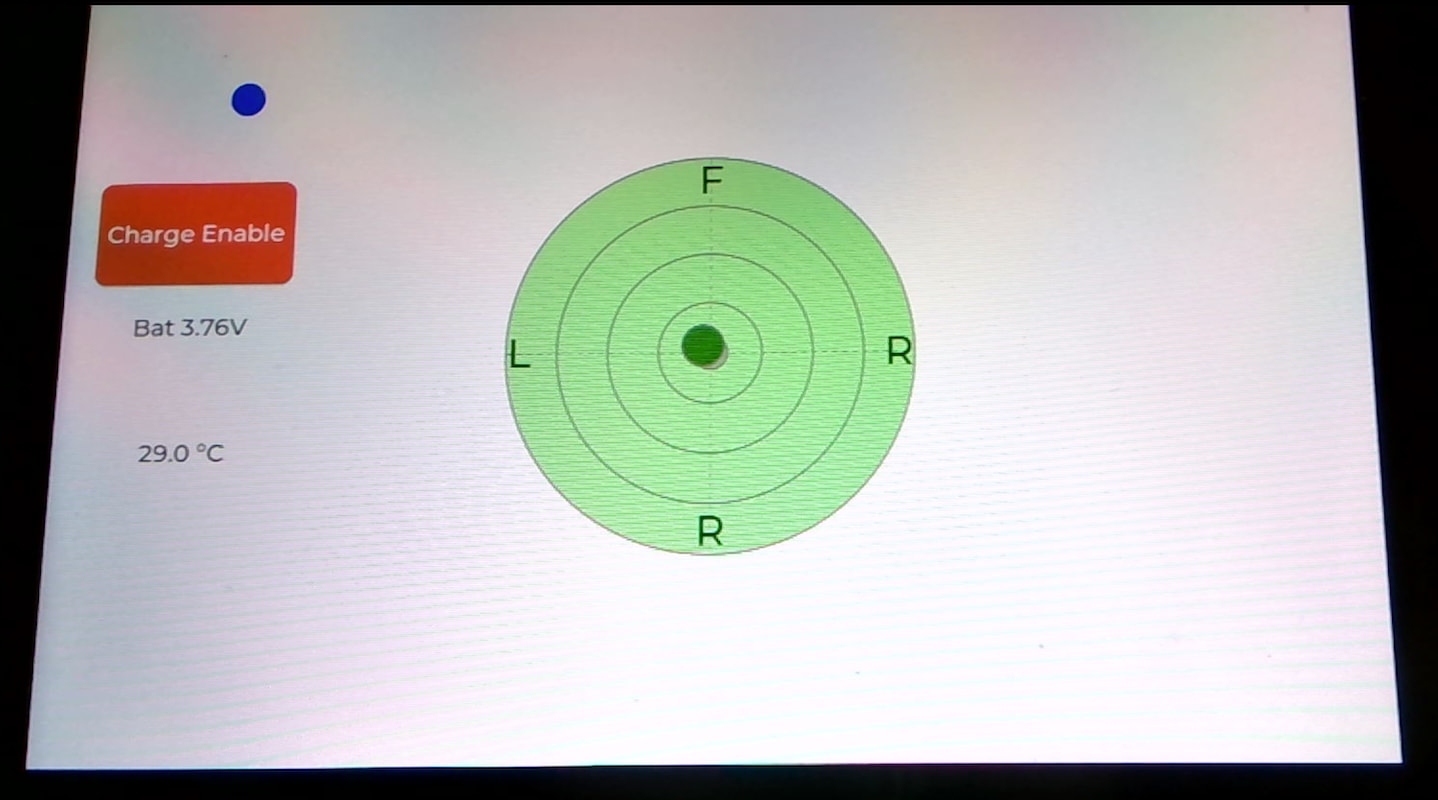
Here's a config that demonstrates the display, touchscreen, accelerometer, battery charge.
fsuk
May 8, 2026, 2:29pm
11
Thanks for your hard work!
I've done some testing with your config and mine and the display, touch, motion and battery all seem to work great.
The only minor issue I found (using your config) was the power hold to power off is not working, the button/binary sensor is raising an event so I think its either the condition or the script.
fsuk
May 8, 2026, 2:35pm
12
Never mind!
Power off button only works when running on battery.
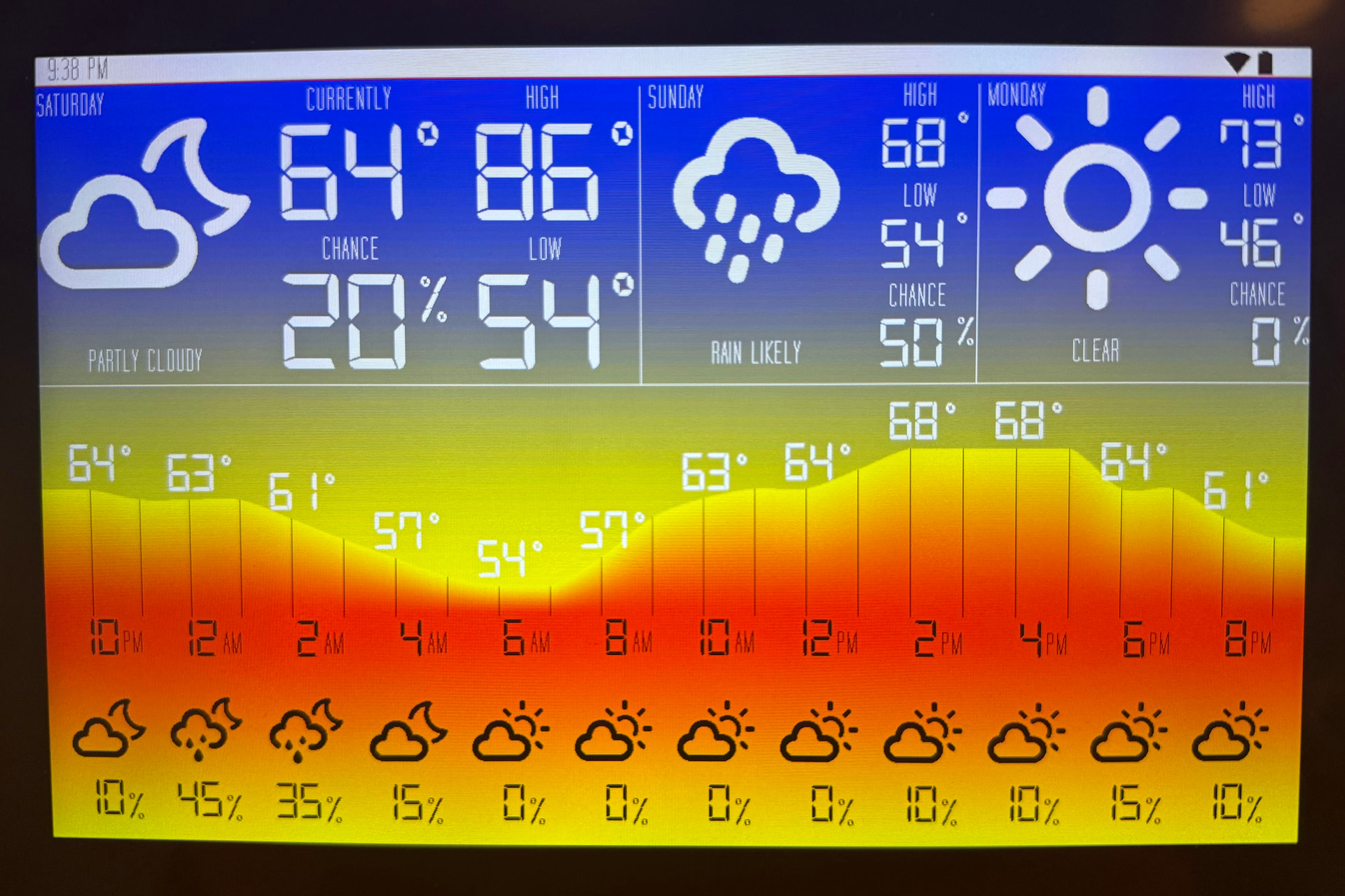
This thread was super helpful in getting custom firmware working on my LuxWX platform. Thank you!!
alva
August 1, 2026, 6:55pm
15
Thanks for all your work, i got audio and speakers with there dac and adc working, and added the rtc.
But i have no idea about the cam.
Maybe it will helpfull to someone else.
substitutions:
  name: seed-d1001
  friendly_name: Seeed Studio D1001

esphome:
  name: ${name}
  friendly_name: ${friendly_name}
  on_boot:
    priority: 15.0
    then:
      - light.turn_on:
          id: lcd_backlight
          brightness: 15%

esp32:
  variant: esp32p4
  engineering_sample: true
  flash_size: 32MB
  cpu_frequency: 360MHz
  framework:
    type: esp-idf
    advanced:
      enable_idf_experimental_features: true
      execute_from_psram: false


logger:
  level: debug

psram:
  speed: 200MHz

debug:

api:
  encryption:
    key: !secret seed_d1001__encryption_key

web_server:
  version: 3

http_request:

esp_ldo:
  - channel: 3
    voltage: 2.5V

esp32_hosted:
  variant: ESP32C6
  reset_pin: GPIO13
  cmd_pin: GPIO6
  clk_pin: GPIO11
  d0_pin: GPIO7
  d1_pin: GPIO8
  d2_pin: GPIO9
  d3_pin: GPIO10
  active_high: true

xl9535:
  id: expander
  i2c_id: misc_i2c

ota:
  - platform: esphome
    password: !secret seed_d1001__ota_password
    on_begin:
      then:
        - light.turn_off: lcd_backlight
wifi:
  ssid: !secret wifi_ssid
  password: !secret wifi_password

display:
  - platform: mipi_dsi
    model: SEEED-RETERMINAL-D1001

light:
  - platform: monochromatic
    output: backlight_output
    name: LCD Backlight
    id: lcd_backlight
    restore_mode: ALWAYS_ON
    default_transition_length: 0s
    gamma_correct: 1.0


output:
  - platform: ledc
    id: backlight_output
    pin: 14
    frequency: 1220Hz
    inverted: false
    #min_power: 15%

i2c:
  - id: lcd_i2c
    sda:
      ignore_strapping_warning: true
      number: GPIO37
    scl:
      ignore_strapping_warning: true
      number: GPIO38
    scan: true
    frequency: 400kHz
  - id: misc_i2c
    sda: GPIO20
    scl: GPIO21
    scan: true
    frequency: 400kHz


lvgl:
  byte_order: little_endian
  rotation: 270
  style_definitions:
    - id: circle
      radius: circle
      outline_width: 2
      outline_color: grey
      align: center
    - id: dashline
      width: 100%
      height: 100%
      line_dash_width: 5
      line_dash_gap: 5
      line_color: grey
    - id: cardinals
      text_font: montserrat_40

  on_pressing:
      - lvgl.widget.update:
          id: dot
          x: !lambda 'return point.x - 18;'
          y: !lambda 'return point.y - 6;'

  top_layer:
    widgets:
      - label:
          hidden: true
          id: power_down_label
          text: "Powering off"
          align: center
          bg_color: darkgrey
          bg_opa: cover
          text_color: white
          text_font: montserrat_40
          text_align: center
          width: 50%
      - label:
          align: top_right
          x: -60
          text_font: montserrat_16
          text: "Press and hold green button to power off"

  widgets:
    - container:
        layout: vertical
        align: left_mid
        pad_all: 20px
        height: 50%
        width: 20%
        widgets:
          - button:
              width: size_content
              id: battery_charge_button
              widgets:
                - label:
                    text_font: montserrat_24
                    align: center
                    text: Charge Enabe
              checkable: true
              pad_all: 10px
              text_font: montserrat_24
              on_value:
                - switch.control:
                    id: battery_charge_enable
                    state: !lambda return x;
                - delay: 200ms
                - component.update: vbat
          - label:
              id: vbat_label
              text_align: center
              text: "--"
              pad_all: 10px
              text_font: montserrat_24
          - label:
              id: temp_label
              text_align: center
              text: "--"
              pad_all: 10px
              text_font: montserrat_24


    - container:
        width: 400
        height: 400
        align: center
        styles: [circle, cardinals]
        bg_color: lightgreen
        bg_opa: cover
        widgets:
        - container:
            styles: circle
            width: 75%
            height: 75%
        - container:
            styles: circle
            width: 50%
            height: 50%
        - container:
            styles: circle
            width: 25%
            height: 25%
        - line:
            styles: dashline
            points:
              - 50%,0
              - 50%,100%
        - line:
            styles: dashline
            points:
              - {x: 0, y: 50%}
              - [100%, 50%]
        - container:
            styles: circle
            width: 8%
            height: 8%
            bg_color: grey
            bg_opa: 50%
        - label:
            text: R
            align: bottom_mid
        - label:
            text: F
            align: top_mid
        - label:
            text: L
            align: left_mid
        - label:
            text: R
            align: right_mid

        - container:
            id: indicator
            styles: circle
            width: 10%
            height: 10%
            bg_color: tomato
            bg_opa: 100%
            x: 100
            y: 100
    # Red dot that follows touch
    - obj:
        id: dot
        event_bubble: true
        scrollable: false
        x: 154
        y: 114
        width: 36
        height: 36
        bg_color: blue
        bg_opa: COVER
        border_width: 0
        radius: circle

script:
  - id: power_down_script
    mode: single
    then:
    - lvgl.label.update:
        id: power_down_label
        hidden: false
        text: "Powering off in 3s"
    - delay: 1s
    - lvgl.label.update:
        id: power_down_label
        text: "Powering off in 2s"
    - delay: 1s
    - lvgl.label.update:
        id: power_down_label
        text: "Powering off in 1s"
    - delay: 1s
    - lvgl.label.update:
        id: power_down_label
        text: "Powering off now"
    - delay: 500ms
    - switch.turn_off: power_hold


  - id: update_id
    then:
    - if:
        condition:
          lambda: return abs(id(roll_id).state) < 1.0f && abs(id(pitch_id).state) < 1.0f;
        then:
          lvgl.widget.update:
            id: indicator
            bg_color: green
            x: !lambda return (int)(clamp(id(roll_id).state, -20.0f, 20.0f) / 20.0f * 200);
            y: !lambda return (int)(clamp(id(pitch_id).state, -20.0f, 20.0f) / 20.0f * 200);
        else:
          lvgl.widget.update:
            id: indicator
            bg_color: red
            x: !lambda return (int)(clamp(id(roll_id).state, -20.0f, 20.0f) / 20.0f * 200);
            y: !lambda return (int)(clamp(id(pitch_id).state, -20.0f, 20.0f) / 20.0f * 200);

motion:
  - platform: lsm6ds
    accelerometer_range: 4G
    gyroscope_range: 2000DPS
    i2c_id: misc_i2c
    update_interval: 50ms
    axis_map:
      x: -y
      y: x
      z: -z

switch:
  - platform: gpio
    id: battery_charge_enable
    name: Battery Charge Enable
    pin:
      xl9535:
      number: 12
      inverted: true
    restore_mode: ALWAYS_ON
    on_state:
      lvgl.widget.update:
        id: battery_charge_button
        state:
          checked: !lambda return x;

  - platform: gpio
    id: power_hold
    name: Power Hold
    pin:
      xl9535:
      number: 10
    restore_mode: RESTORE_DEFAULT_ON

  - platform: gpio
    id: vbat_enable
    pin:
      xl9535:
      number: 6
    restore_mode: ALWAYS_ON
  - platform: gpio
    name: "D1001 Speaker Amplifier"
    id: speaker_amp_enable
    pin:
      xl9535: expander
      number: 13 # Pin 13 steuert beim D1001 den NS4150B Verstärker
      mode: OUTPUT
    restore_mode: ALWAYS_ON # Schaltet den Verstärker direkt beim Start ein

binary_sensor:
  - platform: gpio
    pin: 3
    id: pwr_button
    trigger_on_initial_state: false
    on_press:
      if:
        condition:
          binary_sensor.is_off: vsys_power_good
        then:
          script.execute: power_down_script
    on_release:
      - delay: 300ms
      - script.stop: power_down_script
      - lvgl.widget.update:
          id: power_down_label
          hidden: true
      - switch.turn_on: power_hold
  - platform: gpio
    pin:
      number: 4
      inverted: true
      mode: INPUT_PULLUP
    name: VSYS Power Good
    id: vsys_power_good

touchscreen:
  - platform: gsl3670
    i2c_id: lcd_i2c
    model: seeed-reterminal-d1001

sensor:
  - platform: adc
    pin: 18
    id: vbat
    name: Battery Voltage
    update_interval: 10s
    attenuation: auto
    filters:
      - multiply: 2.0
    on_value:
      lvgl.label.update:
        id: vbat_label
        text:
          format: "Bat %.2fV"
          args: [x]


  - platform: motion
    type: acceleration_x
    name: "Accel X"
    accuracy_decimals: 2
    filters:
      - sliding_window_moving_average:
          window_size: 4
          send_every: 4
  - platform: motion
    type: acceleration_y
    name: "Accel Y"
    accuracy_decimals: 2
    filters:
      - sliding_window_moving_average:
          window_size: 4
          send_every: 4
  - platform: motion
    type: acceleration_z
    name: "Accel Z"
    accuracy_decimals: 2
    filters:
      - sliding_window_moving_average:
          window_size: 4
          send_every: 4

    # Gyroscope axes (unit: °/s)
  - platform: motion
    type: gyroscope_x
    name: "Gyro X"
    filters:
      - sliding_window_moving_average:
          window_size: 4
          send_every: 4
    accuracy_decimals: 2
  - platform: motion
    type: gyroscope_y
    name: "Gyro Y"
    accuracy_decimals: 2
    filters:
      - sliding_window_moving_average:
          window_size: 4
          send_every: 4
  - platform: motion
    type: gyroscope_z
    name: "Gyro Z"
    accuracy_decimals: 2
    filters:
      - sliding_window_moving_average:
          window_size: 4
          send_every: 4

  - platform: motion
    type: angular_rate_x
    name: "Angular Rate X"
    filters:
      - sliding_window_moving_average:
          window_size: 4
          send_every: 4
    accuracy_decimals: 2
  - platform: motion
    type: angular_rate_y
    name: "Angular Rate Y"
    accuracy_decimals: 2
    filters:
      - sliding_window_moving_average:
          window_size: 4
          send_every: 4
  - platform: motion
    type: angular_rate_z
    name: "Angular Rate Z"
    accuracy_decimals: 2
    filters:
      - sliding_window_moving_average:
          window_size: 4
          send_every: 4
  - platform: motion
    type: pitch
    id: pitch_id
    name: "Pitch"
    accuracy_decimals: 2
    filters:
      - sliding_window_moving_average:
          window_size: 4
          send_every: 1

  - platform: motion
    type: roll
    id: roll_id
    name: "Roll"
    filters:
      - sliding_window_moving_average:
          window_size: 4
          send_every: 1
    accuracy_decimals: 2
    on_value:
      script.execute: update_id
  - platform: wifi_signal
    name: wifi
  - platform: uptime
    name: uptime
  - platform: sound_level
    passive: false
    peak:
      name: Peak
    rms:
      name: RMS

time:
  - platform: homeassistant
    id: ha
    timezone: Europe/Berlin
    on_time_sync:
      then:
        # ... and update the RTC when the synchronization was successful
        pcf8563.write_time:
  - platform: pcf8563
    i2c_id: misc_i2c
    update_interval: 15min
    timezone: Europe/Berlin

audio_adc:
  - platform: es7210
    id: d1001_mic_adc
    i2c_id: misc_i2c

i2s_audio:
  - id: mic_i2s_bus
    i2s_mclk_pin: GPIO29
    i2s_bclk_pin: GPIO28
    i2s_lrclk_pin: GPIO27
  - id: speaker_i2s_bus
    i2s_mclk_pin: GPIO33
    i2s_bclk_pin: GPIO32
    i2s_lrclk_pin: GPIO31

microphone:
  - platform: i2s_audio
    id: reterminal_mic
    i2s_audio_id: mic_i2s_bus
    i2s_din_pin: GPIO26
    adc_type: external

audio_dac:
  - platform: es8311
    i2c_id: misc_i2c
    id: dac

speaker:
  - platform: i2s_audio
    dac_type: external
    i2s_dout_pin: GPIO30
    id: speaker_i2s_audio_1
    i2s_audio_id: speaker_i2s_bus
    audio_dac: dac
  - platform: mixer
    id: mixer_speaker_id
    output_speaker: speaker_i2s_audio_1
    source_speakers:
      - id: announcement_spk_mixer_input
      - id: media_spk_mixer_input
  - platform: resampler
    id: media_spk_resampling_input
    output_speaker: media_spk_mixer_input
  - platform: resampler
    id: announcement_spk_resampling_input
    output_speaker: announcement_spk_mixer_input

media_player:
  - platform: speaker
    name: "Speaker Media Player"
    id: speaker_media_player_id
    media_pipeline:
        speaker: media_spk_resampling_input
        num_channels: 2
    announcement_pipeline:
        speaker: announcement_spk_resampling_input
        num_channels: 1
fsuk
August 14, 2026, 12:38pm
16
Just tried to make some changes and it will no longer compile (due to a recent update I expect)
Platform missing. You must include one of the available platform keys: libretiny, nrf52, host, rp2, rtl87xx, ln882x, esp8266, bk72xx.
Note that esp32 is not listed as a platform in the error.
fsuk
August 14, 2026, 12:59pm
17
With a bit of AI help I have fixed the error
The source of your Platform missing error is that your substitutions: block has network configurations (wifi: and api:) nested directly inside it. ESPHome interprets these definitions as immediate instructions to look for wireless hardware on the core chip. Because the ESP32-P4 lacks a radio, it drops down to a fallback error parsing routine [esp32.com ]. [1 ]
I had this:
substitutions:
  name: reterminal-d1001
  friendly_name: reTerminal D1001
  backlight_level: 60%
  wifi:
    ssid: !secret wifi_ssid
    password: !secret wifi_password
  api:
    encryption:
      key: !secret api_key

...

wifi: ${wifi}

api: ${api}
Removing wifi and api from the substitutions and setting them directly fixes the issue
fsuk
August 14, 2026, 1:42pm
18
I have uploaded my full YAML to github
ESPHome Example Dashboard Config For Seeed D1001